When you open a browser, and enter a website address like a news site, an on-line store, an educational site or a social media page, you are using a system that operates behind the scenes to help get you to the correct site on the web. The system is called Domain Name System (DNS). While the vast majority of internet users probably don’t think about it today, DNS has one of the greatest functions in creating an easy and accessible web. If DNS did not exist, individuals would have to recall lengthy strings of numbers known as IP addresses when surfing the web each time they wished to browse a site. Users would have to type the difficult numerical addresses used by the computer to locate each connected device on the internet rather than the easy-to-remember names.
DNS acts as a digital telephone book to the internet. If you save someone’s name to your phone, you won’t have to remember their phone number since your device associates the name with the number. DNS works much like the telephone number directory to match a domain name with an IP address, except that it is used for domain names instead of telephone numbers. When typing an internet site name into the browser, DNS can assist in finding the suitable server where internet site files are stored. This takes place in seconds, and enables billions of people globally to access websites with ease and without technical knowledge of networking systems.

What Is DNS?
The Domain Name System (DNS) is a worldwide system used to convert website names into IP addresses. All devices that are plugged into the internet are assigned an IP address that can be used to uniquely identify the device and enable the computers to communicate. Machines store the numbers, but humans can’t remember these. Therefore, it is easier to remember a website name, such as example.com than a long string of numbers, such as 192.0.2.1. This is where DNS comes in handy: it establishes a link between an easy-to-remember domain name and an IP address.
DNS primarily helps to make the internet navigation quick, simple and easy to use. DNS removes the need to learn a lot of information about the network, allowing people to communicate with the internet in a natural way, via words and names. Most of the time, DNS is involved in determining the right destination when someone enters a website address, sends an e-mail message, or logs on to an online service. It functions via a worldwide network of servers communicating with one another, disseminating correct information on domain names and their locations.
Why is there a need for the Internet to have the DNS?
The internet consists of millions of computers, servers and devices connected to it and using each other’s IP addresses to communicate. The addresses are used because computers must have a clear method of determining the exact location of data and instructions. The internet, however, would be quite difficult to use for the average user if only IP addresses were used. Think going to each and every site and having to remember a different set of numbers. Access to the Internet information would be slower and much less convenient.
DNS alleviates this issue by establishing a link between the human language and computer systems. People can recall website names, and get them to their favorite websites without having to dwell on the details behind the scenes. DNS has enabled the growth of the internet, which would otherwise be impossible without the ability to create recognisable online identities for businesses, organisations and individuals. A company can use a simple domain name rather than have its customers remember a hard-to-remember IP address. The convenience involved is one of the factors that make DNS one of the most pivotal technologies of the modern-day internet.
From the domain name to the IP address.
If you type in a site address into your web browser, a procedure known as DNS resolution starts. DNS resolution process is the way of resolving a domain name to an IP address. The browser will first determine if the address has been visited before and that it already knows the IP address. If it is not available locally, it will be passed on to a DNS resolver that will start to look up the right answer.
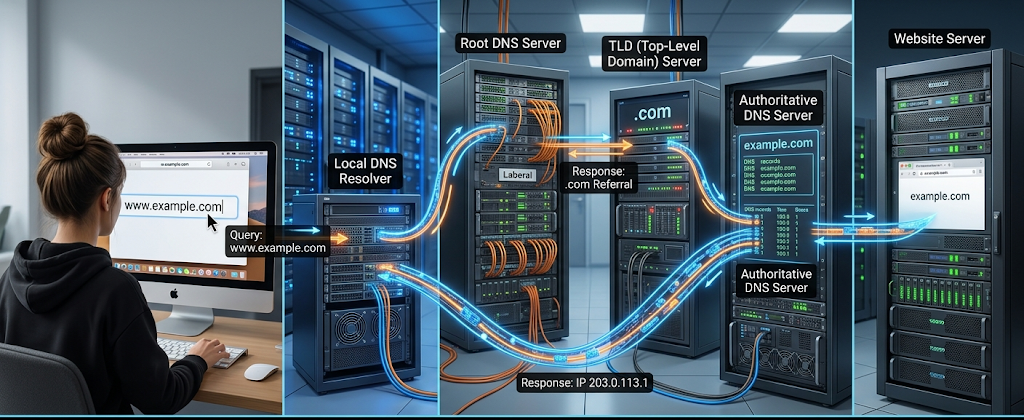
To grasp this process to the full extent, it is vital to be familiar with how domain names turn into IP addresses. There are several stages to the conversion that involve several DNS servers to find the right IP. When the resolver resolves the matching IP address, it will return the information to your device. Your browser can then communicate with the website’s server to retrieve the files required to render the website. This may seem to be a lot of steps but the whole operation typically takes only a few milliseconds.
The Step by Step DNS Lookup Process
The first step is for the user to enter a domain name.The User enters a Domain Name.
A DNS process begins when a person enters a domain name into a Web browser. For instance, a person could type in a site address like www.example.com. The browser knows it should locate this website, but it doesn’t immediately know which IP address the server the website is stored at. It makes a DNS query that will seek out information from the domain.
The browser can use its own stored information, called a cache, before it sends the request over the Internet. If there is a recent visit by the browser to the site, the browser might already be aware of the correct IP address. This will help to speed up the website loading time since the browser will not have to go through the whole DNS lookup procedure once more.
The DNS Resolver Receives the Request
If the browser doesn’t have the information, it passes the request to a DNS resolver. A DNS resolver is a server that identifies for a user the proper IP address. Some Internet Service Providers may offer DNS resolvers which are automatically installed, or users may opt for other DNS services.
The resolver serves as a go-between between the user and the bigger DNS system. Rather than your computer having to query multiple DNS servers, the search is made by the resolver on your computer which returns the answer to you. This allows for a more efficient system, and prevents the devices from having to work as hard as they would otherwise.
The Resolver contacts Root DNS Servers.
If the resolver does not already have the answer it will contact a root DNS server. The top of the hierarchy in the DNS is the root server. They do not keep a copy of each site’s IP address but are able to locate information on various domain extensions like .com, .org, country-specific domain extensions and more.
The resolvers contact the root server that will point to the correct top-level domain (TLD) server. In the case of a user who enters a .com domain name, the root server directs the resolver to the servers that serve .com domain names. This hierarchical system enables efficient management of billions of domain names.
Knowing what DNS Servers are and what they do.
DNS servers are computers that keep and deliver information on domain names. The different DNS servers serve different purposes and collaborate to accomplish the DNS lookup.
If it wasn’t there, it would take a longer time to locate websites and they would not be as reliable.

Root Name Servers
The top level of the DNS hierarchy is the root name server. They help to navigate requests to the right top level domain servers. Hundreds of instances of the root server are located worldwide, to enhance reliability and performance.
They play a crucial role in maintaining the integrity and stability of the internet by directing DNS requests to the appropriate destination.
Top-Level Domain Servers
The top level domain servers keep data regarding the domain extensions. These include .com, .net, .org and country specific domains like .ng (for Nigeria).
These servers do not have the final IP addresses of the websites themselves, but information about the authoritative DNS servers of the websites’ respective domains.
Authoritative DNS Servers
Authoritative DNS Servers have the real DNS information for a domain. They give the correct IP address for a website in a DNS look up to give the final answer.
These records are controlled by the domain owner with either a domain registrar or a hosting provider, and they give the domain owner control over where their domains send traffic.
What is DNS Records?
DNS records are instructions that are stored within the DNS servers, which can be used to obtain information about domains.
Records are used for a variety of reasons, depending on the needs of a website or online service. These records enable DNS to control not just connections to websites, but e-mail and more.
A Record
An A record is used to map a domain name to an IPv4 address. It’s one of the most prevalent DNS records as it specifies which server a website is served by.
The A record assists visitors to find a website when it is visited.
AAAA Record
An AAAA record is similar, but associates domain name with IPv6 addresses. IPv6 was developed due to the growing size of the internet and the need to have more addresses.
With the help of AAAA, the modern networks can keep growing.
CNAME Record
You can use a CNAME record to reference another domain name. This is helpful if you have several websites or services that share the same destination, but don’t want to set up multiple IP address records.
MX Record
An MX record is used to receive control which controls the delivery of email by determining the mail servers that are responsible for receiving email for a particular domain.
Without MX records, the email system wouldn’t know where to send mail.
What Happens When DNS Fails?
DNS is generally very successful but can occasionally fail. If DNS doesn’t work, users can have problems accessing the website even though the website is working. A DNS failure occurs when the system is not able to resolve a domain name to the proper IP address.
Common DNS issues are bad DNS settings, DNS server down, expired domain information, or problems with a user’s ISP. In this case, the browser will show errors like “server not found” or “DNS address could not be found.” These mistakes can lead to the impression of a website not functioning when in fact the issue is between the domain name and IP address.
DNS is a critical component of businesses since its lack of accessibility impacts customers, sales, and communication. A DNS issue may cause visitors not to be able to access the online services, hence, organizations frequently use dependable DNS companies and backup systems to ensure that the visitors can access the online services.

Significance of DNS for internet security.
DNS is more than just the service that translates domain names to IP addresses. It also is very crucial in protecting users and enhancing the security of the internet. New DNS technologies can be used to identify malicious sites, block some attacks, and ensure that DNS data is not tampered with by unauthorized parties.
An interesting enhancement to security is DNS Security Extensions (DNSSEC). DNSSEC provides digital signatures to DNS replies, to ensure that the user is receiving correct information. If the information on the DNS was not protected, the attacker could try to change the information to send users to a fake site. Secure DNS systems play a role in assuring trust between online services and users.
Conclusion
DNS is among the technologies that makes every day life on the internet possible. Each time a user accesses a Web site, an email or any online service, DNS assists in linking human-friendly names to computer-friendly addresses. DNS resolves domain names to IP addresses, eliminating the need for users to remember complex IP addresses and keeping the internet easy to use and accessible.
DNS runs in the background, but it isn’t something that can be overlooked. It helps ensure that users are connected to the right websites and services, ensuring a reliable internet connection. By knowing how DNS works, people can better appreciate the technology that enables the operation of the Internet and why DNS issues can cause issues on accessing websites. For the internet to function in the way that it does, DNS would be a much more cumbersome and difficult-to-use system.