
Cloud computing has revolutionized how people, businesses, schools and organizations store data, execute applications and access digital services. Rather than users storing all their files, programs and computing resources on their own computers or on physical servers, they can access these resources from internet-connected cloud systems when they are needed. But migrating data and applications to the cloud also introduces pertinent security requirements. Cloud Security is the technical, policy, control, and practice measures implemented to safeguard cloud systems, applications, data, and infrastructure against unauthorized access, attacks, data loss, and external threats.
It is also crucial for any user of a cloud platform, even for those with a well-designed one, that they understand the nature of cloud security, since the lack of adequate security controls, over-granting of permissions, misconfiguration, or the careless handling of sensitive information can make any platform vulnerable. For good security, it is essential that the use of the cloud is reliable, and that the people and organizations utilizing the cloud take responsible actions.
What is Cloud Security?
Cloud security is the set of security measures adopted to safeguard cloud computing systems and the information handled by these systems. These can encompass identity management, authentication, access control, encryption, security monitoring, backups, network protection, vulnerability management, and secure configuration. Many aspects of customer accounts, data, applications and configurations are usually the responsibility of the customer, while cloud providers typically handle the underlying infrastructure that supports their services, covering physical data centers, hardware, and some foundational technologies.

The shared responsibility approach is sometimes referred to as the division of responsibility. It is critical for beginners because just because you use a reputable cloud provider doesn’t mean that all workloads are secure. Customers must still establish proper permissions, secure account information, set up services appropriately, watch what’s happening, and implement security measures based on the type and sensitivity of the information they are handling.
Why Does Cloud Security Matters?
Cloud-based environments can hold valuable information such as personal files, application data, financial information, intellectual property, system credentials, personal and customer records, and business documents. Cloud resources are often available over networks, and are managed by online accounts, so those resources are vulnerable to weak passwords, stolen accounts, vulnerable applications, too many permissions, and configuration errors. A security incident can have consequences that go beyond the loss of individual files.
Unauthorized access may lead to loss of confidential data, Business disruption, damage to organizations reputation, financial and legal issues. Meanwhile, security is not just a matter of protecting against malicious attacks. Damage is also possible with incorrect permissions, failed configurations and inadequate backups, but this is not the only way it can happen. A robust cloud security strategy will include a mix of preventative measures, detection, response, recovery and periodic review, enabling organizations to be ready for security issues – intentional and otherwise.
Common Cloud Security Risks and Threats

Unauthorized Access
Unauthorized access is when a person or system accesses cloud resources without proper right to access it. This can occur due to shared accounts, weak passwords, overly permissive permissions, or when former users’ accounts remain active when no longer needed. In certain cases, an attacker can get hold of a valid credential through a means of phishing or other credential stealing method, and log in as a legitimate user.
Access to lots of information and numerous computing resources from one account can make unauthorized access to cloud platforms especially serious if the access privileges are not carefully restricted. This risk can be mitigated by giving the appropriate permissions for the job roles, conducting periodic review of user accounts, shutting down unnecessary access and enforcing more stringent authentication methods for critical systems.
Data Breaches
A data breach is where sensitive or confidential information is accessed, exposed, copied or disclosed without authorization. There are several ways that cloud data can be exposed, such as compromised accounts, vulnerable applications, insecure storage settings, excessive permissions, and other security issues. The information that is used can range from customer information to business records, authentication data, or proprietary matter, depending on the type of organization that has information in the cloud.
Breaches can only be prevented with multiple layers of security, not a single security product. Organizations should recognize sensitive information, restrict access to it, encrypt key information, monitor unusual access, and audit access to information. Regular security assessments can also be helpful to uncover weaknesses before attackers do. As is often said, the biggest lesson to take away from the cloud is that data in the cloud isn’t the same as data protected.
Insecure Cloud Configurations
One of the most significant cloud security risks is insecure configuration, since there are numerous settings offered by cloud platforms that determine the access and use of resources. If the security settings are incorrectly configured, a storage resource, database, virtual machine, application, or network component can be unnecessarily exposed. An administrator, for instance, may unintentionally give users too much access to a resource or too much access to a resource than they need.
Configuration errors can also happen when organizations introduce new cloud resources without also checking their security configurations. The answer is to set up safe configuration norms and closely monitor them. The principle of least privilege, unnecessary network exposure, configuration review, removal of unused resources, and regular testing are all important key points that organizations should be aware of and use to ensure their configurations remain in accordance with their security requirements.
Account Compromise
A form of account compromise is when an attacker gains control over a legitimate cloud account. Phishing, re-used passwords, malicious applications, social engineering and other techniques can be used to acquire credentials. If an account is compromised, the attacker can view information, modify settings, create resources, modify applications, and/or access other systems based on the privileges that were given to the account.
That said, one of the top concerns in any cloud security plan should be protecting accounts. While strong, unique passwords are helpful, multi factor authentication is an extra layer of security beyond simply a password, and should be used when available for organizations. Administrators should track login attempts, investigate suspicious logins, suspend logins for inactive accounts, and provide extra security for highly privileged accounts. Admin rights can also be limited, which will help minimize any harm that might be done if a single user account is hacked.
Data Loss
Data loss means that data becomes unavailable, corrupted, is deleted or becomes unrecoverable. Can occur as a result of accidental deletion or hardware or software issues, malicious activity, application issues, synchronization issues, or security issues. Cloud storage should not be considered a replacement for a backup strategy, but cloud services may offer a reliable infrastructure. If a user unintentionally loses critical data there is no guarantee that it cannot be recovered if proper recovery functions aren’t set up.
Organizations need to determine what information is critical and what policies to set to back up and retain. Periodic backup testing should be done to ensure that backups are actually recoverable if necessary. Backup copies should also not be accessible for alteration or deletion by unauthorized parties. A good backup plan provides organisations with a means of recovering from incidents rather than relying solely on the on-going availability of the primary cloud data.
Cloud Security Best Practices.

Use Strong Authentication
Authentication is the process of confirming a person or system is an account holder that is actually authorized to use an account. The easiest step to cloud security is to use strong and unique passwords and, when applicable, multi-factor authentication. The password should be strong, not predictable, and not be used on other accounts as well, as if the password is found on one account it can be used on others. Another layer of protection is multi-factor authentication, which would ask for another method of verification.
Organizations should also be mindful of administrator and other privileged accounts, as these accounts have the potential to have access to crucial cloud assets. Access to administrative functions should be restricted to those who have a real need to do so and authentication mechanisms should be periodically reviewed to ensure they continue to be suitable in the context of evolving user, system and responsibility requirements.
Use access control, least privilege
Access control is the mechanism that determines which users, applications and systems are granted access to specific cloud resources and what they can do with them. A good rule is that users should not have the permissions that they need to do their job, but shouldn’t have more than that. For instance, a user who just wants to see a document doesn’t have to be allowed to delete or edit it. Least privilege can limit the damage that can be caused by breached accounts and human error.
Roles should be clearly defined, permissions should be given in line with true business needs and permissions should be reviewed periodically. Staff moving between roles and departing the company should have their access rights and roles adjusted and removed in a timely fashion. One of the most significant reasons for periodic access reviews is that permissions can build up over time and result in security vulnerabilities that are not necessary.
Encrypt Sensitive Data
Encryption transforms data into a secure format that can only be deciphered with a key or permission. It can be used to protect data while it is stored and while it is being transferred between systems. Organizations should identify what information is sensitive and decide on the types of encryption that will be needed, depending on their own security requirements and what their cloud provider can provide. Encryption is especially helpful when there is a risk of unauthorized access to protected information, but should not be relied upon as a total security solution.
However, if an attacker gains legitimate access to an application or account that has authorization to read the decrypted information, encryption will not stop him from misusing the information. Encryption should be used in conjunction with other security measures such as authentication, access control, monitoring, secure configuration, and more.
Create Reliable Backups
Backups are important because they create a duplicate of valuable data that can be recovered from if it is accidentally lost, corrupted, damaged by a system failure or security incident. The first step in a good backup strategy is to determine which information is essential and how often it needs to be backed up. Organizations also should establish guidelines for keeping backups and who will have access to them or control them.
Backups are not enough because if they can’t be restored when necessary, they will not be very useful. Restoration procedures should thus be tested on a regular basis. In addition to the above, backup access should be secured, as the attacker may try to manipulate or destroy backup copies during an incident. For people this can be simply safekeeping copies of key papers or photos and for businesses, a more formal backup and disaster recovery plan.
Monitor Cloud Activity
Security monitoring assists organisations to find unusual activity that can be a sign of an attack, compromised account, configuration issue or any other security event. Records can be generated in cloud platforms like logins, changes to permissions, creation of resources, changes to configurations, and attempts to access resources. This information can be valuable to security teams to grasp what is going on within an environment and how they can respond if they notice suspicious activity. When combined with alerts, which can highlight potentially important events, such as unexpected administrator activity, or unusual access patterns, monitoring can be particularly helpful.
However, while not necessarily knowledgeable in all the technical aspects of cloud logging, it is important for beginners to know that there are things that can go wrong and security cannot rely solely on problem prevention. In addition, there must be mechanisms in place to be alert to potential incidents and to investigate them. Good monitoring means having more visibility and can shorten the time between the problem and the reaction of a security person.
Secure Cloud Configuration
The secure configuration should be a continuous process, not just a one-time project initiated at cloud environment creation time. The Cloud platforms are constantly evolving and organizations can introduce new applications, users, storage resources, databases, and services at any time. Any change may bring new permissions/situations that require review. The process of configuring a strong system should start with sensible security defaults, and documented standards for logging in, networking, storing, authenticating, and protecting data.
Unused resources and accounts should be removed as they can result in unnecessary exposure. Additionally, administrators should review the configuration changes before implementing them in critical environments and periodically evaluate the resources and weaknesses they have in place. In larger environments, automated configuration checks can be helpful as certain issues can be consistently detected. The aim is to shift the practice of secure configuration from periodic security drills to an integral element of cloud management.
Educate users on cloud security.
While technology can offer the right solutions, they can only be effective if users have an understanding of basic security duties. Employees and other cloud users should be aware of red flags, the importance of safeguarding authentication data, permitted applications, data security, and reporting of unusual activity. Attacks often involve manipulating individuals instead of attacking technical systems, so a strong security awareness component is crucial. Users who know not to share their passwords, not to be fooled by a request to log in they were not expecting, and not to upload sensitive data to an untrusted service can help prevent security incidents.
Staff education should be reinforced repeatedly and practical security advice should be given instead of taking it for granted that the employees are already aware of the dangers of the cloud. Clear policies should define who is allowed to view specific information, how the account or resource should be secured, and what steps the user should take if he or she suspects that an account or resource has been compromised.
Shared Responsibility Model.
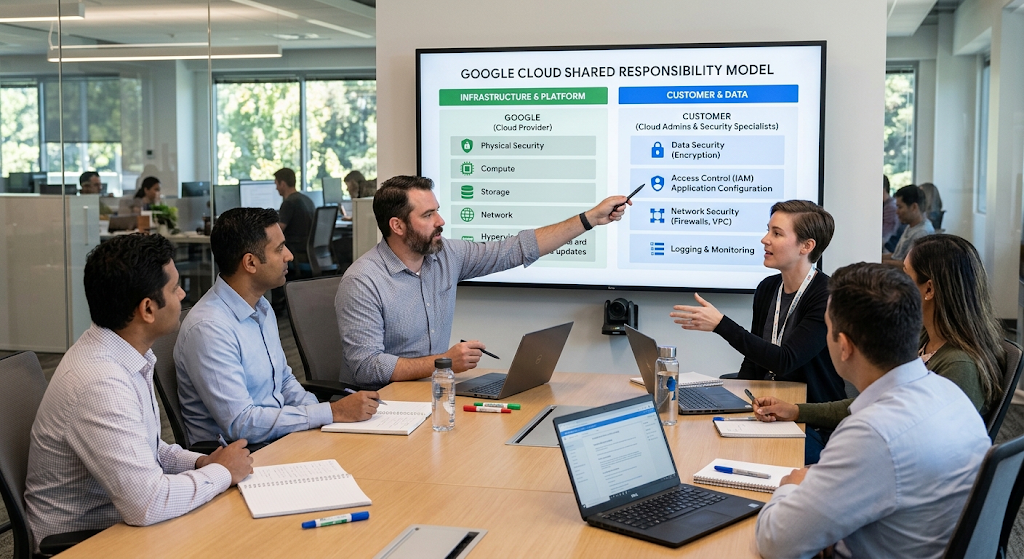
The shared responsibility model is one of the fundamental principles for cloud newcomers. While cloud providers must secure certain parts of the infrastructure that they run, customers are typically responsible for certain parts of their cloud usage. It can differ from one provider to another and service to service. For instance, a provider could take care of the physical premises and infrastructure while a customer will take care of things like account security, data protection, permissions and application configuration.
This is because organizations should not think that choosing a reputable provider means that they are off the hook for security obligations. Users should make themselves aware of the controls provided by the provider and those that they need to set up before they deploy a workload. If one knows this boundary, it prevents any security loopholes which may arise based on the fact that a certain area of the environment is assumed to be secure.
Basic Cloud Security Checklist for Newbies
Cloud security can be approached on a step-by-step basis in order to grasp a manageable number of essential security practices, rather than trying to master all advanced security technologies at once. Secure all critical accounts with strong passwords and multi-factor authentication if available. Then, check permissions and ensure that users are only given access to what they actually need. Protected information must be protected appropriately, especially if the information is sensitive, with encryption if applicable, and important files and business data must have good backup copies with tested recovery plans.
Cloud configurations should be monitored and audited on a recurring basis to check for any unnecessary cloud exposure, unused accounts, permissions or other vulnerabilities. If appropriate, monitoring should be set-up to ensure that unusual activity is detected and investigated. Last, but not least, users should be provided with security training and know how to report suspicious activity. These are the fundamental steps that can be extended as an organisation gets to know cloud security better.
Conclusion
Cloud computing offers a lot of advantages, but with it comes the responsibility of doing things safely and securely. Securing a cloud environment goes beyond just depending on the security features provided by the cloud service provider. Users and organisations are also responsible for securing their accounts, managing their permissions, setting up their resources appropriately, protecting sensitive data, having proper backups, monitoring activity and being aware of their responsibilities in the cloud. Layered security controls and consistent management are common ways to mitigate some of the most frequent risks, such as unauthorized access, data breaches, insecure configurations, account compromise and data loss.
Newcomers don’t have to master all of the high-level cybersecurity concepts first before they can safely access cloud services. Users can create a much more robust environment to protect their information and applications in the cloud by learning about the shared responsibility model and using some basic practices: secure configuration, monitoring, backups, encryption, and least-privilege access.