
Introduction: Why Cybersecurity Matters in Today’s Digital World
The internet has revolutionized the ways in which people communicate, work, learn, shop, and conduct themselves in personal relationships. Digital technology offers a multitude of conveniences and connections, from social media accounts and online banking to cloud storage and remote work platforms. This growing reliance on on-line services has also led to greater opportunities for cybercriminals to steal information, disrupt businesses, spread malware and commit identity theft. The issue of cybersecurity is not restricted to huge corporations or technology specialists, it is a matter that impacts us all who have a digital device to use. From surfing the web to checking email, loading apps or saving vital information online, there are ways to be safe with your digital activities that can help you minimize the dangers of cyber threats.
The tools and tactics of cyber attacks are also constantly changing as attackers find new ways to take advantage of weak passwords, outdated software and systems, unsecured networks, and human errors. Security flaws are the cause of many successful hacks that would otherwise be considered impossible without advanced knowledge of hacking. An unattended account could reveal personal chats, finances, business records or private information. This is why cybersecurity awareness is one of the most crucial skills to have in today’s digital age. Knowing about the typical risks and employing effective security strategies can help individuals and organizations create a safer online environment and better protect themselves from online threats.
Recognizes the Value of Cybersecurity Practices
Cybersecurity is the practice of safeguarding computers, mobile devices, networks, applications and data from unauthorized access, damage, or theft. It is using security tools, engaging in safe online activities and being aware of potential risks. There are advanced cybersecurity systems in place within companies that utilize techniques like encryption, artificial intelligence and security monitoring, but basic practices can ultimately help people protect themselves. Many common attacks can be avoided by basic actions like generating unique passwords, getting software regularly updated, and taking caution when interacting with messages.
The significance of cyber security has been increasing as personal and professional activities are more and more tied through digital platforms. Students keep their assignments in the cloud, employees log on to their company’s systems from a remote location, businesses gather information about their customers, and families use smart devices in their home. Each connection presents a potential spying opportunity for cybercriminals. Security of digital information is a blend of technology and knowledge. Users should understand that cyber security is a continuous process and they need to take steps and practice responsible behavior on a regular basis.
By following these effective cybersecurity tips, individuals can enhance their online security and minimise exposure to common cyber risks. These are useful tips that can make it more secure, protect personal data and promote safer online habits, as recommended by government agencies, security professionals and technology organizations. These are easy to learn and can make a big difference in establishing a solid base for digital safety.
1. Use Complex and Special Passwords for Each Account
Passwords are still among the most important first lines of defence in the fight against cybercriminals. Even with the significance of passwords, a lot of people employ weak ones that are simple to guess, for instance the same word they use for their regular computer password or perhaps some universal numbers, birthdays, or using easy terms. Attackers can steal information from one account, and then try to use it on another site, a technique called credential stuffing. The same password can be used on multiple platforms and if it gets compromised on one, may compromise others.
A good password is long, different and hard to guess. Users should not use short passwords that are based on personal information, but should include a combination of letters (upper and lower case), numbers and symbols. Phrases consisting of a number of unrelated words can also be very secure, but easier to remember. A longer phrase with personal significance, for instance, is typically sounder than a short convoluted password that may be hard to keep in mind.
Another good practice is using different passwords for each and every site. Every online account should be protected with a different password, so if one account is compromised, the others will not be affected. Many people may have a lot of online accounts and remembering all of them is a challenge. A password manager software might be helpful to keep and organise passwords securely so that your users can come up with more powerful codes without having to memorise all the login particulars. These tools also help to eliminate the ability to use easy to guess passwords again.
Users should also change their passwords when there is any indication of a possible security breach. When a website says that the data of the user may have been leaked, it is best to change the affected password as soon as possible, as this can prevent unauthorized access. It is also not a good idea to provide passwords to others since it would make it easier for others to access personal accounts. Adopting good password practices forms the bedrock of cybersecurity, and helps minimize the risk of unauthorized access to accounts.
2. Enable Multi-Factor Authentication (MFA) for Extra Protection
MFA, also known as multi-factor authentication, is an extra level of security above and beyond a username and password. MFA uses more than just one form of verification, but will ask the user to do so in another way. The security code could be sent to a mobile device, an authentication app, a fingerprint scan, facial recognition or a physical security key. If someone is able to guess a password, they may still not be able to log in without the second verification question.
Given the inherent flaws of passwords in the face of today’s cyber challenges, many online services have adopted multi-factor authentication. While data breaches, phishing, and leaked passwords may reveal logon credentials, MFA makes stolen credentials less effective. If an attacker gets someone’s password via a spoofing site, for instance, he or she will still need the other authentication factor to login to the account.
MFA should be enabled on accounts that hold sensitive data like an email account, banking services, business systems, and cloud storage platforms. Email accounts are particularly important since they may contain information for other account recovery options. Once the cybercriminal has access to an email account they could try to change the passwords for other accounts associated with it.
While MFA could be a minor inconvenience during the sign-in process, it has substantial security advantages. Users are encouraged to use MFA whenever available and to select secure authentication methods whenever possible. Generally speaking, authentication applications and security keys provide better security against some attacks than text messages. One of the simplest ways to beef up personal cybersecurity is to adopt MFA as a regular practice.

3. Understand How to Identify and Prevent Phishing Scams
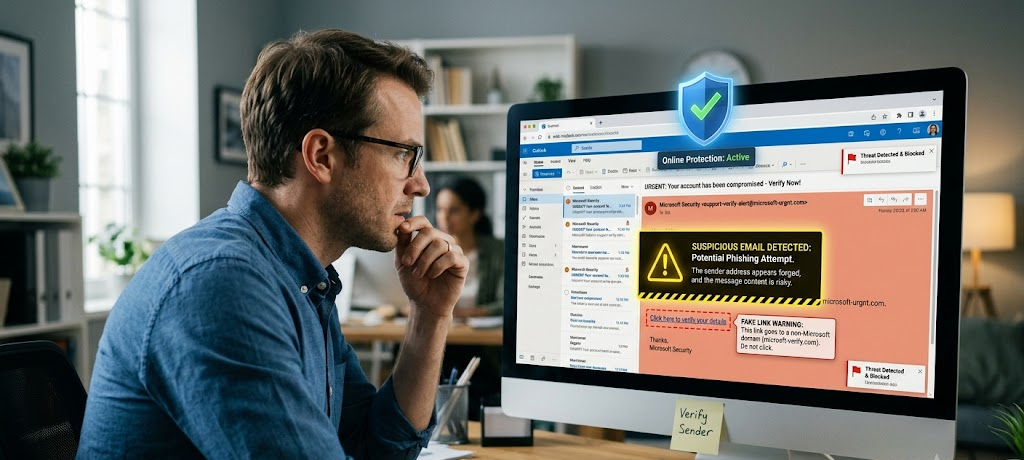
Phishing is one of the most prevalent cybersecurity threats because it’s more about human behavior than technical vulnerabilities. Phishing is a scam in which criminals assume the identities of trusted individuals, companies or organizations and try to deceive people into disclosing personal information or into taking unsafe actions. The scams are commonly sent by email, text message, phone call or disguised as a legitimate-looking Web site. The attackers may pretend to be from banks, employers, delivery companies, social media sites or government bodies.
One of the popular phishing strategies is to create urgency. Messages might say that an account will be closed, payment needs to be confirmed or action needs to be taken. This type of pressure is meant to make one do something, without taking the time to see if it’s a real request. When people are worried or rushed, they are more prone to err. Cybercriminals know people will make mistakes if they’re worried or rushed.
To prevent being phished, users should take care to look closely at messages before clicking on links or opening attachments. Red flags are unusual email addresses, spelling errors, requests for personal information, links to unexpected sites and urgency in the text. Before clicking on links, you can hover over the link to see what address the link leads to. It is also important to not give out passwords or financial information on any web page that is accessed through an unsolicited message.
It is important to ensure that organizations and individuals become accustomed to verifying requests that seem out of the ordinary. For instance, if someone receives an email from a bank that they click on expecting to go to the bank, they can go to the official website of the bank or call them with the customer service number provided by them. Being aware and making a wise decision is a great protection against phishing and indeed many successful attacks rely on people not paying attention to warning signs.
4. Make Sure to Protect Your WiFi Network from Unauthorized Use
The secure Wi-Fi network is the key to ensuring online safety as it is the link between devices and the internet. There are many activities that many people do every day on wireless networks including education, telecommuting, entertainment, shopping, and financial transactions. But if the Wi-Fi network is not well secured, the hackers can try to hack into it, spy on the users’ online traffic, and use it for malicious purposes. Devices connected to an unsecured network may be vulnerable to data breaches, malware attacks, privacy issues, among other things.
One of the initial steps to securing any Wi-Fi network is to change the username and password set by the internet service provider or the manufacturer of the router, as these are the default credentials. Common logon information is generally known and can be easily guessed by attackers. A good router password will make it more difficult for an unauthorized user to access the network settings. Users should also make sure that they employ modern security encryption techniques, like WPA3 or WPA2, since previous methods may not be strong enough against today’s cybersecurity risks.
The access and whereabouts of a wireless network should be taken into account. Home users should not give their primary WiFi password to too many people, and may also set up an “extra” network for guests. A guest network provides guests access to the Internet without connecting to devices that may hold personal files or sensitive information. It’s also a good idea for businesses to isolate networks that are used by employees, customers, and smart devices to minimize the effects of potential security issues.
Frequent scans of connected devices can alert new users or unusual activity. There are some settings that will be available with many routers that will show all devices that are currently connected to the network. Users are warned to investigate the device if they see the name of an unknown device and change the password for their Wi-Fi connection if it is necessary. Another tip is to make sure that the firmware on the router is up-to-date as manufacturers will issue updates that address security vulnerabilities. A secure WiFi network offers greater protection for all online use and lowers the risk of breaching.
5. Ensure the Up-to-Date Maintenance of Software, Applications and Operating Systems
One of the easiest but most powerful cyber security habits is to keep software up-to-date. Many delay updates because they don’t seem to be as convenient as they could be or applications work fine without them. But when software updates are released, they can contain valuable security enhancements to address vulnerabilities that hackers could exploit. So, cybercriminals are constantly looking for weaknesses in operating systems, browsers, apps and devices. Once these weaknesses are found, patches are released to make them more secure and to make it harder to exploit.
A lack of software updates increases the chances of security breaches as the attacker can exploit previously identified vulnerabilities. In the case of an operating system developing a security loophole and a user not taking the critical security updates, the criminals can exploit the vulnerability with automated tools. This can result in malware infections, unauthorized access or loss of important data. These threats are minimised with regular updates as devices are kept up to date with the latest security enhancements.
Automatic updating is a great feature since they can get critical patches to be installed on devices and applications without the user having to remember to do it. But users should keep an eye on their devices to make sure anything is being updated. Although it is possible to download an application from an unofficial source, this should be avoided as it could contain hidden malware or a modified version that steals information.
Computer software updating is not the only thing that needs to be updated. Even smart phones, tablets, smart televisions, routers and other connected devices need routine maintenance. With the growing use of internet-connected devices, these devices are getting targeted by cybercriminals as many users don’t bother updating them. Having all devices up to date makes it easier for users to stay safe and secure, and it also minimizes the potential attack surfaces.
6. Safeguard Personal Information and Manage Your Online Presence
Because personal information can be used for identity theft, financial fraud and targeted attacks, it is valuable to cybercriminals. Personal information like full names, addresses, phone numbers, identification information, account information and personal interests are all things that can be used to make a convincing scam. People post things on the internet without thinking about what can be done with that information. It is critical in the field of cybersecurity to become aware of what is shared, publicly, of what is not, and how.
Social media is a place where people often put up content with the intent to share only with their friends that can be useful to an attacker. Small things such as birthdays, addresses, family members, employers, or daily activities might not seem to matter, but it all adds up, and criminals can piece together details about individuals. This data can be used to answer security questions, impersonate someone, or make more convincing lures.
If you’re using an online platform, you should check the privacy settings and make sure that you’re not letting others see your content. Users are not to agree to requests or messages from unknown persons and are advised to be careful of quizzes and surveys that ask for personal information that is not required. There are activities which are launched online which are not intended for providing any authentic service to the user instead, data is being harvested.
Another aspect of a good digital footprint is being mindful of your actions before you post, download or interact online. Removing information on the internet completely may be difficult once it’s available on-line. Users should think about whether there might be future risks associated with information that should not be public. Safeguarding personal information does not imply that you should not use the Internet at all, but rather that you must use the Internet responsibly and appreciate the importance of personal information.
7. Use Secure Payment Systems When Shopping Online
Safe Browsing Practices prevent users from reaching sites, downloads and online activities that can lead to cyber threat. There are millions of websites on the internet, but many of them are not trustworthy. Some pages are specifically created to spread malware, to gather personal information, or to try to get visitors to disclose personal information. Having the right mind-set during browsing can help you avoid common security issues.
Users should verify the security of the website they are visiting and make sure the address is correct before entering any of their information. HTTPS encryption ensures that data that are transmitted between a user and a website are secure, lowering the risk of information being stolen. But, it is important for the users to keep in mind that the use of this HTTPS protocol doesn’t ensure the website’s trustworthiness. Cybercriminals can also develop websites that appear safe or legitimate; users must take into consideration the reputation and function of the website.
Extra care should be taken when downloading files and applications. Attachments, unofficial software downloads and suspicious pop-ups may contain malicious software. The apps should be downloaded only from trusted resources and scanned, if needed. Be wary of free offers which sound too good to be true; cybercriminals are likely to incentivize unsafe behaviour with appealing offers.
Adding security features like anti-virus, browser protection, and spam filters will offer further protection. These tools should not be used in place of good judgment; however, they can identify and prevent the most harmful threats. Safe browsing is, after all, about technology and awareness. Users can minimise the risks of the Internet by thinking before clicking and checking information before accepting it.
8. Keep Regularly Backed Up Copies of Important Data
Data backups are a crucial component of cybersecurity as they are a safeguard against information loss due to unforeseen circumstances. Files may be lost due to cyber-attacks, malfunctioning hardware, accidental deletion, or hardware damage. In the event of loss without backup, it could be very hard to recover any important documents, photographs, business records, or personal files. Backups are a way of ensuring that information is not lost if there are issues.
An especially grave problem with losing data is ransomware, which is a kind of malware that blocks users from accessing their data till a ransom is paid. While robust security measures can minimize the chances of ransomware from infecting, backups offer a second layer of security. If certain files are stored securely elsewhere, users can recover their files even if the attackers aren’t included.
Good backup policies are frequently those that duplicate backups. Users can use external storage devices in conjunction with trusted cloud backup to ensure greater reliability. While backup devices should always be connected, some attacks can also impact connected backup devices. Important backups are also supposed to be backed up with robust security and passwords.
It is also essential to test backups, since if it can’t restore information, then it’s of no use. Occasionally, the users must verify the correctness of the file save and the correctness of the recovery processes. Regular backups build confidence and minimize the effects of cyber events by allowing for the protection of important data.
9. Enhance Device Security and Protect Connected Devices
Most of today’s users are dependent on several digital devices such as laptops, smart phones, tablets, smart watches, and other internet connected devices. These devices contain lots of personal data and allow users to log into their online accounts, which is why it is essential to safeguard them. Private messages, financial data, saved passwords and sensitive documents may be compromised if a device is lost, stolen or compromised. Appropriate use of device security measures minimize the potential for unauthorized use or misuse of information.
Screen locks like password, PIN, fingerprint or facial recognition are among the simplest ways to secure the device. Many people leave devices unlocked for convenience, but this leaves the door open for anyone who gets a hold of them to have access to private information. A strong screen lock makes it more challenging if a device is misplaced or stolen to access information stored on that device.
The users are also urged to keep their devices updated with the security patches and uninstall unnecessary applications. Installed applications that are not necessary can raise unnecessary security concerns, particularly if they are still collecting information or don’t have updated security capabilities. Users should always check permissions to an app before installing it and should be aware that some apps may be unnecessary and not need access to contacts, files, cameras, microphones or location data. Unnecessary permissions may be a gateway to revealing personal data.
A good security measure is to set up device tracking and remote security features. Many of today’s devices have features that enable their users to recover lost devices, remotely lock devices, or delete sensitive data in case of loss. Such features can help to protect the device if it is physically inaccessible. Additionally, users are advised to refrain from using unsecured networks or charging stations that have unknown owners as attackers might try to exploit unsafe connections to compromise devices.
Smart home products like cameras, speakers and connected appliances are also covered by cyber security. These devices must be protected by strong passwords, secure network connections and up-to-date software. With the advent of more connected technology, any device can be a potential target. With a few simple steps, convenience doesn’t have to mean compromising on privacy and security.
10. Build Cybersecurity Awareness and Keep Up to Date on Emerging Threats
Cybersecurity is an ever-evolving landscape as cybercriminals constantly evolve their tactics. What works in security now could change in the future in response to new threats and technologies. Therefore, it is crucial for both individuals and organizations to stay up to date with the latest cybersecurity threats. Awareness means that potentially malicious events are spotted earlier and user can take proper action in time to prevent serious harm.
Cyber incidents often occur when people don’t know about the warning signs. Employees can inadvertently click on malicious attachments, students can post too much information on the internet, and people may not check a website before clicking on it. Cybersecurity education contributes to informing the population on how their behaviours contribute to the security of digital information. While technology can help, it cannot stop all threats: human decisions are very important when it comes to online safety.
Employees should be trained in cybersecurity because everyone that interacts with the company’s systems is part of the security. Employees need to be familiar with the signs of phishing, password protection, handling of sensitive data and suspicious activity. Fostering a cybersecurity culture is a strong way for businesses to stay ahead of the curve and be ready for potential attacks.
Anyone can do their part to keep their knowledge up to date by following reputable cybersecurity organizations, reading cybersecurity updates, and getting to know some of the most common scams. Family members, friends and colleagues also can benefit from a conversation about cybersecurity practices, as online safety impacts communities and individuals. As more and more people are aware of digital risks, cybercriminals have an easier time overcoming them.
Creating cybersecurity awareness isn’t about learning to be a technology expert. It is about exercising good judgment, asking questions about strange requests and knowing some basic protection measures. Little knowledge can go a long way to solving big problems and helping to make the Internet a safer place to be.
Common Cybersecurity Pitfalls
Even those who know about the importance of cyber security can make mistakes that end up making them more vulnerable. Identifying these common pitfalls is an essential part of making online safer. A common error is using, for instance, the same password for numerous accounts. This seems like a convenient way, but it becomes a domino effect, such that one compromised account can impact many others. It is important to use unique passwords and password management tools to significantly decrease this risk.
Another common error is not acknowledging software updates. There are some users who delay updates assuming that they are not necessary or will take time. But security patches are essential if devices are to be protected against known attacks, though that may be delayed. Regular updates are not a burden; it’s a safeguard.
A risky behavior is clicking on links that are not known. Cybercriminals will often send emails disguised as if from a trusted sender. Users should not click links, download attachments or input personal information without verification. Minimal time spent on verifying the authenticity of a message will avoid major security issues.
Backups are also an area in which many fail to realize their importance. They expect their devices to carry on functioning and their files will stay accessible. But unexpected things can happen anytime. Backups are a great way to protect yourself from data loss and recover important information in the event of a problem.
Last but not least, there are those who feel that cybersecurity is the preserve of technology people. In fact, all digital device users play a part in securing online information. Proper cybersecurity practices can be acquired over a period of time and any little change could add up to a big difference.
A Quick Everyday Online Safety Checklist
It does not take a complicated action to maintain cybersecurity. Through regular patterns, users can make themselves much safer from prevalent online dangers. The following are some easy tips that you can follow on your cybersecurity checklist: Use strong passwords; Use multi-factor authentication; Regularly update software; Secure your Wi-Fi network; Avoid emails and messages that may be suspicious.
Users should also regularly check their account settings, delete unused applications and watch for unusual activity in their financial and online accounts. Reviewing privacy settings of social networking sites can be useful in determining who can see what information. Important files are backed up regularly, devices are always secured with a login procedure.
Beyond the individual practices, security policies should be formed, employees trained and the right security technologies employed to help enterprises/corporations become secure. Important to protect the customer information and company data, if it is compromised, it can affect the reputation, financial and operational well-being of a business. Prevention is always better than cure with regard to cyber security.
Cyber security is not a one-off job but is a continuous duty. Threats will stay shifting but solid security practices will keep you safe. If people and organisations make cyber security a part of their daily online practices, they can reap the rewards of the internet without needless risks.

Building a Safer Digital Future
The opportunities are great in the digital world, but so is the need to display responsible online behavior. Cybersecurity is not just for big businesses or for those with the technical expertise to handle it, it is a problem that impacts every individual that uses the internet. Securing digital information is crucial across all facets of communication, online learning, business processes, and financial transactions.
Here are the top 10 cyber hygiene tips that will help you have a safer online experience. Strong passwords, multi-factor authentication, awareness of phishing, securing Wi-Fi, software updates, protection of personal information, safe browsing, data backup, device security, and awareness of new threats all help to bolster digital security.
The best way to protect yourself from cyber threats is to make it a habit. Minor things like reading the suspicious message before replying or updating the application when advised can stop big security issues. Technology is constantly evolving and users need to keep advancing and become aware of it and adjust their security practice.
The safety of the internet relies on everyone’s actions and decisions in the digital world. Responsible cybersecurity practices can help to keep individuals, communities, and organizations safe. Ensuring online security is not only about stopping the bad guys; it’s about building a more secure and trustworthy future for the web.