Introduction
Many users have encountered the terms 32-bit and 64-bit in their operating system installation, software download and computer upgrade, but are unsure of the meaning. These terms refer to the structure of a computer system, including the amount of memory it has, how it processes data and how efficiently it can execute an application. Most computers are 64-bit, but some older computers and special machines are still in use that use 32-bit technology. It is crucial that you know the difference between these two architectures, and you might want to consider the performance, software compatibility, and hardware upgrades you can make with the operating system you choose.
There is little difference between 32-bit and 64-bit systems except that the 64-bit system has a larger processor word size. The 32-bit processor can manipulate chunks of data smaller than the 64-bit processor, which can manipulate larger chunks of data more efficiently. There are a number of differences that impact the architecture, such as maximum RAM, speed, security features and compatibility with current applications. Users should be aware of these differences and what impact they have before upgrading the operating system or software.
If you want a more technical discussion about these architectures, you may want to read this post about difference between 32-bit and 64-bit systems. This information can be used by users to make informed decisions about their computer systems when they are buying, upgrading, or selecting an operating system version.
What is 32-bit or 64-bit?
32-bit and 64-bit are to do with the architecture of a computer’s central processing unit (CPU). The CPU does calculations and runs instructions that enable software and applications to run. The number is the size of the data units the processor can operate on. A 32-bit processor is able to process data in 32 binary digits at a time, whereas a 64-bit processor is able to process 64 binary digits of data at a time.
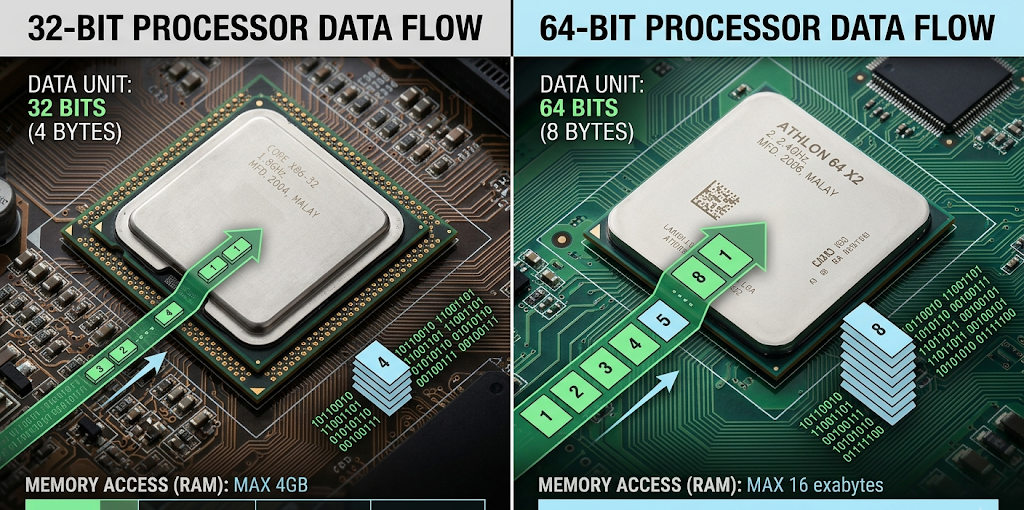
Regular numbers and letters can’t be used inside a computer. Instead, it communicates in binary language, made up of strings of zeros and ones, or 1s and 0s. The larger number of bits that a processor can process in a single clock cycle, the more bits of information it will operate on in each cycle. A 64-bit processor can, therefore, process larger amounts of data than a 32-bit processor, which makes it more efficient to handle more complex tasks.
The difference, however, is not that a 64-bit computer is automatically twice as fast as a 32-bit computer. There are a variety of factors that affect performance, such as processor performance, RAM, type of storage, graphics hardware, and optimization of the software. The primary benefit of 64-bit architecture is its capacity to support greater amounts of memory and support more heavy duty applications.
The Role of the Operating System
The operating system essentially serves as an interface between the computer hardware and software programs. The software includes operating systems for computers and servers, such as Microsoft Windows or Linux distros. The operating system should be able to operate under the architecture of the processor.
A 32-bit OS is made to run on a 32-bit processor and will also run, albeit with some limitations, on some 64-bit processors. But, if you are running a 64-bit operating system, you’ll need a 64-bit processor, as modern CPU architecture has the advanced capabilities required by a 64-bit OS. Downloading the wrong version of the operating system may lead to sub-optimal performance or even be incompatible.
How Memory Access is Different with RAM Limitations
The primary distinction between the two is the amount of RAM that they support. Random Access Memory (RAM): Memory used temporarily to hold data that a computer needs to access quickly. The more RAM a computer has, the more applications can be opened and utilized at the same time, and the larger the files that can be opened.
The limitation in memory is a very serious problem for a 32-bit OS, since it can only address a finite number of memory locations. Theoretically, a 32-bit system can access 4 gigabytes (GB) of RAM (2³2 possible memory addresses). But in reality, the operating system may only see less than 4GB, as certain memory addresses are committed to hardware including graphics cards and other devices.
For users with over 4 GB of RAM, having a 32-bit operating system will not allow them to properly use their RAM. This may not be a significant problem for basic activities like using the Internet, editing documents, or running simple programs. But those using video editing, games, coding, graphic design and/or big data bases can encounter issues.
The advantages of 64-bit systems for memory
A 64-bit operating system eliminates memory limitations of the 32-bit operating system. In theory, a 64-bit processor has the ability to handle a tremendous amount of RAM, more than most home computers need. Current 64-bit operating systems can handle much more memory, and are ideal for professional workloads and high-end applications.
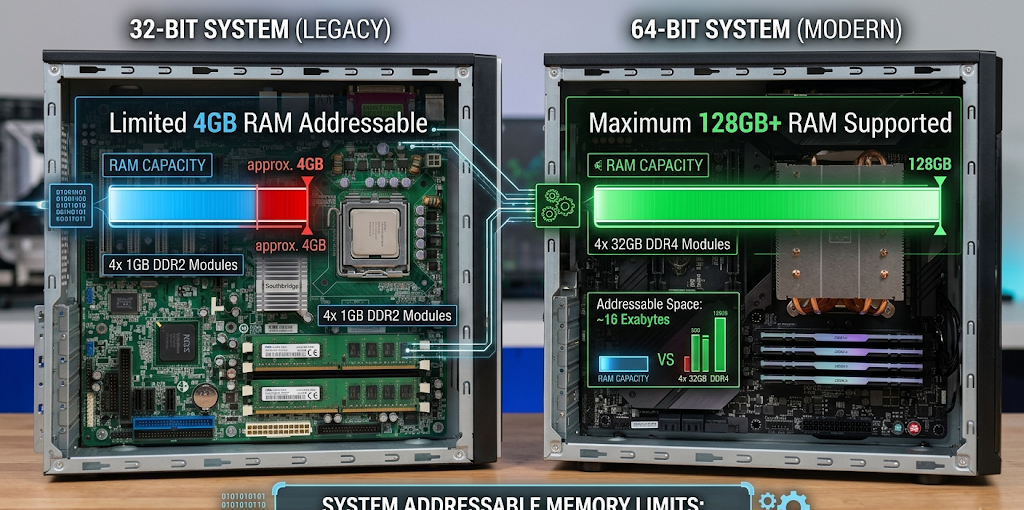
If there is more RAM, a computer can simultaneously execute multiple programs and not slow down significantly. A user can edit high resolution videos, run virtual machines, play modern games, and open more tabs in the browser on a 64-bit operating system that has enough memory. The more sophisticated the software, the more memory that is required. That’s why 64-bit systems are the norm for today’s computers.
Performance Differences Between 32-bit and 64-bit Systems
Computational speed and speed of operation
One of the primary benefits of 64-bit systems is that they can handle more data than 32-bit systems. This means that applications written for the particular 64-bit architecture can do complex calculations more efficiently. Applications that require heavy-duty computing, such as scientific simulations, artificial intelligence, video production, and 3D graphics will often make use of 64-bit computing.
But the difference in performance may not be dramatic in common scenarios like writing documents, checking email, viewing videos or browsing websites. For simple tasks, a high-performance 32-bit system can perform well, while an older 64-bit system may have trouble if it only has a small amount of RAM or a slower processor.
The actual performance difference will vary, depending on whether the software is 64-bit optimized architecture. Some of the programs that were developed for the 64-bit version of Windows can benefit from the extra memory and processing power they have, whereas the 32-bit version might not be able to use it.
Multitasking Capabilities
Another benefit 64-bit systems have over 32-bit is their ability to multitask. Many modern applications require users to run multiple programs at once, including browsers, communication, media and productivity programs. These tasks are better managed on a 64 bit operating system which can be paired with adequate RAM.
The memory capacity of a 32-bit system can cause your machine to slow down if it’s running several demanding applications. When RAM runs out, the system will use virtual memory, which is slower, as a backup and can slow down performance.
Compatibility of Software and Hardware
One of the factors to consider when choosing between 32-bit and 64-bit is software compatibility. Applications are developed for 64-bit operating systems, because those systems offer a higher performance and support newer technologies. Fewer people are using legacy hardware, and many developers have discontinued work on new 32-bit versions of their software.
Many 32-bit applications can typically be executed by using compatibility features in a 64-bit operating system. This enables customers to keep running old programs following their system upgrade. Most of the modern applications, however, are 64-bit and do not work with 32-bit OS.
For those who require professional software, newer games or specialised tools that need a 64-bit processor, this limitation can pose an issue. Users should find out if their critical applications are compatible with the OS version they want to upgrade to before upgrading.
Hardware Driver Compatibility
Drivers that enable the operating system to interact with hardware devices like printers, graphics card, scanner, network adapter, etc. Drivers are typically different for 32-bit and 64-bit operating systems. Users must ensure their hardware is compatible in order to shift from 32-bit OS to 64-bit OS. The older devices might not have 64-bit drivers updated, thus not working properly. The hardware is usually 64-bit enabled, which means that it can be more easily installed on newer computers.
Security upgrades for 64-bit systems (ENHANCED)
Another place where the 64-bit operating system systems may have advantages is with regards to security. Newer 64-bit systems have better security capabilities than older 32-bit systems, which makes it a challenge or impractical to implement on older systems.
Some features like better support for new encryption technologies, stronger security features and better memory protection are common to many 64-bit systems. These capabilities allow computers to withstand certain cyber threats, and enhance the reliability of the system.
While it isn’t all about architecture, it’s a safer combination of an updated 64-bit operating system and regular software patches, anti-virus software and safe web practices than relying on old technology.
How to determine if your computer is running 32-bit or 64-bit
Checking on Windows
If you’re using Windows, you can determine the architecture of your system using a few simple steps. Go into Settings – System – About. You will see the System type under the device specifications section. This section will show you if you’re running a 32-bit or 64-bit operating system and if your processor supports 64-bit technology.
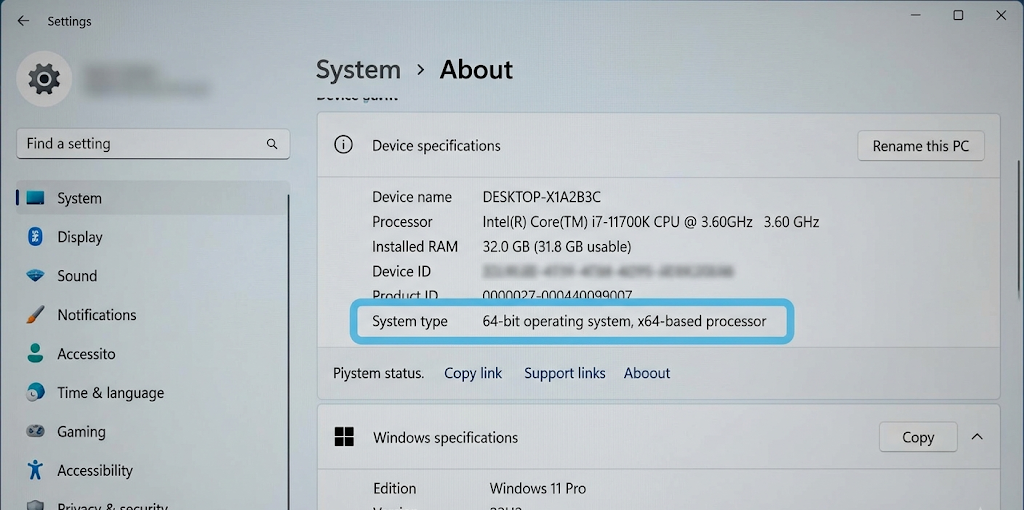
The other approach is to access the Control Panel, click on System and Security and select System. The system information page will give you information on the operating system version, processor type, and memory installed.
Checking on macOS and Linux
Most Mac users will be running 64-bit operating systems as Apple’s OSX operating system is a 64-bit operating system. Older Macs with differing hardware generations may have other restrictions.
To check the system architecture in Linux, open a terminal and type in some commands that provide information about the system. The outcome will show you if the OS is running a 32bit or 64bit version.
The understanding of system architecture aids users for installing compatible software and also provides an insight into whether the computer can be upgraded.
Which 32-bit or 64-bit Operating System to use?
When a 32-bit System Makes Sense
While 64-bit systems are the recommended systems to use, there are times that a 32-bit OS could be beneficial. Lightweight 32-bit operating systems can be utilized on older computers that have less hardware resources. There are also a number of specialised industrial devices that on certain older software applications require 32-bit environments for compatibility.
If users are doing only basic tasks and have older hardware, it may not be necessary to upgrade immediately. They should be aware, however, that the support for 32-bit systems will slowly become phased out as technology progresses.
Why Most Users Should Choose 64-bit
For most modern computers, a 64-bit operating system is the better option. It offers access to additional RAM, can support newer applications, enhances multitasking capabilities and is more compatible with existing hardware.
Users who are going to upgrade their computers, install heavy applications or keep their computers for several years should opt for a 64-bit operating system when their hardware can support it. It offers a more future-proof computing experience and is compatible with the latest technology.
Conclusion
The 32-bit and 64-bit systems differ in terms of computer architecture, memory management, performance and compatibility. 64-bit systems are now the standard, offering improved performance and security features, as well as the ability to process a larger amount of RAM and support modern software, whereas 32-bit systems were once popular and have their uses, but are no longer the norm.
The operating system to use will depend on the hardware that is available and the activities that a user wants to do. There are many modern computers where upgrading to 64-bit OS is beneficial as it is more flexible and will be useful in the future for technological advances. When purchasing computers, upgrading devices or installing software, these differences should be taken into consideration.