Introduction
Today’s digital world is hyper-connected, and all transactions, communications and data depend on interconnected networks. You’re using the internet from your personal PC, watching DVDs and videos on your smart TV or working with critical corporate data systems, and your devices are in constant communication with systems all over the world. But that seamless connectivity comes with a lot of security concerns. Any open connection is an open door for exploitation, whether it be by malicious automated systems, ransomware, or identity thieves, all looking to take advantage of technical vulnerabilities. Network security is no longer a luxury that is just reserved for technology companies, it’s a necessity for individuals and organizations. The first step in defending these digital perimeters is to set up clear boundaries between trusted internal networks and untrusted external networks.
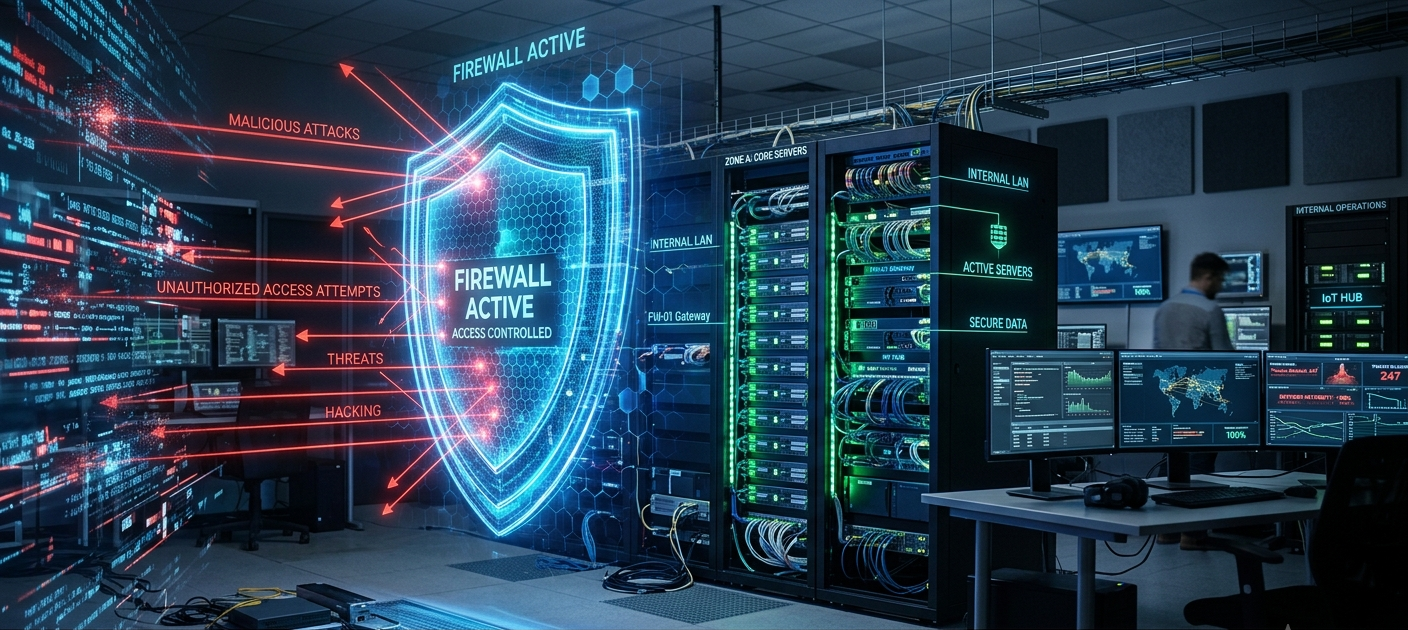
The heart of this defense is the one of the most important tools developed for cyber security: the firewall. A firewall is similar to a border crossing or a watchful eye and gatekeeper that examines, assesses, and regulates all data that enters or exits a private network. If there is no firewall, any connected device is 100% vulnerable to a wide ranging probe from automated exploit kits on the open Internet against the entire range of IP addresses. Firewalls provide a clear separation between internal and external networks and help to enforce security policies, allowing legitimate traffic to pass through while blocking and alerting on untrusted, malicious, or suspicious traffic as soon as it attempts to enter the network.
What is a Firewall and How Does It Work?
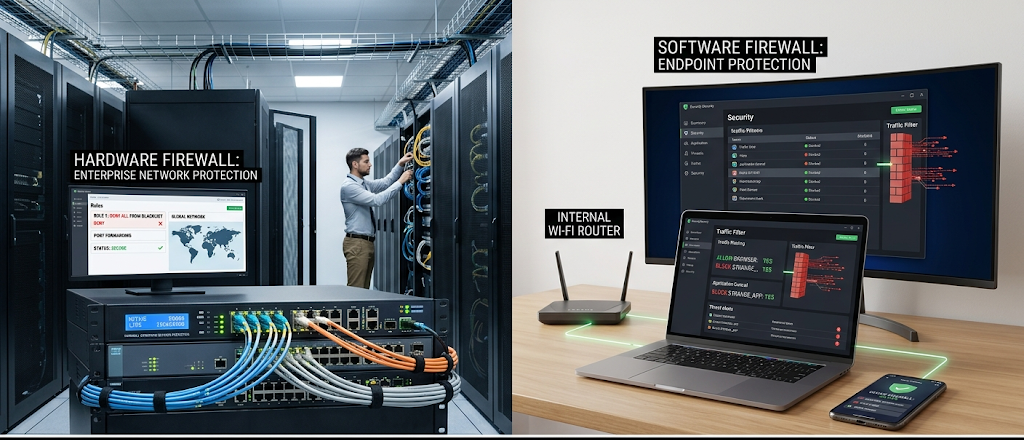
A firewall is a network security device or software that is designed to inspect both incoming and outgoing network traffic according to a set of security rules. It’s important to examine how data moves over the internet to understand how it works. Data is divided into small, organised parcels called data packets. Every packet contains a payload (the data being carried, whether text, images, or code), as well as header information including important metadata including source IP address, destination IP address, transmission protocol and port numbers. As a packet arrives at a network’s edge, the firewall intercepts it and examines the header and compares it to established access control lists (ACLs) to decide whether to allow or block the packet from entering or leaving the network.
Traffic filtering mechanisms at various layers of the Open Systems Interconnection (OSI) network model are heavily used in the decision making process of a firewall. Simple firewalls use stateless packet filtering, which means that they only look at each packet individually, without taking into account what has happened previously. However, the stateful packets inspected by advanced modern firewalls would monitor the current state and context of whole network connections. The stateful firewall can block unwanted incoming traffic on closed ports, offering a strong layer of perimeter security, by recognizing whether the incoming packet belongs to an existing and valid communication session, like a response to a request that you initiated for a website.
Two Main Types of Firewalls: Hardware vs. Software Solutions
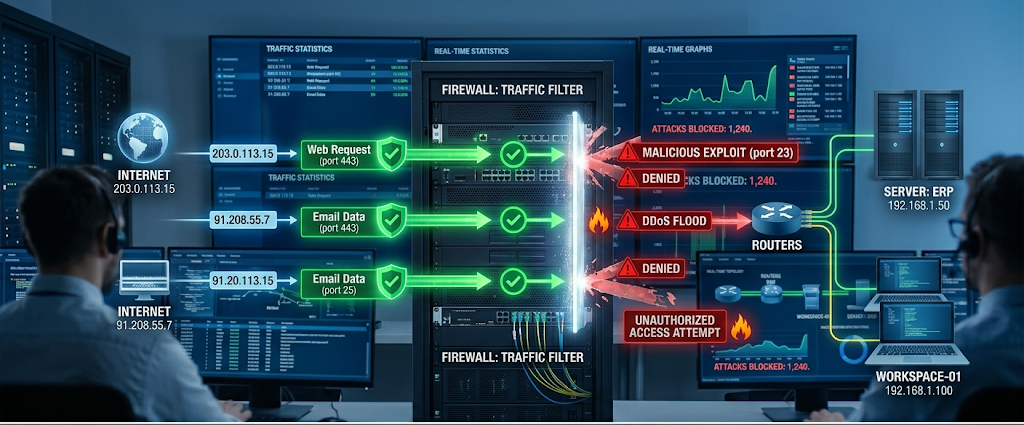
Most firewalls are either hardware based appliances or software based applications. A hardware firewall is a physical device placed directly between an internal network gateway and an external internet connection, usually a network router or a stand-alone hardware firewall box sold by an enterprise. Unlike software firewalls, which require network host computers to process large amounts of network traffic while maintaining the normal operation of the host computer, hardware firewalls have dedicated and specialized hardware that can process this traffic without requiring any extra computing power or memory in the network host computer. The architecture of the perimeter stops malicious traffic at the last possible point in the network, before it reaches a desktop server or personal computer.
On the other hand, a software firewall is software that is installed directly on the individual endpoint device, for example, a desktop, laptop, server, or smartphone. Software firewalls examine traffic at the operating system level, and can check not only the network protocol address, but also the application trying to traverse the network. This granular control lets the user block a particular suspicious program from making any background connections but not interfere with the normal functioning of web browsers. When building a complete defense strategy, it’s important to recognize the difference between hardware and software firewalls to ensure that network perimeters are safeguarded as well as individual endpoint devices.
Hardware and software firewalls have different advantages in their operation, but using only one can create holes that allow for dangerous exposure. A hardware firewall is the best choice for filtering the wide range of incoming threats across a whole organisation or a whole household, but will not work if a laptop is taken away from the home network and connected to an insecure public Wi-Fi connection at a coffee shop. However, software firewalls can be deployed on any single end point as it moves from location to location, but deploying and managing individual software firewalls on thousands of end points throughout the enterprise can become a nightmare. For this reason, the modern security paradigm is largely based on a “defense in depth” approach, which combines host-based software firewalls and perimeter appliances.
How a Firewall Works to Filter Network Traffic and Block Cyber Threats
Effective Network Ecosystems Protection requires a series of increasingly advanced filtering technologies to deal with the ever-more complex threat vectors. In the basic level of filter, the rules are based on packet inspection: IP address, port numbers and protocols. For instance, if an attack is made by an unknown IP address trying to connect to the Remote Desktop service on port 3389, the firewall’s rulebook is examined. If there is no explicit rule allowing this traffic, the packet is dropped silently or rejected actively. This way, port scanners will not be able to scan for services that could be accessed on the internal server and exploit popular software vulnerabilities.
Advanced security needs have led to the use of Deep Packet Inspection (DPI) and Next-Generation Firewalls (NGFW) beyond just header analysis. Next-Generation Firewalls can open the packet payload for inspection of malicious signatures, embedded exploit code or unauthorized application protocols with DPI. NGFWs integrate real-time cloud threat intelligence, encrypted traffic inspection, stateful inspection and integrated intrusion prevention systems (IPS). This enables the firewall to identify evasive malware that may exist in the legitimate HTTPS traffic or to detect malicious database queries before they arrive at sensitive backend application servers.
One of the other key filters that is deployed in modern networks is the Application-Layer Firewall or Proxy Firewall. A proxy firewall is a firewall at network layer 7 (OSI) that functions as a gateway between internal clients and external web servers. The proxy firewall opens the connection on behalf of the user and analyzes the data that is returned as it is sent to the client computer to determine if there is any malicious code or forbidden web categories. Application-layer firewalls reduce direct network exposure: They completely isolate direct network connections between internal hosts and external servers, and prevent malicious attackers from communicating directly with internal device operating systems.
Why Every Home Network Requires Firewall Protection?
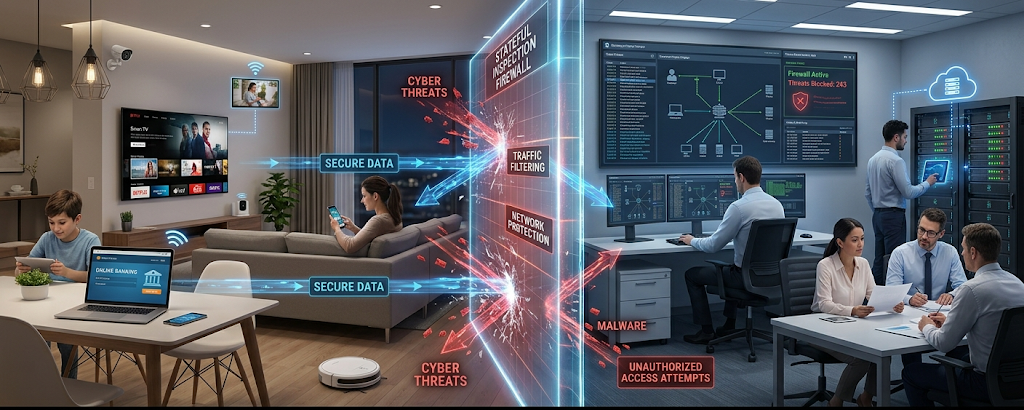
Many home internet users have the false notion that cyber criminals only attack large corporations, financial institutions, or government agencies. In fact, there is no such thing as being too small to be attacked by an automated cyber threat, since cybercriminals routinely scan millions of home IP addresses an hour with automated botnets. Unprotected home networks can include unsecured smart devices, such as the Internet of Things (IoT) devices including smart TVs, security cameras, thermostats and connected appliances. They often come preconfigured with a default password or previously unpatched security holes, so they are easy targets for automated ‘exploit bots’ that are used to infiltrate them into large distributed denial-of-service (DDoS) botnets, or to leverage them to gain access to personal banking information on family computers.
A properly configured firewall at the edge of the home network is an important layer that blocks automated Internet scans from locating vulnerable smart home devices. A majority of contemporary customer internet routers have integrated hardware firewall features that use Network Address Translation (NAT). NAT provides a single IP address from the ISP that is visible to the outside world and allows you to keep devices on the inside invisible to unsolicited incoming traffic. Home network users combined with active host-based software firewalls on their home computers and smartphones create a formidable line of defense against unauthorized access, drive-by malware downloads and malicious remote takeover attempts.
In addition, home networks have become extensions of the corporate network perimeter due to remote and hybrid working environments.Also, remote and hybrid working environments have changed home networks to a direct part of the corporate network perimeter. If an employee accesses his or her company’s VPN, cloud-based databases or proprietary company files from personal home Wi-Fi networks, an infection on a home computer or on a compromised smart device can easily penetrate through secure tunnels directly into company data centers. With an active network firewalls, families can rest easy that unauthorized network access is not possible, sensitive personal information data is protected, financial information is safe, and families can prevent their own personal hardware from becoming a point of entry into an enterprise cyber attack through the supply chain.
Importance of Firewalls for Enterprise and Business Networks
Business and Enterprise Networks can’t function without firewalls. When it comes to institutions, corporate enterprises, and small business enterprises that are dealing with proprietary data, a strong firewall security is a must for them to operate. Organizations move tons of IP, proprietary financial information, confidential trade secrets, and customer data that needs to be protected from persistent threats coming from the outside. One successful network attack can lead to devastating financial losses, ransomware attacks that may cost millions, costly liability, and irreparable brand damage. Enterprise firewalls are the first line of defence in ensuring business continuity, acting as the barrier to millions of incoming and outgoing network transactions per minute, and blocking unauthorised entry to corporate databases.
Beyond just defending against malicious entities, enterprise firewalls play a crucial role in ensuring regulatory compliance and data governance standards. Industry standards like Payment Card Industry Data Security Standard (PCI DSS), Health Insurance Portability and Accountability Act (HIPAA), and General Data Protection Regulation (GDPR) clearly require robust access controls and perimeter defenses. Organizations can use enterprise-grade Next-Generation Firewalls to implement granular access policies to meet encryption standards, maintain detailed audit logs and prove compliance in required regulatory security audits.
Distributed workforce, multi-cloud deployments and third-party vendor integrations have expanded the modern business architecture beyond its traditional boundaries. Zero Trust Network Architecture (ZTNA) is therefore a framework that enterprise firewalls are vital to implementing. In Zero Trust security, organizations don’t assume that the traffic on their internal network is safe. Each request, from an employee’s workstation inside the office, a remote employee, or a cloud microservice is constantly authenticated, authorized, and examined before being allowed to access sensitive company data, through enterprise firewalls, micro-segmentation policies, and identity-aware security gateways.
Pre-plan Firewall Setup and Administration
Just installing a firewall appliance or turning on software protection doesn’t guarantee total security – the success will depend on how well the firewall is configured and maintained over time. A very basic of operational firewall management strategies is the use of “Default Deny” policy. A default deny posture denies all incoming and outgoing network traffic by default and allows traffic to pass only if it is the traffic of a security rule explicitly approved by a documented security rule. This helps to ensure that unauthorized apps, unusual network protocols, and suspicious logins go past security filters without being detected.
Operational best practice for security administrators also involves the regular auditing of the rulebook and maintaining security policies. Enterprise firewalls build up hundreds or thousands of rules over time due to one-off projects, legacy applications, and departed employees. These old and unchanging rules have the potential to present dangerous security loopholes which attackers can use to penetrate perimeter security. It is essential that the security teams conduct regular rule base reviews to remove all unnecessary rules, overly permissive rules, and outdated rules in order to keep firewall access policies in step with the security needs and operations of any organization.
Lastly, regular signatures, software and hardware firmware updates are essential for active protection against current cyber threats. Threat actors always find new security vulnerabilities, evasion techniques and exploit vectors to circumvent the traditional firewall rules. Real-time threat intelligence feeds, automatic intrusion prevention signatures and timely vendor security patches will prevent new zero-day exploits, threat variants and active command and control channels from compromising the network infrastructure.
The Challenge of Digital Perimeter Security in the Modern World
In an era of rapidly evolving technology and increasingly sophisticated cyber threats, the need for strong network security is paramount. While other components of cybersecurity are important, firewalls are still the cornerstone of any security strategy, acting as the first line of defense against external networks. From perimeter traffic filtering with physical hardware to host-based software applications that protect individual endpoints, firewalls offer around-the-clock visibility, accurate traffic management, and essential defense against unauthorized access, malware distribution, and automated attacks with exploits.
A proactive, multi-layered approach is necessary to secure digital assets, adapting to the changing threat landscape. Home users and enterprise networks alike can set up strong security boundaries by mastering the intricacies of firewall functionality, choosing the appropriate hardware and software, and following best practices for configuration and maintenance. A thorough firewall solution provides a layer of protection to keep your private data, networked devices and important business processes safe, secure and reliable in the increasingly interconnected digital world.