
One of the most prized possessions to an individual or business is data. Photos, videos, documents, customer information, financial records and important memories can accumulate over a number of years and disappear in a matter of seconds. Lost files can be caused by damage, ransomware attacks, accidental deletion, theft, or hardware failure, and can destroy files that were never properly protected. Many people think a backup system is safe because they have made a copy somewhere else, but if they have not been set up, maintained, tested and properly protected, then a backup system is not reliable.
Unfortunately, there are a number of common backup practices that give a false sense of security and leave people vulnerable to permanent loss of data. By learning about the top Data backup mistakes, you can create a more robust backup plan that will help ensure your important files are protected when unexpected issues arise.
Why backup errors are hazardous.
A backup is not just an additional copy of a file that’s stored elsewhere. A sound backup strategy is a well-thought-out solution to safeguard data against multiple threats. Moving files to an external drive or cloud folder is a common error users make in thinking that their information is protected. But, all of these can cause backups to fail, including the use of outdated copies, damaged storage hardware, incorrect settings, security issues and human error.
The problem is, backup issues can go undetected until the time you need them the most. Since at the point when individuals notice that their back up can’t restore their files, it might be too late to recover significant information. Establishing dependable backup practices involves education about disaster failures and taking preventive measures before a catastrophe.
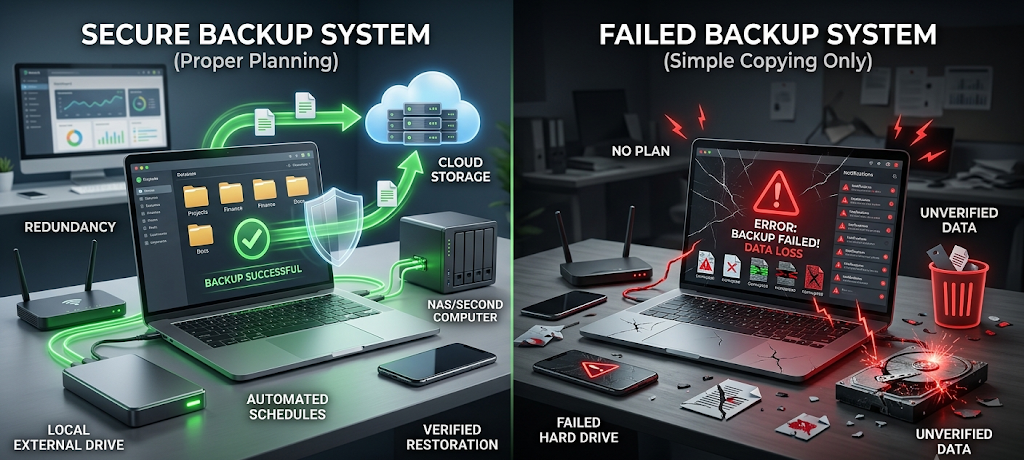
7 Most Common Data Backup Errors That Lead to Data Loss
1. When a backup isn’t a backup
The worst backup error is to make backups and never test them. Some people think that if a backup has run successfully, the data is safe. Unfortunately, a backup notification does not tell you if the backup was successful, if the files stored are complete, readable or can be retrieved. Backups can get corrupted, certain folders might not be backed up because of some settings, and storage devices might fail for no apparent reason. The true test of a backup system is if the files are able to be restored when necessary. If not checked regularly, users might not know about the problem until they lose their original data and try to recover for the first time.
Backups should be a part of data protection, not an emergency. Any individual or organization should regularly check back in to make sure that things are running smoothly. Businesses can conduct recovery drills to make sure that all employees understand the recovery process and how to access important information should a failure occur. Backed up photos, documents and videos can be opened even by personal users and tested. The checks will help prevent the creation of issues with files missing, damage to backups, or improper configuration. A backup which isn’t tested is only a chance, not a certain safeguarding. A reliable backup system is developed over time by continually testing and refining it.
2. Keeping Only One Backup Copy
Another often made error is relying on one backup copy. Most of them keep their files in one cloud account or one external hard drive and think that this is sufficient protection. The issue is that all storage methods have their drawbacks. Devices can become lost, stolen or damaged, cloud accounts can be hacked and external drives can fail. If there is only one copy of these original files, and that one copy has been corrupted by the same event, then there is no recovery. One copy will provide one point of failure and if one accident occurs, there is no ability to access it again.
A better policy would be to have several copies in various locations. This minimises the risk of one incident wiping out all of the data versions. For instance, important files may be located on the primary device, an external backup system, and on a separate cloud or off-site location. There are various risks for which different storage environments can provide protection such as hardware failure, theft, natural disaster, and cyberattack. It is not about the number of copies that it is about creating copies that are independent of each other. The best back up plan takes into account what might go wrong and will always have another path to recovery for valuable information.

3. Having Backup Drives Connected All The Time
It might seem like a convenient idea to have an external back-up drive plugged into the computer at all times so that files can be automatically backed up without effort. This is a serious security issue, though. When the primary computer is infected with ransomware or other malware, it can also infect any back-up drives that are connected to the infected computer. The backup device may be a potential target for the threat, instead of being a protection device. Also, if the computer system is damaged or if there is a power surge or electrical issue, it may also cause damage to attached storage devices.
Instead, it is better to unplug backup drives when not in use, particularly when safeguarding personal or business data. With some users opting for rotating backup drives, with various drives being connected at specific times and then stored off-site after. Other backups involve the use of protective measures including access controls, data encryption or separate storage areas. While convenience is a key consideration, it should not be the only one, as the idea behind a backup is to have it available if things go wrong. A backup device that is always in the same environment as the original device has the same risks and can fail at the time of most need.
4. Ignoring Backup Versioning
A lot of backup systems will only back up the most recent version of a file, which is why they fail. This is a problem when users accidentally delete important data, make an incorrect save or find that a file has been corrupted after the latest version was backed up. If it is not versioned, its previous healthy version could be lost forever. File versioning enables you to retrieve previous versions of documents, images and other files, providing you with the option to undo any mistakes without losing any data.
Versioning is particularly important for businesses, students, writers, designers and anyone who frequently works with files and documents. Up until now, a corrupted document can be perfectly fine today; but if there are no previous versions, how can you get back to the previous state? A backup system should store several copies of the history of the data, where the schedule reflects the significance of the data. The frequency of version tracking may vary from file to file, depending on the scenario. To avoid versioning will mean few options for recovery and little chance to avoid permanent loss due to small errors.

5. Not Encrypting Backups
Many users think to backup only their primary devices and don’t realize that backups are also targets. Cybercriminals are getting to know how important backups are, as they are now able to make it difficult for the victim to recover their information. If backup accounts, storage devices or network locations are not well secured, attackers will try to remove, encrypt or steal the backup data. Confidence without security can be created by a backup system that does not have security measures.
To ensure that backups are protected, use strong passwords, add extra security features like multi-factor authentication, keep software up-to-date, and restrict unnecessary access. Alternatively, information should be secured by encrypting it to prevent easy access by unauthorized parties in case a device is lost or stolen. Businesses need to be mindful of the rights and access their employees have to make changes to backup systems so that only the ones that are supposed to have access to do so can. Security and backup planning go hand in hand; if data is to be preserved, then copies are preserved and those copies are stored somewhere.
6. Not Automating the Backup Process
Another major error that leads to many backups being unsuccessful is relying solely on memory. Making regular backups is a goal that many people have, but get sidetracked in everyday life and end up forgetting. Occasional backups can miss weeks or months of changes. Prior to the next manual backup, recent files, projects, and memories can be lost forever if a device fails.
Automation can eliminate the element of human forgetfulness. Scheduled backups can automatically back up new and updated files at regular intervals, keeping the protection on track during periods of high user activity. Backup frequency should be determined by how often data is changing, and how critical it is. There’s a difference between people who are backing up their daily business records and those who are backing up their occasional personal photos. Automated systems ensure uniformity and mitigate the risk of valuable information being lost due to missed backup jobs.
7. Assume Backup is Recovery Without a Plan
The last crucial error is assuming that as long as you have backups they will be easy to recover. In fact, data recovery in the event of a large failure involves preparation. Users may not be aware of the location of their backups, how to access them, how to restore files and the order in which they need to be restored, or how their recovery tools work anymore. Even if there is a backup available, it can be hard to use in an emergency, without a recovery plan in place.
It is important for a complete backup strategy to have knowledge of what data is important, where copies are stored, how often backups are performed, and how restoration is to be completed. Especially for businesses, recovery procedures are important to ensure continued operations in the event of an unexpected disaster. People should also know how to restore their photos, documents and personal files without any confusion. Backup isn’t just a matter of storing information—it’s also about having the information be restored when needed. A recovery plan takes backups from passive storage and turns it into an active protection system.
Building a reliable backup strategy
The avoidance of these errors calls for a combination of protective measures. A good backup plan involves more than just making a single copy of critical files; it includes multiple storage media, storing backups in multiple locations, testing backups regularly, securing backup files and having a recovery plan. Designing backups around a possible failure point is the best backup system. Threats include accidental deletion, hardware damage, cyberattacks, and unexpected disasters, and if users take these threats into account, they can create a system that will actually work to protect their data, rather than giving them false confidence.
Data protection does not happen on a single occasion. Changes in files, aging of devices, and new threats are always emerging. Frequent backup checks and protection enhancements maintain efficiency with time. From safeguarding personal data to your company’s most valuable information, a robust backup strategy can save you a lot of stress and frustration.

Conclusion
It is not that technology simply isn’t available, but because of common backup errors that lead to permanent data loss. Not testing backups, maintaining only one backup, keeping drives plugged in all the time, neglecting backup history, failing to secure backups, failing to plan for automation, and failing to have a recovery plan can all make a small backup problem a big disaster. Fortunately, there are steps you can take to minimize these risks and ensure that data protection is seen as a priority responsibility.
Fortunately, there are measures you can take to lower these risks and make sure that data protection becomes a top-notch responsibility. A reliable backup system not only copies files, it helps to give users confidence that critical information will survive events they didn’t expect. Preemptive action before data loss occurs is the key to recovering valuable files in the event of data loss, or losing them forever.