Every time you start a challenging video game, edit a high-resolution video file or just open a new tab in your web browser, billions of small calculations happen in an instant. The heart of this digital symphony is the Central Processing Unit, or CPU for short. The processor, which is often called the “brain” of the computer, interprets instructions, manipulates data, and performs basic logic, enabling software to run smoothly. Even the best graphics cards and fastest storage drives are useless without a capable processor and if there is no processor to give them instructions, nothing happens.
The knowledge of how a processor works is not just meant for software engineers, hardware technicians or anyone else in the technical sense. From custom-built gaming rigs to the sleekest laptops for everyday productivity to the upgraded enterprise workstation, understanding the inside of the silicon silicon die can help you make the right and most cost-effective purchase. There are a lot of terms and jargon used to market the products in the modern technology market, and the acronyms are too many to count.It is a technology market packed with marketing terms such as boost clocks, thread counts, IPC gains, and other such terms and acronyms. Once you are familiar with the basics of processor architecture, you will be able to decipher through marketing jargon and make a fair assessment of the raw numbers and pick the “right” part for your computing requirements, while keeping your budget in mind.
The Central Processing Unit and What It Does!
If you want to see the elementary importance of the Central Processing Unit in today’s computing system, you need to see how information flows through hardware. The CPU serves as the chief command interpreter responsible for converting and translating instructions from software applications to a binary machine code which the physical electrical circuits can interpret. To get into the details of enterprise-level definitions and enterprise hardware history, the introduction to what is CPU and how does it work is a great baseline to start with. In essence, the processor accepts simple Arithmetic, Logical and Input/Output instructions from running applications, and performs them in turn (or concurrently) while coordinating with the physical memory to keep your operating system responsive and stable under load.
Modern CPUs are engineering wonders and contain billions of transistors on a little silicon called a die. These tiny switches switch on and off in a flash, corresponding to binary ones and zeros. The silicon chip can work together with millions of transistors in dedicated blocks to perform complex mathematical operations, control the power state of the system, and direct data to and from system memory, storage drives and expansion cards. The CPU manages the flow of data and processes tasks, while the GPU manages specific parallel tasks such as rendering graphics. RAM is used for temporary storage while a GPU is hosting a specific parallel task; the CPU controls the rest of the workflow and enables crucial decision-making processes to take place throughout the entire computing system.
The Internal Architecture: Anatomy of a Processor
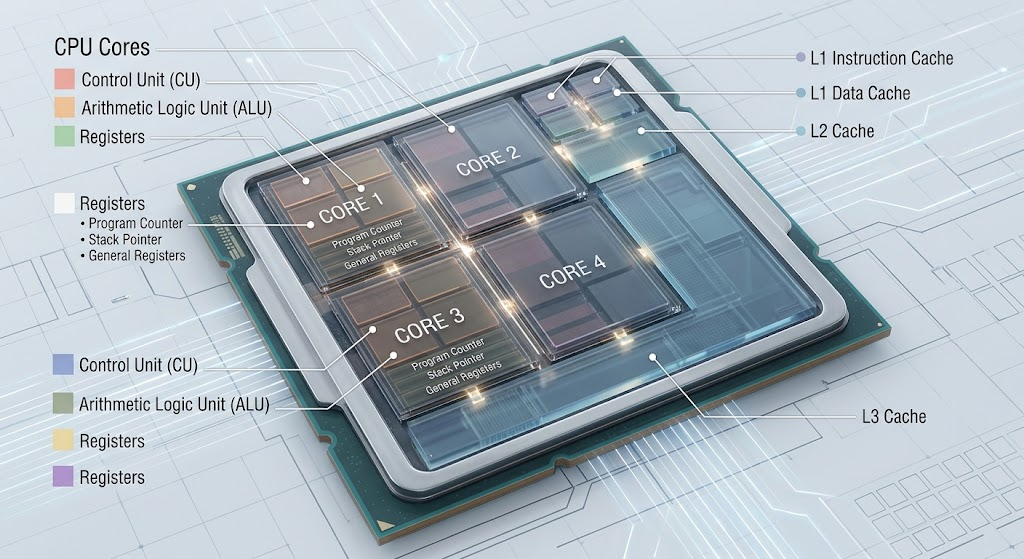
Each Central Processing Unit has a number of major special purpose sub-components that collaborate to efficiently process information. Knowing these sub-units is helpful to understand how abstract programming code can translate into the actual execution on physical hardware circuits.
The Control Unit (CU)
The Control Unit is the traffic manager of the system. Does not actually carry out mathematical calculations or data manipulation; it merely fetches instructions directly from the main memory, interprets them and produces specific electrical control signals to move other components of the system.
The Control Unit coordinates the internal timing of the chip to ensure that data flow is smooth and efficient and to prevent pipeline stalls or timing conflicts.
The Arithmetic Logic Unit (ALU)
The actual arithmetic is performed in the ALU part of the processor chip. It facilitates two basic kinds of operations: basic mathematical arithmetic (addition, subtraction, multiplication, and division), and logical boolean operations (AND, OR, NOT and comparisons such as equal-to or greater-than).
Each graphical render, physics calculation or database search is broken down into a fast sequence of simple math and logic operations that are performed directly in the ALU.
Internal Registers and Cache Hierarchy
The CPU registers are extremely small and fast memory cells within the CPU’s core itself. They store ALU’s current input values, addresses, and output values at each nanosecond. In addition to having multiple levels of software caching, processors also contain multi-level hardware caching (L1, L2 and L3).
L1 cache is very small and very fast, located right at the execution logic, L2 cache and L3 cache are larger, and slower, but are used for storing instructions frequently needed to prevent the CPU core from idling while waiting for instructions from memory.
The Four Phases of the Machine Cycle: Fetch, Decode, Execute and Writeback
Each and every operation you carry out on your processor, such as moving the cursor, compiling code, or anything else, is carried out in an endless loop known as the instruction cycle or machine cycle. It is a continuous loop which runs across all the active processing units, billions of times per second.
Fetch: Retrieving Instructions
Fetch: The CU fetches the next instruction byte (which is the next instruction to be executed) from the high-speed L1 instruction cache or from system RAM and stores it in the internal Program Counter register, which indicates the address in memory.
Decode: Understanding Instructions
Decode: The internal decoder circuitry receives the binary sequence fetched and converts it to a specific micro-operation (micro-op) and determines which functional units or registers are needed to execute the operation.
Execute: Processing Instructions
Execute: The operation goes to the target processing unit (Floating-Point Unit or ALU). The physical circuits perform the specified binary arithmetic, conditional check or data routing procedure.
Writeback: Storing Results
Writeback: The result of the execution is written back to a target register or to system cache/RAM, and while the result is stored the CPU is ready to fetch the next instruction.
Multi-Core Scaling and Hyper-Threading (MT)

Traditionally the processor had a single physical core and could only perform a single instruction stream in any given microsecond. For older operating systems to run more than one application at a time, they had to quickly switch between different programs or tasks, appearing to the user to be running multiple programs at once when really they were not. The modern silicon design overcame this limitation by using multiple independent execution cores on a single physical processor chip.
Physical Core
Physical core: Is a single processing unit with its own Control Unit, ALU, register and L1/L2 cache structure. For example, a quad-core CPU consists of four separate silicon processing engines all of which can execute four task streams simultaneously without loss of performance.
The modern desktop/Server platforms provide from 6 to 64+ cores, with dramatic increases in performance for multi-threaded applications such as video encoding, 3D rendering, scientific simulation and server virtualization.
Simultaneous Multithreading (SMT) and Hyper-Threading
Simultaneous Multithreading (SMT)—also known as Hyper-Threading by Intel—renders one physical core as two virtual cores, or threads, to the operating system, taking utilization of the cores one step further. SMT does NOT increase the number of physical computing units in the core, but rather the number of sets of registers and instruction pointers.
When one thread is waiting for data to arrive from main system memory, the core’s ALU can instantly process work for the other thread, thereby achieving up to 20-30% more power efficiency when using multithreaded applications, and maximizing the efficiency of the CPU’s hardware.
Clock Speed, Gigahertz and Instructions Per Cycle (IPC)
One of the key specs users look at while purchasing hardware is its clock speed, which is measured in Gigahertz (GHz). The clock speed is the rate at which the internal crystal oscillator keeps time for all the operations within the processor. The internal clock for the system is 4 gigacycles per second, meaning the clock rate is 4.0 GHz.
One of the pitfalls of comparing CPUs is to compare them without considering their clock speed. The total single threaded execution speed depends on the number of Instructions Per Cycle (IPC) and on the raw clock. IPC is a measure of how many instructions the internal design of the chip is able to execute in a single clock tick. The new processor architecture operating at 4.0 GHz, but with high IPC, can outperform an older architecture operating at a higher 5.0 GHz clock, as the new processor is able to do a lot more useful work in each of its clock cycles.
The Base clock speed is a guarantee to the minimum speed that the chip will run at under normal thermal usage, and the Boost clock speed is the maximum temporary speed that the chip can run at under normal thermal usage, if it is allowed by the power delivery and thermal headroom. Today’s desktop CPUs vary their frequency from millisecond to millisecond to increase the clock speed at busy moments and lower it to use less power on idle moments, to help control output heat and conserve energy.
The Architectural Paradigms of x86 vs. ARM Architecture
Differences Between x86 and ARM Architecture Paradigms
There are two different sets of instructions used by processors—ARM (Reduced Instruction Set Computer or RISC) and x86 (Complex Instruction Set Computer or CISC)—and they are competing for the desktop, mobile, and server processor markets.
| Architectural Feature | x86 Architecture (CISC) | ARM Architecture (RISC) |
| Primary Markets | Whether you need a desktop PC, gaming rig or a server, you can find the right solution. | Smartphones, Tablets, Ultra-portables |
| Instruction Design | Complex, variable-length instructions | Simplified, fixed-length instructions |
| Power Efficiency | Power peaking, increased thermal output. | Superior power efficiency, lower thermal footprint, is achieved.This results in superior power efficiency, lower thermal footprint. |
| Key Vendors | Intel, AMD | Apple (Silicon), Qualcomm, MediaTek |
| Performance Profile | Unrivalled sustained peak performance | High efficiency/watt, low idle drain. |
Until recently, x86 processors powered the high-power desktops and servers of the world, because they were capable of performing more instructions in the same amount of power, whereas ARM chips ruled the roost on battery-powered smartphones because of their efficient instruction design. But in today’s manufacturing, these were traditional lines have been forgotten. Apple’s ARM-based Silicon processors prove that desktop-class execution performance can be achieved with incredible battery life, and Intel and AMD are continuing to make dramatic improvements to the power efficiency of current x86 chips with hybrid core combinations.
How to Choose the Right CPU for Your Needs
There are certain key metrics to consider if you want to know if you’re getting a good deal for your CPU purchase. Selecting the processor you need depends on how much you really use software and how much your hardware can afford. If you need more cores than your average application uses, you are getting less value from the extra cores, and if you don’t spend enough on the processor, then you have to spend more on your dedicated video cards or other high-end peripherals.
Single-Core Performance
Single-Core Performance: Cuts down on lag and delays in PC usage for competitive gaming, web browsing and faster overall desktop responsiveness.
Multi-Core Scaling
Multi-Core Scaling: Essential for intensive content creation tasks such as 4K/8K video editing, 3D modeling, code compilation, and running virtual operating systems.
Thermal Design Power (TDP)
Thermal Design Power (TDP): Describes the amount of power and heat that the chip uses and dissipates, to help you select the right motherboard power delivery and CPU cooling solutions.
Platform Features
Platform Features: Ensure compatibility with current standards such as PCIe 5.0 expansion bandwidth, DDR5 memory support, integrated graphics options, and socket longevity.
Comparing CPU Usage to Computing Workloads
Comparing CPU usage with the tasks being performed in computing operations. When buying or upgrading a system, you should think about the different workloads that utilize the different processor specifications:
Everyday Productivity and Office Tasks
High core counts and ultra-fast boost clocks aren’t required for browsing the web, using an office suite or media. The processor used is either a 4-core or 6-core chip with built-in graphics, and it should be smooth like a flash and require no expensive after-market cooling if it has a 4 or 6 core processor; if it’s for gaming then it should have integrated graphics.
High-Refresh PC Gaming
Today, games heavily depend on the speed of single-core processors and low memory latency. With a discrete GPU of sufficient power, the highest frame rates and no frametime stuttering are achieved with a 6-core or 8-core CPU with high boost clock speeds and large cache sizes, like AMD’s 3D V-Cache technology or Intel’s high-clock Core i5/i7 models.
Content Creation and Professional Workstations
Applications such as video rendering, 3D modeling and software engineering make great use of parallel processing. Powerful 12- to 24-core desktop processors and the newest high-end workstation chips (up to 64 cores) can substantially shorten render times and compile queues, thereby boosting productivity for professionals.
Conclusion: Understanding the CPU Before Buying
The CPU remains the foundation of every modern computer system, controlling the flow of instructions, managing communication between components, and determining how efficiently software applications run. From the Control Unit that directs operations to the ALU that performs calculations, every part of the processor works together through the instruction cycle to transform software commands into real-world results.
Understanding concepts such as CPU cores, threads, clock speed, IPC, cache memory, architecture, and thermal design power helps users avoid confusing marketing terms and make better purchasing decisions. A powerful CPU is not always the processor with the highest number of cores or the biggest GHz rating; instead, the best choice depends on matching processor capabilities with the user’s actual workload.
For everyday users, a balanced processor can provide excellent responsiveness and efficiency. Gamers benefit from strong single-core performance and optimized architectures, while professionals working with demanding applications can take advantage of higher core counts and multithreading capabilities. By understanding how processors work internally, buyers can choose a CPU that delivers the right combination of performance, efficiency, and value for their specific computing needs.