Introduction
The type of accounting system a business uses can have a significant impact on the smoothness of business transactions, cash flow tracking, reporting and dealing with financial professionals. For small and growing companies, this choice is starting to be a cloud vs. desktop accounting software. Cloud Accounting Software is accessed via online platforms, as opposed to an individual computer, and is available to authorized users on supported devices and locations. Traditionally, desktop accounting software is installed on a computer or a server that a company manages, while cloud accounting software is hosted on servers in the cloud. While both methods can help with key accounting functions like invoicing, expense tracking, reporting, reconciling and financial record keeping, there are significant differences in accessibility, maintenance, security responsibilities, collaboration, backups, integrations, pricing and scalability. Awareness of these differences can assist businesses when choosing a system that matches the businesses current operations while also allowing businesses to avoid the excess costs and restrictions with the expansion of the business.
Cloud Accounting Software vs. Desktop Accounting Software: What’s the Difference?
The key distinction between the two systems is their location and the fact that financial data is mostly maintained at the other location. Usually, cloud accounting software operates in the cloud and can be accessed via a web browser or mobile application, allowing users to not be solely responsible for maintaining the accounting program on their own computers. Providers manage all of this properly, including the infrastructure, system maintenance, system updates etc. Traditionally, desktop accounting software is installed on the business’s computer and the company takes responsibility for maintaining the software and for keeping the information on their computer safe. In some modern desktop products, the line is not even entirely hard and fast as features are now available that is cloud connected. However, the fundamental types remain distinct: cloud accounting puts more emphasis on having access to the Internet, centralized information and data, while desktop accounting focuses more on having software that is installed locally, and operates on a local computer. (certinia.com)
Accessibility and Convenience
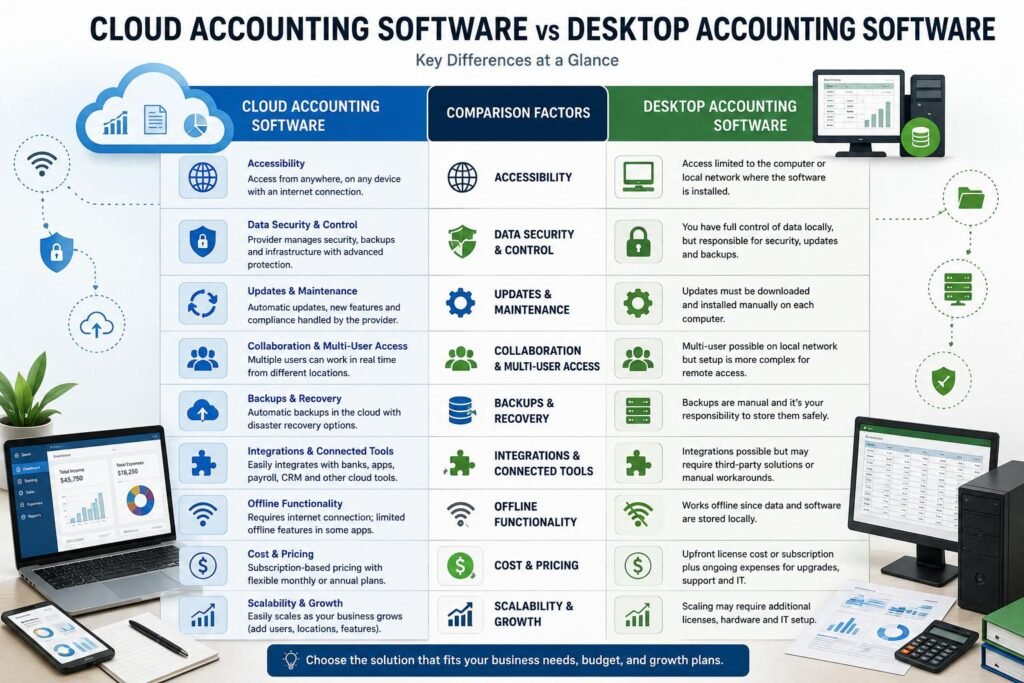
Cloud accounting is one of the most noticeable benefits of being able to access it. The system is online, which means that users can log in from anywhere and use a variety of devices, depending on their internet connection. This can come in handy if you’re a business owner who travels, a remote employee, or an accountant who has to see business records without getting to the company’s office. A cloud system may additionally make it possible for to decrease reliance on any specific computer as financial data is certainly not locked in the computer where the program was initially installed. So, desktop accounting might be less flexible in this regard, especially if the software is designed to run on a single computer or local network. For companies that are mainly run from a single office, and don’t require remote access, however, desktop systems might still be suitable. The more convenient alternative would then be the one that allows for greater mobility of the business and its finances.
The Dynamics of Data Security and Control
There is a difference in the responsibilities of security and it is important in any accounting model that a business has. In a cloud accounting arrangement, the service provider typically handles a lot of the technical details, for example the upkeep of the system and security measures, while the business is accountable for use permissions, passwords, gadget security and fitting procedures. A good cloud provider will have professionally managed infrastructure which could be very costly for a small business to duplicate. The desktop software provides a business with greater control over its home environment, but comes with extra responsibilities. Businesses might be responsible for controlling device failures or theft, user access, antivirus, operating-system updates, and software security. Both models are not guaranteed to be 100% secure. Before choosing an accounting platform, a business should explore the security measures, authentication procedures, access controls, backup protocols and data policies that the provider offers.
Automatic Updates and Maintenance
Further, there’s a distinction regarding software updates and continuous maintenance. Normally, cloud accounting software is owned by the provider and users are notified of the new features, enhancements, security fixes and regulatory updates without having to download each one of them on their respective machines. This can decrease the amount of administrative tasks for small businesses without IT personnel. Updates for desktop accounting software might need to be downloaded and installed on the appropriate computer, which could necessitate more manual effort to maintain the software. Businesses also have to take into account the compatibility of the accounting application, operating system and other software. Some desktop products are now enhancing this with services that are cloud based that take some of the burden of maintenance off the shoulders of the organization. Automatic maintenance can be a very appealing feature for a business owner that does not want to have to use a lot of technical administration with accounting technology.
Cooperation and Multiple User Access
As a company expands and the accountants’ roles are divided between the owners, accounting staff, managers and outside accountants, collaboration may take on even greater meaning. Cloud accounting can enable multiple users with authorization to access the same information in the central account, which can help minimize the need to move files from one computer to another. In addition, depending on the user permissions and plan of the software, an accountant can potentially have access to the records while the business owner is creating invoices or monitoring cash flow from a different location. When installed on a local network or set up properly to share, desktop systems can provide support for multiple users as well. But an integrated approach may be more complex when staff are based in different offices or require to access simultaneously outside the office. Cloud solutions are therefore ideal for distributed teams, and desktop solutions for businesses where most accounting work is done in the controlled environment of the office.
Backups and Recovery Data
There are also points where the two models differ greatly, such as the backup. In a conventional desktop setup, the company may be more liable to managing regular backups of the accounting files, and also keeping them somewhere secure. An organization without adequate backups might experience a considerable problem or loss of data if the computer fails, is damaged, stolen, or has a serious software problem. This is typically the case with cloud accounting, as businesses don’t need to take care of the storage infrastructure itself, since the financial information is stored in the cloud. But there are no data-recovery issues that can be ruled out with cloud storage, businesses should never take that for granted. They should be familiar with the provider’s backup, retention, recovery, export and data-access policies, too. A sound accounting system should be supplemented by clear internal procedures for protecting important financial information.
Integrations and Connected Business Tools
Most companies these days don’t rely solely on accounting software. They might require integration with payment processors, banking software, payroll, inventory, CRM, expense management, project management and reporting. Internet-based architecture can mean that cloud accounting platforms will usually have an edge as they can be integrated with other Internet based applications or APIs more easily than on-premise platforms. This can cut down on duplicate information entry and assist in automating procedures among various business systems. Integrations can be supported through the use of desktop accounting software, but may only be possible depending on the specific software, operating system, version and integration technique. So businesses need to consider the integrations they need, not because of the size of the marketplace, but what they’ve got to require. An easy integration with the tools already in place in the company can provide greater value than a tool that requires a lot of integrations that the company will never use.
Offline Functionality
One place where desktop accounting software might still be beneficial is in offline functionality. Traditional desktop software relies on software that is stored locally and accounting data that is not needed over the internet, so this type of software can typically be used without an internet connection. It can be beneficial for companies that have to use the internet in a place with an unreliable or expensive connection. Depending on the system, users are able to continue performing some accounting tasks and synchronize the information when connectivity is available. In contrast, cloud accounting typically requires you to have an internet connection to use the main application and get up-to-date financial data. Some providers will have mobile apps or will have limited offline functionality, but this is very different from one product to the next. If businesses are in an environment where connectivity issues tend to be common, they should thus explore the possibility of an offline function before adopting the cloud environment. While there is a benefit in the cloud accessibility, this is an important practical consideration and probably outweighed by the benefit of having Internet available most of the time.
The Price and the Total Cost.
The pricing should be measured not only through the price of the product, but also by other factors. In the past software for accounting on a desktop was purchased or had a license fee, but with the modern products there can be subscription fees, support and/or cloud based options. Subscription pricing is a common business model for cloud accounting, and this can help businesses manage their costs, as they pay in small chunks rather than a big lump payment upfront. Subscription costs can add up over a number of years, however, especially when more users, payroll, inventory, enhanced reporting, integrations and other features are needed, which often demands higher tiered plans or paid features. Expenses of desktop systems may also be ongoing such as upgrades, support, maintenance, hardware, IT support and backup infrastructure. So the most cost-effective option will then depend on the situation of the business. Owners need to consider total cost of ownership (TCO) when comparing the advertised subscription or purchase price of the software, and include other costs such as users, hardware, maintenance, training, backups, integrations, and support.
Scalability and Growth of the Business
For businesses that anticipate growth, scalability is a crucial attribute. A company can start small with only one owner, a limited number of transactions, and then expand its number of people or locations, customers, products, currencies, or legal entities. The ability to expand accountancy services can be made easier with cloud accounting, since many tools come with more options and plans to enable further users, transactions, connections and functions. This isn’t the end of the word on saying that all cloud products automatically scale to infinity; businesses should still research user limits, transaction restrictions, reporting options, storage policies and integrations. Growing businesses can also benefit from the use of desktop software, particularly if they can benefit from more sophisticated versions and networking. But sometimes it may need extra installations, hardware, licenses, and/or infrastructure in order to expand. Therefore, business owners should be thinking not just about how well the system can accommodate the company at this point, but how it will accommodate the company in a few years.
Cloud Accounting vs Desktop Accounting: Which is better?
There is no one right or wrong answer because the decision will depend on the business’s operating environment, budget, accounting needs and growth plans. Generally, businesses that prefer remote access, collaboration, automatic maintenance, connected apps and flexible access to up-to-date financial information are good candidates for cloud accounting. It can be beneficial for startups, freelancers, growing companies and businesses with employees or accountants that are located in other regions. For organizations with specific requirements and processes around desktop software, local control, reliability in the absence of an Internet connection, or a fixed location may make desktop accounting appealing. For companies that have unique accounting needs, it is also crucial to determine if the applications of their choice offer the reporting, inventory, payroll, tax and industry-specific functionality required by their businesses. Choosing a system based on the fact that its cloud or desktop is not necessarily the best option for decision-makers; they should consider the technology in relation to their true work and budget.
Key Factors to Consider Before Choosing
Business owners need to develop a viable checklist for their operations prior to buying or having to move to an accounting system. The first phase would be to determine the number of users and if they require simultaneous access, and from different locations. Then ask yourself if the business will need to operate offline, have automated bank feeds, invoicing, expense management, payroll, inventory, tax support, third-party integrations, and/or financial reporting capabilities. It’s also essential to consider security and backup measures, such as user permissions and the provider’s data recovery processes. Cost is also an equal consideration: estimate subscription or license costs, implementation, training and support, upgrades, integration and extra users. Lastly, take into account growth potential. What works great for a small business can become limiting as the business grows, the number of transactions, the number of employees, or reporting needs increase, or as the business expands to a new location. If a careful evaluation is made the company is able to avoid the frequent changes in accounting systems as the business expands.
Conclusion
While there are similarities in the basic tools that cloud accounting and desktop accounting can offer, the way that the two approaches use technology and administration is vastly different. Cloud accounting prioritizes Internet-based access, centralized data, collaboration, automation of updates by providers, connected apps, and scalability; desktop accounting offers more of these features offline and visual control of the local computing environment. Another factor with cost is it is not as straightforward as a subscription versus a software purchase and maintenance, backups, hardware, support, upgrades, integrations, and users’ needs can all impact the cost. Cloud accounting provides many benefits for modern businesses, especially those that have adopted remote working and digital tools.
Get more well researched information about Cloud accounting software vs desktop accounting software here.