Introduction: What Is Computer Networking and Why Is It Important?
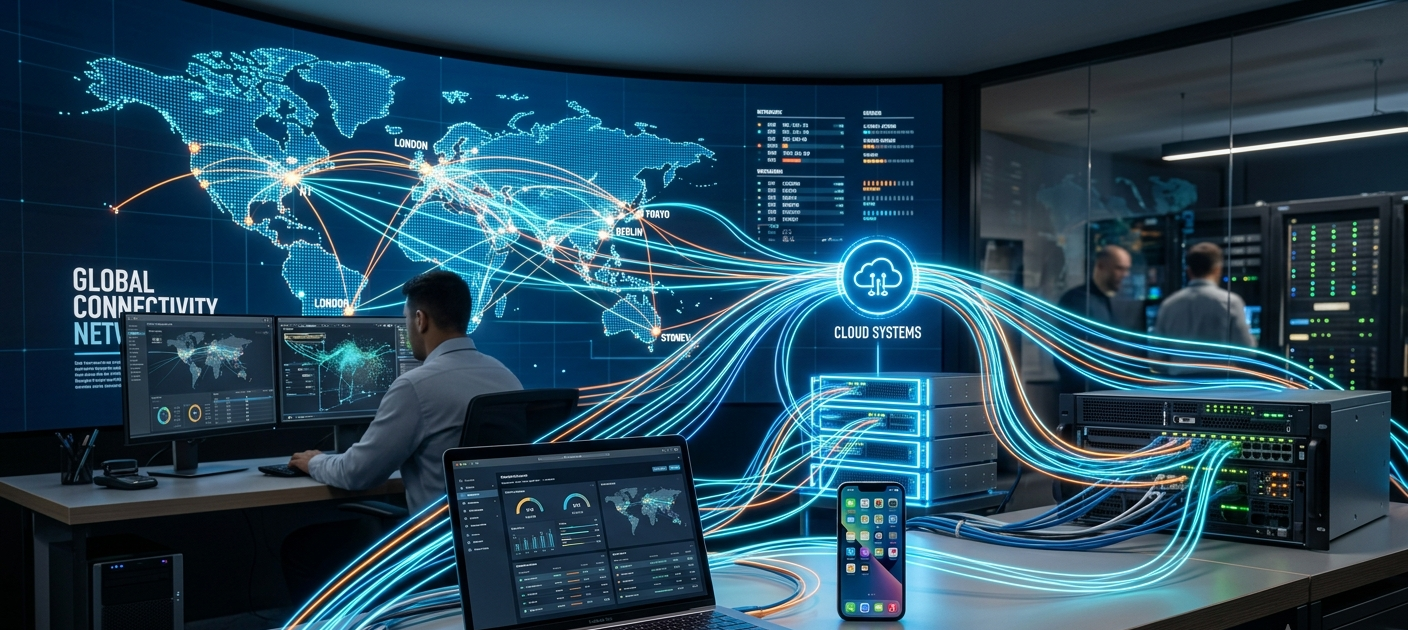
In the present day of the digital world, the majority of activities rely on computer networks. Networks facilitate communication between devices, such as sending messages on a smartphone, streaming videos online, making online payments and attending virtual meetings. Computer networking refers to the process of interconnection of various computers, smart phones, servers and other digital devices to share information and resources. Today, if there were no networking systems, the Internet wouldn’t exist and modern businesses, schools, governments, and individuals would not be able to communicate efficiently.
When computer networking is first introduced to a beginner, it can appear to be complicated due to the vast amount of technical jargon and the many systems, running simultaneously, required to create a network. The principle is straightforward, however: Networking enables devices to recognize and connect with one another and to exchange data between one unit and another. Computers require identification systems and communication mechanisms so that they can accurately identify and pass information between each other.
Knowing about networking gives a good grounding in the functioning of the internet and the working of digital communication in the background. IP addresses, routers, switches, DNS, LAN, WAN, VPNs and wireless networking are all critical components of today’s technology. After you have these concepts understood, you will find that it is easier to understand cybersecurity, cloud computing, software development, and many other fields of information technology.
How Devices Communicate on a Network
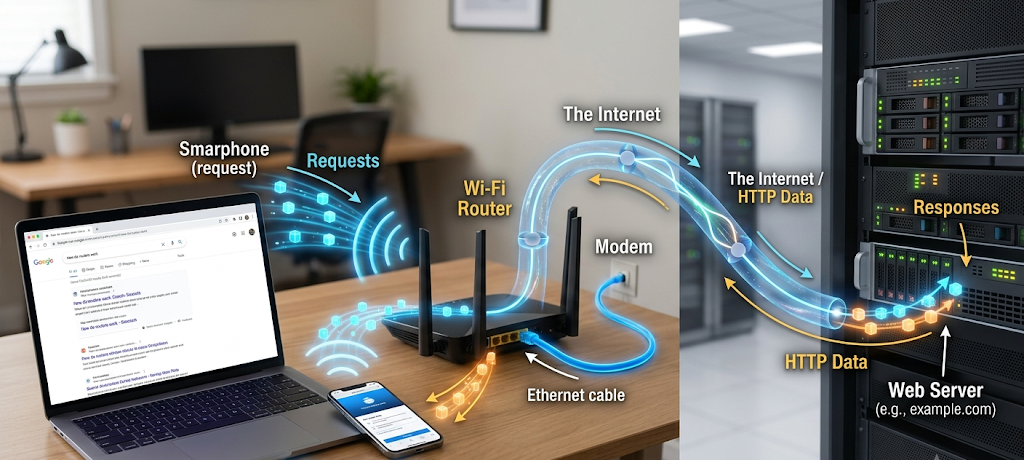
All devices that communicate over a network have to adhere to certain rules (protocols). These protocols are like a universal language which enables various devices to communicate in a successful manner. When a user visits a website, for instance, his or her computer or smartphone will use a number of networking processes to communicate with a web server. The device requests information, the network sends the request to the right server, and the server sends the information to the network that will be displayed on the Web page.
Information transmitted over a network is typically segmented into smaller units known as “packets”. Information is divided into packets, which makes it quicker and more reliable to send the information through the network because each packet can be sent through the network efficiently before it can be reassembled at the destination. To control this flow of data, networks employ different technologies and devices that enable information to reach the proper destination without any unnecessary delays.
All of the devices on a network must be identified. That’s where identifiers like IP addresses come into play. There’s also other equipment to handle traffic flow, like routers and switches, and services like DNS to enable consumers to access websites without remembering complicated numerical addresses.
IP Addresses: The Identity System of Networks
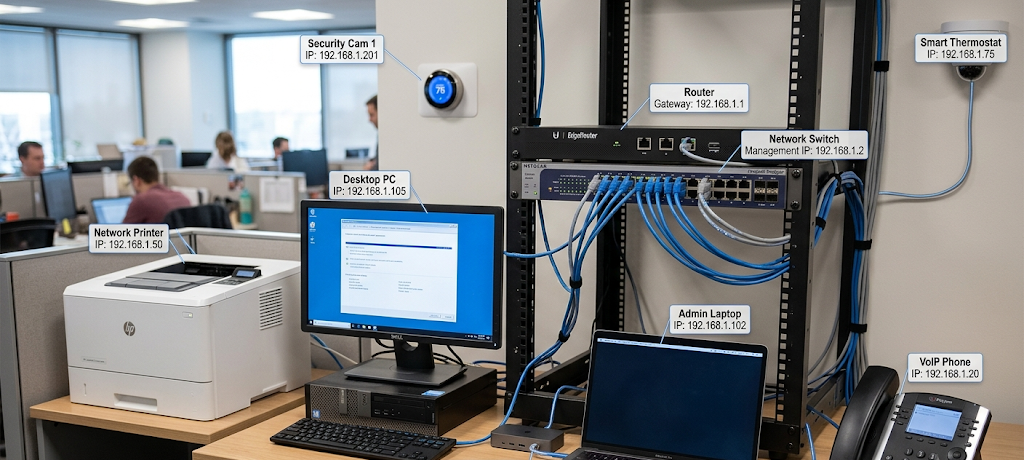
IP address is one of the most crucial computer networking concepts. An IP address is a numerical identifier that is used to identify a network-connected device. It facilitates devices to recognize and communicate with one another. An IP address is akin to a home address that enables a delivery person to find a particular building; it enables data to locate the right device.
To gain more understanding, you can read more about IP addresses and how it works on computer networks. All Internet-connected devices, such as computers, phones, tablets and servers, communicate using an IP address.
The IP addresses are of two types: IPv4 and IPv6. The older system is called IPv4 and consists of a chain of four numbers separated by periods, e.g., 192.168.1.1. Internet connected devices have grown massively, however, and so have the number of IPv4 addresses. IPv6 was created to offer a significantly greater number of available addresses, and to meet the ever-increasing demand for connected devices.
Public or private IP address can also be distinguished. One IP address is public, which is used to identify a network on the internet and the other is private, which indicates devices within a local network, including computers in a home Wi-Fi system. A typical router assigns a private IP address to the devices inside the network and has one public IP address to communicate with the Internet.
Routers: The Traffic Controllers of Networks
A router is one of the most crucial devices in a computer network that takes care of directing data between various networks. Its core function is to identify the flow of information and to identify a best-route to deliver it to its target. The router is the link between the home network and the Internet when the user accesses the Internet from home.
When people search for information online, for instance, the device transmits a search request to the router. The router analyzes the address of the request and directs it along the necessary network connection. Once the response is received, the router passes the information to the appropriate device. This occurs in mere seconds and users can visit websites, watch videos, etc., and communicate online almost as quickly.
Routers are also crucial security devices. Some routers come with a firewall to secure the network from unauthorised entry. They can also control traffic, schedule some activities and connect with wireless service using the Wi-Fi technology. Routers play a critical role in household, office and company networks, where they join several devices together and guarantee trouble-free communications.
Switches: Devices Used to Join Devices to a Network
A switch is a device used to link devices together in a network.Switches: Devices used to join devices to a network.
Routers are used for interconnection of networks, but switches are primarily used to inter-connect devices in the same local network. A switch is used to provide an efficient way for computers, printers, servers and other devices to communicate within a particular area, like a school, office building, or home.
A switch operates by detecting devices attached to it by their unique hardware address called MAC address. Once data is received at the switch it checks the destination device and only sends the information to the correctly address device, rather than broadcasting the information to all connected devices. This speeds up the network and decreases inopportune traffic.
Switches are particularly vital in business settings where a lot of devices have to communicate frequently. For instance, in an office setting, shared files, printers and company applications could be accessed by connected computers that use them. If there were no switches, communication among the devices would get slower and less efficient.
DNS: The Address Book of the Internet
The DNS is the “address book” of the Internet. The Domain Name System (DNS) is a service that makes it easier for people to use websites. The Internet uses IP addresses to identify computers, but it would be hard for humans to remember a different number for each website. DNS addresses this issue by translating easily memorized domain names to IP addresses.
When a user types in a simple website name, for instance, instead of a lengthy numerical address into a browser, the website’s name is entered. When the DNS system searches its database, it locates the matched IP address and then it directs the user’s device to the respective server. This occurs in the background fast while people visit any site.
DNS is one of the key components of the internet that makes it easy to use. If it didn’t exist, users would have to remember long numbers to access all of the web-based services that they used. Another important benefit of DNS servers is the ability to temporarily store data, a process known as caching, which allows for faster loading speeds when people return to the websites that they have previously visited.
LAN: Local Area Networks Explained
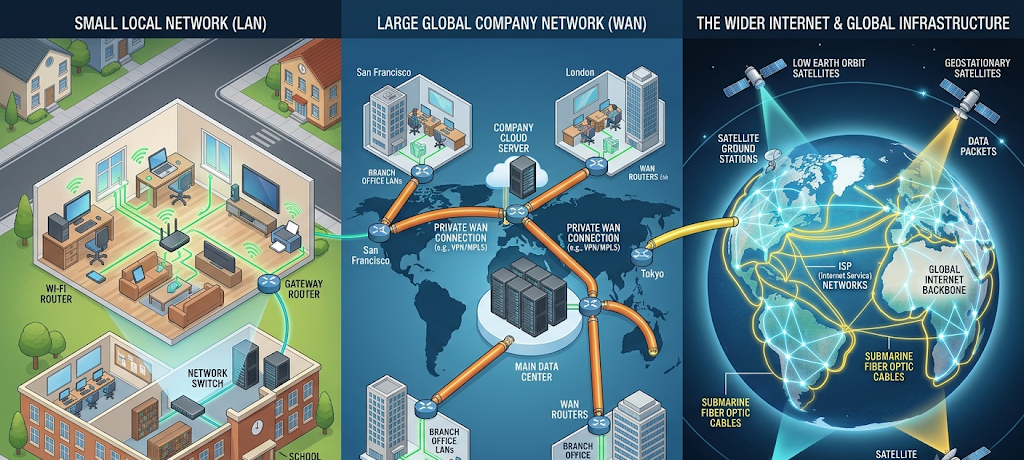
A LAN, or Local Area Network, is a network of devices that are located within a small area. LAN are typically found in small businesses, computer labs, schools, and homes. The goal of a LAN is to enable those devices that are connected to share information, resources and the Internet.
In a home LAN, a number of gadgets, including gaming consoles, smart TVs, laptops and smartphones, can share the same router. These devices can talk to each other and have access to common services. A LAN can be used in a school computer lab to share printers, educational software and Internet access among several computers.
LANs typically are characterized as high speed, high reliability, since devices are near to each other. They can connect via wired (e.g. Ethernet wire) or wireless (WiFi) links. Good LANs can facilitate communication and resource sharing within an organization, enhancing productivity.
WAN: Wide Area Networks – Large Distance Networks
A Wide Area Network (WAN) is a network that spans a large area. WANs can be used to link devices and networks between cities, across countries and continents and are different from LANs which serve smaller areas. The internet is the greatest example of a WAN since it connects millions of smaller networks around the world.
WANs are typically used to link offices at various sites. For instance, a company with several branches across countries can use a WAN to enable its employees to access shared communication tools, databases, and systems. With WAN technology, organizations can manage their business across the globe, still keeping their digital connections in place.
WANs are usually connected using telecommunications systems, fiber-optic cables, satellites, and other technologies due to the distance they span. WAN connections can be more complicated to manage than LAN connections, due to the distance, security and speed of the connection.
VPNs: Making Safe and Secure Internet Connections
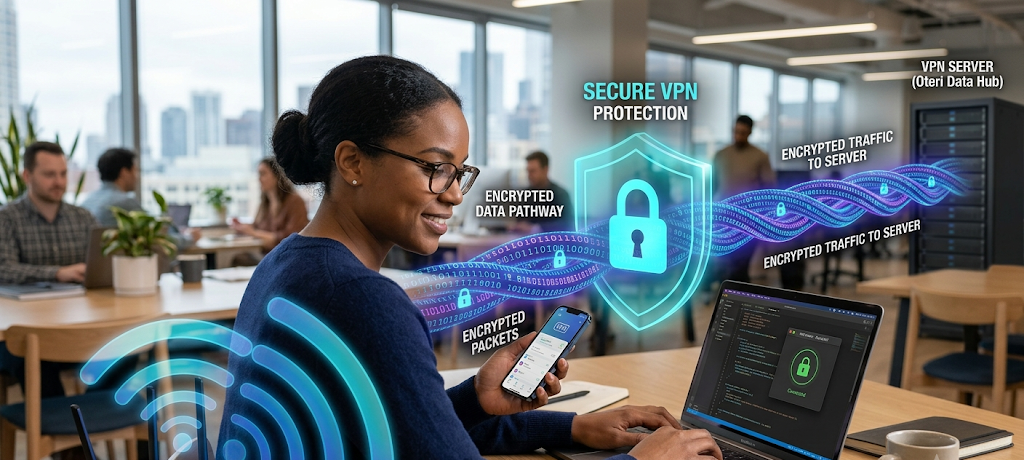
Using On-line Interactions Safeguards VPNs.VPNs: Making Safe and secure Internet Connections. A Virtual Private Network (VPN) is a technology which makes a safe and secure connection between the user’s device and network via the online market. VPNs are typically utilized to enhance personal privacy, secure delicate data, and also access private networks.
When someone connects to a VPN, their internet activity is encrypted and data is encrypted into a secure format which is less approachable for unauthorized access. This is particularly beneficial in public Wi-Fi networks where the security risks might be greater, like in airports, hotels or cafes.
VPNs are also used by businesses to enable their employees to securely connect to the company’s systems from offsite locations. For instance, if a user is working remotely, they can access files and applications stored on the private network of the organization without compromising security by using a VPN.
Wireless Networking: Connecting Without Cables
Wireless networking is a method of communicating between devices without cables. Wireless networks use radio signals for the transfer of information between devices, rather than wires. The most widely used example of wireless networking is Wi-Fi, which is found in a variety of environments such as offices, schools, homes, and public areas.
Wireless networking offers convenience and flexibility as users will be able to link to devices from various locations without having to install cable links in every location. Wireless technology is crucial for smart phones, laptops, tablets and smart home gadgets to connect to a network and communicate with one another.
Wireless networks, however, must be secured, since the signals are broadcast in the air and can be picked up by anyone, for that matter. Wireless connections are protected from security threats by strong passwords, encryption and updated network equipment.
Importance of Computer Networking
Computer networking is important because it provides a variety of benefits. The modern digital communication relies on computer networking. Networks are transferring information behind the scenes, each time that people send emails, use websites, online apps, or go to social media. The basic concepts of networking allow people to make informed decisions about technology and to prepare for advanced aspects of computing.
Learning about IP addresses, routers, switches, DNS, LAN, WAN, VPNs, and wireless networking provides beginners with a clear picture of how devices communicate. While these concepts are technical, they are grounded in simple concepts, such as the identification of devices, the connection of systems, the direction of information, and the protection of information.
Networking abilities will be in higher demand as technology continues to expand. Knowing how to use a network is not only helpful to the cybersecurity professional or software developer, but also a valuable knowledge for all users of technology to use the Internet safely and efficiently.
Conclusion: Building the Foundation in Networking
Computer networking is the “invisible system” which links people, devices, and information worldwide. While networks may seem complicated, their underlying goal is straightforward – to facilitate effective and secure communication between devices. IP addresses are used to identify devices, routers route information, switches establish network connections between local devices, DNS enables easier access to websites, LANs and WANs link networks, VPNs secure data transmissions and wireless technologies allow for more flexible connections.
These basic ideas will provide a foundation for those new to technology. In an age of increasing technological systems, networking knowledge will continue to be an essential ability for anyone interested in computers, the internet and the future of communication.



I appreciate that the article focused on practical takeaways instead of unnecessary information.
I found this post insightful and easy to understand.
I found the content useful and easy to follow.
The discussion shared practical information I can use while browsing online and I look forward to reading more from you