
Introduction
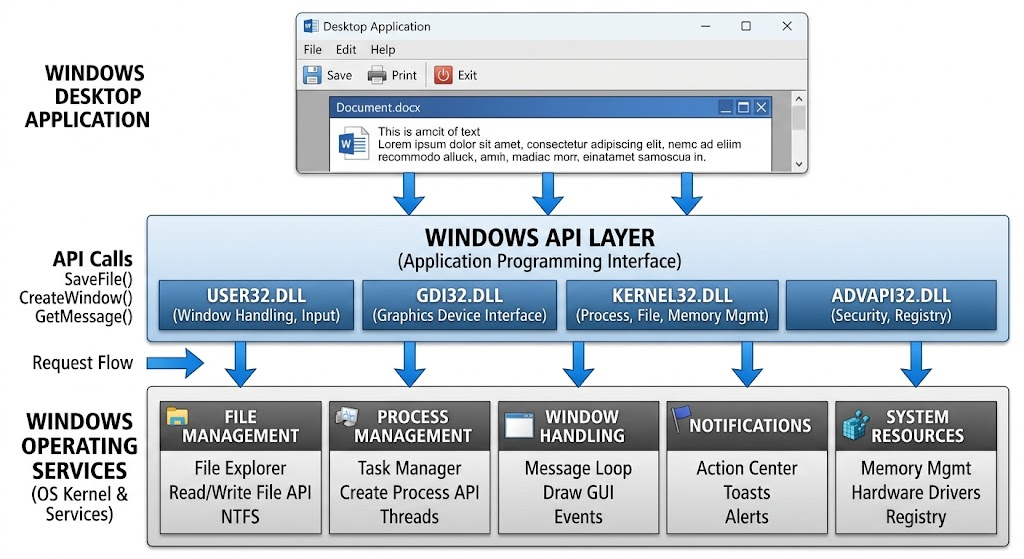
The buttons, menus, and text on a screen are not all that windows do. They communicate with the operating system for opening files, process management, input from the keyboard, output to notify, device communication and resource allocation. Such operations rely on interfaces that enable software to call Windows for services without having to code for each of the operating system’s functions. These interfaces can be found in the Windows Application Programming Interface (API) which allows developers to create applications to interact directly with supported Windows features. Knowing Windows API programming is especially helpful to programmers who seek to go beyond simple GUI programming and gain insight into how desktop applications operate inside. Developers can leverage Windows APIs to access the operating system’s capabilities in a controlled and structured manner when building various kinds of software, such as a file manager, a system monitoring tool, a desktop productivity application, or a native Windows application.
What Is Windows API?
A set of programming interfaces, functions, data types, constants, and system conventions available to applications for accessing services in the Windows operating system. It enables programs to call for special actions, like opening a file, starting a process, or showing a dialog box. The API allows the separation of the details of Windows from the developers so that they just have to understand the interfaces that are documented by the API that are available for them to use to request the services. Requests are passed to Windows which checks the necessary conditions/permissions and returns the results that the application can use. These interfaces are used by many of the traditional desktop applications, such as those written in C and C++. Other languages can be used to create Windows applications, and are also supported by the Windows API via interoperability. Understanding these interfaces allows developers to have a better understanding of the relationship between application code, operating system services, and computer hardware.
Win32 API is commonly used to refer to the relatively older Windows programming interface, although its range of application varies from 32-bit to 64-bit, depending on the specific API and platform. The list of available functions is available in the Win32 APIs reference, which groups documentation by UI, files, networking, security, diagnostics, graphics, and system services. This organisation facilitates the selection of the right interface for the specific programming task rather than having to sift through unrelated functions. For instance, if a developer is creating a file utility, he or she can explore the functions of file management, or if a developer is creating a desktop application, he or she can explore the functions of windows creation and message handling. These are the categories that will help you get a start in learning the Windows API and select appropriate interfaces for real-world projects.
Using Windows Applications to Communicate with the Operating System
An application invokes an OS service in the form of an API function, using the appropriate interface provided by Windows. Parameters describe the operation to be performed and may return a value to denote success, failure or other result. Windows then executes the operation based on the way it is implemented and the rights an application has to access it and the state of the system. Some of the API functions will complete their operation instantly while others will trigger operations that are performed later or that return results through messages, callbacks or other means. An application could ask Windows to draw a window and then get messages from Windows when the user interacts with the window, for example. Likewise, a file operation may return a handle that the application uses in future to read and/or write. This interaction model enables software to access the functionality of an operating system without having to re-implement that functionality itself.
Applications are not automatically given access to all of the system resources. To safeguard users and system stability, Windows uses security boundaries, permissions, process isolation and other rules of the operating system. A program may ask to access a file or process but Windows might refuse if the program does not have the rights. Some operations also have specific privileges or have restrictions on execution environments. Because of this, it is not always possible to call an API function and have it return a successful result. The developer should be aware of the purpose of each function, input parameters should be given, the return value should be checked and failures should be handled. They’re quite important to a reliable Windows development, as they eliminate incorrect assumptions about the operating system and enable applications to act correctly if resources are not available or access is denied.
Essential Windows API Concepts
There are some concepts that are used throughout Windows API programming and by knowing them it is easier to read and maintain the native code. Functions are operations that an application can request, while constants and flags are options that will affect the operations. Data types are the information sent to and from the API, including numbers, strings, structures, and identifiers sent to and from the application. Handles are another concept of importance: they are values that Windows uses to represent or refer to a resource like a window, a process or a file.
A handle can be a reference to a resource, which can then be passed to the appropriate API functions. In addition, developers need to be familiar with function return codes, calling conventions, header files, and libraries since they affect the declaration and access to native interfaces. These ideas are the basis for writing applications that interact with Windows in a consistent and safe manner.
Working with Files and Directories
Accessing files is one of the most common uses of operating system APIs. Applications might require to create documents, read configuration files, save user preferences, check the contents of a directory, or control file properties. Windows offers several built-in file functions such as CreateFile, ReadFile, WriteFile, and CloseHandle for operations where control over file access is needed. CreateFile will open an existing file or create a new one, depending on the parameters. A valid handle can then be used to do supported operations and eventually be released once the application is no longer using it.
Access modes, sharing options, and creation dispositions should be indicated by the developer to show how the file is opened and if other processes can access it at the same time. Simple file operations at the application level can be achieved more easily with the help of standard C++ streams and the filesystem utilities, and when one wants to use certain Windows features the native functions can be more convenient.
Creating Windows and Handling User Input
A graphical Windows application has to present info to the user and at the same time react to what the user does. The Windows API gives functions for classing windows, creating them, putting up controls, and in charge of the interaction between apps and the desktop environment. A window is represented by a handle which is usually used the HWND type that identifies the window when you call related API functions. Also apps use a message based programming model to react to events like key input, mouse movement, window resize, and requests to close the app.
Windows puts messages into the right queues and applications get to them via a message loop. A window procedure deals with the messages sent to a certain window and it is up to the application what to do. This method allows the OS and the application to coordinate user input without the program having to check for each and every event.
Managing Processes, Notifications, and System Resources
Windows apps at times require info of other processes which includes their kids, what they are doing, and how they use resources. The OS puts out process related APIs which in turn support management and monitoring which of course is subject to access permissions. For instance a diagnostic tool may look into process info to determine why an app is using large amounts of memory or is slow to respond. Also we see notifications which are very important as apps may want to inform the user of a task’s completion, a warning, or a big event.
By app and notification type developers may use message boxes, app notification features, or Windows supported notification interfaces. As for resource management we must pay attention to memory allocation, threads, sync objects, and handles. Also these resources must be freed when they are no longer needed and shared data must be protected from unsafe concurrent access. Good resource management improves reliability and also helps to avoid issues like leaks and deadlocks which in turn improve app performance.
Building a Simple Native Windows App in C++
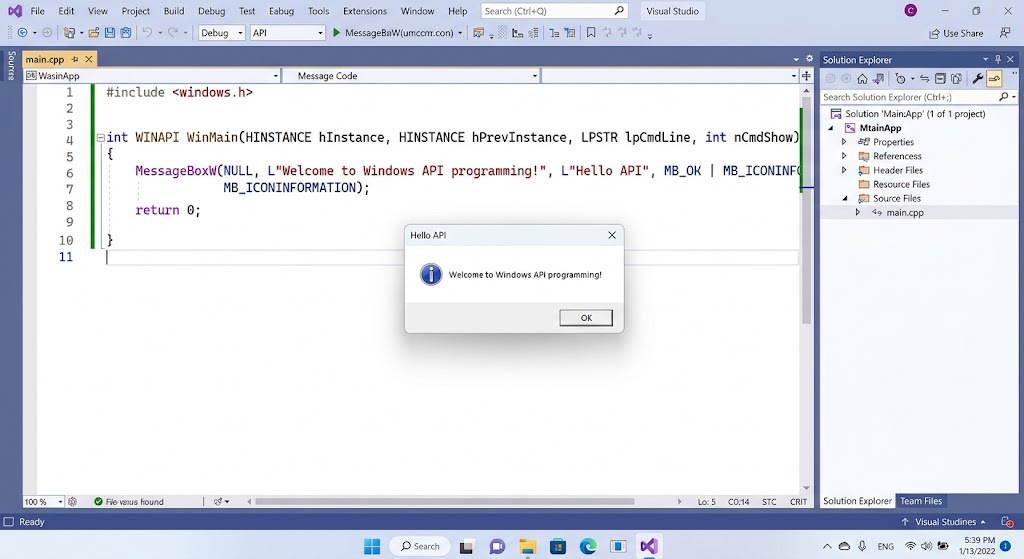
A developer uses a documented OS function which they pass in the required parameters to and gets a result which the application may use.
#include <windows.h>
int WINAPI wWinMain(
HINSTANCE hInstance,
HINSTANCE hPrevInstance,
PWSTR pCmdLine,
int nCmdShow)
{
int result = MessageBoxW(
nullptr,
L”Welcome to Windows API programming!”,
L”My First Windows Program”,
MB_OK | MB_ICONINFORMATION
);
return result == 0 ? 1 : 0;
}
Understanding the Example
The include file for Windows provides for many Windows API functions, types and declarations. In a standard Windows GUI application the wWinMain function serves as a Unicode input point, as may be with a traditional Windows implementation. Also included is the MessageBoxW call, a Windows request to present a message box on screen with the provided text and title. The first argument of this nullptr is the report that the message box did not have a specified parent.
It also includes flags to provide an OK button and an info icon as the final arguments. The method also returns the value of the user’s response or 0 if the process fails. In our example we test this output and use it to set the exit code of the program. In order to create the program you can create a new Windows desktop application in Visual Studio, choose the proper Windows subsystem settings and then build. In very few lines of pure C++ this small program does present how you may implement basic Windows features.
Grasping Win32 APIs, C++ and Managed Languages
Win32 APIs and C++ have different roles although they are very much used in the same breath. The Windows API which presents the OS interfaces, while C++ is a language in which developers write to those interfaces and put in their application logic. A developer may use C++ standard library for data structures and algorithms at the same time which they call Windows functions to put up windows, do native file work, or manage processes. This mix provides great flexibility but also requires in depth knowledge of native data types, handles, resource lifetimes, and error reporting practices. Other languages do this also. In the case of C# For example they have .NET libraries for common app tasks and via Platform Invoke, also known as P/Invoke they access selected native functions. Which native or managed approach to take in the development of an application depends on what the app needs to do, the structure of the present architecture, the teams’ background and the level of OS access required.
Managed languages present runtime services which in turn simplify memory management, application development, and exception handling. In C# Windows Forms and Windows Presentation Foundation present well trodden options for desktop interface development and also .NET libraries which support common file, network, and collection operations. When an application requires a native function which is not easily made available by its managed libraries P/Invoke may put forward a solution in the form of a bridge to a proper native DLL function. But of course interop brings in other issues like native data types’ match up to managed types, correct declaration of character encoding, passing of native handles, and making sure memory is valid throughout the required time. Also it is worthwhile for developers to look at what .NET or Windows Runtime interfaces are available which may have the needed function. At a high level these interfaces will reduce complexity and when at all possible should be used but at the same time certain carefully chosen native calls can bring in the required functionality the application needs.
Finding and Understanding API Documentation
In the development of software which interfaces with Windows APIs very thorough documentation is a must. Microsoft’s Windows dev documentation is in depth and includes parameters, return values, supported OS versions, used header files and libraries and also has coding examples. When working with a new function out of the blue developers need to look at the function’s signature and what each input param does and then see the notes on what environment that function works in.
Also docs may put forward other similar functions which may be a better fit. For instance if you are working with files look at what all is available for file operations and if you are developing a GUI look at the window creation and message handling. Also the official Windows API index is a great place to start looking into these. By reading up on what you are going to do before you do it you can avoid bad function declarations, wrong assumptions and at large run time errors.
Error Handling and Debugging
In a reliable Windows application which is to say that it must deal with failures instead of assuming that every API call will go through. That which reports errors may be that the file does not exist, the resource can’t be accessed, out of memory issue, or that the supplied params are invalid. What the proper error handling is going to be in each case depends on the function at hand. Some functions report back with a True/False, some will return handles that must be checked against what we have documented as failure values, and still others will use special return codes. For many Win32 functions which doc notes that the function sets the thread’s last error value we have at our disposal the service of GetLastError which reports out that info.
We as developers must get that info right after we detect a failure which is before some other operation comes along and changes it out from under us. Also for this we have debugging tools, diagnostic logging, and targeted tests which will in turn help us zero in on the root cause. As for the error messages they should tell the full story clearly, in internal logs we want to put in enough detail to support that troubleshooting but at the same time not to include any sensitive info.
Permissions and Application Security
Windows security sets what actions an application may perform and which resources it may access. Files, processes, services and other system elements may have permissions which play to — of particular actions being performed only by authorized users or apps. We recommend that developers ask for only the access that is required for the task at hand instead of going ahead and asking for the broadest possible permissions. Also applications should check user input, carefully review file paths, and avoid to the great extent which they can to not trust data from external sources.
What requires admin privileges should be put off to when truly necessary. To run an entire app with admin privileges is to increase the impact of any defects or vulnerabilities present in the software. Thus developers should study access control systems, user account permissions and the principle of least privilege. Secure API use is a complex issue which goes beyond just calling the right function; also into the design of the application which leaves OS resources protected.
Compatibility Across Windows Versions and Architectures
Windows apps may run on a variety of OS versions, hardware platforms, and configurations. Thus it is up to the developer which APIs they use to be sure that they are supported by the target systems. Also some functions may only be present in certain Windows releases and also may work differently based on system config or environment of execution. Also application architecture plays a role as 32 bit and 64 bit processes may have different pointer sizes, structure layouts, and interop requirements.
Code which assumes that all pointers are of the same size may break if recompiled for a different architecture. We recommend that developers use the appropriate Windows data types, go by the defined structure of things, and stay away from the inner workings of the OS which may change. Also before release we recommend testing on supported configs to identify any compatibility issues. If an app requires an optional feature which may not be present the developer should check for that feature’s presence and provide a different option when it isn’t.
Best Practices for Windows API Programming
In the field of Windows API development success comes from the right use of functions and adoption of sound software engineering practices. We recommend that developers start with a simple well defined task, use the primary documentation resources, and put together a base example which is very basic in feature before adding in more complexity. At the point of each API call it is important that developers use proper parameters, check the documented return values, and properly deal with errors. Also resources like file handles and synchronization objects must be released as the documentation states, that includes during error conditions.
Also it is best that applications not block the GUI with long running tasks and in multi threaded code use the right synchronization for access to shared resources. Security should be a key focus throughout the development process especially when dealing with files, other processes, or privileged actions. Also it is a good idea to test the application on the supported Windows versions and architectures. By following these we see that which we produce is easier to maintain, more error resistant, and better prepared for the real world.
Conclusion
Windows API programming provides a practical approach for developers in which they see how desktop software talks to the OS. Via documented interfaces apps are able to create windows, process user input, manage files, look at what processes are running, present notifications, and use other available system features. C++ is still a good choice for native Windows dev, but managed languages like C# also you get high level libraries in combination with native interop when you need it. As for language choice in whichever you pick, what you will do is study up on function parameters, handles, permissions, error handling, and what is required for compatibility to put out reliable software.
The best way to develop those skills is to start out with simple programs, check out the official docs, and then step into more complex OS features as you go. With consistent practice programmers are able to go beyond basic app interfaces and build out Windows software that has control, efficiency, and security in its interaction with system services.