AI is transforming the way developers build Windows desktop applications, enabling software to understand documents, summarize content, process images, and intelligently retrieve relevant information. In the past, numerous applications relied on sending data to remote servers, receiving an answer, and requiring a solid Internet connection to operate most of its features related to artificial intelligence. Developers can now deploy appropriate AI models on Windows machines, enabling many applications to operate locally, minimizing reliance on networks. Microsoft offers a number of tools that can help with this, such as Foundry Local, Windows AI APIs, and Windows ML. They come in various forms to cater to various development requirements, including tools that enable you to embed ready-made AI features into current desktop applications or tools designed to enable you to deploy customized machine learning models. Gaining insight into their functionality allows developers to choose suitable models, handle hardware constraints, safeguard user data, and create applications that stay relevant with advancing AI technology.
This unit helps users gain insight into local AI models in Windows applications.This unit enables users to learn about local AI models in Windows applications.
Local AI Models in Windows Applications
Local AI models are machine learning models capable of running on the user’s local device rather than on an external server. These models can be deployed into a Windows desktop application, where they can analyze text, recognize information in an image, generate responses, and other tasks supported by the model can be processed with the available processing resources of the computer. The inference can be performed using a central processing unit (CPU), graphics processing unit (GPU), or neural processing unit (NPU), depending on the model and runtime. This is a good way to use it for situations where personal documents, business records, offline workflows or information that users would like to have on their devices is being used. However, application developers need to be aware that it does not mean that an application developed locally is always secure, or that it will produce accurate results. There are still file permissions, secure storage, adequate error-handling, and careful testing to be dealt with in the applications. Microsoft’s developer documentation for Windows AI offers a glimpse into the available technologies and how developers can incorporate AI features into Windows applications.
Local AI is particularly useful for applications that don’t need to constantly reach out to external services and must run quickly. Try a desktop research solution that summarizes reports, extracts text from scanned documents, and enables the user to find information in a set of documents. However, having suitable models locally run can mean these operations can proceed without an internet connection once the models and application resources have been installed. It can also decrease the quantity of information flow outside of the computer, an important factor when dealing with confidential information. But developers have to take into account the size of the model, the amount of available memory, processor speed and the complexity of the task requested. The small language model might perform well with concise documents or small knowledge bases, but it may not be capable of handling extensive text or complex arguments. Because of this, developers need to choose models based on what is required to run the application as opposed to the largest the model can be.

Core AI Features for Windows Desktop Applications
1. Text Summarization and Document Analysis
Text summarization is a technology that enables desktop applications to convert a lengthy piece of text into a concise summary that captures the key information. For instance, a research application might be used to summarize a report, a productivity app to condense notes from a meeting, or a document manager to create previews of long documents. If a cloud service is required, then the local language model can also be used to accomplish these tasks, as long as the selected model can perform the required function. Document Analysis enhances this capability by enabling applications to locate significant portions within a document, to deconstruct its content into points and/or to answer questions within provided documents or to structure the content into some logical form. Developers should pay attention to documents when they are run through a processor, since large documents can be processed beyond a model’s context window, or scanned PDFs can be processed into searchable text with optical character recognition. If documents are segmented into smaller elements and answers generated and then checked against the original document for reliability, this should be done. Summaries should also be formulated as interpretations generated by the AI, not as a promise of a substitute for reading significant original documents.
With the support of available language models, Microsoft’s Windows AI APIs provide language-processing functionality for supported Windows configurations, such as summarization and text generation. These capabilities are covered in the Windows AI APIs documentation, which includes details about the capabilities and the types of hardware that are supported, as well as information about available development resources. Foundry Local is another possibility that allows the applications to be executed using supported open source language models on the computer. It is based on the requirement of the application to have the ready-to-use functionality from Microsoft or flexibility in selecting models. Developers need to separate out between what they can extract from a document and what they can make new conclusions from it when creating features for document analysis. It is often possible to verify the extraction from discernible source passages, but statements in generated explanations may be unsupported. A reliable application will keep document references and show when information is not available and prompt the user to check key information against the original.
2. Image Processing and Optical Character Recognition
The AI-based image processing allows Windows applications to analyze and manipulate images, rather than just show them. Based on the models and APIs available, developers may employ features including image description, object identification, image enhancement, segmentation and object removal. These features can be used to enhance photo-management software, accessibility applications, creative applications, and enterprise computers that handle visual information. One such application is optical character recognition (OCR) which allows you to extract machine-readable characters from photos, scanned documents, and other images. After extracting the text, the app can then index it, provide a summary of it, or feed it into a language model for additional processing. Microsoft offers image-processing and text-recognition features via its Windows AI technologies, with some features requiring specific hardware, operating system, and availability. For this reason it is imperative that developers test the compatibility before selecting an implementation. Lighting conditions, image quality, resolution, text orientation and language support can all impact recognition accuracy, so it is important to test the application with realistic images rather than only ideal images.
Developers looking for experimentation before adopting an implementation can find out about available AI capabilities and development patterns in Microsoft’s AI Dev Gallery and Windows AI samples. Developers will find these resources useful to learn how to incorporate their supported features for images and language into their applications. A realistic example of the image processing pipeline could start with a user loading a user photograph of a printed document. The application will firstly determine the type and size of the file, then use OCR to process the content and provide the readable text, and optionally send the content to a local language model for summarization. For images that include a chart, diagram or complicated layout, the developer might require more processing time because standard OCR is unable to recognize the relationships between the visual elements. Applications should also include previews, be able to save original files in edited images and be able to convey failure to process. Using image recognition and language processing together, developers can develop some useful workflows that don’t rely on having to use a separate cloud-based AI service for each operation.
3. Intelligent Search and Information Retrieval
Typical desktop searching works on either the file names, keywords, metadata, or the exact matching of text. These techniques can still be helpful but can be ineffective when users explain the information in their own manner and not exactly as it is presented in the document. Meaning and context and relationships between queries and content in the store can enhance retrieval through intelligent search. A popular approach is semantic search, which involves encoding the text as vectors called embeddings. These representations are used in documents and search queries to facilitate an identification of the content in a document that is conceptually related to the query, although they might be expressed in different terms. For instance, if a user searches for information on how to save on electricity bills, a desktop knowledge manager might be able to pull up a report suggesting how to cut energy use. Developers can combine it with traditional keyword retrieval to enhance results and maintain exact match for names, dates, identifiers and other exact information. The quality of search remains contingent on the preparation of the documents, the choice of model, type of indexing, and the comparison of the resulting results with actual queries from the user.
Intelligent search can be used in a retrieval-augmented generation (RAG) workflow, when paired with a language model. The application first goes through a local document collection and extracts relevant parts of the document and gives these parts to a model as supporting context. The model then produces an answer by referencing the information retrieved rather than completely relying on what was learnt during the training process. This design may be useful for users to ask questions to their own documents and it will make it easier to show supporting references. Retrieval, however, does not prevent hallucinations and a model may interpret evidence in ways that go beyond what the documents indicate. Developers need to provide relevant source passages, respond to questions for which no relevant passages are found, and differentiate between retrieved facts and generated explanations. Local indexing and local inference can cut down on unnecessary data exposures for applications that store sensitive data, but this method also requires the developer to secure the index and its representations. The best way to achieve good retrieval quality, source transparency and answer generation is to plan them as interconnected components of one system, which is the intelligent search system.
Comparing Local AI Models with Cloud-Based AI Services
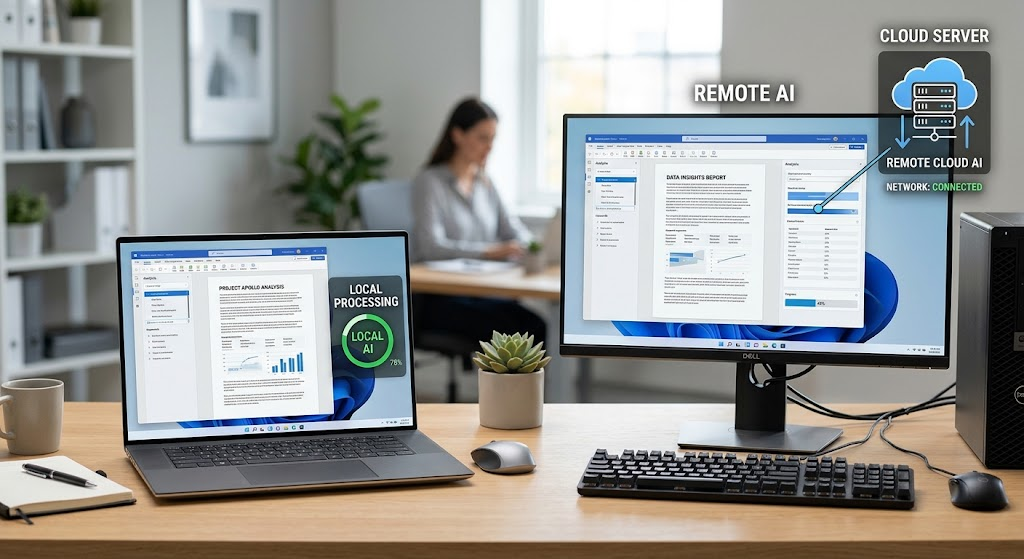
Finally, deciding on a local model versus a cloud service is one of the most crucial choices in designing an AI driven application for Windows. Local inference makes calls to the user’s computer to retrieve results from the inference, while cloud inference sends some data to a remote service whose responsibility it is to do the requested computation and return the result. Both of them are not necessarily better. Local models can have better privacy, offline support, and a lower inference cost, and cloud can have larger models, centralized management, and features that are not easily run on normal computers. A developer will need to consider the number of tasks involved, the sensitivity of the data that the user is likely to be using, the hardware used by the user and how well it will perform each feature. Some applications can take advantage of both methods, where mundane, relatively simple requests are handled locally and when they are more complex, there is an option to handle them in the cloud. Microsoft’s guide to selecting a Windows AI solution describes the distinction between the cloud-based and the Windows AI APIs and Foundry Local and Windows AI.
| Consideration | Local AI Models | Cloud-Based AI Services |
| Privacy | Inference can be performed on the device while keeping the data on the device. | Data is sent to the remote service for processing. |
| Internet access | After setting up and installing the model, inference can be performed offline. | Typically needs access to the internet. |
| Latency | Does not send messages across the network and performance will depend on the local hardware. | Depends on network conditions, load on the server and response time of the service. |
| Hardware | Needs adequate local memory and processing power. | Most demanding model computation is on remote infrastructure. |
| Operating costs | No cloud inference charge, but it still costs money for hardware, distribution, storage, and support. | May include usage based charges, subscriptions and network costs. |
| Model capabilities | Limited by the chosen model and resources. | Can offer larger and more powerful hosted models. |
| Maintenance | Developers are responsible for controlling local performance, model versions, and compatibility. | Underlying inference infrastructure is managed by providers. |
| Scalability | Performance can change depending upon the number and capabilities of the users’ device. | Service capacities of the server can be scaled based on the provider’s service. |
- Hardware Requirements and Performance
Local models have different hardware requirements, and developers should not presuppose that all Windows computers can support all AI features. While smaller models and lighter image-processing systems can be applied to the standard computer, larger language models may need massive memory and faster computers. Memory can be reduced and inference could be faster, depending on the output quality, by quantizing the numerical precision used for representing model parameters. GPUs are able to process workloads that take advantage of parallel processing, and the NPUs are capable of efficiently performing certain AI tasks.
Microsoft’s Windows AI APIs are managed features that function on compatible devices, depending on the feature. There are other ways to run models locally, such as Foundry Local and Windows ML, that run with a variety of Windows hardware setups. Beginner programmers should test their application on typical machines for start-up time, memory, processor and battery life. A smooth running application on a powerful development machine may have poor performance on a lesser specification laptop and so compatibility testing and realistic performance testing should be part of the development process.
- Privacy, Security, and Data Protection
Local inference is also important because developers can be concerned about privacy if their applications handle sensitive data, such as financial data, business documents, personal notes, and more. An application that processes data locally without sending it to a remote service can minimize exposure from sending prompts and documents to a remote service. However, the local processing does not guarantee that an application is secure. Even if these issues are solved, files can still be accessed if the permissions are set incorrectly, logs are written insecurely, the device has unprotected caches, or malicious software has been installed on the device.
Developers should ensure that there is limited storage of data, secure sensitive files, clearly explain how AI tools are using the information, and refrain from storing more information than needed. Cloud-based services must be treated with extra care in terms of data transfer, retention policies of providers, access control, contractual issues, and relevant privacy laws. If a hybrid design is adopted, the application must make it clear to the user when information is being sent to a third party and seek consent as appropriate. Microsoft’s principles on responsible AI for Windows applications are a good initial reference to assess safety, transparency and responsible implementation.
- Latency and Operating Costs
The time between submitting a request and getting a result is called latency. Local models eliminate the need to communicate with a remote inference server and this may make them appealing for interactive applications requiring rapid response. But a local inference isn’t always quicker than a cloud inference. A difficult model that is running on a limited hardware configuration might take longer to respond than a powerful cloud hosted model, and the first time it is called the local model may need to be initialized or download resources that are needed to run the model.
Cloud services can have network latency and may also have request quotas or service disruptions. The expenses are similar in the sense that they vary. While local inference is not costly, there are some factors to consider, such as model distribution, disk space, application support, hardware compatibility, and testing. While cloud services can make deployment easier, they can also add costs to the ongoing use of the service that can rise with each user and request. A sensible evaluation takes into account real response times and estimates total ownership costs, not just processor specs or model costs.
Microsoft Technologies and Development Tools
- Windows AI APIs
Windows AI APIs give developers access to supported AI capabilities via Windows development interfaces, so that developers can incorporate features without having to individually select and manage all the underlying models. Some capabilities supported include language processing, text recognition and image-related capabilities, and depending on the API and device. These APIs are helpful when your application requires some of the built-in capabilities of the platform and you’d like Windows to handle more of the AI infrastructure. The biggest drawback is that not all features are supported by all Windows PCs.
Some APIs require Copilot+ PC hardware and others require additional configurations. At runtime, feature detection should be done and if a feature is not available for a user, an alternative should be offered. Microsoft’s Windows AI API overview and getting started guide details how to set up and provides links to specific tutorials. Developers should be sure to check the supported Windows version, the Windows App SDK requirements, model availability, and distribution conditions for the Windows version(s) that a specific API supports before incorporating that API into an app.
- Foundry Local
Foundry Local lets developers deploy supported open source language and speech models directly on the Windows platform. It can be useful when there is a need to select a model for an application that isn’t offered by a platform API, or when the target computers are compatible with only a certain Windows AI API. Foundry Local provides an interface which is compatible with OpenAI, which means that developers can use familiar request patterns with supported clients, but send the inference call to a local service instead.
This can decrease the code to be modified when trying different compatible models. The developers must take into account model downloads, hardware performance, licensing and API stability. They should also be able to tell the difference between local inference and the activity of the network to retrieve models or update catalog information. For setting up a development project, and to explore local model integration, refer to the getting started guide for Microsoft’s Foundry Local.
- Windows ML and ONNX Runtime
For developers who want to deploy their own machine learning models, or who are interested in controlling a larger portion of the inference process, Windows ML is the way to go. It provides infrastructure to run compatible models with ONNX Runtime and can utilize supported CPU, GPU, and NPU hardware via execution providers. The Open Neural Network Exchange (ONNX) model format is a useful tool for sharing trained machine learning models among tools and deployment environments. The developers can train or use a supported framework to get a model, then convert a model to ONNX if that is required, and use it in a Windows application.
This is suitable for special applications like classification, image analysis, and custom prediction workflows. It is more work than a ready-made API, though, in terms of responsibility for model selection, pre-processing, testing performance, and understanding the output. The Windows ML documentation covers the framework, the way it uses hardware to accelerate AI, and its place in the Windows AI ecosystem.
Development Environments and Programming Languages
Developers can integrate AI into Windows desktop software using familiar languages and application frameworks. C# WinUI 3 or Windows Presentation Foundation (WPF) is suitable for many modern desktop applications, while C++ may be appropriate when low-level system access or specialized performance requirements are important. Python is valuable for experimenting with models, evaluating data pipelines, and building prototypes before moving functionality into a production desktop application. Visual Studio provides tools for developing and debugging Windows applications, while Visual Studio Code can support lightweight development workflows and AI-related extensions.
Developers should also explore Microsoft’s AI Dev Gallery, which provides an interactive environment for trying supported Windows AI capabilities and examining sample implementations. Microsoft’s Windows AI samples and tutorials offer practical examples that can help developers understand how the different approaches fit together. Regardless of the chosen language, application architecture should separate user-interface code from model inference, document processing, and data storage to simplify testing and future updates.
Example Project: A Local AI Document Assistant
A practical way to understand these technologies is to build a Windows desktop application called Local AI Document Assistant. The application would allow users to import text-based documents, extract text from scanned pages, generate summaries, and search a personal document collection using natural-language queries. A C# applications built with WinUI 3 or WPF would provide the interface, while a local language model would handle summarization and question answering. OCR would extract text from supported scanned documents, and a local search index would help users locate relevant passages.
Foundry Local could supply the language model, Windows AI APIs could provide suitable platform capabilities on compatible devices, and Windows ML could support a custom ONNX model if the project required specialized inference. The initial version should focus on a small number of dependable features instead of attempting to implement every possible AI capability. Keeping each component separate would make it easier to replace a model, improve search quality, or add a cloud-based option later without rebuilding the entire application.
Project Architecture and Implementation Steps
Begin by creating a desktop project and designing a simple interface with document import, summary generation, search, and results panels. Add a document-processing component that validates supported file types, extracts text, and stores the extracted content alongside useful metadata such as filenames and page numbers. Next, integrate the chosen local inference option and create a summarization workflow that divides lengthy documents into manageable sections when necessary. Combine section summaries into a concise overview, but retain links or references to the original document so users can verify important statements. For intelligent search, begin with keyword indexing and then add semantic retrieval if the project requires meaning-based matching. When a user asks a question, retrieve relevant passages and provide those passages to the model as context. The application should return the answer with source references instead of presenting generated content as unquestionable fact. Finally, test the application with short and long documents, scanned images, missing models, unsupported hardware, malformed files, and requests that cannot be answered from the available material.
A simplified implementation workflow can be represented as follows:
- Import: Allow users to select supported documents and images.
- Extract: Read document text or use OCR for scanned pages.
- Prepare: Clean the extracted text and divide long documents into suitable sections.
- Index: Store searchable text, metadata, and optional semantic embeddings locally.
- Process: Send relevant text to a compatible local language model for summarization or question answering.
- Present: Display results with source references, processing indicators, and clear error messages.
- Evaluate: Measure response quality, speed, memory usage, and search accuracy on representative computers.
The most important implementation principle is to keep AI inference separate from the rest of the application. A dedicated service or interface can manage model initialization, input preparation, inference requests, cancellation, and error handling. The user interface should remain responsive while processing takes place, and lengthy operations should report progress where appropriate. The application should also check whether the selected model is installed and compatible before making requests, rather than assuming that every computer has identical capabilities. Where possible, developers should make the model configurable so that a future version can replace it without changing document storage or interface logic. This architecture improves maintainability and makes it easier to introduce additional capabilities, including image descriptions, alternative local models, or an optional cloud-based fallback.
Limitations and Best Practices for Local AI Development
Although local AI makes advanced functionality more accessible, developers must account for limitations in accuracy, context length, reasoning, and hardware compatibility. Small language models can generate incorrect statements, misunderstand ambiguous instructions, or overlook information in lengthy documents. Image recognition systems may also fail when images are blurry, text is poorly aligned, or the content differs from the data used during model development. These limitations should influence the application’s design. Developers should test models with representative data, measure performance against clearly defined requirements, and avoid presenting uncertain output as verified information. For document analysis, source references and evidence-based retrieval can help users check answers. For image processing, previews and reversible editing operations allow users to inspect results before accepting changes. Applications should also communicate when a feature is unavailable or when processing fails. A reliable AI feature is not simply one that produces impressive demonstrations; it is one that behaves predictably, handles errors gracefully, and makes its limitations understandable to users.
Responsible development also requires attention to model licensing, software updates, data handling, accessibility, and distribution. Developers should verify whether a model’s license permits their intended commercial or personal use and review any restrictions associated with redistribution. They should consider the size of model downloads, provide users with clear installation information, and avoid downloading large resources unexpectedly. Applications intended for a broad audience should offer graceful alternatives for computers that lack supported hardware. For instance, a desktop application could provide conventional keyword search when semantic search is unavailable, or allow users to choose a compatible cloud service when local inference is too demanding. Any cloud fallback should be transparent about what information leaves the device. Developers should also maintain tests that measure output quality and response time as models, drivers, operating systems, and development frameworks change. These practices help ensure that AI features remain useful, understandable, and maintainable beyond the initial release.
Conclusion
Building AI-powered Windows applications with local models allows developers to add useful intelligence to desktop software while improving offline availability and reducing dependence on remote inference services. Text summarization, document analysis, image processing, and intelligent search are practical starting points because they address familiar problems and can be combined into complete workflows. Microsoft’s Windows AI APIs, Foundry Local, and Windows ML provide different paths for integrating these capabilities, ranging from ready-made platform features to flexible local model deployment.
Choosing the right approach requires evaluating hardware requirements, privacy expectations, inference speed, total operating costs, and model limitations. For many projects, a hybrid architecture that supports local inference while offering an optional cloud alternative can provide a useful balance between privacy, performance, and capability. Ultimately, successful AI development depends less on choosing a fashionable model than on building a well-designed application, testing its outputs carefully, protecting user data, and making informed technical decisions as the Windows AI ecosystem continues to evolve.