Introduction: Understanding the Role of an Operating System
An operating system is a basic system software that every computing device, ranging from the mobile smartphone in hand to the super computer used in global financial networks, depends on. A computer without an operating system is simply a collection of electronic parts such as silicon microprocessors, memory chips, storage drives, and circuit boards that can’t run user instructions or control software applications. The operating system is the basic software structure that starts up the hardware routines, controls the physical resources and provides an environment in which application software programs can run reliably. It converts high-level human actions, like clicking on an icon, typing on a keyboard or tapping an electronic touch screen, into low level, binary language understood by physical transistors. The operating system’s purpose is to hide the complicating factors of electronic devices, so that software can be developed without having to write special routines for each specific model of processor and graphics card currently in use.
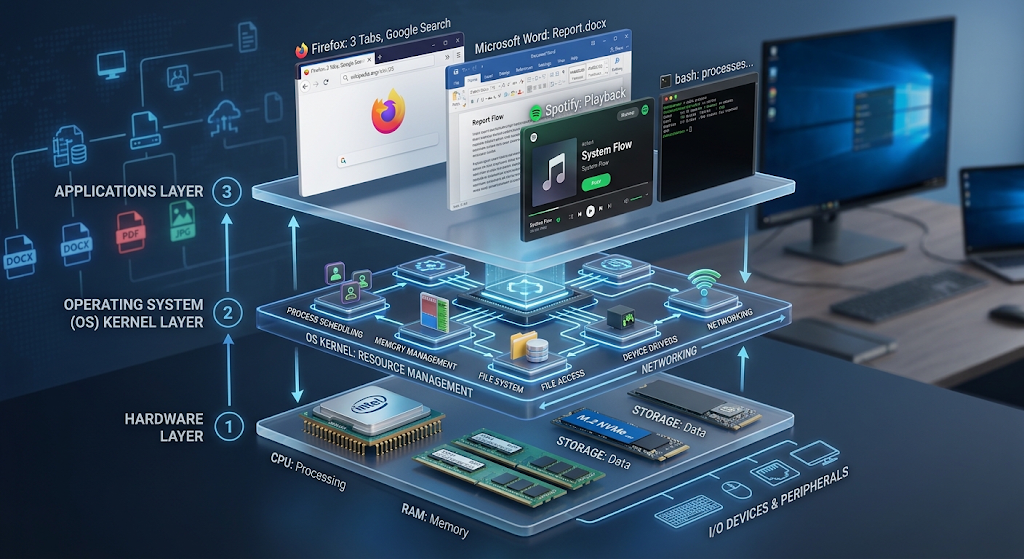
In order to understand the modern software to hardware device interaction, it’s necessary to analyze the OS at a structural level starting with its kernel. Upon booting, the system motherboard runs a simple firmware program (UEFI or BIOS) that performs some basic tests on the hardware before loading the operating system kernel into physical RAM. When running in memory, the kernel remains in operation until the device is turned off, and manages everything from the device’s memory regions to its access to central processing unit processing time, to its handling of system calls. The kernel is like a master controller that allows application programs to run in separate memory spaces, so if something goes wrong in one web browser tab, the entire computing environment won’t crash. By abstracting out the details of hardware and arbitrating the resources, the operating system translates all the noise of the electronics into a seamless, orderly, and interactive computing experience for the world.
The Architecture and Structure of Modern Operating Systems
The architecture of a modern operating system is built of conceptual layers, separating the user level applications from the lowest level system operations. The bottom layer is the physical computer hardware: CPU cores, system memory chips, storage media, and peripheral controllers. The kernel is located above the hardware, and runs in kernel mode, also referred to as supervisor mode, in the privileged state of the CPU. The operating system can control the hardware functions safely and has full access to registers and execution instructions in kernel mode. User space is the outer shell that surrounds the kernel, and it is an unprivileged execution environment that is used for standard applications, background services and user interfaces. Applications use a system call, or standard request, to access hardware resources such as input/output operations or accessing a file from a disk drive or sending data over a network adapter. This separation is strict to ensure that runaway software does not harm system files, corrupt memory space or threaten user security.
What Is an Operating System? Definition and Core Purpose
The term what is an operating system refers to the fundamental software layer that manages computer hardware resources and provides services that allow applications to operate effectively. An operating system acts as the communication bridge between users, software applications, and physical hardware components.
It controls system operations, manages available resources, and creates a stable environment where programs can execute without requiring users or developers to directly control complex hardware instructions.
Major Functions of an Operating System
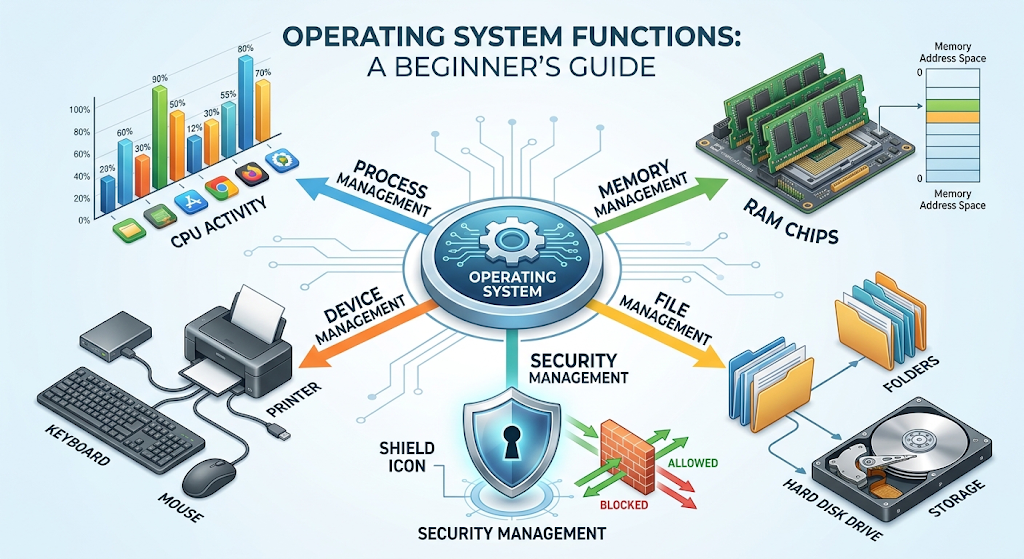
Operating Systems have five major functions. The five major functions of an Operating System are:
1. Process Management
Process management is one of the most important functions of an OS, deciding who gets CPU time when there are multiple processes running and background processes. A process is currently running a copy of a computer program, including the program code, memory allocated to it, open files, and system resources. Modern processors have a limited number of physical cores, and the operating system uses a complex CPU scheduling algorithm, like Round Robin, SJP and Multi-Level Queue scheduling, to quickly switch the execution thread between processors.
The process of context switching happens thousands of times every second, and users have the illusion that dozens of applications are running concurrently. In addition to scheduling execution time, the process manager is involved in process creation, process termination, communication between processes, and synchronization of threads between processes. It also avoids situations in which processes get stuck in a “deadlock” situation where each of two processes is waiting for resources which the other processes are holding, thus avoiding any danger of deadlock.
2. Memory Management (RAM Allocation and Virtual Memory)
Memory management: The process by which an operating system assigns and manages the actual RAM (Random Access Memory) among currently running software processes and the operating systems kernel. Each app will need its own memory allocation for execution variables, program code, dynamic libraries, and user data while it is running. The memory manager keeps track of each and every byte of physical RAM, continually identifying address ranges that are still free, that are being used, and what processes are using what address ranges.
Modern operating systems provide virtual memory features that make use of the existing RAM memory, dividing it into fixed-sized units called pages and mapping them to virtual memory address spaces. If physical RAM becomes full, the operating system dynamically moves memory pages that are not currently in use to a specific area of the secondary storage device, called a swap file or page file. It’s a high-level paging system that enables the execution of large programs that consume more memory than is available in a system, but doesn’t cause applications to replace one another’s private data buffers.
3. File System Management and Data Storage Control
File system management offers a systematic approach for organizing, storing, accessing and protecting digital files from non-volatile storage devices such as Solid-State Drive (SSD) and Hard Disk Drive (HDD). If a file system were not used, all binary data on disk drives would be stored as a random sequence of one million, one million, two million, two million, etc., bits, making the retrieval of information by applications inconvenient, if not impossible. The file management part of the operating system is responsible for managing the raw blocks of storage and making it into logical hierarchical structures that can be grouped into folders and directories with unique names, extensions, and metadata.
Popular file systems such as NTFS, APFS, ext4, and FAT32 on portable drives have a very detailed file allocation table that records the exact physical locations on the drive, when files were created, when they were modified, and who has permission to access them. In addition, file managers provide high-level data integrity capabilities, including journaling, which stores pending write operations in a transaction log and writes them to disk at the end of the transaction, thus avoiding corruption in event of a sudden power loss or system crash.
4. Device Management and I/O Handling
Device management controls how the operating system interacts with an extensive range of peripheral devices such as the keyboard, mouse, display monitor, graphics card, sound card, network interface adapter, USB storage device and more. Each hardware manufacturer will create electronic interfaces for hardware components to communicate with each other, and the operating system will create special software routines called device drivers to provide a consistent communications channel. A Hardware Abstraction Layer (HAL) is a layer in the device manager that takes standard application requests and converts them to electronic signals that are understandable to the device.
The operating system also performs Input/Output (I/O) buffering, caching and spooling to fine-tune performance variations between quicker microprocessors and slower peripheral equipment. For instance, when a user is typing a report in a word processor and a printer is taking too long to produce paper pages, the print spooling buffers store the data in memory or disk storage so that the user can keep working while the printer is printing.
5. Security and Protection, and User Interface Management
The dual lines of protection and interaction are security management and user interface provision of a modern OS. Security mechanisms ensure that system resources, user files and administrative controls are not accessed by unauthorized users, and not infected by malware, or are elevated by privilege escalation attacks. Access control lists, user login credentials, user profiles and application permissions are all controlled by the operating system using secure sandboarding techniques.
At the same time, the operating system oversees the user interface, which is the visual or textual interface between human users and the computational processes going on within the computer. The GUI subsystem is the one that will present him with interactive windows, icons, and menus, or the CLI will process text commands in a terminal window, and return visual feedback to the user as it goes. All these administrative frameworks work together to safeguard computing sessions in a secure, predictable and intuitive way.
Types of Operating Systems
There are several structural types of operating systems, depending on the architectures they run on, the hardware platforms they are designed for, and the environments they are meant for. Traditionally used in large enterprises for mainframe operating systems, batch operating systems are intended to run a series of similar computational jobs in a queue without user interaction. While early MS-DOS was a single-user single-task operating system (where a single user could run a single program at a time), modern single-user multi-tasking operating systems enable the desktop user to run dozens of software applications at once. Multi-user operating systems enable multiple users to log in to a central computing node simultaneously while keeping memory isolates and user sessions separate. Also, Real-Time Operating Systems (RTOS) have been designed for specific applications where computation responses must operate within fixed micro-second timing constraints, such as medical instrumentation, industrial robotics, automotive braking systems and avionics for aerospace applications, where a timing delay may be catastrophic for physical failures.
Major Operating Systems and Their Ecosystems
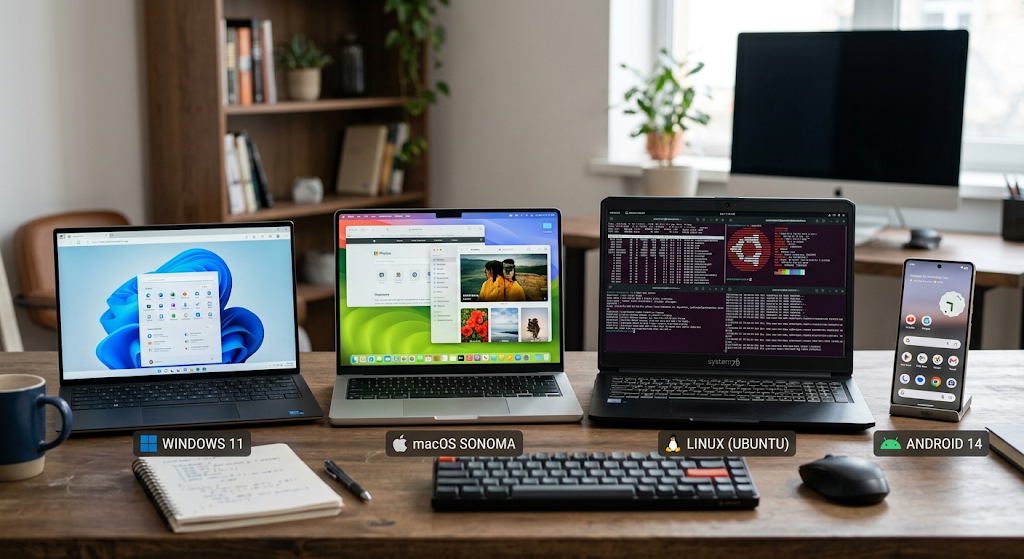
Microsoft Windows: The Versatility and the Dominance of the Enterprise
Microsoft Windows is the world’s most popular desktop operating system and runs hundreds of millions of personal computers, laptops, corporate workstations and enterprise servers worldwide. Modern versions of Windows (10 and 11) have been developed based on Windows NT’s kernel architecture and are known for their excellent backward compatibility, the wide range of software they support, and the variety of hardware devices that have device drivers.
Windows is a flexible operating system that works great in the office, for video editing, software development, and as a high-performance PC. Centralized management infrastructure such as Active Directory, extensive domain policies, and native security capabilities, such as Windows Defender and BitLocker drive encryption, further solidify its enterprise use. All these factors combine to make Windows a versatile platform, both in personal and business usage.
Android and Other Operating Systems: Integrated Hardware-Software Synergy
The mobile operating system is called iOS, while the desktop version is macOS; these represent a completely different ideology that emphasizes vertical integration, in which the same company is responsible for designing both hardware and software in the operating system. macOS is built on the Darwin Unix kernel foundation (XNU) to provide a very stable, secure and fast computing platform, highly preferred by creative professionals, software engineers and digital media producers.
Apple silicon microprocessors (e.g. the M-series chips) seamlessly integrate with macOS, enabling unmatched power efficiency, consistent memory architecture and fast graphics performance. In addition, Apple’s mobile operating system, iOS and iPadOS, focuses on tightly-controlled apps, required app store curation, robust end-to-end user privacy controls, and seamless cross-platform synchronization through iCloud, delivering a unified and seamless user experience across the various form factors of Apple devices.
Linux and Open-Source
The Linux operating system kernel was developed by Linus Torvalds in 1991, is open source, free and has become the backbone of digital infrastructure globally. Unlike commercial proprietary operating systems, Linux is provided with open source licensing, such as the GNU General Public License (GPL), which means that anyone can look at the source code, modify it, compile it, and share it. There are several customized versions (distros) of Linux operating systems that are tailored for various use cases, such as Ubuntu, Fedora, Debian, Red Hat Enterprise Linux, and Arch Linux.
In fact, Linux is driving virtually all of the top 500 supercomputers in the world, most of the Web servers that host public Web sites, public cloud computing infrastructure (like Amazon Web Services and Google’s cloud platform), container engines such as Docker and Kubernetes, and billions of embedded smart devices – and it has proven to be the most stable, secure, and scalable option available.
The Global Mobile Standard: Android
Android Is The Global Mobile Standard
Android was developed by Google and the Open Handset Alliance, and is the world’s most widely used mobile operating system that powers billions of active smartphones, tablets, smart TVs and wearable devices globally. Android is based on an adapted version of the Linux kernel, and adds Google Mobile Services (GMS) to create a versatile mobile operating system for manufacturers such as Samsung, Xiaomi, Motorola and Google Pixel.
Android execution environment is responsible for running applications smoothly in a variety of ARM and x86 hardware architectures, with the help of the Android Runtime (ART). Android’s deep customization features, massive application store on the Google Play Store, solid touch-screen gesture support and adaptive notification systems have made it the preferred platform for mobile computing to a wide range of global demographics and price points.
The Future of Operating Systems: Cloud, Edge Computing, and Artificial Intelligence Integration
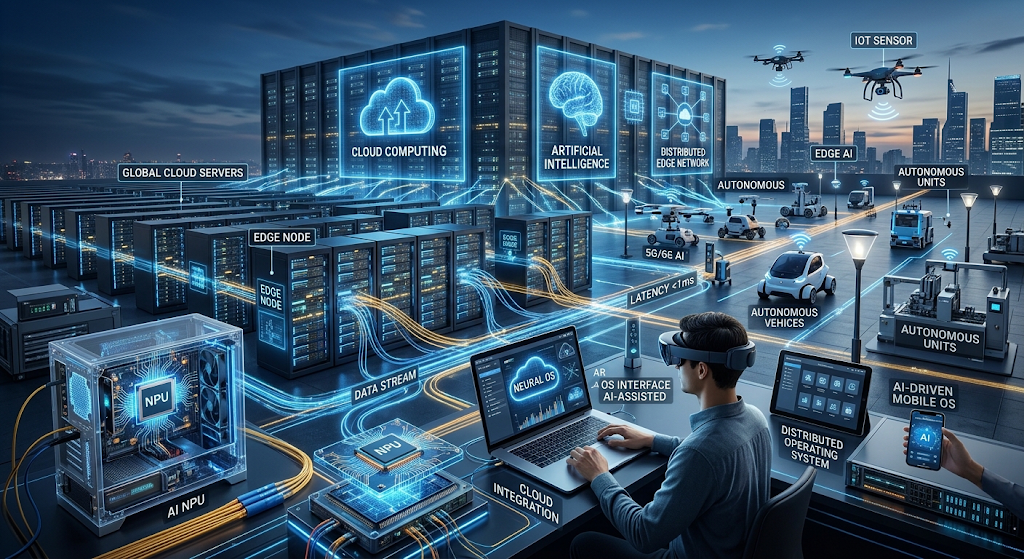
The operating system design is changing more than ever to satisfy the requirements of cloud computing, edge processing, distributed networks, and AI integration. Contemporary light-weight operating systems, like Google’s ChromeOS, are based on web-centric architectures in which the most important computational loads and applications are saved in other data centers, situated in the cloud, instead of on a neighborhood bodily drive. At the same time, virtualized environments and container hypervisors have revolutionized the way of managing servers as they allow multiple virtual operating systems to run on a single physical server machine.
Moreover, the advent of modern Artificial Intelligence (AI) has seen AI-specific acceleration schedulers being directly embedded in system kernels to optimise work routing between traditional CPUs, GPUs and dedicated Neural Processing Units (NPUs). The evolution of computing infrastructure towards quantum processors and micro-IoT edge nodes will continue to drive operating systems to evolve to provide secure, efficient, and intelligent resource orchestration.
Choosing an Appropriate Operating System for Particular Tasks
Factors to Consider When Selecting an Operating System
The selection of an appropriate operating system is a crucial choice that depends on individual computational needs, technical skills, cost considerations, and the software environment being utilized. Microsoft Windows is a very practical and widely supported operating system for everyday users, office workers and even PC game enthusiasts who need maximum software compatibility and hardware flexibility. Apple’s Mac OS is attractive to creative and multimedia professionals that rely on graphic design, audio editing, and video editing because of its color-accurate display pipelines, optimized creative software, and integration with mobile devices.
Many developers and cloud engineers prefer Linux distributions because of its zero licensing fees, minimal resource consumption, kernel configuration options, and command line prowess, along with its ability to be customized and configured to the developer’s liking. Meanwhile, mobile consumers face a cross-over between iOS and Android, where privacy is controlled and the devices are uniform, versus customization is unrestricted and the range of devices is wide.
Conclusion
Despite all the other software affecting the digital world, the operating system is the most fundamental software in use, managing behind the scenes the intricate relationship between the user and the physical circuits. The OS bridges the gap between the electronic hardware and the tools that can be used to run anything from a basic web browser to a sophisticated artificial intelligence model, as it learns how to interact with the basic operations of systems, such as scheduling processes, allocating memory, managing files, controlling peripheral devices, and enforcing system security.
Operating systems are the tools that empower humanity to make efficient use of the raw power of a computing device to do useful work, whether on a desktop computer, a mobile smartphone, cloud-based server node, or embedded smart device. Operating systems will continue to be the backbone behind innovations in today’s global digital landscape as technology evolves towards edge computing and hardware-accelerated machine learning.