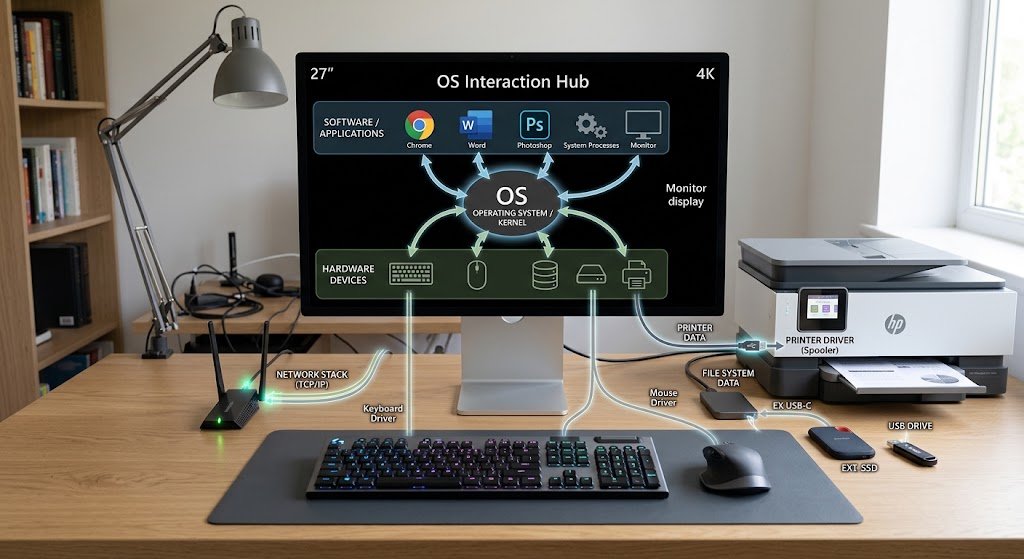
Today’s computers rely on numerous hardware components to successfully execute everyday activities, such as accessing information on a screen, typing on a keyboard or using storage devices to save documents or files, and communicating over a network. Typically, these applications do not interact with the applications by controlling the electronic parts of the devices. Rather, the operating system offers a controlled layer between software and hardware. This responsibility is called device management and empowers different applications to use this hardware without getting into the gory details of each hardware model.
There are a number of important mechanisms in device management: device drivers, input/output operations, interrupts, buffering, caching, and hardware abstraction. These mechanisms work together to send and receive information from the processor, memory, applications and physical devices. Otherwise, if each application had to be configured for every different keyboard, printer, disk, display, network adapter and USB device it wanted to connect to, modern computing would be extremely hard to maintain.
Device Management in Operating Systems
Device management is a part of the OS that manages and coordinates hardware devices attached to computers. It allows the apps to have a uniform method for calling hardware services, and let the hardware management routines run in the background. Typically, when a user presses a key, an application need not understand the electrical signals that are generated by the keyboard, or the specific commands that are to be interpreted by the controller. The operating system gets data from the hardware, understands it via the required software pieces and passes the corresponding data to the application.
This is also the case when an application saves a document, prints a page, shows an image or sends out information via a network adapter. As a result, device management serves like a middleman between software and the physical components. It also regulates access to shared devices, handles several demands at once, identifies some errors, and assists prevent programs from interfering directly with hardware resources used by other programs.
Importance of Device Drivers in Operating Systems
A device driver is a special type of software that allows an operating system to communicate with a specific type of hardware device. The different devices have different communication protocols, registers, commands and capabilities; the operating system can’t assume that every piece of hardware is the same internally. Rather, a driver knows the technical specifications of a device and interprets requests from the operating system that the hardware can execute. For instance, a print job is passed to a print driver that interprets it to output instructions for a specific printer, and a network driver communicates with a network adapter based on the interface supported by the network adapter.
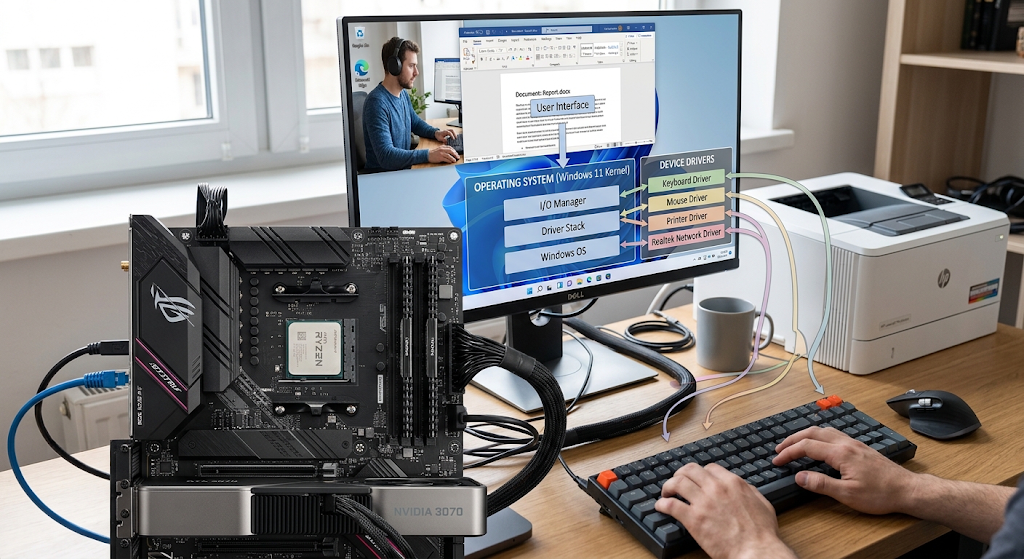
Drivers can also deliver data to the OS and display it to the OS for use by other software. This separation is crucial in that application developers do not need to write distinct hardware-control code for each device. Drivers can be obtained from the operating system, the hardware manufacturer, or any other software vendor and maintaining compatibility and keeping them up to date can help boost reliability, functionality and security.
Input & Output Control.
Computers store information in their memory, transfer it to and from their storage, and communicate with external devices. When information is received from a device by the computer it is termed as input, for example, the data received by a network adapter is input. When the computer sends information to a device, such as a display receiving an image or a printer receiving a document, then there is an output. With good input/output management, the operating system can perform these transfers without requiring the application to directly control the hardware.
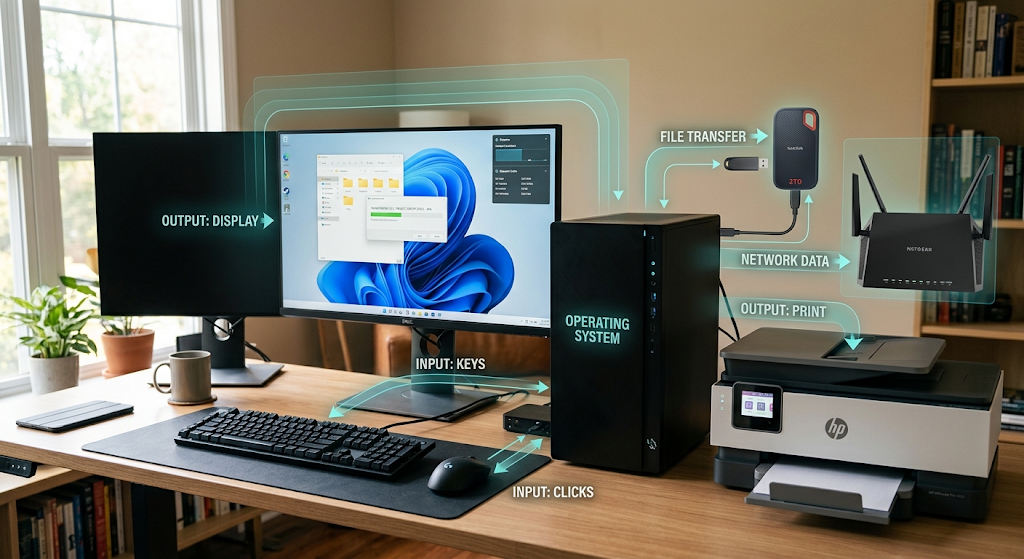
The operating system controls the way requests are made, the temporary storage location for data, the access to devices, and when operations are completed. The speed of the devices must also be taken into account since the slow devices can cause the processor to wait unnecessarily for I/O. The OS can queue requests, provide memory as an intermediate buffer, and enable applications to carry on with other work while devices finish their operation.
How Operating System (OS) Communicates with Hardware
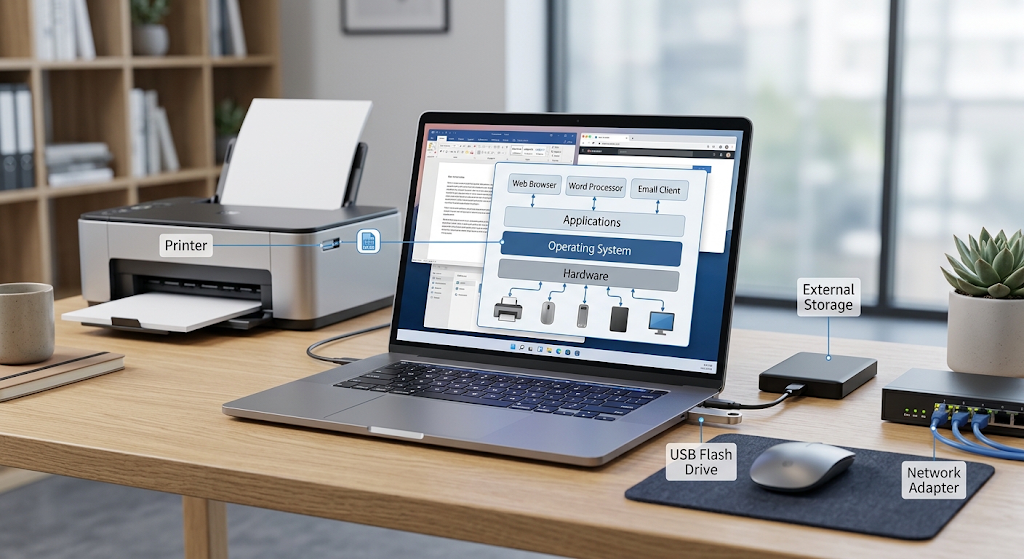
Typically, the communication between an application and a hardware device is hierarchical with more than one layer involved, as opposed to a single layer of an application-to-device connection. An app makes a request to perform an operation via an operating system interface. The operating system then decides which device and driver to respond to the request. The driver converts the request into operations that are appropriate for the hardware and the device controller communicates electronically with the physical device. Data can flow through system memory by means of one or more of the methods supported by the device controller, depending on the hardware and operation.
When the operation has progressed or completed, the hardware can notify the operating system. This multi-level system eliminates the need for the ordinary applications to be aware of the commands for the hardware. It also provides the operating system with a chance to enforce permissions, coordinate competing requests, handle errors, and provide the same interface. An operation, like reading a file, receiving data from the network, or sending data to a display, can be performed in a program without knowing what hardware model is installed.
Lengthy Interruptions and Hardware Events.
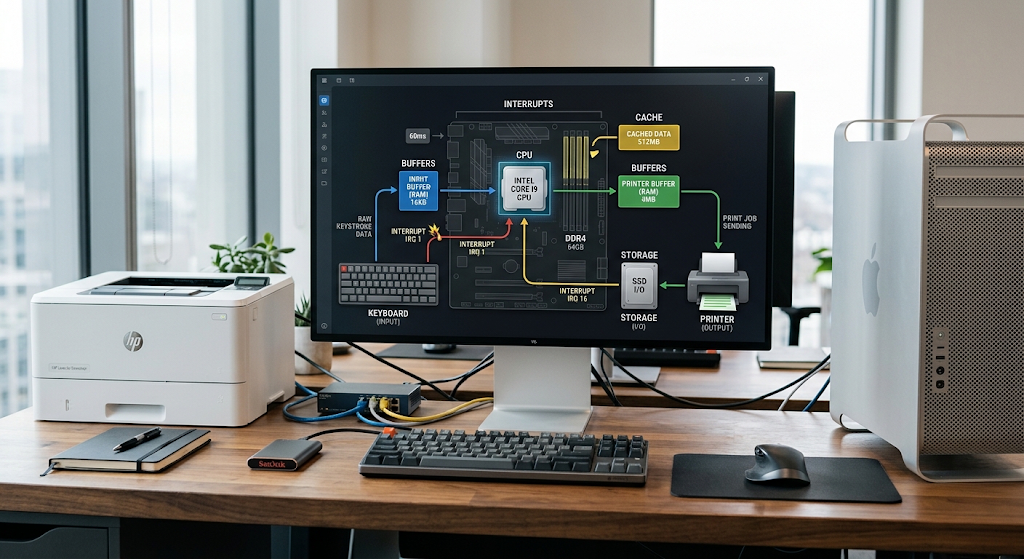
Interrupts are important features that enable hardware devices to signal the processor that an event is calling for attention. If there were no interrupts, the processor would have to continually poll each to see if it’s done an operation or got new information. This persistent polling, which is sometimes referred to as “this file is being checked”, may consume processing power, especially if a device is not in use for extended periods. In an interrupt-based system, a device can interrupt the processing unit if there is an important event.
For instance, a keyboard controller might interrupt if there is new input ready, or a storage device might interrupt when a desired operation has been completed. When the interrupt arrives the operating system performs the necessary handling code, which is typically provided by the driver and uses other kernel functions. Interrupt handling should be carefully designed because too many interrupts or poorly designed interrupt handling can have an adverse impact on system performance. Modern Operating Systems therefore implement highly developed methods to efficiently process hardware events and continue execution of normal applications.
Buffering Mitigates Data Loss and Temporary Data Storage
Another useful technique which operating systems use to cope with speed variations between software processes and hardware devices is buffering. A buffer is a temporary memory storage location used to temporarily store data that is being moved between components that are operating at different speeds. Think about a keyboard and a processor: A person can type a few characters a second, but the processor can do an enormous number of operations at the same time. The operating system can reserve incoming data in a buffer until the application can handle it, rather than forcing the application to wait for each individual character.
Buffering can also be helpful for output devices like printers that can get data from the computer faster than they can print it. Data can be stored in a queue or buffer and fed to the printer as the mechanical parts are available. Buffering deals with differences in operating speed by eliminating short-term delays that would otherwise cause system-wide disruption and enables applications and devices to be more independent.
Caching and Optimizing I/O Performance.
Caching is a technique that stores frequently accessed data in a storage that can access it faster if the data is accessed again. Memory caches are a common feature of operating systems that are used to minimize the amount of slower operations that need to be performed when multiple operations are performed on the same information. For instance, if the program constantly accesses information from a storage device, the operating system can store recently used data in memory. The latter request on the same information can then be fulfilled from the cache without needing to perform any further physical storage action.
Many types of persistent storage are slower to access than memory, which is why caching can greatly enhance the perceived performance. The challenge for however, is to manage the data cached carefully, particularly when the data is changing. The operating system will have to make sure that information is delivered to the right device at the right time and that the app receives the same information. Caching, as a result, is a compromise between speed, memory use and data consistency. Proper cache management can minimize the need for unnecessary hardware operations and enable applications to operate on data more efficiently.
Managing Keyboard, Mouse and Other Input Devices
Input Devices:
These are devices that send information to the computer from users or the environment, e.g., game controllers, keyboard, mouse, touch pad, scanner, microphone. The operating system receives signals from these devices and translates them into events that applications can interpret, via device drivers and input subsystems. The hardware passes information when a key is pressed, which ends up being an input event handled by the operating system. The electrical behavior of the keyboard usually doesn’t need to be interpreted in an application.
Rather, it gets a uniform representation of the user’s input via the operating system’s input interface. It works similarly with pointing devices, except that the data can be a movement, button presses, scrolling, etc. The operating system can also simultaneously handle several input devices and decide which application should get specific events. This abstraction can be used to create applications which can utilize a wide range of hardware devices without having to develop a whole new communication system for each of the devices.
Managing Storage Devices
Storage devices like hard disk drives, solid state drives, USB drives, and memory cards need special handling as they are expected to store persistent data and can very well differ in their physical properties. Storage hardware is accessed by the operating system via the proper drivers and controllers, and file system software dictates how files and directories are structured. The operating system is able to find the file when the application asks for it, and the operating system will then make a call to the storage device for the read operation that it requires. If information needs to be stored, the operating system manages the writing process so that the information is moved to the right place.
While modern storage devices can execute operations many orders of magnitude quicker than mechanical devices, they still must be managed with care of requests, queues, caches and data transfers. The operating system can also monitor device availability, manage errors, manage partitioning, and give permissions to determine who or what can access certain resources. The layers enable applications to operate on files without being aware of how the storage controller, flash cells, and sectors are physically arranged.
Displays and Graphics Hardware
Applications typically control hardware via the operating system, rather than by direct electrical control, as in the case of displays. Applications that require to show text, images, video or graphical interfaces usually interact with graphics-related software components that are offered by the operating system and related drivers. The graphics subsystem then communicates and interacts with the graphics processing hardware and display device to create the output. The graphics hardware could also act as a special processor that can process complex graphics image and texture data, video frames and three-dimensional scenes, handing off specialized tasks to the central processor.
Display drivers and graphics APIs offer uniform interfaces for programs to make requests to the display. It’s important to keep in mind this abstraction, since computers can have graphics processors from a range of different manufacturers that use different architectures and have different performance. The developers can use the standardized interfaces provided by the operating system and graphics system, rather than developing separate applications for each graphics device. It can then manage access to the graphics hardware and guarantee that different applications can access the graphics resources without directly interfering with each other.
How to Print or Send Output through External Devices
In printers, there is a need to manage the device for hardware which has physical operations. The printer can’t just accept an application’s document in the same format as the application saves it. The operating system and printer driver program must communicate with the printer by following commands and data format appropriate to the specific printer. Paper size, print resolution, trays, color, and printing modes are some of the characteristics that the driver is able to consider. Typically, printing takes longer than normal processor tasks, so the operating system can queue up the print job rather than having the application wait for it to come out of the printer.
This way, users can still work and print in the background. If multiple applications want to print, the OS is able to control their tasks based on its print subsystem and configuration. This is also true of many output devices on the outside: Software makes a standard request, the operating system and driver does the rest of the job, receiving the device-specific information needed to create the actual output.
USB Devices and Plug-and-Play Hardware
The use of USB peripherals are one example of how operating systems deal with peripherals that are plugged and unplugged during the running of the computer. USB devices may be peripherals such as keyboards, mice, Flash drives, webcams, external storage, audio devices and more. If a suitable device is connected, the operating system will know of its presence, and recognize information relating to its type and capabilities. It can then identify which driver or driver class to communicate with that device.
This process belongs to the wider “plug and play” model which minimizes the amount of manual work that a user has to do to configure each piece of hardware. If a device is unplugged, the operating system has to adapt its resource management and discontinue usage of the unplugged resources. The ability to remove safely is particularly significant for storage devices when there are pending writes in memory or caches. Effective device management in this way means that dynamic changes in hardware won’t needlessly interrupt applications or cause data corruption.
Abstraction
One of the most important concepts of modern operating systems is called “hardware abstraction”. It implies that software can communicate with hardware devices using standard interfaces without requiring knowledge of all the components and detailed mechanics of the device itself. For instance, an application could ask to write data to a file, and have no idea what kind of storage media the file is on, whether it is on an SSD or hard disk or a USB storage device or another supported medium. Likewise, a program may ask for input on the keyboard without anything to do with the actual design of the keyboard.
Much of this is hidden from drivers, operating system subsystems, APIs and device controllers. The hardware abstraction will ease portability for software as it is not required to be rewritten when a different device is installed. It also helps in easier development, allowing the programmer to focus on the application rather than on low-level communications. However, hardware differences do not disappear entirely when working with abstraction. These differences must be known by the operating system and drivers internally to be able to have a standard software request and translate it into an operation that each particular piece of equipment can carry out.
Security and Reliability of Device Management.
Similarly, the management of devices is crucial to the security and reliability of the system, as devices may store sensitive data or be integral to the stability of the computer system. Operating systems thus limit the ways that normal applications access the hardware. Access to some devices or certain hardware instructions is generally restricted to privileged software to prevent a faulty or malicious application from modifying other software or hardware components of the system. Special attention should be paid to the drivers themselves as they are situated near the hardware and often have a wide range of system privileges.
A compromised driver can lead to accidents, data loss or hardware communication issues, and a weak driver can cause security issues. These risks are minimized by permission systems, isolation mechanisms, validation procedures and driver management policies in operating systems. Detecting and responding to device failures also is important to reliability. Storage devices can report errors, network adapters can drop connections and USB devices can disconnect unexpectedly. Good device management provides the operating system with the ability to detect such situations and react appropriately without shutting down the computer system.
Importance of Device Management
The various parts of device management are not independent, but rather part of a layered system. The first step in an application is to go to the operating system interface and request a particular operation. It is up to the operating system to decide what subsystem and driver to use, which interact with the device controller and the hardware. In the operation, buffering can be used to temporarily store data, caching can be to reduce repeated access to slower devices, and scheduling can be used to prioritize competing requests. Interrupts signal to the processor that there is hardware that needs attention or an operation has finished.
The abstraction of the hardware allows applications to use consistent interfaces instead of device-specific commands. Important resources are protected by permissions and privileged execution, and the operating system is afforded a mechanism for error-handling when hardware fails. With this combination, a computer can run and sustain different devices without the need for all applications to comprehend the internal workings of each device. The OS helps coordinate the interaction process in the background regardless of what type that task is, whether it’s reading a file, obtaining network information, printing a document, displaying a video frame, or talking to the keyboard.
Conclusion
With its ability to manage devices, the operating system enables modern computing to be practical and flexible. Applications must be able to interact with keyboards, printers, storage drives, displays, network adapters, USB peripherals and other devices, but do not typically communicate directly with each of them due to the fact that devices are designed differently, and communicate in different ways. The role of device drivers is to convert the requests from the OS to the specific hardware, and interrupts are used to inform the processor of an important event. Input/output management controls data transfer and buffering smooths out variations in device speeds.
By using caching, repeated accesses to slower hardware can be avoided, and by using hardware abstraction, many of the complexities of individual hardware can be hidden from the application through standard hardware interfaces. All these mechanisms form a connection between software and physical hardware. This creates a platform that enables developers to create applications on consistent interfaces and operating systems, and lets the operating system deal with the tricky business of coordinating all the different pieces of hardware, communication, performance and stability.