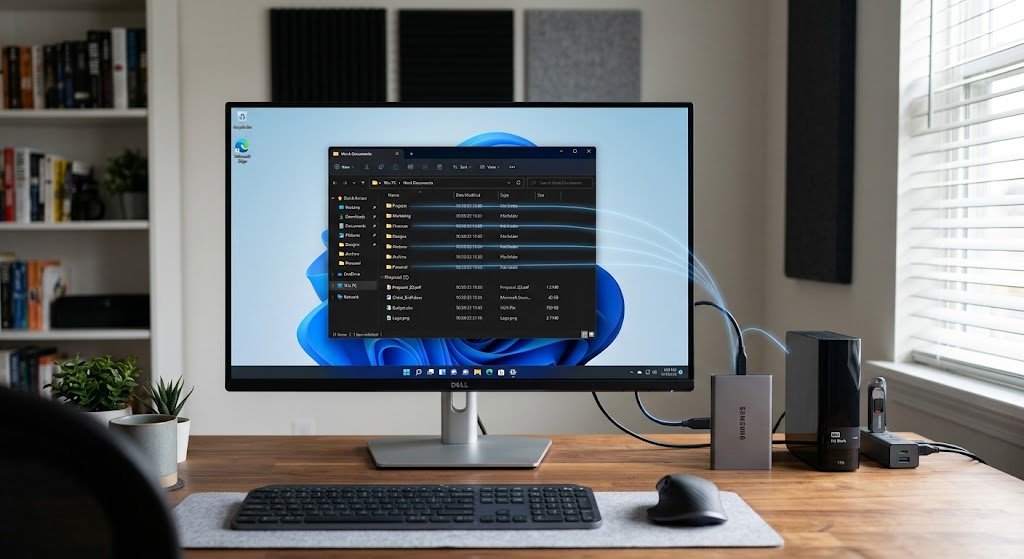
One of the most vital elements in an operating system that enables it to store, locate, organize and manage information on a storage device is a file system. The operating system uses a file system to decide where and how to store information each time a user creates a document, downloads an image, installs an application, saves a video or deletes an old file. Physical storage devices like hard disk drives, solid-state drives, USB flash drives, and memory cards have a ton of storage space, but it would be hard to utilize without a structured way to organize that space.
A file system offers that structure, establishing the name, location, and information stored about the files and how others and applications can interact with them. File organization is, therefore, fundamental to understanding the operation of operating systems when data is created, modified, moved, copied, and deleted in and out of the computer.

What is a File System?
A file system is any technique and rules employed by an operating system for structuring data on a storage device. Storage devices are physically organized in blocks or sectors, which are used to store binary data, even though the user usually accesses folders, files, icons, and documents. The file system establishes a logical organization that relates the information the users interact with to the physical places where this information is stored. It maintains records which will indicate to the operating system where to locate a certain part of storage space and where to find another portion for new data. Depending on the file system, these records can contain information about file names, locations, sizes, timestamps, ownership, permissions, and other attributes. Examples of common file systems are the NTFS file system, which is widely used with the Windows operating system, the ext4 file system which is commonly used with the Linux operating system, APFS used by the newer Apple operating systems, and FAT-based file systems, which are still popular on removable storage devices due to being widely supported.
A file system also offers a uniform method of communicating with storage for applications, which would not have to know the physical specifications of a specific disk if the system did not have one. Generally, the program does not need to know which physical storage blocks have what file when it requests that the operating system open the file. Rather, it offers a name or path and the OS looks to the file system for the information. The separation of application and physical storage is significant because the technology of the same storage may vary, as could the layout. A modern solid-state drive works differently from a traditional hard disk but applications can continue to use the same operations as creating, reading, writing and deleting files. There are so many layers of detail that are hidden from users and software developers because of the file system and operating system.
How Files are Allocated on Storage Devices.
File allocation is the method by which a file system allocates free disk space to the data in a file. A storage device consists of a number of manageable units, typically known as blocks, or clusters, depending on the specific file system and storage device. If a user saves a file, the operating system calculates the amount of space the file requires, and requests the file system to allocate appropriate space. A small text file can use a small number of blocks; a large video can use thousands or millions of blocks. The file system keeps track of blocks in the file so that the operating system can read (or access) the file contents at a later time. Allocation is important as it can lead to wasted storage space, slower performance, or fragmentation in the event the allocation isn’t organized properly. The different file systems employ different allocation structures, allocation strategies to provide a balance between performance, reliability and the efficient use of available storage.
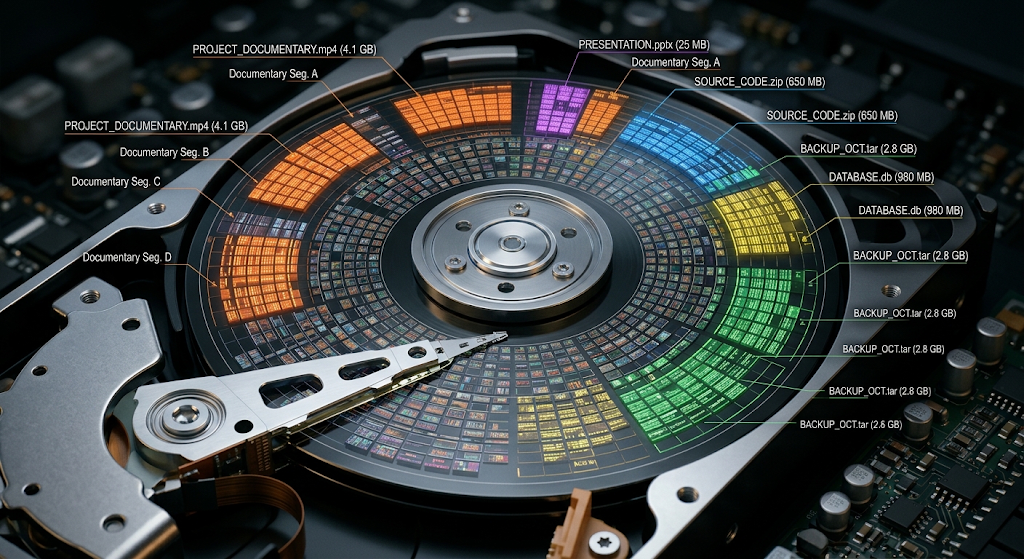
Files need not be in a contiguous location on a storage device. A file can have several different sets of blocks, depending on the file system and the condition of the storage. This may occur when files are created, deleted and modified multiple times creating “holes” in the file that can later be filled with new data. In the case of traditional hard disk drives, over-fragmentation can result in more than one disk head moving and thus decrease performance. Today, file systems have taken steps to minimize fragmentation by grouping together related data when feasible through allocation strategies. Since solid state drives have no moving mechanical heads, the performance characteristics are different, but even so there is still the need to track and manage storage space – which is where file allocation comes in. The operating system thus depends on the file system to keep track of the correspondence between each file and the physical or logical storage where the file’s data resides.
What Occurs when a File is Created?
Several things can happen when a user creates a new file, where it seems like only one operation happens. Assume that a user opens a word processor, types some text and clicks on Save. The application requests that the operating system create or modify a file. The file system is responsible for determining if there is an appropriate directory, checking available storage, allocating space for the information in the file, and creating the file’s metadata.
It also stores information about the file, like its name, size, and access/modification/creation dates, owner, and permissions, following the rules of that file system. The actual information is thereafter stored in the storage areas assigned. After all of these operations, and once the information has been stored, then the file will be ready to use in the future. The simplest way to save an action takes coordination between the application, operating system, storage device, and file system.
Directories and File Paths.
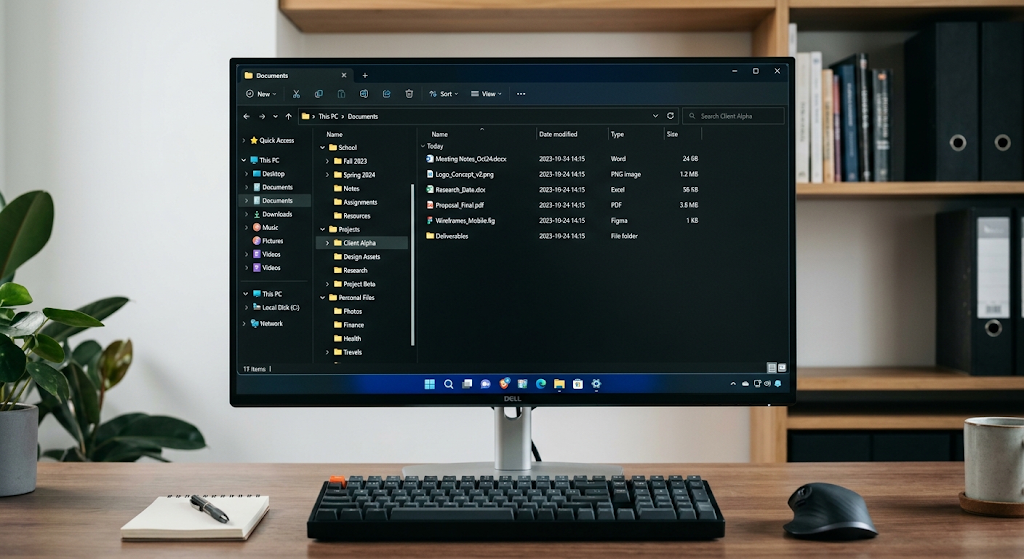
Directories, also known as folders, are used in a hierarchical manner to organize files. A file system is used to store files and other directories, rather than having all the files in one large collection. This forms a tree shape which may be multi-level. A computer may have a Documents folder, and within it contains folders for School, Projects, and Personal Files. A path to identify each file can then be built, which describes its location in this hierarchy. The structure of the directories makes it easier for users and applications to find related information and to manage large sets of data. Directories likewise have or point to information on the inside that enables the file system to link the names of files with the records that describe it. The specifics vary from file system to file system, but the basic idea is to allow for an organized namespace to access stored data.
If a user copies a file from one folder to another within the same file system, the operating system might not have to copy the entire file to a new location. It can rather frequently update the directory information so that the file is linked to a different path. This can make a move operation considerably quicker than copying and removing the original file. Moving a file, however, between different storage devices or file systems is a different story as the target could have a completely different allocation and metadata structure. In that case, typically the operating system needs to establish a fresh depiction of the record on the target and also move the substance. This is the reason why transferring a large file between systems within the same storage system can be virtually instantaneous, but moving the same file to another storage system could take a lot longer.
File’s Metadata and Attributes.
The metadata of a file does not include the actual content of the file. Metadata may contain information about the file name, file size, file creation and modification dates, file owner, permissions, and references to where files store information. Some filesystems include extra attributes like attributes linked to symbolic links, extended attributes, security information, or special types of files. The reason for metadata is that the OS has to know more than just the contents of a file. For instance, when a user looks at a folder and observes that a document is 20 megabytes and was updated yesterday, the user obtains this information from the file system’s metadata. The OS uses metadata to be able to answer these questions about a file efficiently, while not having to scan all of its data every time.
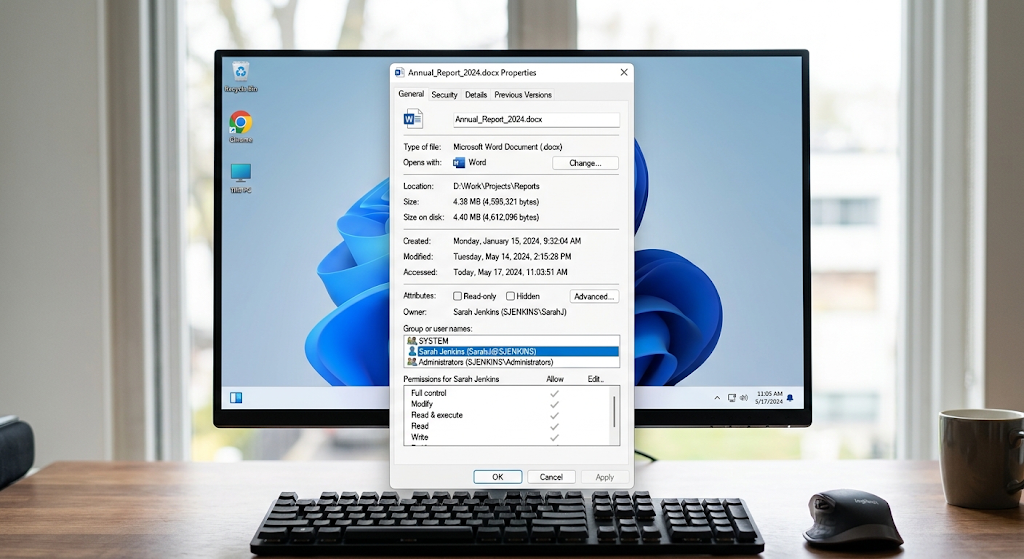
The metadata will also vary as the user interacts with the files. Depending on the operating system and file system configuration, opening a file might change some or all of the information related to access. The size and modification time of a document may vary depending on the editing operations performed on the document, and changing the permissions changes the security-related metadata of the document. Renaming a file may only alter the name information or directory entry associated with it, without necessarily altering the content itself. The act of deletion will also cause changes to the metadata as the file system will need to tell users that the corresponding directory entry and storage area can be reused. These operations illustrate that a file system is more than the sum of its parts. It provides a dynamically changing state description of the structure and state of information on the device in the form of a database.
File Permissions and Security
File permissions will dictate who can access files and what they are able to do with them. To keep unauthorized users and applications from accessing and modifying information freely, operating systems rely on permissions. Depending on the operating system and file system, permissions may differ among the permissions for reading, writing, executing, deleting or modifying a file. Ownership information can also be used to determine the user or group that a file is owned by. Traditionally, Linux systems with file systems like ext4 offer a model of permissions that include the owner, group, and other users, whereas Windows systems with NTFS file systems offer detailed access control lists that can provide access rights to various users and groups. Modern Apple systems with APFS can also access operating system security mechanisms that govern access to stored data. Where application programs need to be restricted from accessing sensitive information unnecessarily or where computers are shared and controlled by several users.
Permissions are only relevant when a program tries to do something to a file. For instance, when an application attempts to change a document that it does not have permission to change, the operating system may refuse the request instead of allowing the change. This type of security is not related to the physical placement of storage. A file can be otherwise fine on disk, but not accessible to a given user or application. Permissions can then be thought of as rules that are used to decide if an operation should be permitted by the operating system and file system. File permissions, along with other operating system security measures like authentication, encryption, and application security, can help minimize unauthorized access and inadvertent changes to information in storage.
Journaling and File System Reliability
Some file systems employ journaling to make them more reliable when changes in the file system are interrupted by events like power loss, system crashes, or hardware failures. If a file operation gets interrupted in the middle, it may leave the file system partially modified and other parts of the file system untouched. This can bring some inconsistencies that can complicate accessing a file or have other issues. The journaling file system keeps track of some of the changes or operations that were intended to take place, to be able to tell what was going on during an interruption. The computer restarts, and the file system can utilize this to perform the proper task more efficiently than it would if it had to scan all of the storage devices from start to finish. Although a journal does not prevent storage device failures, it can help to ensure consistent file system structures following unexpected failures.
Journaling or other mechanisms for ensuring reliability are implemented differently in different file systems. NTFS has journaling capabilities to ensure consistency of critical file system structures, and the ext4 file system also supports journaling, with additional capabilities to enhance reliability and performance. APFS implements a file system architecture different from the one used by HFS+ and includes modern features that aim to deliver robust data integrity and efficient storage management. FAT systems tend to be quite simple in design and very few have the level of journaling that NTFS and ext4 do. This difference may be significant if a specific kind of use is being targeted for a file system. A removable drive for use with a wide range of devices might focus on compatibility, whereas an operating-system drive might be more concerned with reliability, permissions, advanced metadata and recovery options.
Manage Storage, Free Space.
A file system needs to continuously monitor the storage areas allocated and still available. A file is created by assigning free space to it and assigning a pointer to it in the system. When a file is removed, the file system can flag the storage to be available for new files to be stored in it. It is very important to note that when the file is deleted, not all the bytes of its previous contents are erased at once. In many cases, the file system simply eliminates or modifies the links that enable normal applications to locate the file, and notes those where the file is now stored, as if they were unused. Remnants of the previous data may sometimes exist physically, until they are overwritten, or are managed by the storage system, in these areas. The behavior will vary depending on the storage technology, operating system, file system, and how the file was deleted.
The free space management also impacts performance. When new data is added to a storage device, if there is only a small amount of free space available, then the OS and the file system may have less options to allocate the new data. There may be increased fragmentation of files and some operations may need to be repeated to identify suitable storage locations. There are various methods employed by file systems for keeping track of free blocks, clusters or extents. A few maintain allocation tables, bitmaps, trees or other structures that make it easy for the system to locate free space fast. Cooperation between the OS, the file system and the drive controller is also a part of storage management on solid-state drives. Technologies like TRIM can let an operating system tell an SSD when it no longer needs a storage area to be used, which can help the drive make the most of its internal storage.
Comparison of Common File Systems.
NTFS
NTFS, short for New Technology File System, is one of the main file systems of Microsoft Windows. It offers functionality that is appropriate for the modern operating-system environment, such as handling large files and large volumes, implementing file permissions, security information, journaling, and various advanced metadata features. The structures that NTFS employs enable the operating system to locate and manage the files efficiently while the security attributes of NTFS make it appropriate for computers that are shared by multiple users and applications and have varying access rights.
NTFS is typically the preferred file system for the internal storage of the Windows system drives because of its close integration with Windows storage and security mechanisms. It proved to be much more advanced than older FAT file systems, but can be used on devices and operating systems outside the Windows world, depending on the platform and software.
ext4
ext4 is a popular Linux file system, and a replacement for previous extended file systems. It maintains a large volume of data and files, journals, permissions on files and efficient allocation methods. Another notable aspect of ext4 is that it supports features which are designed to minimize fragmentation and maximize performance on a large storage system, which could include ranges of contiguous blocks.
Its permissions system fits seamlessly into the Unix and Linux model of users, groups and permissions. Ext4 is used for Linux installations and servers as it is deeply embedded in the Linux operating system. It has been designed to meet the requirements of systems where reliability, performance, permissions and scalability are pertinent.
APFS
APFS, which stands for Apple File System, is a new file system designed by Apple for its file and storage systems. It was created keeping today’s storage media in mind, especially solid state storage, and it offers space sharing, snapshots, cloning, support for encryption and robust metadata organization. Multiple volumes that can be dynamically allocated to use available space in a container without having to be assigned a fixed amount of storage.
System features and recovery processes can benefit from using snapshots to preserve a point-in-time representation of file system data. APFS also utilises structures for the efficient handling of files and directories. It’s tightly coupled with Apple’s operating systems, so it’s integral to the way that modern Macs and other Apple devices handle their internal storage.
FAT-Based File Systems
Despite this, FAT based file systems (FAT32 and exFAT) are still significant due to their simplicity and widespread usage. While FAT32 has a number of advantages, including being supported by many operating systems and devices, it also has some drawbacks, including a maximum file size of about 4GB per file. The exFAT file system was created to offer a more appropriate design for larger removable storage mediums and larger files, without constraining compatibility.
In general, FAT-based systems don’t offer as many advanced features as the NTFS, ext4, or APFS systems, especially with respect to permissions, journaling, and more complex metadata. Their simplicity may be a benefit when it comes to moving a storage device to a different computer, camera, television, video game console, or any other device. The type of file system, therefore, must be not only technically appropriate, but also compatible with the devices requiring access to the file system.
What happens to a File if it is Modified, Moved or Deleted?
There are several stages to modifying a file, with most being hidden from the user. Changes to a document that an application makes are communicated to the operating system, which then accesses the file system to write the changes to storage. The new data might replace old data at the same storage location as the old data, or be stored in a new location and the metadata for the old file be updated to point to the new data. This can change the size, modification time, allocation information and other metadata of the file. Moving a file within the same file system may not require moving all of the contents of the file, but mostly just the directory information. However, a file being copied must be written to new storage locations and a new file created. This is because similar file operations can consume vastly different amounts of storage activity.
Removing a file is not as simple as just wiping it out and sending it away as soon as it’s deleted. In the usual case, the operating system will delete the directory element that lists the file and free the underlying disk space that was used for the file. How this is implemented depends on the file system and operating system and other factors can influence what may happen to the underlying data. With solid-state storage, for instance, the drive could also have wear management and garbage collection operations internally later. To the user, the file may be deleted right away from a folder, and the file system still handles the physical or logical space that represents the file. It’s helpful to know this when thinking about data recovery, storage performance, privacy and the contrast between deleting a file and securely removing its contents.
Significance of File Systems
The foundation upon which modern operating systems place the functionality to make the raw capacity into a structured, orderly environment in which users and applications can safely manipulate information is the file system. Hidden from normal users much of the underlying complexity, they manage allocation, directories, metadata, permissions, free space, and recovery mechanisms. Every time a user creates a document, saves a photo, downloads software, renames a folder, moves a file, or discards unwanted data, the file system and operating system coordinate a number of various operations to keep the storage organized.
Each file system has to trade off its design for various considerations based on the environments it serves. Each of these has its merits: NTFS is known for its integration with Windows, along with security features and advanced storage functionality, while ext4 is widely adopted in the Linux world and offers excellent allocation and permission management, APFS is designed for Apple’s more modern storage landscape, and FAT-based systems are useful for things that require a wider range of compatibility. Knowing these differences enables the users to see how the seemingly simple folders and files shown on a computer screen work.