Introduction
When you see words like “accounts payable,” “accounts receivable,” “bank reconciliation,” “general ledger” and “financial statements,” accounting can be intimidating. In the past, companies relied mainly on paper records, spreadsheets, calculators, and manual bookkeeping to manage finances. Historically, companies have relied on paper records, spreadsheets, calculators and manual bookkeeping to track finances. Today, that changed a bit with the development of modern technology. In today’s world, accounting software can capture transactions, arrange financial data, come up with balances, monitor invoices, reconcile bank activity, and generation accounting reports with considerably less manual work. They are important tools in the broader context of digital accounting software that enable businesses to transition financial operations from paper-based to systematically managed digital workflows. Learning the accounting software is beneficial not just for businessmen but also for freelancers, entrepreneurs, students and even those who want to know what’s happening behind the numbers that are shown in the accounting dashboard.
Accounting Software: What Is It?
Accounting software is computer software that is used to record, organize, process and analyze financial information by individuals and organizations. The users record the details of each transaction in the software, which records the data in structured accounts in lieu of physically writing the details of each transaction in a bookkeeping ledger. Accounting software can have a variety of functions depending on the program, such as invoice generation, tracking income and expenses, payroll, inventory, budgeting, tax, bank integration, financial reporting and payment processing. This software isn’t merely a digital notebook. Implements accounting principles to the data entered and will automatically update the related records. When a customer pays an invoice, for instance, the software application can document the repayment, decrease the amount owed to the customer and add the amount paid to the cash or bank account, and also update the financial reports. That’s one of the primary functions of accounting software: this relationship between the individual transaction and bigger financial records.
How Accounting Software Keeps Track of financial transactions
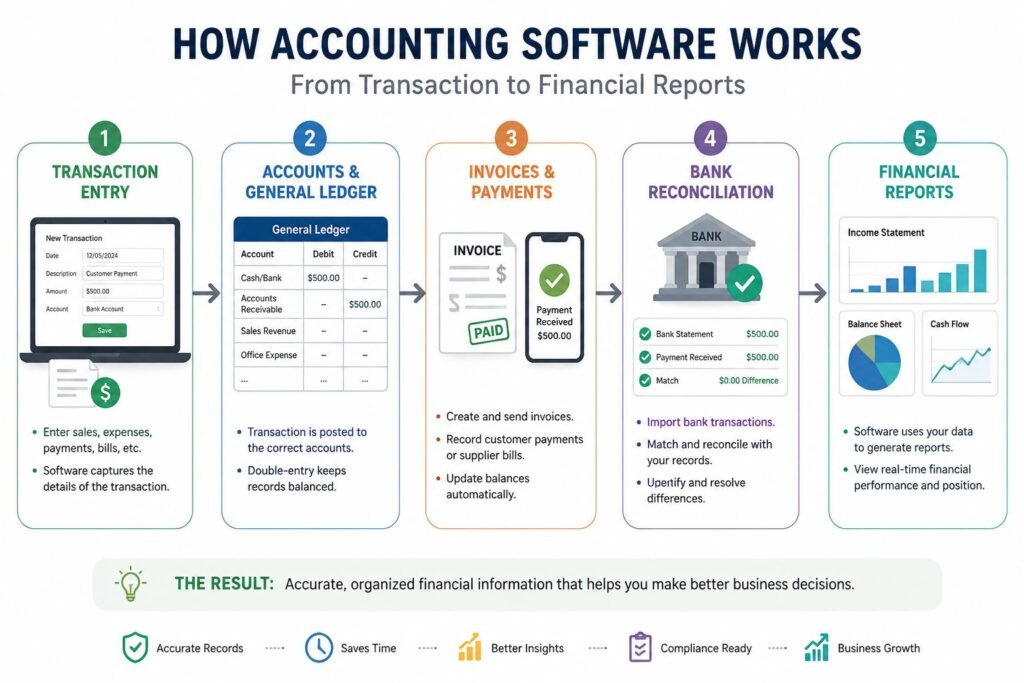
The core of accounting software is the capturing of monetary deals. Every time a business does something that is financially significant, a transaction takes place, e.g., when the business receives money from a customer, or buys supplies or pays rent, or receives a loan, or pays an employee. The software typically prompts a user to type in important information like the date, amount, description, customer, supplier, payment type and account category as they enter a transaction. The system then pairs up the transaction with the correct accounts according to information given. Accounting software is usually based on the double-entry bookkeeping system that requires transactions to have an impact on two or more accounts. For instance, if a business purchases office supplies on its bank account for $200, the software will be able to mark up an office-supply expense and decrease the cash or bank account. This results in “chained” records instead of disjoined records.
Understanding the General Ledger
The general ledger is also one of the key components in the operation of accounting software. It can be considered as the main filing system of the financial transactions of a business, with all relevant information collected under separate headings like cash, sales income, rent, equipment, loans, accounts payable, accounts receivable and so on. Once any transaction has been added to the accounting system, the software reflects the related information in the accounts of the appropriate ledgers. This essentially translates to the fact that users don’t need to update all of the affected accounts individually. The system keeps running balances and utilizes the records to prepare reports. The general ledger can be thought of as a big electronic filing cabinet with various categories of financial transactions in separate sections for a beginner. Each transaction is entered in the relevant parts, so that the software can calculate the business’ assets, liabilities, income and expenses at any given moment.
Managing Income and Revenue
Businesses can more easily track income with accounting software, which will track money received from customers and other sources. Creating an invoice will cause the software to capture the amount of revenue that is anticipated and the amount that the customer owes. After receiving the payment, the system could be used to highlight the invoice as paid and to update the cash/bank account as paid. The actual recognition of revenue can be based on an accounting method and configuration that may dictate when revenue is recognized, not when money is deposited into the bank account. Another way that software can be used to streamline income is to categorize it, and this will enable a company owner to determine which merchandise, services, customers or income lines are cashing in. These records will be helpful over time to understand sales performance. The user can now view a summary of all the income for an interval of time, compare multiple intervals, and view key differences that may need to be investigated further.
Tracking Business Expenses
Expense tracking is done in a similar fashion. As long as the business incurs a cost like rent, transportation, advertising, software subscription, utilities, office supplies or professional service, it can be added to the accounting system. Expenses are usually categorized by the user to enable the software to categorize expenses and provide useful reports. Receipts can be uploaded or taken a photo of in some systems, or transactions can be imported directly from a bank account or payment services that are connected to the system. The software can then assist the user to determine the amount of the business’s spending and the destination of that spending. For small businesses, this can be especially useful as it can be hard to keep track of costs in a variety of bank statements, receipts, emails and on paper records. Accounting software can simplify budgeting, tax processing, business analysis and decision making by having all expenses in a centralized place.
What is Accounts Payable?
Money that a business owes its suppliers and other vendors is called accounts payable. This can be handled with accountancy software which can record bills upon receipt and help to keep track of them until they are settled. Yesterday, a company ordered $1,000 worth of supplies from a supplier and was billed for the products. A company ordered $1,000 worth of supplies from a supplier, and was billed for the products yesterday with 30 days to pay. The user can input the bill into the accounting system, including the supplier, the amount of the bill, the due date, the expense category and the payment time. Then the software can display that the company is $1,000 in debt, and alert the user when they are nearing the payment date. When payment is made, the system is able to log the payment and deduct the amount paid from the amount of payable balance. For more advanced programs, they can also automate their approval procedure, schedule payments and even offer reports that will alert you to bills that are overdue.
How Accounts Receivable Works
Accounts receivable is the other side of the coin, as it is the money owed by customers to the business. If a business sells a product or service and the customer agrees to pay for it at a later date, the business will have an amount receivable. An invoice can be created with the customer details, products and services rendered, amount due, terms of payment, and the due date in accounting software. The invoice will stay in the system until it is paid. Businesses can then keep track of unpaid invoices and figure out who’s late with payments. Some accounting applications even automatically send out invoice reminders, log partial payments and generate accounts-receivable aging reports. The features are essential because a business can show a profit on its books, but still not be profitable in terms of cash flow because of slow-paying customers. Careful management of receivables can help businesses determine how much money is anticipated and when to receive it.
Bank Reconciliation Explained
Bank Reconciliation: This is the activity of matching transactions in an accounting system with those reflected under the bank. It is meant to ensure that the business’ accounting books accurately reflect the business’ banking activities. This can be made easier with accounting software by importing transactions from a connected bank account, or manually uploading a bank statement. It checks transactions that are imported into the system with records to match payments, deposits, transfers, etc. When something does not match, the user is able to research the difference. For instance, a payment might show up on the bank statement but not in the accounting system and a transaction could be double counted. Frequent reconciliation can detect errors, missing transactions, duplicate transactions and any unusual activity. It also affords business owners increased confidence that the balances reflected in their books are correct.
How Accounting Software Creates Financial Reports.
The most significant benefit of accounting software is that it can convert individual transactions into financial reports. The system is also continually structured financially; this means that it is possible to use the financial data in the accounts to create reports without having to manually calculate them. Typical reports include income statement, balance sheet, cash-flow statement, accounts receivable report, accounts payable report, expense report and general ledger. An income statement is a financial statement that details revenue, expenses and profit or loss for a specified time frame. A balance sheet is a statement of assets, liabilities and equity at one point in time. A cash-flow statement is about cash that the business has received and paid out. These reports allow owner to have a clear idea of financial performance and position. They can also serve as sources of information for accountants, lenders, investors, managers and tax professionals for financial decisions.
What Happens when you Enter a Transaction?
Let’s make accounting software more easily understood by trying to picture the following: you receive a $500 customer payment. The user can just click on the customer and type in the amount, payment account and click save transaction. There are a number of simple records which can be updated by the system behind that simple action. The customer’s balance could go down $500, the relevant bank or cash account balance could go up $500 and the transaction could either be part of the records to be included in financial reports or the customer’s balance could go down. If the payment is for an invoice that has been issued previously, the invoice status might automatically change from ‘unpaid’ to ‘paid. The software can also be used to archive the transaction for future searching, reporting, recon and auditing purposes. This is a great example of a fact that a lot of people don’t understand, but accounting software is not just a data storage system. It links financial events to accounts, customers, suppliers, invoices, payments and reports, allowing for a single event to update multiple aspects of the accounting system.
The Benefits of Automation, Integration and Accurate Data
With modern accounting software, you can automate a lot of repetitive accounting tasks. It can automatically import bank transactions, send out invoices on a regular basis, compute taxes, remind customers about unpaid bills, categorize transactions, or create scheduled reports, among other features, depending on the product. Integrations can also link accounting software to payroll platforms, payroll processors, inventory software, e-commerce stores, customer relationship management (CRM) software, and banking. These linkages can decrease the variety of data needed to be entered by hand. But automation is not meant to take the place of human supervision. Financial records can still be inaccurate if they are caused by incorrect categories, duplicate transactions, incorrect information on invoices, or poorly configured accounts. Users should therefore ensure that they review automated entries and reconcile their accounts regularly, keep supporting documentation and review reports for unusual results. The best accounting software isn’t accounting advice; it’s a tool that makes accounting easier and more consistent to use.
Why Accounting Software Is Useful for Beginners and Small Businesses
One of the major advantages of accounting software for beginners is that it can make the processes much easier that would otherwise involve a lot of manual work. It is able for a freelancer to make invoices and keep an eye on the payments, or for a small business owner, it can track the expenses, handle supplier bills, reconcile the bank accounts and check profitability. Accounting students can also practice how transactions impact various accounts and reports using software. The system can be used to establish the relationship between practical business activities and accounting concepts in textbooks more clearly. However, those who are new to accounting must get a grip on some of the fundamentals before going all in on automation. It will be easier to enter information correctly and identify mistakes if you know the difference between income and expenses, assets and liabilities, receivables and payables, and cash flow and profit. While software can make accounting more efficient, knowing what the numbers mean can’t be overlooked.
Choosing the Right Accounting Software
Businesses should look into their specific needs when selecting accounting software and not necessarily go for the one with the most bells and whistles. What basic business needs when it comes to accounting software is different to what a larger business needs. When it comes to accounting software, a small business might just need invoicing, tracking expenses, reconciling the bank and basic accounting reports, while a business that’s growing may need payroll, inventory management, access for multiple users, more in-depth reports and a number of extensions. Easy to use is also a factor since complex programs may not encourage users to maintain accurate, up to date records. Transaction limits, user restrictions, payment-processing fees, payroll costs, and optional features, among other factors, should all be taken into account when considering pricing. Security, data back-up, customer support, mobile access, reporting and compatibility with banking and payment systems are also aspects that businesses should explore when considering a booking system. The correct answer should not only improve the management of financial information, but it should also not increase complexity.
Conclusion
The working of accounting software is similar to how it converts all the daily financial transactions into structured digital accounting records. The software tracks various business transactions such as when the business receives money, when the business pays an expense, when the business sends out an invoice, when it receives a bill from a supplier, or when it completes any other financial transaction with an account and links it to that account. Those records can, in turn, be used to assist accounts payable and receivable, bank reconciliation, financial reporting, budgeting and financial analysis. One of the most crucial concepts to grasp for novices in accounting software is that it is not just a calculator or an electronic ledger. It is a system that is connected together and that will keep updating financial information and update records accordingly. When users grasp the flow of transactions from entry to ledger accounts to financial reports, accounting software becomes a lot less daunting. Digital accounting can streamline bookkeeping and enable businesses to make informed decisions with accurate data, regular bookkeeping reviews and proper bookkeeping system.
Get more well researched information about How accounting software works here.