
One of the most crucial tasks of a contemporary operating system is process administration. The operating system should be able to handle all the work being done by all of the programs that the user opens, starts, launches, edits, or runs at the background of the computer. When a program is in a disk, it is not necessarily an active program; when it is executed, the system creates and manages a process that has the resources and information necessary for running it.
These processes allocate CPU time, memory, other resources, communicate with each other and react to events through process management. As computers typically execute several applications simultaneously, good process management enables the operating system to share hardware resources and keep the applications responsive, stable, and in order.
Operating System Process
A process consists of a program being executed along with resources and information needed for its execution. A user launches an application, and the operating system loads the instructions and data needed to run the application into memory and creates a process to represent the application. The process can include data elements like program counter, CPU registers, memory-management data, open files, security information, and so on, which are assigned by the operating system. This information enables the operating system to stop the process and resume it at an appropriate point later. Normally, each process has its own execution state and address space, thus enabling two processes to run the same program independently. For instance, running two application instances may give rise to two processes that share some or all of their memory and execution details without running any related work.
Another aspect of process management is the control of the entire life cycle of a process. Once created, a process finds itself ready for processor time, is able to execute instructions, can wait for input or another resource, and finally ends. In this life cycle, the operating system maintains a record of the process and what resources are available to it. There is typically a data structure in the OS called Process Control Block (PCB) for each process. The PCB may hold data of the process, such as its status, program counter, CPU register values, scheduling data, memory-management data, and data about the resources allocated to it. The operating system can coordinate many processes without getting lost in what they are doing because this information is maintained.
How to Create a Process
When the operating system requires a new unit of execution to be created, it is called process creation. This can occur when a user starts an application or when an active process launches another process or when the operating system generates a service or background task. When the process is created, the operating system allocates an identifier to it and sets up the resources it needs to run. It also sets up the initial memory environment of the process, and stores significant data in the management structures. Depending on the operating system and how the new process is created, the new process may get some of the attributes or resources of its parent process. After the process has been created, it is normally placed into a state where it can wait for an opportunity to execute on the CPU.
Modern operating systems need to create processes efficiently, since a lot of applications initiate background processes. For example, a web browser can employ several processes (or threads) to run separate parts of itself—such as displaying pages, running scripts, managing network operations, or sandboxing certain parts. In creating a process, one must not only put instructions into memory, but also do so with the added feature of sharing memory with other processes. The operating system is responsible for setting up each resource limit, security permission, memory structure and scheduling information. They enable one process to not improperly interfere with another and enable applications to do what the user expects.
Understanding Process States
Processes do not run continuously on the CPU until they are finished. Rather, it alternates between states as the operating system switches between its execution. The most popular states are new, ready, running, waiting or blocked and terminated. A new process is created in the new state and the operating system is preparing the state for running. After it is ready to run, it goes to the ready state and waits for the scheduler to allocate CPU time. Once selected, it enters the “running” state and runs instructions. It can enter the waiting state if it requires an input operation or some other resource that is not available at the moment. Once the required event occurs, the process may go back to the ready state. If the work is completed or it is otherwise terminated, the process goes into the terminated state.
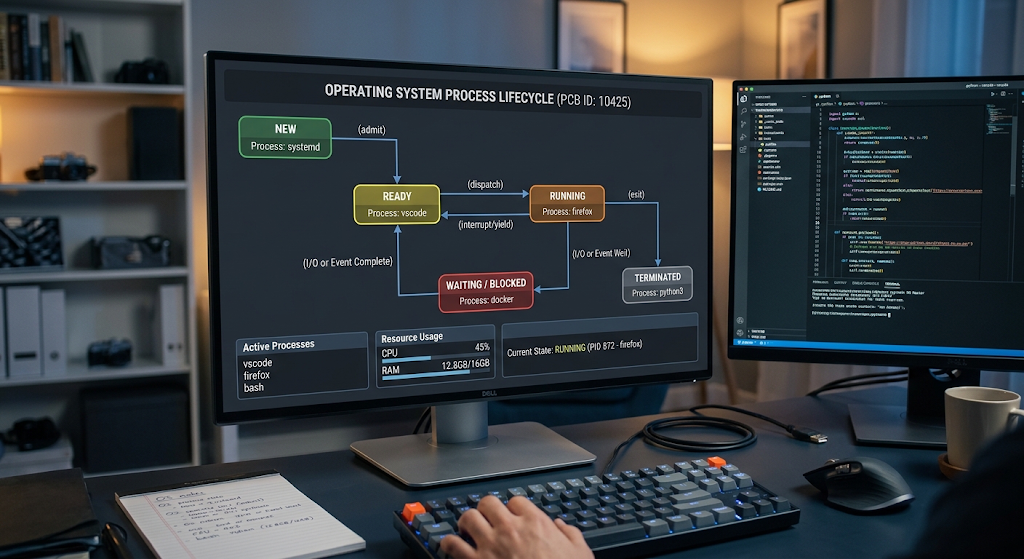
These States enable the OS to use the CPU resources efficiently. Suppose one process is waiting for data to be received from a storage device. Giving the CPU to that process while it waits would be a waste of CPU resources. Rather, the OS can suspend the running process and let another ready process run. Once the storage operation is complete, it can be placed back in the ready queue. This continual switching between states is an essential part of multitasking, in that the processor can perform useful operations while waiting for a slower resource to become available.
Processes and Threads
A process is a place where a program runs, a thread is a smaller piece of running that is contained within a process. One thread or more threads may be present in a single process, depending on the design of the application. Threads in the same process typically share resources like the process address space and open resources but also have their own execution information (program counter, registers, etc.). With this sharing, threads in the same application can work together in an efficient manner on various tasks.
Multithreaded applications are used because various components of an application may require concurrent processing. For example, a web browser can have different threads to process user events, manage network operations, and run background calculations. The applications can be more responsive as a waiting task does not have to block other tasks from progress if these are waiting on other threads. Shared resources do have some challenges, however. With multiple threads operating simultaneously on the data without coordination, it is possible to get inconsistent results. Operating systems and programming environments then offer synchronization mechanisms which assist the developer to manage access to shared resources.
CPU Scheduling
If there are several ready processes/threads that can run, then CPU scheduling decides which one will be allocated the processor time. A CPU may process only a few instructions at any given time per processing core, so the OS can’t do without scheduling mechanisms to determine processor time allocation. The scheduler takes into account the goals of the system, process priority, waiting time, and the behaviour that might be expected of the process in execution. There are various scheduling algorithms with different strategies. Some try to execute tasks in the order that they are received, others try to do the shorter tasks first, assign priorities, or partition the CPU time into a repeating time slice.
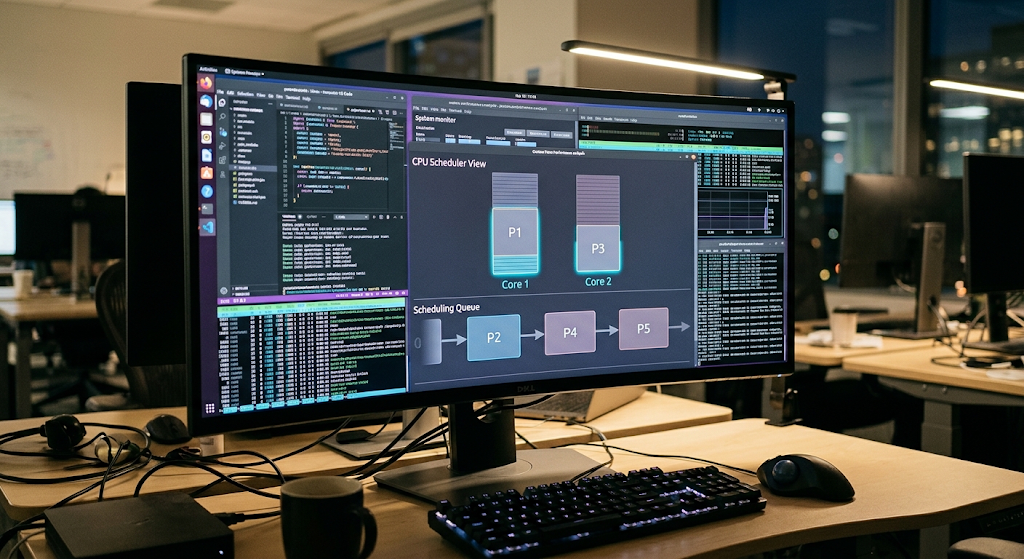
For more information on how operating systems decide on which process to execute on a processor, refer to CPU scheduling. On the system that hosts multiple applications concurrently, CPU scheduling ranks among the most critical system components. A scheduling system which allocates processor time suitably can assist interactive applications in maintaining their responsiveness without disturbing background applications’ progress. Modern operating systems may also take into account factors such as where and when to run a task, using more than one CPU core, processor priority, processor affinity, etc.
Common CPU Scheduling Approaches
Various scheduling techniques have been devised to meet various computing needs. First-Come, First-Served scheduling assigns CPU time in the order of processes’ arrival; it is fairly simple to implement but may lead to longer processes delaying shorter ones. Shortest Job First tries to run the jobs in order of their estimated execution time, which may be hard to predict. Priority scheduling is a scheduling technique which assigns priority to various processes so that more important processes are allocated the processor’s attention first.
Round Robin scheduling provides each process that is ready with a short time slice before it is made ready for another process to run. Modern operating systems employ more complex scheduling techniques, which sometimes are combinations of several of the above concepts for managing interactive applications, background processes, priorities and multi-core processors.
Context Switching
Context switching is used by an operating system to switch from running one process/thread to another. The operating system needs to save the relevant state of the running task before a change, to be able to recover the task later. This information may be the CPU registers, program counter and execution related information. The operating system then loads the saved execution context of the next task, and continues the task execution from the previous context. It may seem that the process has been halted temporarily, but its execution information is still available for the restoration.

Context switching is necessary for multi-tasking and there is overhead in context switching too. A switch allocates some time to save and restore execution information, which are not used to directly execute application work. Huge switching can then result in lower efficiency. Every operating system tries to do a balance between responsiveness and performance: they choose the best scheduling period and they implement the mechanisms that minimize the unnecessary overloading. In modern multi-core systems, multiple processes or threads may be running concurrently on multiple CPU cores, eliminating the need for pure concurrency to be based on rapid switching.
Multitasking in Modern Operating System
Multitasking is a feature of a computer that enables it to handle multiple tasks simultaneously during a given time. A user may be using a browser, listening to music, downloading a file, getting notifications and having security software running in the background. A lot of processes and threads may be involved in these activities. They are coordinated by the operating system, which makes decisions about how to schedule processor time, manage memory, and handle input and output operations and about who can access shared resources.
To do multitasking on a single CPU core, multiple tasks are rapidly switched in and out of CPU memory. The processor performs one and then the other is done by the operating system, and so on. These changes may occur very fast, so that the user feels that these applications run simultaneously with each other. In computers with more than one CPU core, there is a potential for true parallelism if multiple threads can run concurrently on separate cores. However, these activities need to be coordinated carefully as several tasks can still be competing for memory, storage, network resources and other hardware components.
Process Synchronization
When processes or threads must access shared resources, or synchronize their activities, process synchronization is needed. If the tasks are not synchronized, then two tasks might try to modify the same data in almost the same moment, which will result in unpredictable results. This can be referred to as a race condition. For instance, if two threads read the same shared counter and then modify it and write back, one of the modifications could be lost. The final value may consequently not reflect all the operations that have been performed.
Operating systems offer synchronization concepts and mechanisms that can be used to manage access to shared resources. Mutexes, semaphores, locks and other synchronization techniques can be used to guarantee that only the right tasks are accessing critical sections at specific times. A critical section is some portion of the program that accesses shared data or shared resources in a manner that needs controlled coordination. However, careful design is needed to prevent unsynchronized processes from becoming deadlocked. For instance, deadlock can happen when processes are waiting to be granted resources that are already held by other processes.
Inter-Process Communication
Typically, processes run in distinct address spaces; this protects one process from inadvertent or unauthorized manipulation of another process’s memory. But applications frequently must communicate with each other. Communication between different processes (IPC) refers to mechanisms that enable different processes to communicate and coordinate their activities. Pipes, message queues, shared memory, sockets and signals are some common IPC techniques. The mechanism selected will vary depending on the nature of the information being exchanged and the applications involved.
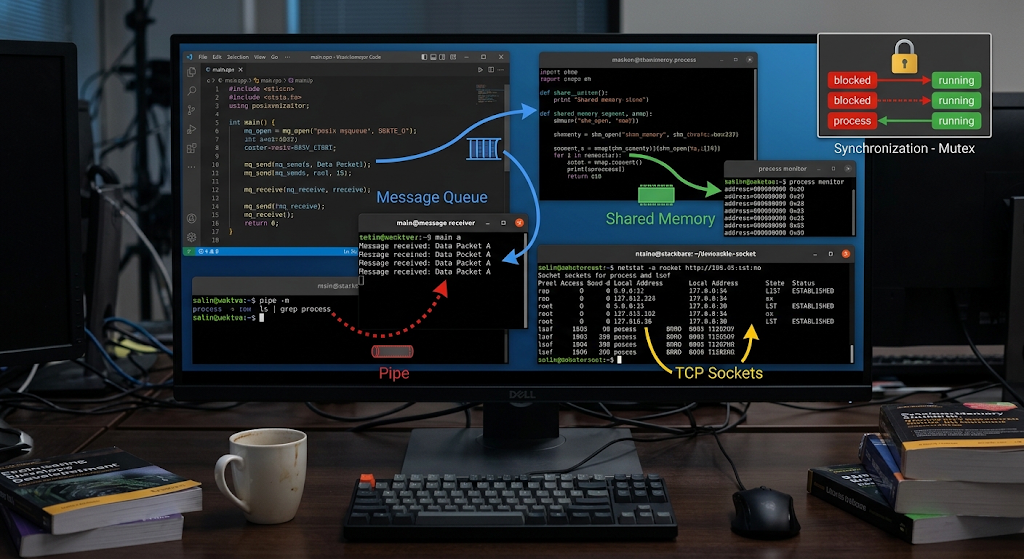
Processes can communicate via pipes, and structured messages can be exchanged between processes via message queues. Shared memory is memory that is allocated to a certain area and can be shared by multiple processes, offering efficient communication but necessitating synchronization to prevent conflicts. Sockets are mainly used to communicate between processes on different computers in a network, but also can be used between programs on the same computer. These mechanisms enable separate processes to cooperate with each other, but also retain the isolation that process-based operating systems offer.
What Happens when a Process is Executed and How it Terminates
When the process gets CPU time, instructions from the process are executed by the processor according to the logic of the program. In the execution of the process, it can execute calculations, access memory, request input/output operations, generate new processes or threads, and interact with other processes. If the process requires a resource that is not available, it can go into a waiting state. The OS then assigns CPU time to another task that is ready. This process alternates between ready, running and waiting until it completes the cycle.
Eventually, a process comes to an end when it has completed its work or when it is intentionally terminated. When the process is terminated, the OS frees up resources allocated to it, including its memory and some OS-managed resources. The operating system may also store data about the process’ termination so that it can figure out how that process is terminated and a parent process or other process can find out. It is important to terminate properly as resources that are not released properly can still not be made available to other applications. The operating systems thus have mechanisms to track and control finished processes and reclaim resources.
The Importance of Process Management.
Today’s computers can run a variety of processes and remain responsive, thanks to effective process management. Processes might otherwise be able to jockey for CPU time in an unpredictable fashion without scheduling. Process isolation also makes it easier to protect other applications from memory errors in one application. If there is no synchronization, then there is the possibility of tasks modifying shared data. If there were no communication mechanisms, then independent processes would be hard to help each other. Process management bundles up these functions together by managing creation, scheduling, execution, synchronization, communication and termination of tasks.
Process management is particularly apparent in the use of a computer in the day to day world. A user interface, network connections, notifications, media playback and background services can all operate on a smartphone simultaneously. Multiple development tools, browsers, office applications, system services, and cloud synchronization can run concurrently on a desktop computer. The operating system organizes all these activities with processes and threads, scheduling, context switching, synchronization and communication. With these features, hardware resources can be shared, but applications still run independently.
Conclusion
Process management is also an essential aspect of contemporary operating systems since it affects the allocation of the computer’s resources to the running programs and the units that execute them. Processes allow us to run programs in a controlled environment and threads enable an application to be divided into smaller units of work to be executed. Process states indicate the location of the tasks in their life cycles and CPU scheduling are responsible for determining which ready tasks get processor time. Context switching enables the OS to switch from one task to another, and thus allows multi-tasking, and synchronization prevents conflicts between tasks that are running concurrently and sharing resources. Inter-process communication is a mechanism for two or more processes to communicate and synchronize their activities.
These mechanisms enable an operating system to coordinate a complex workload without having to manually manage allocation of processors. Process management is organizing several applications to run concurrently every time they run. Awareness of processes, threads, scheduling, context switching, synchronization and communication is thus important to grasp the workings of modern computers and why many applications and background services can run efficiently on an operating system.