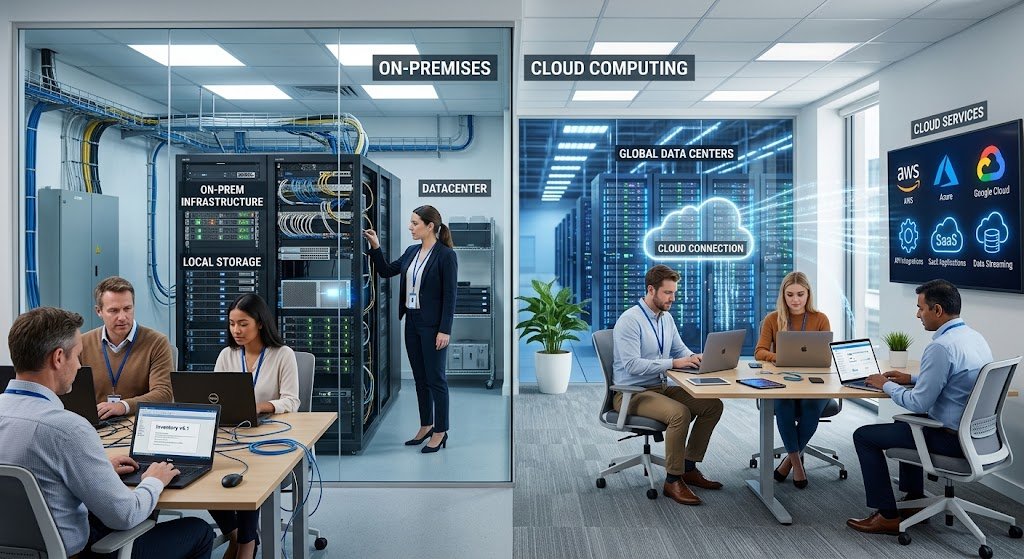
Computing infrastructure is a key enabler of the storage and availability of information, application and system processing, communication with customers and the provision of digital services within businesses. Organizations once used to rely mostly on traditional computing, where hardware and resources were bought, installed, and maintained on their premises – including servers, storage devices, networking gear and more. This can give a direct control of technology resources, but it can also be a huge investment and an ongoing technical management effort.
Cloud computing has provided a new method for obtaining and utilizing computing resources through internet-based services, offering an alternative to traditional methods of on-premise hardware and software. This transition has made the difference between traditional computing and cloud computing more evident for businesses that are taking decisions on computer technology management. Learning more about the differences between the two approaches will enable organizations to make informed decisions on infrastructure, security, scalability, accessibility, maintenance, and long term costs.
What is Traditional Computing?
On-premises computing, also known as traditional computing, is a method that relies on an organization’s direct control or ownership over technology infrastructure to maintain its technology systems. The servers can be housed in a dedicated server room or data center, and the storage systems, network gear, backup devices and security appliances are handled by the organization’s own information technology group and/or a technical partner. Generally, the organisation is responsible for all the activities related to hardware purchases and installation, software installation, operating system management, replacing faulty equipment, installing updates, and physically securing equipment. This model has long been a standard one for companies, schools, government agencies, hospitals and other organizations that need a specific computing environment. While traditional infrastructure can provide significant control of systems and data, the organization needs to also take responsibility for the physical resources, technical maintenance, capacity planning, and costs of ensuring that these resources are functioning.

The traditional characteristic of computing is that it is the hardware upon which it runs that is owned. If a company requires more computing resources, they typically have to buy new servers, storage devices, network gear, and so on, and then set them up. This process can be lengthy as equipment must be chosen, ordered, shipped, installed, set-up and tested in preparation for use by employees or applications. Organizations also need to make estimates of future needs since they might need less hardware than they buy and more hardware than they need to buy may be underused. Over the years hardware becomes outdated and often is required to be replaced even if it is still working. Furthermore, physical infrastructure needs proper space, power, cooling, physical security and backup power. The responsibilities create a significant operating commitment in traditional computing, especially for those that have large and complex technology environments.
What is Cloud Computing?
The cloud computing paradigm replaces the traditional infrastructure paradigm by providing access to computing resources through cloud service providers instead of having to acquire all the physical components needed to power applications. An organization does not need to keep all its servers and storage devices onsite, but can access those resources via a network, usually the Internet or private connection to the data center. These can range from virtual machines and databases, storage, networking, development platforms and full software applications. One of the major aspects of cloud computing is the ability to provision resources when they are needed and resizing them as needs evolve. As a result, cloud computing is appealing to organizations that wish to decrease the amount of physical infrastructure that they operate and to increase their flexibility in the way that computing resources are obtained and managed.
Cloud-based infrastructure refers to the “infrastructure” (meaning the underlying computing resources) provided by cloud environments. Rather than having to build and maintain their own physical facilities, cloud providers have massive data centers with servers, storage systems, networking hardware and other technologies. Part of these resources can be accessed by customers based on their needs and their service arrangements. Virtualization is also a critical technology of many cloud solutions as it allows the use of a single physical machine to run multiple virtual machines. This can give a customer more flexibility with infrastructure and make it easier to provision resources because a new server does not have to be installed physically in the customer’s building. Cloud infrastructure thus not only moves computing infrastructure away from the office or Data Center, but also alters how organizations obtain, manage and expand technology resources.

One obvious distinction between the two is that with traditional computing, hardware is owned, while in the cloud computing model, hardware is not. Typically, the organization buys or leases physical servers and associated hardware, and continues to manage them for the duration of their useful life. This will provide the organisation with a high level of direct control over the infrastructure, but this comes with a high level of responsibility. IT requires to keep an eye on equipment, replace any broken parts, maintain operating systems, manage cooling and power needs as well as plan for hardware upgrades. Clouds often involve a significant amount of the physical hardware being owned and maintained by the cloud provider. Virtual resources, services and management interfaces are the resources with which customers typically engage, not individual physical resources. Depending on the cloud service model adopted, this frees up time for internal IT teams to focus on applications, data, users, and business requirements instead of on particular physical infrastructure tasks.
Maintenance and Updates
The two approaches also have widely varying maintenance needs. Traditional computing environment: An organization keeps its physical and software systems. Software maintenance can include compatibility testing, application updates, security patches, and operating system updates, while hardware failures can necessitate problem diagnosis and replacement. Depending on the planned maintenance, it may be necessary to interrupt services sometimes if systems cannot be updated during service.
Cloud providers are responsible for the infrastructure that underlies the service, in many cases many servers, networking systems, facilities and other parts. But, this does not imply that customers are not responsible for any maintenance. Some customers might also need to handle applications, configurations, access permissions, data and software updates, depending on the service being used. The only major difference is that, in cloud computing, the customer no longer has to bear the bulk of the responsibility for the underlying physical infrastructure, but the service provider does.
Storing and managing data.
Another big difference between traditional and cloud computing is storage. Most organizations that rely on traditional infrastructure, tend to buy physical storage systems based on their anticipated data needs. As the volume of business information increases, it may eventually become necessary to acquire additional storage arrays, servers, backup equipment or disks. Accurate prediction of future storage requirements could thus be difficult making planning of capacity a challenge. Cloud computing offers a more flexible solution as businesses can often expand and shrink storage space through cloud-based services without having to buy and set up their own storage devices.
Depending on the cloud storage service, it can also feature multiple-location access, disaster recovery, data backup and sync. But a company still must have a good data-management policy since it does not mean that the risks of accidentally deleting data, unauthorized access, lack of configuration, or backup policy are eliminated when data is moved to the cloud.
Scalability and Performance
One of the greatest benefits of cloud computing over traditional infrastructure is scalability. When it comes to on-premises systems, scaling up typically means buying more hardware, setting it up, installing it and configuring it with the current systems. It can take weeks or longer depending on the procurement process and technical nature. Depending on how quickly you need the computing resources, cloud environments may be able to offer it to you in a much shorter period of time, as the necessary physical infrastructure is already in place in the provider’s data center. If there is a growing demand for a specific organization, they might be able to add more virtual servers, processing power, storage or other resources without purchasing hardware in their own premises. Likewise, if demand drops, resources may be lowered, thus not allowing organizations to maintain capacity that is not needed most of the time. Websites, applications, online services, and businesses that have varying workloads throughout the year may find this elasticity very beneficial.
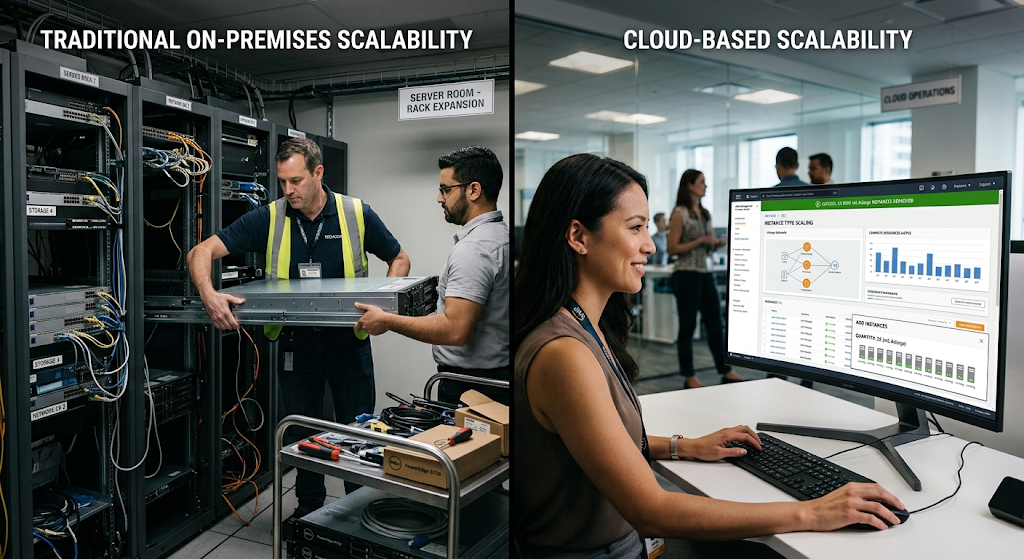
Traditional infrastructure may be a viable option if workloads are predictable and an organization can afford capacity to fulfill its needs. If a company is running the same applications on a consistent level, they might be able to enjoy stable performance without having to change applications on a regular basis, if dedicated hardware is used. Predicting future growth, however, can be challenging. Rapid surge in demand can cause a lack of applications or service disruption for an organization that lacks adequate physical capacity, until more hardware can be acquired and installed. Cloud computing does alleviate these capacity-planning concerns, however, by providing extra resources via software provisioning. This does not mean peak performance, or that it removes the necessity of careful planning, but can provide organizations with a significantly greater degree of flexibility when demand fluctuates. Being able to rapidly scale up or down to meet dynamic workloads may be a critical consideration for businesses that are expanding and for digital services.
Security and Control
Security in traditional computing and in cloud computing is important, but the responsibility is split differently. With traditional infrastructure, organizations have direct control over physical servers, networking equipment, and the facilities where their systems are located. They can set up physical controls, networking policies, security technologies and internal policies as they need them. But in addition to the control comes responsibility for the organization to effectively implement and maintain those protections.
Cloud providers generally have a large data center where there are physical and technical security measures in place, but customers’ responsibility is for the things they can control in the environment. It may be accounts, passwords, application configurations, data access, and more, resources that can be managed by customers. Security in the cloud is not a “no-touch” situation, however, but rather one where the provider should be responsible for a portion. Rather, organizations must be aware of the responsibilities that they have shared with the services they’ve chosen and ensure their environments are set up accordingly.
Accessibility and Remote Work.
Cloud computing can also be of significant benefit when it comes to accessibility. The traditional designs are based on the internal network and physical locations of an organisation. Those employees and others who are not in those locations may need virtual private networks, remote desktop tools, special configurations, or other tools to access internal applications or files. Cloud services typically aim to provide computing resources to the network and enable users to use applications and data regardless of their location.
These can help in remote working and inter-office collaboration and can be used by employees who travel frequently. But this access should always be weighed against appropriate security measures. Organizations have to take great care to manage user identities, authentication, permissions, devices and network access. While convenient access through cloud computing may make remote access easier, it should not cause an unsecured access to sensitive information or business systems.
Cost of Cloud Computing vs. Traditional Computing
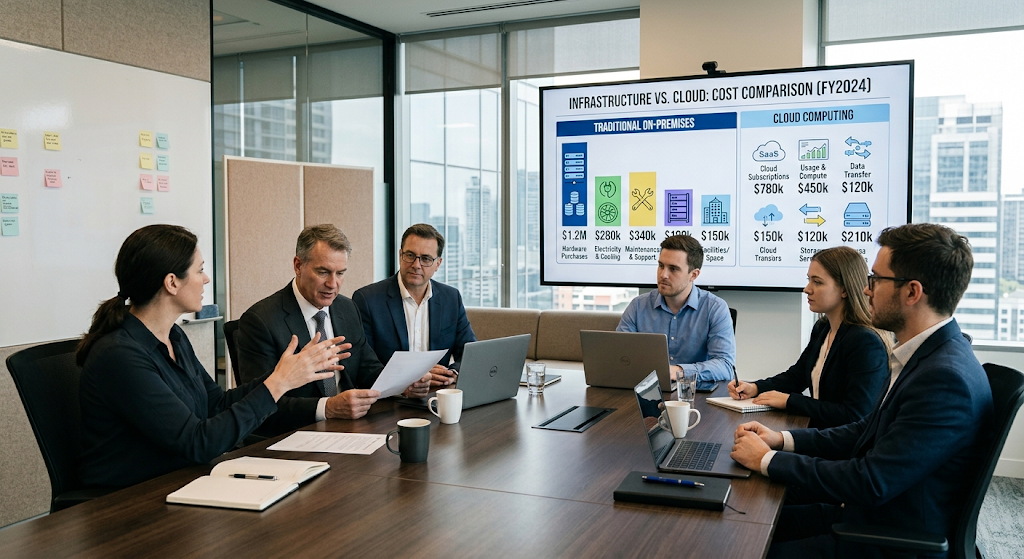
One of the top factors that organizations usually consider when they compare between cloud computing and traditional computing is cost. For traditional infrastructure, there is often a heavy capital cost for the initial investment as organizations have to buy servers, storage devices, network gear, backup devices, software licenses, and facility setup. Electricity, cooling, physical security, maintenance contracts, replacement equipment and technical staff costs can also be extra expenses. These costs can be warranted if an organization requires a dedicated infrastructure and expects to use it for a number of years. The overall effect on financial models is that the organization can pay the provider for the services and resources based on the provider’s pricing model. Customers might be charged for storage, computing power, databases, software licensing or other services, depending on the service. This can lessen the requirement for enterprise large upfront hardware investments, but regular cloud bills can be significant if resources are not managed wisely or workloads increase greatly.
The total cost of cloud computing should not be compared to the one-time price of a physical server, however, to just the monthly cost on the cloud bill. When evaluating the two environments, you want to go through the entire life cycle cost. The costs of traditional infrastructure are hardware depreciation, facility operations, electricity, cooling, maintenance, backups, upgrades, and personnel. Some of these can be offloaded onto cloud computing, but it will also bring in recurring service costs, data transfer fees, storage costs, software subscriptions and potentially other provider-specific fees. Other things to take into account are the cost of migration, employee training, cloud management tools and security enhancements. The most cost effective solution will be based on workloads, usage, already in place infrastructure, staffing, compliance requirements and business objectives. An analysis of total cost of ownership should therefore look at all costs and not just one category of cost.
Flexibility of Cloud Computing vs. Traditional Computing
Cloud computing can also help organizations become more flexible because the technology can be accessed and customized without dedicating the same amount of time to physical infrastructure planning as in traditional computing environments. A business that is going to launch a new digital service might not require the purchase of servers and the setup of a dedicated facility to provision the computing resources. As projects grow, development teams can build test environments, deploy applications, try out various services, and scale up capacity.
These activities also can be accommodated in traditional environments, though extra physical resources may need to be purchased and infrastructure prepared before the developers can be accommodated. The cloud model can thus help to cut down on some technology deployment cycles, and help businesses react to shifting market needs faster. This is beneficial especially for businesses with the technology needs that are constantly changing or experiencing fluctuating workloads.
Advantages and Disadvantages of Traditional Computing
Traditional computing is still useful because it offers a direct control of the physical infrastructure, and can be appropriate for workloads with predictable requirements. On-premises systems are preferred in businesses with special hardware requirements, internal infrastructure policies, prior investments in physical hardware, or special requirements that justify the use of a dedicated environment. Organizations can also create their infrastructure as per their own specifications and have complete control over the placement of devices.
But this requires a lot of accountability. It is necessary to buy and replace hardware, and maintain facilities, secure systems and plan capacity. Initial investment may be substantial, as can be the time for building infrastructure. In contrast to traditional computing, it provides control and independence, and can be more complex to operate and scale.
Advantages and Disadvantages of Cloud computing
The advantages of cloud computing are many, such as the flexibility of the resources, the fact that you don’t need to be reliant on the customer hardware, remote access, quick provisioning and being able to scale resources as needed. It can also enable organizations to use high-tech infrastructure without having to build and maintain their own big data centers. For startups and growing businesses, distributed teams, organizations with evolving workloads, and educational institutions, these benefits can prove invaluable.
Meanwhile, there are factors to not overlook when considering cloud computing. The relationship between organizations and the providers (and the connectivity they use) becomes transactional, and resources can be costlier if there is no careful monitoring. Moving workloads between providers can also be harder as a result of vendor lock-in. The need for security and compliance is still relevant, and there is a need for appropriate policies across accounts, data, applications and access.
Traditional Computing vs Cloud Computing: Which is Better?
There is no definitive answer about the advantages of cloud computing versus traditional computing as it depends on the technical needs, financial resources, security requirements, workload trends and long-term plans of an organization. For organizations that need to manage their own hardware deployment, with stable workloads, existing large infrastructure investments, or the need for a physical environment, traditional infrastructure can make sense.
Cloud computing might be more appealing to businesses that want flexibility, faster scalability, remote access and less liability for physical hardware. Many organizations also favor a hybrid strategy to support some workloads on premises and others in the cloud. Such a method can give a balance between control and flexibility in the cloud. The best decision will be based on examining each workload instead of taking a blanket approach to the infrastructure model for each system.
Conclusion
This comparison is not unique to cloud computing, but is indicative of a trend in how organizations are procuring and operating technology. In the traditional computing environment, a significant amount of computing is dependent on the physical hardware that is owned or directly controlled by the organization, that is, where the organization pays for the equipment, facilities, maintenance, security and capacity planning. Cloud Computing shifts the underlying infrastructure to provision and operated by the service provider, and provides customers access to compute resources via services that are typically provisioned and scaled more flexibly.
Cloud systems can have benefits in areas of accessibility, scalability, deployment speed and infrastructure management, and traditional systems can have benefits in areas of direct control, and may make sense for certain specialized or predictable workloads. It’s important for organizations to consider the expense, liability, security concerns, performance requirements, and future growth for their unique workloads, instead of treating one model as the “best”. With its emphasis on flexibility and digital services, cloud computing is expected to play a crucial role in the future of technology infrastructure for businesses.