Introduction
Business accounting software has evolved a great deal from the days of paper records and software that was installed locally, to digital systems that can be accessed from just about anywhere. Nowadays, one of the most critical decisions that a business would have to make in choosing accounting technology is whether to go with cloud accounting software or a traditional desktop accounting system. While both can be used to record transactions, reconcile accounts, manage invoices and report finances; they work in completely different ways. Cloud based accounting involves financial records and accounting software being stored and processed via internet-based systems while desktop accounting typically involves the software and financial data being stored on a particular computer or a local network. It is crucial to know these differences because having the proper system will make it easier to collaborate, secure data, manage finances, and make things more efficient, while the wrong choice will cause needless financial costs and operational challenges.
Choosing cloud or desktop accounting isn’t an issue of modern versus traditional technology; it’s an issue of what the company prefers. Accessibility, data storage, data security and backup, data collaboration, software updates, pricing, integrations, Internet dependency, and people accessing financial information are all important considerations for businesses. One accountant in one office for a small business might be quite different to a small business with employees in multiple workplaces. Similarly, a company that has poor internet connections might contemplate cloud accounting differently than one that has quick, reliable internet connections. Business owners can evaluate and make an informed decision based on the pros and cons of strategies, their operational requirements, budget, and long-term growth plans.
What is Cloud Accounting?
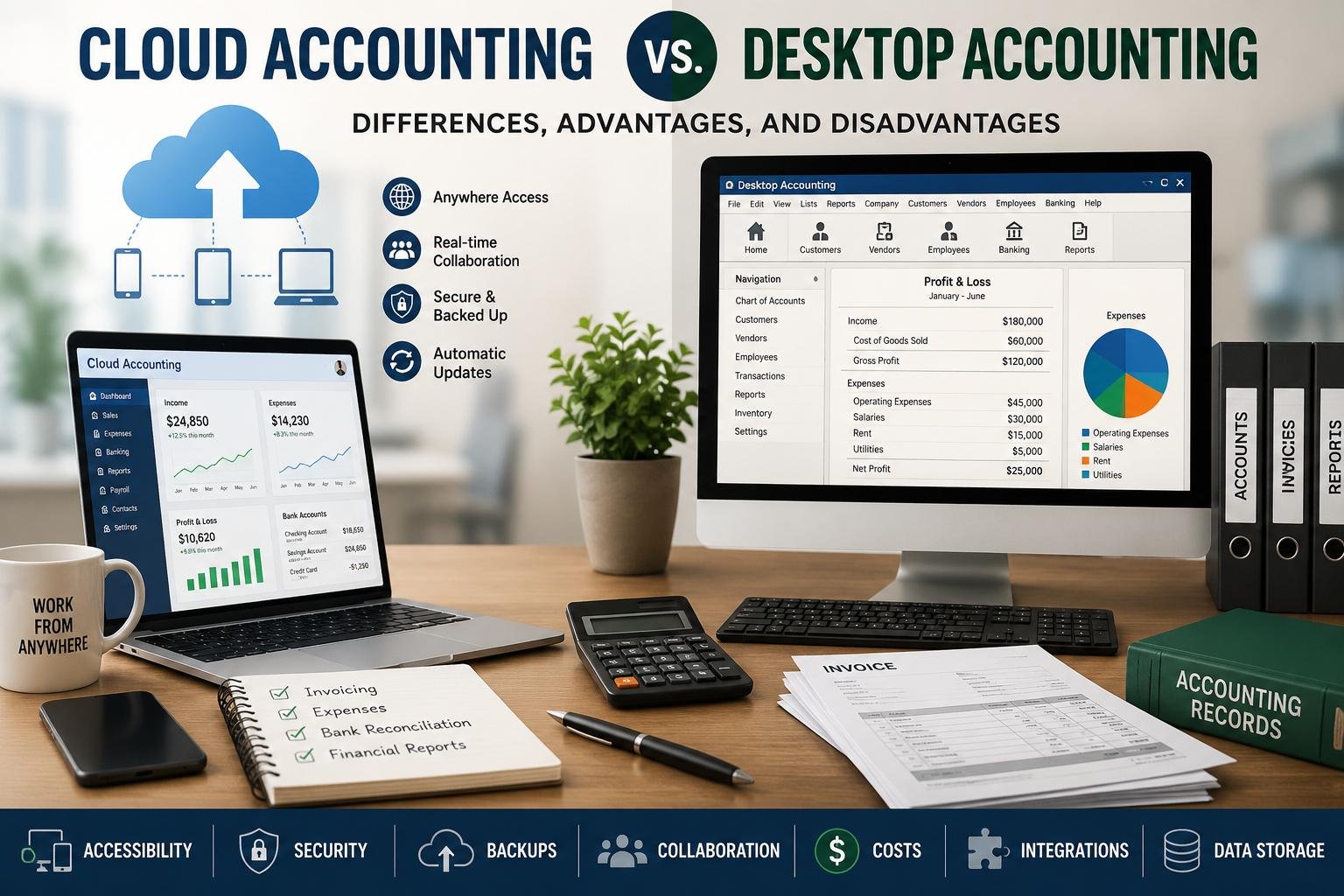
Cloud accounting is accounting software and services that are accessed via the internet, and not completely on a single computer. Unlike the traditional accounting software system, which is only held on a local device, the financial information of the business is normally kept on offline servers by the software supplier. Users can log in to the system using their supported device(s) and will be able to view their accounting information as per their access rights. This way, companies can use the financial records without having to attach themselves to a specific Office PC.
One of the key benefits of cloud accounting is flexibility. The financial information of a business owner may be viewed in an office, at home, on trips, or in another place that provides Internet access. No need to constantly move files from one computer to another for employees to use the same accounting system. Cloud systems can have a variety of tools, such as invoicing, expense management, bank feeds, payroll, reporting, payment processing, inventory management, and integration with other business applications, depending on the provider and subscription plan. While cloud accounting comes with many advantages, there are also a number of factors to consider including the dependency on internet connections, costs, provider reliability, access to accounts and understanding of how the provider protects customer information.
What is Desktop Accounting
Desktop accounting involves software that’s installed on a computer or local business network. Financial records are not usually maintained mostly on the provider’s cloud platform, but in the device or on an organization’s server. The user generally logs in to the accounting program on the computers that it has been installed on. Some desktop systems can support more than one user on a local network, but they are typically less accessible than system via a cloud-based system.
The use of desktop accounting has been quite popular, as the companies can exert a significant amount of control over the accounting environment. After users buy or license the software and set up the software on their machines, they may be able to use the software without the need for continuous Internet connections. This may be useful for companies that have inconsistent Internet access. Specialized accounting features that are suitable for specific industries or workflows can also be provided on desktop systems. But businesses generally have to deal with all the aspects of maintenance as well, such as backup, updates, managing hardware, and safeguarding financial data stored locally.
Accessibility is one of the Key Factors.
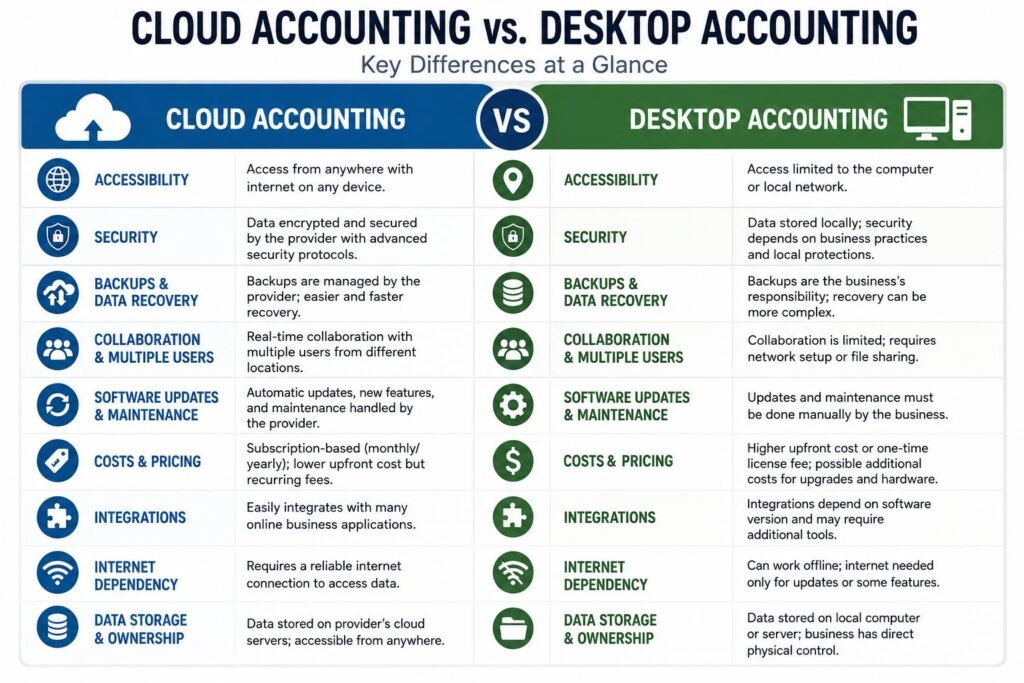
One of the most obvious distinctions between cloud and desktop accounting is the ease of access. Cloud accounting is built around remote working. Typically, the authorized user can log into the system with a computer or mobile device connected to the internet. This simplifies working with financial information from various places for business owners, accountants, managers and employees. For instance, if a business owner is away from the office on a business trip, he or she can check on sales, expenses, invoices and reports without coming back.
The physical location of the computer on which the software and data are installed are more likely to affect desktop accounting. Some desktop systems may be available for remote access with other technologies, but this may require more configuration and/or technical assistance. This can make it more difficult to work remotely. This limitation might not be important in a business where the accounting team is mainly located in a single business office. Companies with multiple locations, remote accountants, owners who travel often, etc. however, may find the cloud accounting option to be more convenient.
Security and Data Protection
This is a critical issue, whether a business uses any type of accounting system. The idea of cloud accounting doesn’t necessarily imply that data is automatically insecure since it’s saved online. Reliable providers generally employ different kinds of security protocols including encryption, authentication protocols, access limits, monitoring and other protections to maintain their customer data. But, businesses must still ensure that they have robust passwords, use MFA if available, restrict employee access and look out for suspicious activity on their accounts. Security services provided by a cloud vendor will not mitigate the lack of internal security.
When a business has desktop accounting, it has more direct control over the location of its accounting files but it also has more responsibility. When financial data is kept on an office computer, the company should take steps to prevent the computer from being affected by malware or unauthorized access, hardware failure, theft, or accidental damage. Having proper access control in place and being aware of sensitive financial files that are easily copied and exposed is crucial for businesses. Thus, both models cannot be regarded as inherently secure. The key concern will be the security measures implemented by the business and the ability of the selected system to effectively and efficiently incorporate those security measures.
Backups and Data Recovery
The other key distinctions between the two methods are backups. The burden of making reliable backups is typically more on the business with desktop accounting. You might require copying files to external drives, network storage or other secure location regularly as part of accounting files. In the event that a company fails to back up data and the computer fails, there is the potential that recent transactions may be lost. So to have a good desktop backup strategy, you need discipline, secure storage, lots of tests, and preferably multiple locations.
Typically, cloud accounting service providers take care of a lot of the base and back up procedure for their customers. This can decrease the manual work for the enterprise. Businesses should not take it for granted however that provider managed backups eliminate all data-recovery issues. They should know the provider’s backup policies, backup retention / backup recovery / backup terms of service. It is also advisable to keep proper records of the business and have other export/back-up measures in place as required. While cloud accounting often simplifies the recovery process for businesses in certain scenarios, it is crucial that businesses are aware of the measures in place to protect their data.
Collaboration and Multiple Users
In general, cloud accounting is much better suited for cases where multiple users must access the same accounting data. Authorized users may be able to collaborate at a single centralized system as opposed to emailing accounting files or moving files between office computers. An accountant can make the record of transactions, a business owner can check upon the reports, for instance, without the need for everybody to be physically present. No single user may also have different permission levels that allow them to view and/or modify certain aspects of the business.
While there is nothing to stop Desktop accounting being used by multiple users, it may be more complex when the software is installed to a local network. The businesses will require taking care of the shared files, network permission, user licenses and technical configurations. There are additional tools that may be needed for remote collaboration. This may not be a problem in a small company, where there are only one or two accounting users. But as a business grows, its value to having all information accessible online can become greater.
The Software is Updated and Maintained.
Typically, the customer has to undertake less technical maintenance with cloud accounting. Upgrades, fixes, security and new features can be released via the software provider’s web site. Typically, users need to install only one update at a time, on one computer. This can save time and maintain the business on the latest version of their accounting system.
When using desktop accounting, more involvement in software maintenance is often necessary. Patches and updates may be required for the software, including business software, to ensure it is compatible with the operating system and that it interfaces with other software properly. Depending on the product, there could be extra expenses involved with the major improvements. The upside, however, is that businesses could have more control over when they’re willing to switch their accounting setting. This level of control may be preferred by organizations reliant on legacy software that requires specific software.
Costs and Pricing
Pricing is a major factor when deciding which accounting system to use, be it cloud or desktop. Many of the cloud accounting services are available in subscription packages, where the business has to pay monthly or yearly subscription fee to use this software. This can help make the initial adoption relatively cost-effective, as they may not have to make a large initial payment in software costs or buy expensive hardware. But subscription fees are recurring, and adding users, features, transactions, payroll services, and more adds to the cost.
Accounting softwares for desktop can cost more initially, or it can be a one-time license fee, depending on the options available; there is a wide range of pricing in accounting desktop softwares. Other expenses that businesses may have to pay include upgrades, technical support, server equipment, maintenance, security and backup systems. As a result, it can be misleading to look at just the price you pay when buying the car. The businesses should take into consideration the whole cost of ownership, from software to hardware, maintenance to backups, support to training, and upgrades. In the case of a cloud solution, we might be better suited for a growing business, and a desktop solution might be more cost-effective for an organization if it has consistent needs and established infrastructure.
Business Connectivity and Integrations
It is hardly ever the case that companies today work without accounting software. They can depend on payment processors, banking systems, payroll software, customer relationship management software, inventory software, e-commerce software, expense management software, and reporting software. Cloud accounting systems are frequently more focused on integrations due to the fact that they are accountable to other online services. These links can help decrease redundant data entry and enable information to flow more smoothly between systems, if supported.
Compatibility with integrations may also be a factor for desktop accounting software, subject to the software, operating system, version, and connectors. Additional configuration and/or third party applications might be needed for some integration. Therefore business organizations highly reliant on automation should consider the integrations offered before investing in a system. Most importantly, it’s not just the number of integrations a platform offers, but whether or not it can reliably integrate with the applications used by the business.
Data Storage and Ownership
Data storage is the main aspect that differentiates cloud and desktop accounting. The information for accounting is typically stored in cloud resources that are hardware resources managed and hosted by the cloud provider. This eliminates the need for businesses to keep the main accounting database on their office computer. It also could facilitate access to information on various devices.
Usually, the accounting files are kept on the desktop systems or on an organization’s internal network. This provides the business with more direct control over its storage space, but also makes it more responsible for ensuring data is protected. Businesses should be aware of the location of the accounting data, which has access to it, how it is backed up and how it can be exported should the company move to new software. It’s important to note that data ownership, retention, portability and access will be examined closely before choosing an accounting solution, whether it’s a technology model or the data involved.
The Advantages and Disadvantages of Cloud Accounting
Advantages of Cloud Accounting
Many companies love the flexibility and collaboration that cloud accounting brings can enjoy several benefits. Authorized users can access the system remotely, and centralize data can minimize the requirement for manual transfer of accounting files. Automatic updates can help lower maintenance and provider-managed infrastructure can help with technical administration and backup. Cloud platforms are also often integrated with other online business tools that can help automate and enhance workflow efficiency.
Disadvantages of Cloud Accounting
The drawbacks are that it requires an internet connection, requires a subscription and is dependent on an outside place. Businesses must rely on the provider to have a reliable infrastructure and to keep financial information secure. They also need to think about how they will react if the provider changes the pricing, discontinues a feature, has an outage or changes the terms. While cloud accounting may be very convenient, businesses must be mindful of the reliability of the services, security measures of the service being used, data export options, and customer support before choosing a cloud service provider.
Advantages of Desktop Accounting
Businesses can have more direct access to their software and data environment on a desktop system. Users can still work even without an internet connection, which can be crucial in places with weak or intermittent internet connections. For companies, the desktop option may be more appealing due to its integration with existing processes or for handling specific accounting tasks. In the case of an organization’s staffing complement has remained consistent over time, and most activities take place in a single facility, a desktop system may be suitable.
Disadvantages of Desktop Accounting
The downside is that they are less accessible over the distance, have more backup responsibilities, and require more hands-on maintenance. If the proper measures are not taken, local storage of accounting data can be compromised due to a hardware failure, theft, malware, or accidental data deletion. Another drawback of working from different locations is that it can sometimes be less convenient to collaborate. The ongoing maintenance and administration of software applications, hardware compatibility, security software and backup systems can be burdensome for the business, especially in the long term.
Factors to Consider when Deciding between Cloud Accounting and Desktop Accounting
There is no single solution since it will vary with the situation of the organization. Cloud accounting might be better suited to companies with mobile workers, multiple sites, regular collaboration or heavy integration requirements, or desire mobile access. It’s also appealing to expanding companies that wish to steer clear of the accountancy servers and manual software application updates.
If a business has a consistent accounting model, a single office, needs to work offline or wants to manage the accounting environment on their technology space, then desktop accounting may be most appropriate. It is also effective when a company has an existing infrastructure and existing employees that are already trained on the system. That should be based on the business needs and not only because it’s the latest technology.
Key Factors to Consider Before Choosing
Businesses must evaluate internet reliability, number of users, remote-work needs, budget, security features, backup plans, and reporting and integration needs before choosing cloud or desktop accounting. They should also take into account the amount of technical support they want to deal with themselves. A business needs to consider if staff require being able to access financial records simultaneously, if they work out of the office on a regular basis, and if management have to have access to financial information when travelling.
The provider or software vendor should also be thoroughly investigated by business. Questions that are important are; How is the data protected, how backups are dealt with, how is technical problem solved quickly, how can data be exported and what happens after the subscription ends and what is done if the price changes in the future. Prototyping a system prior to deployment can also be useful to employees to see if the interface, features, reports and workflows are appropriate for everyday use. The best accounting technology is simply the technology that enables the management of finances correctly without any unnecessary complexity in the operations.
Conclusion
While both cloud and desktop accounting systems offer great solutions for businesses’ financial data management needs, they offer different solutions in terms of accessibility, storage, security, backups, collaboration, maintenance, price, and integrations. Cloud accounting tends to offer more flexibility, remote collaboration options, centralized access, and convenient updates, whereas desktop accounting allows businesses to work offline, maintain direct local control, and have a familiarity with the software.
Businesses should not select an accounting system because it is popular, inexpensive or because of the increasing popularity of a technology. Instead, they should evaluate how their employees work, the location of their financial information, the level of technical responsibility that they can handle, and what they may need in the future as their business expands. Cloud accounting can offer flexibility and connectivity to many modern businesses that are becoming more and more digital. Others may continue to find desktop accounting to be a feasible option. Considering the access, security, backups, collaboration, updates, costs, integrations, and storage of data can help business owners select an accounting technology that meets their current needs and will help them in their long-term financial management objectives.
Get more well researched information about Cloud accounting vs. desktop accounting here.