Programming is the act of writing programs so that they can be followed by a computer to perform a particular task, solve a problem, process information or control a digital system. While Python, Java, JavaScript, C++ and Java have varying syntax and properties, they share many core principles. If someone starts this and has understood the concepts, then he can easily transfer his knowledge from one programming language to another as the concepts are very similar across languages.
Programming is not just about copying and pasting examples. It includes the skills to divide problems into smaller steps, to represent information, to make decisions, to repeat operations, to organise instructions and to react to unexpected events. These concepts can be applied to the creation of a wide range of software applications, including websites, apps, games, automation tools, data systems, and more.

How Does Programming Relate to the Real World
It is significant to learn the basic concepts of programming for programming languages are means of expressing logical solutions. A novice programming student might have trouble understanding why certain programming structures are used if he concentrates solely on the syntax of one language. If you know the concepts of variables, data types, operators, conditions, loops, and functions, you can identify them in other programming languages.
The following concepts also promote structured thinking, since they force programmers to think about what information they require, what actions they should take and what they are supposed to produce. For the students who wish to achieve a general knowledge of programming, rather than a mastery of one specific programming language, it may be helpful to study Programming Fundamentals.
Variables and Constants
Programs must store and manipulate information and for this reason, variables are among the simplest program concepts. It can be viewed as a named storage area to contain a value during the execution of a program. For instance, one program may have one variable that holds a student’s name, another that holds his age, a third his examination score, and a fourth his account balance. A variable’s value might change during various operations in a program. The variable for the total price of multiple products may vary depending upon the number added, such as the total price of the vehicle and accessories. The flexibility of a program is due to the use of variables, which enable the same instructions to be used with various values rather than the need to program the instructions one by one for each possible value. Thus, the knowledge of how variables are created, assigned, modified and retrieved is vital to nearly all programming tasks.
The ability to store data is what makes constants like variables. Constants are used to store data that doesn’t need to change during a specific program or portion of a program. They could be a maximum number, a mathematical constant, a conversion factor, or a tax rate. Constant values may be used to help make programs easier to understand; a meaningful name can be used repeatedly in a program to represent an unnamed constant. Constants can also prevent unintentional changes to values that are to stay constant. The syntax of declaring a constant will vary according to the programming language used – and some are stricter than others regarding the requirement of constant values. It is important to note for beginners that variables are used to store information that can change from one execution of the program to the next, and constants are used to store information that the program should not change.

Understanding Data Types
Data types specify the type of data that a variable or value is. Programming languages have categories for data like integers, floating point numbers, strings, characters, and Booleans, because different data types and numbers require different sorts of operations. An integer can hold the value of a whole number (10 or 250); a floating-point value can hold the value of a number that has a decimal part (12.5). A string contains a string of characters that may be used to represent text, like a name of a person or a sentence, whereas a Boolean typically represents one of two logical states, like true or false. Other programming languages offer more complicated types for dates, collections, objects and more. Knowledge of data types enables programmers to select the best data storage methods and avoid errors resulting from misusing data types.
Data types are especially significant when programs are used to make calculations or put together various pieces of information. Examples: You can add two numbers together, adding a number to a sentence requires conversion or may be an error. A programmer might need to change data between different types of data, such as converting text entered by a user into a number to do an arithmetic operation. Certain programming languages make some conversions automatically, others require the programmer to explicitly perform the conversions. A beginner should thus not only know the names of the common data types but also the particular way in which the data types are used in the language he/she is learning. Knowing about data types is essential to understanding code, and it can make coding easier because it can help programmers see that they have a problem before it gets harder.
Operators and Expressions
Symbols or special words that instruct a program to take some action with one or more values. Arithmetic operators are used for arithmetic operations: Addition, Subtraction, Multiplication, Division, Remainder. To compare values and find relationships between values, such as whether one value is greater than another or if it is smaller than another, comparison operators are used. Logical operators can be used to combine and/or modify conditions, enabling more complex rules. The assigning operators are used to assign values to the variables or to the values that are already assigned in the variables. Operators enable programs to perform operations on data and make decisions using computations and comparisons. It is important to learn the operations because even simple programs rely on expressions that involve some sort of combination of values, variables, and operation.
Expressions are made up of values, variables and operators that yield a value. For instance, a program could sum together multiple scores and divide them by the number of scores in order to determine a student’s average. A condition may be a comparison between a person’s age and the minimum required age and return a boolean result. Beginners should also understand the order of operations (also called precedence), which is the sequence that parts of an expression are evaluated. Parentheses may be used to indicate the need for an operation to be performed in a specific order, or to make a statement easier to understand. Proper knowledge of the expressions helps the programmer to be able to predict what his/her code will do and errors that may occur in calculation and condition understanding will be reduced.
Conditional Statements
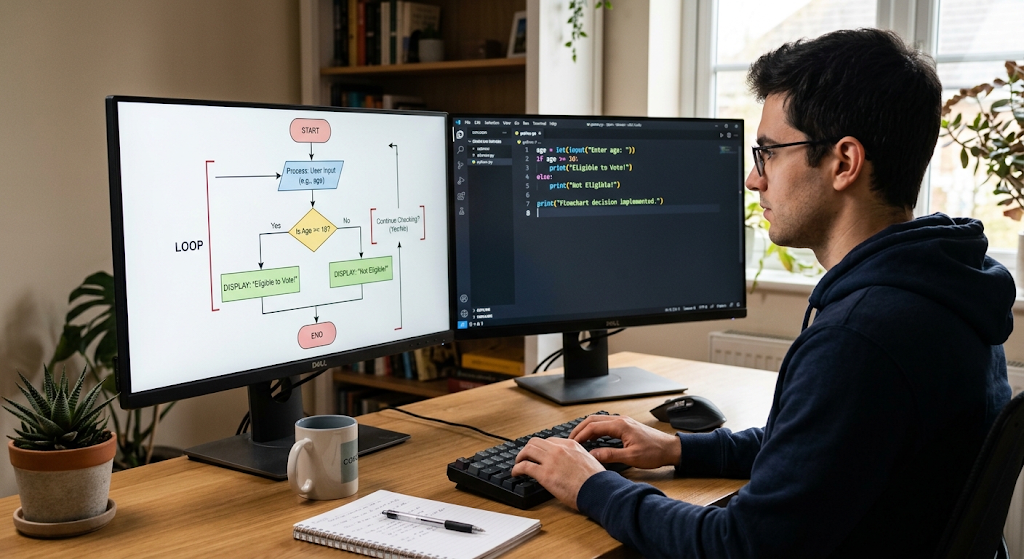
During a program, program decisions may be required based upon information at hand. Conditional statements are used to instruct a computer to execute various instructions based on a given condition. The most frequently used structure is the if statement that runs a block of code if a condition is true. There are also other languages that allow for the alternative case and further conditions, such as else-if. For instance, a program might determine if the student’s score is below a certain mark and output a message if it is or if it is not. Conditional statements are useful since they enable a program to react to varying information instead of performing the same series of instructions each time.
Some more complex programs may have a number of conditions that are interconnected. Logical operators may be used to provide conditions in combinations. A program can use logical operators to determine if more than one condition is true or if one or more conditions are true. For instance, an application may be able to run only if the user has provided valid data and the permissions are in his favor. Programmers should try to make their conditions as clear and logically correct as possible, otherwise, the condition may be complicated, which makes the program hard to understand and maintain. Getting started can be done by trying to make decisions in code, for example, whether a number is positive or not, whether a word in a password is a vowel or not, or what message to show depending on the input of a user.
Loops and Repetition
Loops enable programmers to execute a group of instructions again and again without having to type the instructions over and over again. This is helpful when a job is to be done more than once. For instance, a program could, for example, print all the items in a list, read in thousands of records, add up values for a group of data, or prompt a user for more input until they enter something that is acceptable. There are different kinds of loops such as for loop and while loop, depending on the programming language used. A for loop can be useful in situations where the programmer is aware of the collection or the range of values to be processed, and a while loop can be useful if the repetition should continue while a certain condition is true. Loops are important to grasp since almost every real-world programming problem contains a loop.
It is important for beginners to be aware of the conditions that control loops since a loop that is not designed properly can produce unexpected results. A loop could terminate prematurely, miss some information, or not terminate if the condition that controls it is never false. Programmers must thus know how a loop’s variables change, and when the loop should end. In some languages, there are also statements that enable a programmer to pass out of the rest of the current iteration or out of the loop altogether. These features can be helpful, but need to be used judiciously to ensure that the program remains comprehensible. The real essence of learning loops is the realization of repetitive patterns and the ability to express them in an efficient way, minimizing the duplication of code and facilitating program modification.
The Behavior of Functions and Code Reuse
Functions are blocks of code that can be used for a specific purpose. A programmer can write the instructions just once, and call the function as many times as the task is required. Functions can take inputs (also known as parameters or arguments) and can return an output when they are done. For instance, there may be a function to compute the order’s total price, one to verify information entered by the user and a function to format a date. Dividing a program into separate functions allows the overall structure to be more easily understood as each function can be responsible for a specific task. Functions also benefit testers and maintainers because they can test and maintain a single piece of logic without having to look at a whole application.
Usually good functions have well-defined purposes and meaningful names. Functions that do too much can be hard to understand and reuse. As a beginner, it is important to recognize that some operations are repeated, and determine if they can be broken down into functions. The concept of scope is also introduced in functions, which refers to the accessibility of variables in programs. The value of a variable that is declared within a function can be different from what it is outside the function, depending on language and variable type. An understanding of parameters, return values and scope allows programmers to write code that is organized rather than relying on a great deal of shared information. These principles can be applied to procedural, object-oriented and other programming styles.
Arrays and Collections
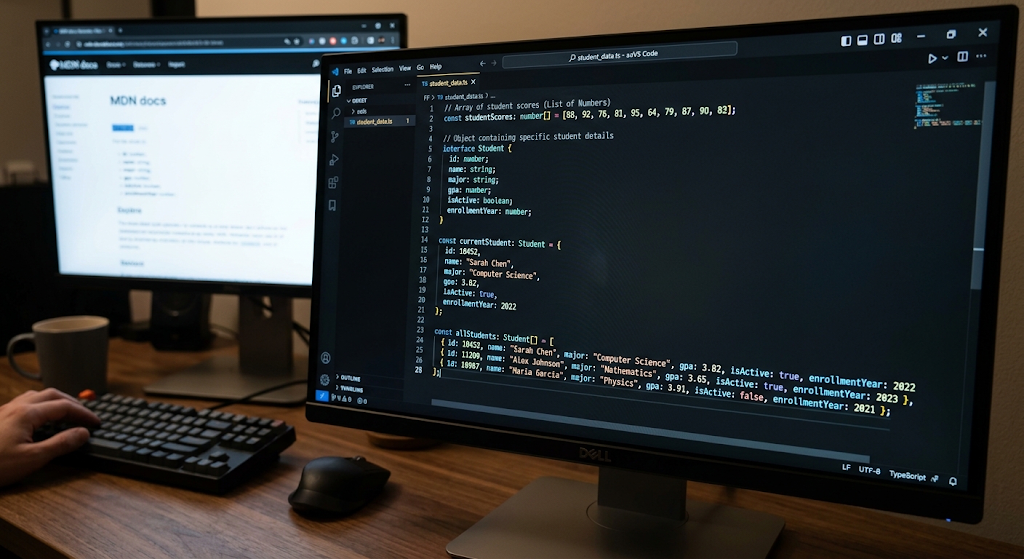
Arrays are a great tool for programmers to use in the organization of large sets of related data.
Working in with arrays also sees the use of loops which is a very common thing as programmers tend to go over each element in a group. A loop is a great tool to look at each item, to count a total, to search for a certain value, or to change the array’s content. Also in today’s programming languages we see other collection types out there which were designed for special uses. A list may be what you want when order is a factor, and a set may be best when you do not wish to store duplicate values. A map or dictionary may be the structure you need to associate a key with its value. For beginners it is important to see collections as data organization tools and to learn which structure to use for the job at hand.
Objects and Object-Oriented Concepts
In object oriented programming we see that objects are used to put related data and behavior together in one package. In an application an object may present a relevant element like a customer, bank account, product, vehicle, or employee. We see that data which comes with an object is usually in the form of properties or attributes, and the things that the object does are what we call methods. For example a bank account object may have in it the account balance and account number which in turn has methods for deposit and withdrawal. Also this approach is that it helps programmers out by which they can put related info and functions together in one place instead of having them scattered about the program.
Object oriented programming also includes classes, encapsulation, inheritance, and polymorphism. A class may serve as a base which a new model is built from. Encapsulation includes the practice of putting associated data elements in a single unit and restricting access by other parts of the system. With inheritance the use of one class’s function is inherited by another in some languages that permit the feature and with polymorphism various objects’ ability to react to the same action but in an individual unique way. As a beginner you don’t need to get into each issue at hand right off the bat, instead focus on how objects bring out a structure and action to the issues that you’re looking to present.
Error Handling and Debugging
Errors are a part of the programming process which also includes the learning phase. We see programs break due to wrong syntax, invalid data, unproven assumptions, unavailable resources, or unexpected action during run time. Also we have different tools in programming languages which help us to spot and deal with these issues. Some errors are found out before we run the program at all, while others do not present themselves until we run very specific parts of the program. We have error handling which is very important in making a program respond in the right way instead of just dying out suddenly. For example a program which asks for a number from the user should also put in a check for the event that the user does not input a number, which may be a string for instance. In that case the program should notice the error and ask the user to input an appropriate value.
Debugging is a process of finding out and fixing issues in a program. In effective debugging programmers have to know what the program is supposed to do, see what it is doing instead, and find out why the two differ. At the beginning one can use that out of error messages to go by, to study small parts of the code at a time, to make use of available debugging tools, and to display critical values which may help trace the issue. Also, error messages should not be dismissed as they very well may contain info on which line or what type of issue is present. Programmers also should tell the difference between syntax errors, runtime errors, and logical errors. A program can run through without issue but still present the wrong results if there are logic issues in the programming. Thus it is as important to develop a system of debugging practices as it is to learn to code.

Putting the Fundamentals Together
In practice we see the value in programming basics when they are put to use in a real world issue. For instance, think of a simple program which keeps track of students’ exam results. Variables which hold individual values, data types which tell what kind of value we are dealing with (number or text), and operators which perform calculations. We also have conditional statements which determine if a student has met a certain requirement and loops which go through and process scores of many students. Also we have arrays or other collections which put groups of scores together and functions which break down calculations into re-usable elements. In some cases we may use objects to present students and all of their info. Also error handling which takes care of invalid scores so the program does not misbehave. This example also puts forth that it is best for beginners to see these concepts as connected tools not separate terms.
Another key aspect of programming is breaking down large problems into smaller more manageable tasks. When a beginner looks at an application they tend to think of the full picture at once which in turn may cause the project to seem overwhelming. But the experienced programmers break the problem into smaller pieces, they identify what each part needs, what actions are required, and then they put the pieces together. We use variables, conditions, loops, functions, arrays, objects and error handling as the base for this. The syntax may go from Python to JavaScript or from Java to C ++ but the problem solving principles are the same. That is to say a strong conceptual base is a better asset in the long term than the memorization of large sets of language specific commands.
How to Develop Strong Programming Skills as a Beginner
Beginners develop their programming skills by a mix of theory and practice. We see that reading is great for grading what variables, functions, loops, and other elements do but that writing out small scale programs is a must to turn that knowledge into a practical skill. At start a student may work with very basic programs that do math, value comparison, list processing, or which react to user input. As confidence grows those exercises may become more complex which in turn may see them implement several concepts at once.
Also it is good to peruse through other programmers’ code and try to figure out what each part does. When we make mistakes we should see them as chances to learn how programs behave instead of signs that we are bad at it. Consistent practice, careful testing, and a progressive increase in what is tried out is what helps to develop good programming habits.
Conclusion
Programming basics give the core concepts which in turn help us to understand how software is developed and how computer programs solve problems. We have variables and constants which are used to present info and data types which tell what that info is. Also we have operators which play with values, conditional statements which enable programs to make decisions and loops which deal with repetition. We have functions which present a way to put together reusable code, arrays and other collections which manage groups of info and objects which present a structure to represent data and behavior.
Also we do error handling and debugging which help in identifying issues which aren’t expected and to fix problems. These ideas present themselves in different aspects of modern programming languages which in turn makes them very valuable beyond any single tech. By the study of these principles and how they work together we see that we are able to develop transferable skills which in turn make it easy to learn new languages, build useful apps and also approach programming problems with more confidence.