Introduction to Computer Hardware Architecture
Computers are complex processing systems that accept data, perform instructions, store information and generate readable outputs. The Central Processing Unit (CPU) and system memory act as the brains of the system, working with binary data made up of electrical signals. But raw processor power is largely without value if there were no peripheral hardware mechanisms that connect human interaction with the internal microcircuits. Peripherals convert physical user inputs into digital signals understood by microprocessors, and then convert a processed binary code back to some kind of visual, audio, or tactile feedback perceived by users. For computer science students, educators, and technology professionals, grasping the function of input and output devices is a vital aspect of learning computer architecture.
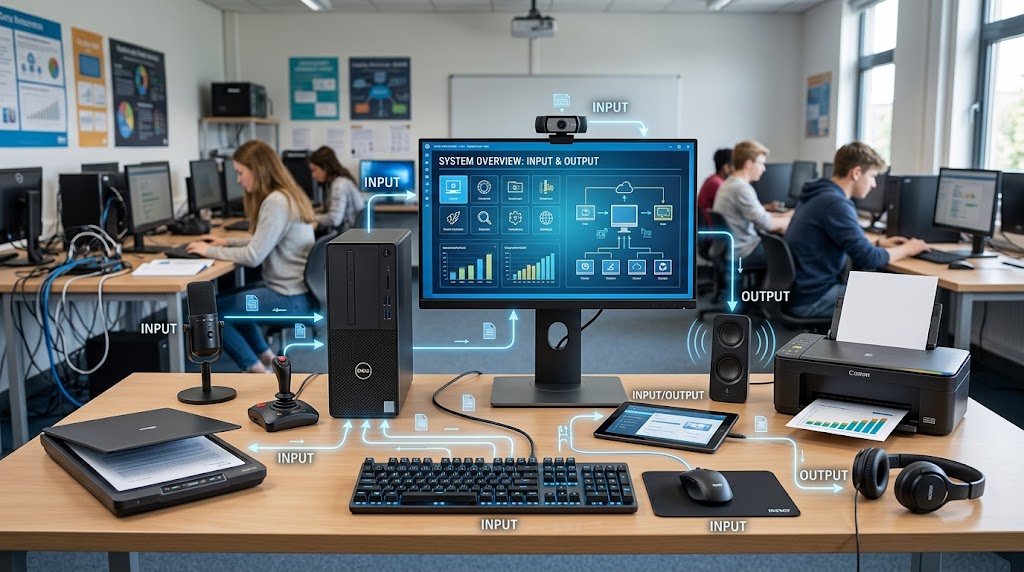
The input/output communication loop is the basic control loop of modern user experience and system design. In a personal computer, workstation, embedded system or mobile device, communication is required between hardware controllers, device drivers, and system software, for every interaction. The input peripheral generates hardware interrupts and sends encoded binary packets to the motherboard when an action happens, as if someone is typing on a keyboard or clicking a button. The operating system manages these incoming signals, passes them on to the currently running application(s), updates its memory registers, and sends output peripheral signals to refresh the screen, play audio signals or print physical pages. The bidirectional communication system is able to operate in a wide range of applications such as software engineering, education, healthcare, and digital media production.

Input Devices of a Computer

Input devices are the most important means of communication by which outside data and user instructions and parameters are fed to a computer system. Such peripherals respond to mechanical stimuli, like a keystroke, or spatial motion, light reflections or acoustical sound waves, and convert them to standardised digital formats using analogue to digital conversion (ADC) or a specialised sensor matrix.
OSs cannot be given instructions (commands) or input from a user if there are no reliable mechanisms available.
Text Input Devices
These are the devices used to input text. These are the parts that can be used to enter text.
Keyboard
The computer keyboard is the ultimate alphanumeric input peripheral, in every computing environment. Today’s keyboards are based on internal circuit matrices which have a physical key switch (mechanical, membrane, or capacitive) located between each key that detects when the key is closed. Each key is mapped to a row and column in a matrix, and when the user presses a key, an integrated microcontroller recognizes the intersection of the row and column and produces a unique signal called a keycode which is transmitted through wireless radio frequencies or via USB.
Mechanical keyboards use individual spring-loaded physical switches, like linear, tactile, or clicky, for added precision and tactile feedback, while membrane keyboards use conductive rubber domes atop printed circuit layers. There are ergonomic keyboards that split the keys in order to limit the strain during long typing sessions, virtual and touch keyboards use software on capacitive display screens.
Spatial Navigation Devices and Pointing Devices
Pointing devices are used to manipulate the position of a cursor and the delivery of action commands in two dimensional and three dimensional graphical user interfaces (GUIs). Optical mouse relies on the small light emitting diode (LED) or an infrared laser and the optoelectronic sensor and calculates the offsets of the spatial coordinates (X and Y movement vectors) from the surface thousands of times per second. Trackballs reverse the concept and move the cursor by rotating a stationary ball with the fingers instead of moving the peripheral itself.
Capacitive sensor arrays under a smooth surface on a laptop touchpad are capable of sensing position of fingers and multi-touch gestures by means of capacitance changes. Flight-simulation joysticks are specialized pointing devices, as are gaming gamepads that feature analog thumbsticks and digitizing space mice for CAD modeling.
Image, Video, and Optical Scanning Peripherals
Optical input devices feature hardware that reads visual media, physical documents, and machine-readable codes from the real world and include them in high resolution bitmapped or vector graphics files. The flatbed image scanners employ either Charge-Coupled Device (CCD) arrays or Contact Image Sensors (CIS) on a motorized carriage to scan physical documents at high DPI resolutions. The technology used in barcode readers and QR code readers involves either a laser beam that focussed or image sensors that reads reflected light patterns and converts them into alphanumeric strings, which facilitate inventory and point-of-sale systems.
Live video is captured using webcams and digital video cameras that focus the light onto CMOS image sensors that produce digitized video for use in teleconferencing, security cameras and biometric facial authentication.
Audio and Biometric Input Hardware
With audio and biometric input peripherals, sound waves and physical biological parameters are converted into structured digital streams. Acoustic sound waves are detected by either a dynamic coil or an electret condenser capsule (or a Micro-Electro-Mechanical Systems (MEMS) diaphragm) and transformed into an electrical voltage signal, which is picked up by the microphones and passed to a sound card to be converted into PCM digital audio files.
Musical Instrument Digital Interface (MIDI) keyboards store musical performance parameters (key pitch, velocity and duration), rather than audio data. Optical and capacitive fingerprint scanners, infrared facial recognition cameras, and iris scanners measure unique anatomical traits of participants and produce an encrypted cryptographic template which is used to provide high-security authentication of participants.

Direct Touch and Stylus Interfaces
Graphics Tablets and Active Digital Pens facilitate handwriting input and design entry into software applications and allow for a precise form of freehand drawing and design. Passive digitizers rely on electromagnetic resonance (EMR) technology in which an under-screen sensor board generates electromagnetic energy to power the stylus’ internal coil that measures the position of the coordinates, the tilt angle of the stylus and thousands of pressure levels, and without the need for any pen batteries.
Active styluses employ a Bluetooth signal and pressure sensors in the pen body to send real-time stroke data to host displays. Direct touchscreens integrate visual elements with capacitive grid overlays that rely on the localized disruption of the electrostatic field when a finger touches the screen to detect finger contact in order to provide intuitive ‘direct manipulation’ gestures.
Output Devices of a Computer

The output devices take digital information from the computer memory and microprocessors and translate the data into physical or sensory forms that are readable to humans and/or external devices.
The peripherals are given binary instructions and carry out the conversion process to display pictures, produce wave oscillations, produce paper materials, or deliver physical force feedback.
Visual Display Technology & Computer Monitors
The major visual output channel is the computer display monitor, which provides real-time operational interfaces, applications, text and video media. Today’s LCDs make use of an active-matrix thin film transistor (TFT) backplane to interact with liquid crystal molecules, which allows light to pass through LED backlights, travel through a color filter to create individual pixels.
In fact, advanced Organic Light-Emitting Diode (OLED) displays have self-emissive pixels, which allow for absolute black levels, outstanding contrast ratios and wide color spectrum coverage (DCI-P3 and Adobe RGB). This is measured at varying resolution levels (Full HD, 4K UHD, 8K), frame rates (60Hz to 360Hz), response time (ms), and panel types (In-Plane Switching, Vertical Alignment and OLED).
Audio Output Devices
Audio Output Peripherals converts digital audio data streams into acoustic sound waves that can be heard by human ears. Digital signals are sent to high fidelity Digital-to-Analog Converters (DACs) which output low voltage analog signals to amplification circuits, either as internal sound cards or external audio interfaces. Electrodynamic speakers and subwoofers use speaker drivers which bend paper, polymer or metal cones in response to electromagnetic forces, causing air pressure waves to occur within audible frequencies (20 Hz to 20,000 Hz). Headphones and in-ear monitors feature microscopic-sized drivers that sit close to the ear canal to provide high-isolation, detailed stereo sound stages when you’re listening privately, designing a sound or telecommunication.
Printing and Hard Copy Output Devices
Inkjet printer making coloured paper prints. Acknowledge that your child is feeling upset.Let your child know that you recognize that your child is upset.
Digital documents, vector graphics and 3D geometric models are converted into physical media by printers and physical plotters. Inkjet printers are essentially super tiny sprays of liquid ink that quickly squirt onto a paper surface to create photographic-quality prints and colour documents. The electrostatic drum units, semiconductor lasers and fine particles of toner powder are used in laser printers. Laser beams create static electrical charges on the electrostatic drum which attract the toner particles that are then transferred to the paper by intense heat and pressure from the fuser rollers. Industrial plotters are used for printing technical blueprints and architectural schematics using mechanical pen arms or large format inkjet arrays. The 3D printers also take hard copy output into the third dimension, either by extruding thermoplastic filaments (PLA, ABS) or by curing photopolymer resin layer by layer to create solid objects from 3D computer-aided design.
Haptic and Force Feedback Peripherals
The haptic output hardware is designed to deliver tactile feedback in the form of physical vibrations, force feedback and tactile textures. Linear resonant actuators (LRAs) or eccentric rotating mass (ERM) motors are used to simulate physical impacts, engine vibrations or surface friction in a variety of ways, including in game controllers, haptic flight sticks, and driving wheels.
Motorized exoskeletons or micro-pneumatic bladders can be used in advanced VR haptic gloves and industrial robotic control handles to counteract hand motion, to give the impression of touching, grasping, or weighing virtual items in a virtual environment. Refreshable braille displays use tactile (raised) pin arrays that are moved up and down electromechanically, so that the visually impaired user can read the text output directly in braille code.
Hybrid Means Combination of Input/Output Devices

The devices are bidirectional and exchange data with the computer processor while at the same time returning data to the host architecture, allowing for saving of space and complex workflows.
Device Name, Input and Output Functions
| Device Name | Primary Input Mechanism | Primary Output Mechanism | Common Practical Application |
| Interactive Touchscreen | Capacitive finger touch sensing and stylus sensing will be used. | It comes with a HD LCD/OLED video display. | Wireless gadgets, like smartphones, tablets or interactive kiosks. |
| Network Interface Card (NIC) | Listens to the signals of an incoming network packet | Carries out network packet signals to be sent away | The various types of LAN & internet connectivity. |
| VR Headset System | Head tracking sensors, cameras and gyroscopes. | Has two micro OLED lenses and spatial audio speakers. | Immersive simulation & virtual reality gaming will be the game-changers for the future. |
| Smart Modems / Routers | Changes analog signals to digital signals | Converts digital data to outgoing analog waves | Broadband internet distribution (Fiber, Cable, DSL) |
| Audio Headset with Microphone | Condenser Microphone Audio Capture. | Two speaker drivers with dual outputs.Dual earphone speaker drivers. | Video conferencing, gaming, customer service |
| External SSD / Flash Drive | Records data on to system memory | High-speed permanent flash data storage | Data Backup, Carrying out files, System Recover. |
Comparative Hardware Matrix for Classroom Instruction
The following complete reference table provides examples of peripherals, where they are classified, their type of signal conversion, and their principal use. This table has been included to assist teachers in creating lesson plans on computer architecture and to aid students in learning how to categorize peripherals.
| Hardware Peripheral | Device Category | Input/Output Signal Type | Primary Function | Educational / Professional Use Case |
| QWERTY Keyboard | Input Peripheral | Mechanical keystrokes to ASCII/Unicode. | The ability to enter text and numerical information.Ability to type text and numbers. | Set up and program documents, enter data.Create documents, program documents, input data. |
| Optical Mouse | Input Peripheral | Reflect the light from the surface using XY vectors.Reflect light off the surface using XY vectors. | Cursor spatial positioning | The use of quizzes and data in a GUI navigated environment.Using quizzes and data in a graphical environment. |
| Flatbed Scanner | Input Peripheral | Converted the reflected light to digital bitmap images. | Printed Paper & Photos should be archived. | Document Digitization, Preservation of History |
| Condenser Microphone | Input Peripheral | Vibrations generated by sound waves to PCM audio stream | Acoustic audio recording at high fidelity. | The podcast, music creation, and voice messaging features are also included. |
| Biometric Fingerprint Reader | Input Peripheral | Capacitive Ridge Mapping for Hashing Template | The authentication of identities within a computer network security system. | Security in logging into the system, access control, |
| LED Computer Monitor | Output Peripheral | The digital video is converted into lighted pixels.The digital video is transformed into lighted pixels. | Accessively displaying software interfaces | Media consumption, programming, general monitor. |
| Laser Printer | Output Peripheral | It assures that electrostatic drum to fused toner on paper.It guarantees electrostatic drum to fused toner on paper. | High-speed document printing | The school’s administrative offices and classroom handouts. |
| Studio Headphones | Output Peripheral | Audio DAC voltage to acoustic air waves. | Personal sound reproduction | Audio editing, private listening, remote learning |
| 3D Printer (FDM) | Output Peripheral | The layer instruction given to heated plastic layers. | Physical 3D fabrication of objects. | STEAM engineering projects, rapid prototyping, |
| Tactile Braille Display | Output Peripheral | Read characters from a raised pin array on a screen | Accessibility text output | Provide support for visually impaired students with assistive technology.Support visually impaired students using assistive technology. |
Educational Applications and Pedagogical Strategies
The incorporation of hardware issues in computer science programs needs to be shown through the movement of data in a computer system. By monitoring a single user action, teachers can create interactive lessons that follow the hardware pipeline, from the signal to the result. For example, a key depression on a keyboard is translated to an electrical signal by the input mechanism. The motherboard sends this signal to the interrupt request (IRQ) lines and the CPU updates the RAM registers and sends a message to the graphic processing unit (GPU) to change the values in the pixel buffer. Finally, the GPU tells the output display monitor to light up certain pixels, and the cycle repeats.
Students are able to disassemble, analyze and modify hardware add-on devices, use flowcharts to represent the input-output process of computing, and set up dual monitor workstations in interactive classroom exercises to bring theory into contact with real equipment. The difference between input capture mechanisms, processor handling and output translation serves as an excellent basis for further work in computer architecture, network engineering, robotics and software design.
Conclusion
Input and output devices represent the essential communication bridge between human users and computer systems. Input hardware allows information, commands, and physical actions to be transformed into digital signals that computers can process, while output hardware converts processed data into meaningful visual, audio, printed, or tactile information.
From basic peripherals such as keyboards, mice, monitors, and printers to advanced technologies including biometric systems, virtual reality equipment, and interactive touch interfaces, these devices demonstrate how computer architecture connects the digital world with human interaction. Understanding their functions, classifications, and applications provides students and educators with a strong foundation for exploring computer science, hardware engineering, and emerging technologies.