A small business website can break quietly. A page crawls on phones. An invoice email lands in spam. A domain renewal slips past. Sometimes the first warning comes from a customer.
You don’t need an agency to catch these problems early. A few free website checker tools can show you what’s wrong in minutes. Below, I’ve grouped them into four areas: SEO, speed, domain health and email security.
Why Free Website Checker Tools Matter for a Small Business
Your website works for you day and night. But it can also fail quietly. A missing title tag won’t send you an alert. Neither will an SSL certificate that’s about to expire.
Regular checks catch these issues before your customers do. They also give you clear data to share with your developer. That means less guesswork and fewer wasted hours.
Free SEO Checker Tools to See How Google Reads Your Site
Start with Google Search Console. It’s free and comes straight from Google. You can see which search terms bring visitors to your site. It also shows which pages are indexed and which ones have errors. If you set up only one tool, make it this one.
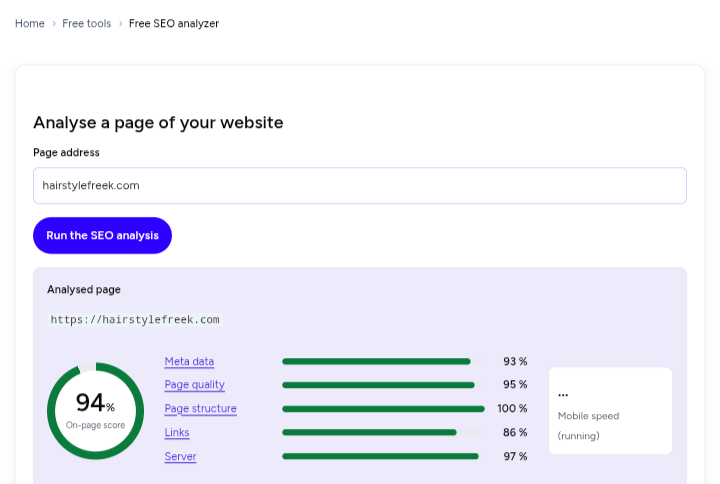
Search Console shows what Google sees over time. For a quick look at a single page, a free SEO analyzer fills the gap. The IT LABS PRO tool checks over 40 SEO points on a page. These include meta tags, heading structure, alt text, links and HTTPS. You then get a to-do list sorted by priority, with a fix for each issue. The basic check needs no sign-up, and you get three free scans a day.
Run it on your homepage and main service pages first. Fix the most important items, then work down the list.
Website Speed Test Tools That Use Real User Data
Slow pages push visitors away. Google PageSpeed Insights is the best free place to start. Paste in a URL, and it tests the page on mobile and desktop.
The report has two parts, and the difference matters. Field data comes from real Chrome users over the past 28 days. Lab data comes from a simulated test run by Lighthouse. Lab results help you find the cause of a problem. Field data shows what your customers actually experience.
Keep an eye on the three Core Web Vitals:
- LCP (Largest Contentful Paint): how fast the main content shows up
- INP (Interaction to Next Paint): how quickly the page reacts to a tap or click
- CLS (Cumulative Layout Shift): how much the layout jumps while loading
Small sites often don’t have enough traffic for field data. If that’s your case, use the lab score. Then test again after each change.
Domain Health Check: Expiry Dates and SSL
An expired domain can take your website and email offline at the same time. It’s a costly mistake, and an easy one to avoid.
Use the free ICANN Lookup tool to check your domain. It shows your registrar, name servers, and key dates. The expiry date is the one to watch. Add it to your calendar, or turn on auto-renew with your registrar.
Next, test your SSL certificate with Qualys SSL Labs. It gives your HTTPS setup a letter grade. It also flags weak settings and certificate problems. Aim for an A.
Email Security Checkers for SPF, DKIM and DMARC
Do you send email from your own domain? Then this part matters. Three DNS records protect that email:
- SPF lists the servers allowed to send mail for your domain.
- DKIM adds a digital signature, so receivers know the message wasn’t changed.
- DMARC tells inboxes what to do when a message fails those checks.
Email providers now expect these records. Since February 2024, Gmail has required all senders to set up SPF or DKIM. Bulk senders need all three. Without them, your emails may go to spam or get blocked.
Free tools like MXToolbox and dmarcian let you look up each record. Type in your domain, and they show what’s missing or broken. No DMARC record yet? Start with a policy of p=none and add a reporting address. Reports start coming in, and your mail still flows as normal.
A Simple Monthly Website Check Routine
You don’t need to do this every day. Once a month is enough for most small sites.
- Open Search Console and review any new errors.
- Run your key pages through an SEO checker.
- Test your homepage speed on mobile.
- Confirm your domain and SSL expiry dates.
- Check SPF, DKIM and DMARC after any change to your email provider.
Once you know the tools, the routine goes quickly.
FAQs About Free Website Checker Tools
Are free website checker tools accurate? Yes, for what they test. Each tool covers one area, so use a few together. For complex sites, a professional audit can add context.
How often should a small business check its website? Once a month works for most. Check again after a redesign, a hosting move or a new email provider.
Which free tool should I use first? Start with Google Search Console. It shows how Google sees your site, and it costs nothing.
Final Thoughts
Your website is often a customer’s first impression of your business. Free website checker tools help you keep that impression a good one. Pick one area this week and fix what you find. Then move on to the next.