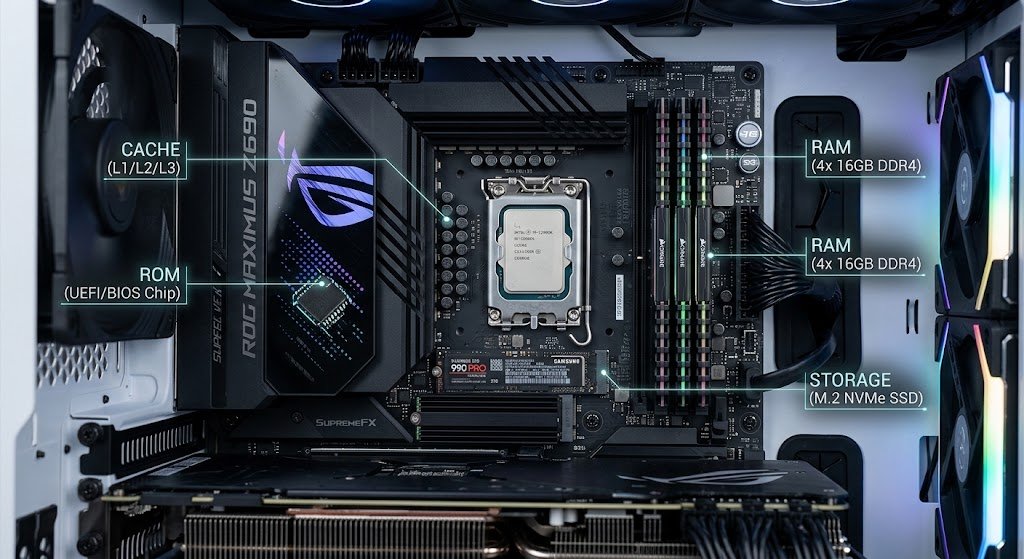
Computer memory is one of the most vital components of any computer, and one of the most confusing to beginners. The word “speed” is often used when referring to computers and people will talk about things such as RAM or storage, cache or hard drives, or ROM without knowing how each of these works, or how they differ from each other. While these words are related, they actually have very different functions within a computer system. There are different types of memory that process information quickly in the computer and other types that store information permanently for use in the future. This helps in selecting a device, to troubleshoot problems and to understand how computers work today.
All computers use more than one type of memory because no one type can offer the optimal speed, capacity, and cost. Generally, the faster memory types are smaller and more expensive; larger storage types are slower, but are able to store a larger amount of data. For instance, a processor requires very rapid retrieval of information that is widely used; and a user requires a large amount of capacity for storing documents, applications, photos and videos. For this reason, computers have a memory hierarchy that consists of cache memory, RAM, ROM and secondary storage devices like hard disk drives and solid-state drives.
Computer memory and why it is important.
Computer memory is a place where data and instructions which are required for operations of a computer system are stored on hardware. A computer, however, could not start, execute programs, store information or store files without memory. The processor or CPU is used to access the information needed to perform operations and this is made possible through memory. There are several different types of memory and each serve a different purpose; there are performance characteristics to each type, and these define how efficiently a computer will run.
The major differences between the types of memory used in computers is that it is not possible to have all three properties – speed, size, and cost – optimized at the same time. A small amount of extremely fast memory is placed near the processor for ready access to instructions that are of critical importance. The larger but slower memory is used for the operations of running applications and storing files. The layered architecture enables computers to provide high performance and usable storage capacity. The layers offer insights into why RAM can enhance multitasking, why SSDs can make computers feel faster, and why cache memory is significant in a processor’s performance.
Computer Memory is usually classified into two classifications: Primary memory and Secondary memory. The CPU can directly access the primary memory, it temporarily or permanently stores instructions that are needed during computer operation. Secondary memory is used for storing data for long-term use and typically has more capacity than primary memory.
Primary Memory vs Secondary Memory.
The memory used by the CPU’s main memory or primary memory. It contains RAM, ROM and cache memory. They are important types of memory used in a computer as they hold the data and instructions that the processor must access to perform programs. The capacity of primary memory is generally small and is much faster than secondary memory.
The type of primary memory most often talked about is RAM memory, which determines the number of applications that can be run concurrently. When a user accesses a program, the operating system transfers the information from storage to RAM where the processor can easily access it. When a computer lacks enough RAM, it may have to use slower memory storage to and from the RAM, causing it to get slower. This is the reason why devices with higher RAM tend to be more responsive in running multiple applications.
Other kinds of memory are primary memory, which holds instructions that are very important to a computer to start and function properly, known as ROM. ROM stores information even when the power is turned off. Usually comes with firmware, a set of low level instructions that enable hardware to communicate with the operating system. The use of modern ROM technologies can make it possible to update the devices and offer enhanced compatibility and security after the device is released into the market.
The secondary memory is storage media that are used to store data for a long time. This includes hard disk drives (HDDs), solid-state drives (SSDs), memory cards, and external storage devices. Secondary storage retains information after the computer has been turned off, whereas RAM does not. Secondary storage devices are used to store operating systems, applications, personal documents and other critical information.

Volatile vs Non-Volatile Memory
The simplest way to differentiate the various types of memory is to determine if the memory is volatile or non-volatile. Volatile memory: It is the memory that needs an ongoing electrical supply to retain the information. If the power is turned off, the data in the volatile memory will be lost. The most prevalent volatile memory is RAM, as it stores temporary memory when the computer is turned on.
The advantage of the temporary nature of RAM is, after all, that computers require memory that can be rapidly replaced and updated. The computer is constantly writing and erasing data from RAM as users access websites, edit documents, play games or run software. It is well suited for the activities that require quick access. Yet, RAM is not permanent storage since it is lost when the power is turned off.
Non-volatile memory preserves its memory without the need for power. Non-volatile memory includes ROM, SSDs, HDDs and flash storage devices. This is the reason why they are ideal for storing important information that will need to be accessible even after the device is powered off. Non-volatile memory is used to store operating systems, personal files, applications, and firmware instructions, since they must be retained even when the power is turned off.
It is important to know the difference between RAM and ROM, as there is a significant difference. The RAM stores temporary data on which computers work quickly and the ROM stores permanent instructions for computer operations. Both are forms of memory but have vastly different functions, speed and ways of storing information.
RAM: The Computer’s Working Memory
Random Access Memory (RAM) is a computer’s “working space” that temporarily holds the data being used by the programs currently running. The information necessary for a user to start up a program, open a file, or perform a task is loaded into RAM on the fly for easy access by the CPU. The larger the amount of RAM a computer possesses, the more information that can be stored easily in its memory, improving multitasking and avoiding the delays that result from having to load data into the computer from the storage multiple times.
The RAM is not meant for long-term storage. It enables data to be accessed randomly, that is, the processor can rapidly retrieve data from any part of the memory module. This is not the case with the older storage technologies where data access might be delayed due to data being read in a particular sequence. DDR4 and DDR5 are the latest RAM technologies, which offer incredibly high data transfer speeds suitable for more demanding applications such as games, video editing, software development, and scientific computing.
But the amount of RAM is not the only factor that can affect computer performance. The processor, storage technology and software optimization are also essential to a computer. For instance, a computer that has a lot of memory but a slow hard drive can seem slow to start applications. A good balance of hardware is key since all hardware elements influence the user experience.
ROM: Permanent memory used for instructions for hardware.
Read-Only Memory (ROM): Memory used to store information that is not frequently changed. It is composed of instructions that will ensure the boot-up of a computer’s hardware components and initiate the boot-up process. ROM stores the first instructions that are executed when the computer is turned on, which are used to perform the startup checks of the hardware and loading the operating system.
Traditional ROM was written into during the process of manufacturing and could not be easily changed. But today’s versions, like programmable ROM, erasable programmable ROM, and firmware stored in flash, enable updates if needed. This flexibility is significant because manufacturers can issue firmware updates to enhance performance, resolve security problems or even introduce support for newer technologies.
ROM doesn’t run any applications and is essential for getting a computer up and running. A computer needs to have instructions stored in its ROM in order to start up and communicate with important hardware components.
Cache Memory.
One of the fastest memory available in the computer system is the cache memory. It sits near or within the CPU, so that the CPU can access information that it accesses very often much quicker than accessing it from RAM. There is the possibility of a reduction in performance if the slower memory cannot keep up with the speed of the modern processor, which can do billions of operations per second. The solution to this problem is to have commonly used instructions and data stored in cache.
Typically, cache memory is segmented into various levels, such as L1, L2, and L3 cache. The fastest and smallest is L1 cache, which is in the processor cores. L2 cache has more capacity than L1 cache but is slower and L3 cache offers more memory that is shared across processor cores. These layers combine to decrease the wait time for the CPU to get information.
Cache memory is faster than RAM, but much smaller and more costly to produce. Thus, computers make use of the cache strategically instead of it being their primary source of memory. It is not intended to store large quantities of data, but rather to increase efficiency by placing the most commonly used data near the processor.
Storage Types: HDDs, SSDs and Other Devices

Secondary storage is used to store data permanently. Hard disk drives (HDDs) have been used for decades and store information using magnetic disks. They are relatively inexpensive and can be used to store a large number of files, which makes them suitable for large collections of files. New technologies are faster and less susceptible to physical damage than HDDs, however, as there are moving mechanical components, they are slower.
As a result of their faster performance and enhanced reliability, solid-state drives (SSDs) are becoming more popular. In contrast to HDDs, SSDs are flash memory with no moving components. This enables them to launch applications more quickly, boot up systems more rapidly, and increase responsiveness. While SSDs tend to cost more per gigabyte than HDDs, they have some speed benefits that make them the choice of many modern computers.
There are many other storage formats other than USB flash drives, memory cards, and cloud storage services. These options help to move, backup and retrieve information easily. Cloud storage is a virtual storage that is located outside of the computer, but operates like a storage unit by using remote servers and accessing data via the internet.
How RAM, ROM, Cache, and Storage collaborate.
A computer works well when the memory types have specific functions. ROM contains instructions that start up the computer when it is turned on, to initialize the hardware. The operating system is transferred from secondary storage to RAM where it can be accessed by the CPU. While running, most commonly used instructions and data are kept in cache memory to boost processing.
The co-operation of memory layers brings a balance between performance and storage capacity. Cache is extremely fast, RAM gives temporary working space, ROM gives instructions to start up and storage devices give permanent storage. All the components are interdependent and if any layer is removed, it would have a great impact on the functioning of computers.
For instance, if you’re upgrading from an hard-disk drive to an SSD, you should have access to files in a much faster time, hence the faster startup speed. More programs can be active and work better with more RAM. Processor cache technology is an area that could be improved to increase the efficiency of the CPU, by minimizing delays in processing. These are just a few examples of why memory types are beneficial when upgrading and/or buying a computer.
Conclusion
At first, computer memory may seem fairly complicated, but once you know what each type serves you should find it much easier to get the hang of it. There are three types of memory in computers: RAM, ROM, cache memory and storage devices each address a different problem. Active programs use RAM as temporary storage; ROM is used for memory; cache is used to speed up communication between the CPU and memory; storage devices store files for long-term storage.
The correlation of these types of memories illustrates speed and reliability in modern computer usage. Processors will be able to function efficiently with fast memory and large storage will allow users to safely store important information. Knowledge of computer memory is important whether it is to choose a new computer, upgrade hardware, or simply learn about how technology works. Knowing about computer memory will offer a lot of information about computers that are used on a daily basis.