Artificial intelligence is rapidly changing how software is built. AI coding assistants can generate code, review pull requests, explain complex functions, and even build complete features from simple prompts. But despite these advances, one challenge continues to limit their effectiveness—understanding exactly what the developer wants.
This is where a screen recorder for AI Coding agent is becoming an important part of the development workflow. Instead of relying only on text prompts or screenshots, developers can now provide AI with visual context, making collaboration faster and more accurate.
AI Needs More Than Code
Most software issues are not purely code-related. They often involve user interactions, animations, layout problems, navigation flows, or unexpected UI behavior.
Describing these issues in text can be frustrating. A developer may spend several minutes writing detailed instructions, yet the AI may still misunderstand the request because it cannot see what actually happened.
Visual context solves this problem.
By showing the entire workflow instead of describing it, developers give AI the information needed to produce more relevant and accurate solutions.
Why Screen Recording Is Becoming Essential
Screen recording has traditionally been used for tutorials, product demonstrations, and bug reporting. However, as AI becomes part of everyday development, its role is expanding.
A screen recording captures:
- User interactions
- Cursor movement
- UI behavior
- Error messages
- Navigation flow
- Voice explanations
When combined, these elements provide context that text alone cannot deliver.
Instead of asking AI to interpret paragraphs of instructions, developers can simply demonstrate the issue.
Clipy’s AI-First Innovation
One platform pushing this idea forward is Clipy.
Clipy’s latest feature is designed specifically for AI-assisted development rather than traditional video recording.
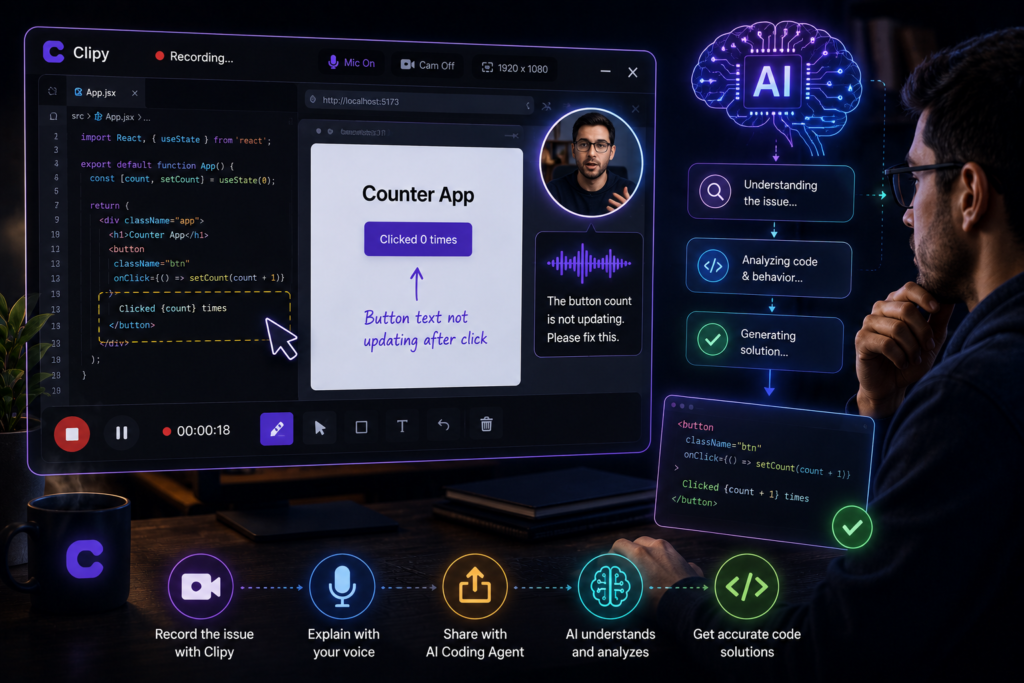
The workflow is simple:
- Record your screen while reproducing a bug or demonstrating a feature.
- Point to the exact component that needs to be updated.
- Explain the desired changes using your voice during the recording.
- Share the recording with your preferred AI coding assistant.
Instead of reading a lengthy bug report, the AI watches the recording, understands the visual context, and generates code or implementation suggestions based on what it sees and hears.
This approach reduces repetitive prompt writing and helps developers communicate with AI more naturally.
Better Collaboration Across Teams
The benefits extend far beyond software engineers.
Designers can visually explain UI improvements.
QA teams can reproduce bugs without writing lengthy documentation.
Product managers can demonstrate feature requests.
Customer support teams can share real user issues.
Everyone communicates using the same visual context, reducing misunderstandings and speeding up decision-making.
The Future of AI Coding
As AI coding assistants become more capable, the quality of their output will depend increasingly on the quality of the context they receive.
The future of software development isn’t just about smarter AI models—it’s about smarter ways to communicate with them.
Visual recordings are becoming an essential layer between developers and AI, helping transform abstract requests into clear, actionable information.
This shift will reduce time spent writing documentation, eliminate unnecessary clarification, and improve the accuracy of AI-generated solutions.
Final Thoughts
The next generation of development tools will combine code, conversation, and visual context into a single workflow.
Platforms like Clipy are already moving in that direction by enabling developers to record their screen, explain the changes they want, and share that recording directly with AI coding assistants.
As development teams continue to adopt AI, using a screen recorder for AI Coding agent will become more than a convenience—it will become a fundamental part of building software faster, collaborating more effectively, and helping AI understand problems the first time around.