Introduction
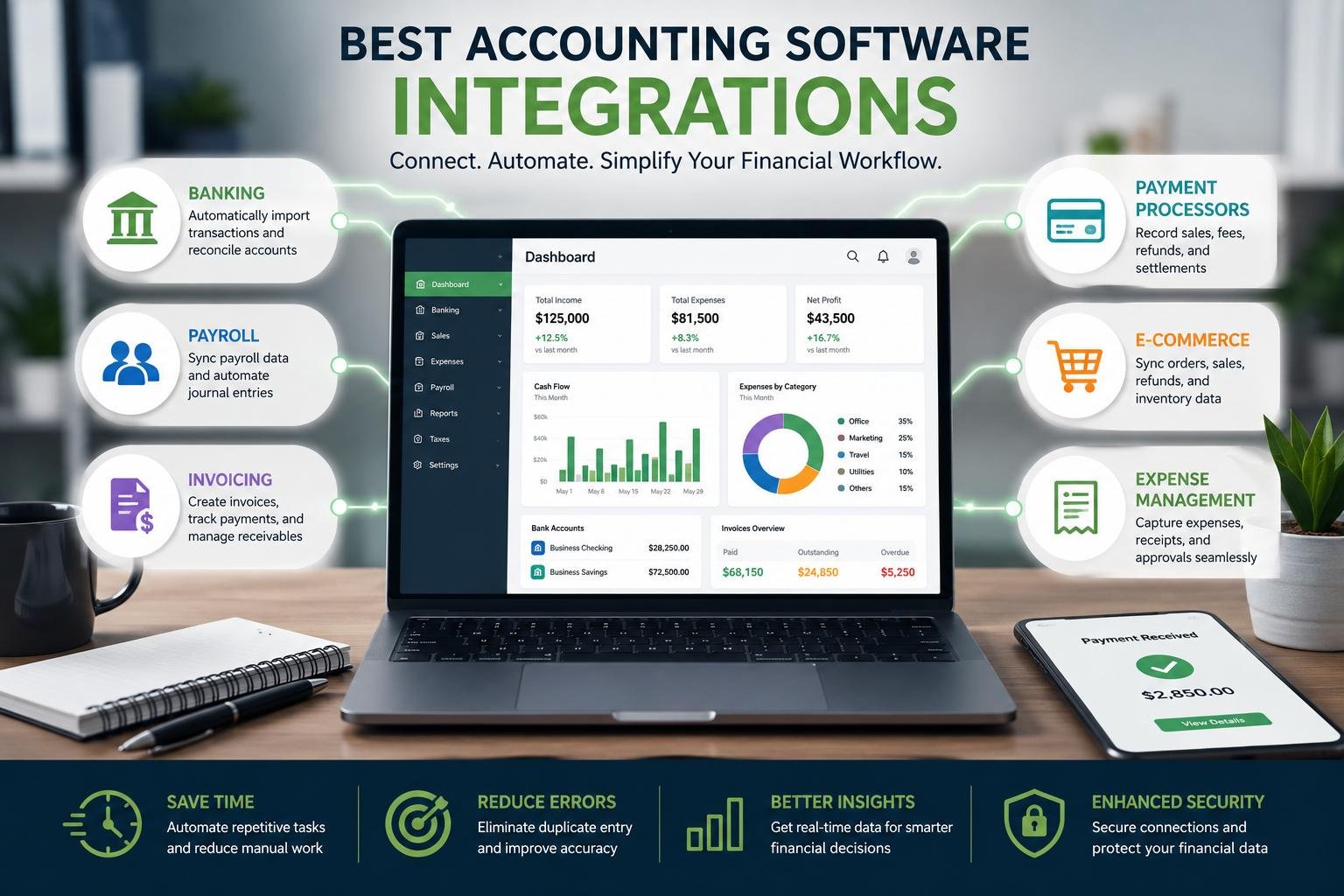
Accounting software integrations does not just have to be a repository for income, expenses and balances once transactions have occurred. Financial data can flow more easily from one system to another, with modern platforms linking financial data to banks, payroll software, invoicing applications, payment processors, ecommerce stores and other business tools with less manual effort. This is important because there is always the possibility of errors being made when typing, classifying and reconciling the data. For instance, companies can integrate accounting software with expense-management tools to manage their employees’ spending and send approved expense data to the financial workflow. These liaisons can be managed properly to streamline administrative duties and enhance financial reporting efficiency, speed, accuracy, and transparency.
But the objective of integration should not be to join all of the applications that a business uses. Rather, companies ought to determine where the financial details are going to be derived from, what systems are going to be accountable for holding on to the financial information, and where the financial information is going to be sent. Transaction activity can come from a bank, employee pay can be calculated using a payroll system, customer billing can be managed using an invoicing system and the accounting system can serve as the financial record hub. Creating such roles eliminates conflicting data and aids in troubleshooting. Businesses should thus consider how well the accounting system will integrate, what applications are supported, how often it is synced with the business system, its security options, data-mapping capabilities, and how well it will accommodate the processes that are important to the business.
Faster Reconciliation with Bank Integrations
One of the most convenient integrations is with banks as they have transactions that ultimately must be recorded, categorized and reconciled by businesses. An integrated accounting system will import transaction data from a supported financial institution, instead of manually downloading the statements and entering the deposits, transfers, payments, and bank charges. Some systems can even suggest categories or match out transactions with invoices and earlier transactions recorded. This minimizes repetitive bookkeeping and brings cash activity to the finance teams earlier. But automation must not be used as a justification that all transactions that have been imported are accurate. Staff continues to periodically conduct investigations of unusual entries, review classifications, look for duplicates and reconcile account balances to ensure that errors, missing transactions, or unusual activity is detected.
Bank feeds can also help with cash-flow management as the information that is occurring in the transaction is fed in to the accounting system sooner. With the ability to see incoming and outgoing payments, businesses can track the amount of cash available, outstanding payments to customers, and forthcoming payments due. The rules sometimes automatically categorize regular payments like bank charges, subscriptions or simple supplier charges. These rules can be a huge timesaver, but are subject to review due to the changing nature of transaction patterns and business situations. A payment that is of one kind may be received as a different kind of payment. So the best bank integration is when you can gather data automatically and review them manually. The goal isn’t to eliminate the accountant from the equation, but to save them from the repetitive task of copying and save more time to be able to review its context.
Integrations for Employee Costs: Payroll.
Another area where payroll can help decrease duplicate work is when payroll systems and accounting platforms have different components of the same financial process. A payroll application could determine wages, deductions, employee benefits, taxes and other amounts related to an employee and accounting software could capture the resultant expenses and liabilities. The systems communicate with each other, so that when they are integrated, all the payroll data is transferred to the right accounting accounts without any finance staff having to re-enter each time after the payroll run. This will make it easier to minimize transcription errors and consistency of the general ledger. This is particularly beneficial for businesses with numerous staff members or multiple payroll periods, where manual posting can become tedious and time-intensive to audit effectively.
Payroll integration also enables companies to retain specialized roles within their systems meant for them. The payroll platform can continue to handle employees’ calculations and payroll while the accounting system gets the financial entries necessary for reporting. Companies should ensure that it only passes accounting totals, or whether it passes detailed employee information. Access should be restricted by job roles and function; connected systems, should have suitable authentication and security controls. A good integration should also be able to have a good record of information transfer or change. This will establish accountability and facilitate investigations should discrepancies arise in payroll, accounting or payment.

Provide Account Receivable and Invoicing Integrations.
Integrating invoicing software with accounting software can streamline the invoicing process, enhancing the efficiency of your business operations. The data in an invoice includes customer data, product/service details, pricing, taxes, payment terms and outstanding balances. When an approved system of invoicing is in place, information is passed straight to accounting and employees do not need to re-enter the information. By paying, customers can then match their payment with existing invoices to easily identify unpaid balances and ensure proper accounts receivable administration. This can decrease administrative holding up and further develop a business’s outlook on the anticipated cash. Automated invoicing can also ensure more uniformity in billing, and provide finance teams with improved visibility of those amounts that have not been paid.
Products and services should be subject to clear rules regarding the transfer of the invoice, the refund, the credit note, the discount and the partial payment, between the systems. If not, an integration may be able to pass on wrong data as readily as correct data. For businesses, it is crucial to determine which application should maintain customer and invoice data and to do a test of the connection prior to employing it for daily business. Auto-reminders and recurring billing can also decrease some manual effort, but must be monitored to ensure that customers aren’t billed incorrectly. One of the most important aspects of a good invoicing integration should be the ability to track a customer’s invoice from beginning to end until it is paid and a final accounting record is generated. This has the benefit of making accounts receivable more manageable and provides finance teams with better insight into funds that are expected from customers.
Payment Processor Integrations
Payment processors play a vital role in businesses that provide online transfers, digital wallets or cards. Integration can be used to transfer payment activity to accounting software and enable sales and bank deposits to be linked to the payment. This is because the final amount that is deposited into the bank account could be different from what the customer initially paid. Differences can also be due to processing fees, refunds, chargebacks or settlement time. An integration that works well can assist businesses to document the initial sale, processor fees, refunds, and reconciling the final settlement with the bank. If this type of process is not put in place, finance departments can waste a lot of time reconciling the processor’s report with bank statements, and they will need to manually explain the discrepancies.
One of the important considerations to keep in mind during connecting payment processors is the settlement time. A payment may be approved one day, settled the next and then be deposited into the bank at a later date. Otherwise, if these timing issues are not accounted for within the accounting cycle, it can get complicated in the reconciliation process and sales may be lost or double counted. It is also important for businesses to keep an eye on the processing fees as they can add up to substantial costs. Integrations should therefore facilitate better tracking of transactions, not just moving a large amount of data automatically. The finance team ought to know the reporting structure of the processor and verify that the accountancy system provides sufficient detail for the information to be stored. For automatic transfer, reconciliation still needs to be carried out periodically.
Set up E-commerce and Sales Integrations.
E-commerce integration can be particularly beneficial to online retailers, as an online store can process orders, revenue, discounts, refunds, shipping costs and taxes, and payment transactions at a high volume. Each transaction would need to be manually entered, which would be inefficient, and prone to errors. Integration with the store and accounting tool can move relevant data from sales based on the business’s desired process. This assists finance groups track income and match up sales activity to records from the payment processor and banking institution. E-commerce transactions, though, may go through multiple systems like storefronts, inventory systems, payment processors, shipping systems and accounting software. Companies will need to be careful to decide what level of transaction detail to have in their accounting records.
Not all data can be transferred, this is not necessary. The quantity of detail can lead to unnecessary complexity, and the lack of it could make it difficult to reconcile. Discounts, returns, taxes, shipping, payment fees and inventory information should be mapped appropriately to the business. They should also identify what the ‘system of truth’ is for products, customers and orders. Unique ownership minimizes duplicate records and conflicting updates. Testing is critical prior to the integration being integrated into everyday business activity as a mistake in mapping could impact hundreds or thousands of transactions. Good e-commerce integration should enable the necessary financial information for reporting without too much hassle for finance personnel.
Expense Management & Other Business Integrations
Expense management integrations can facilitate the link between employee spend and accounting records, and minimize paperwork in employer reimbursement. Receipts for travel, meals, supplies, subscriptions, mileage or other approved business expenses can be submitted by employees. If it isn’t integrated, finance operations may include manually taking receipts over the phone, verifying them, making reimbursement calculations, and manually entering transactions. A connected process can distribute and centralize submissions, approvals, receipts, categories and reimbursements even before the approved records are entered into the accounting system. This can facilitate the review and tracking of expenses and provide a definite record of who spent the money, why, who approved it, and how it is recorded. The process can also help managers and accounting teams to keep a close watch on the expenses.
CRM software, inventory software, project management software, time tracking software, budgeting software, and business intelligence are just a few examples of other integrations that can be made with accounting software. A CRM can give you details surrounding your customers and sales, a project or time-tracking software can give you billable hours and costs of the project. Purchase, stock and cost of goods data can be provided by inventory systems. These relationships enable finance teams to not only track the quantity of money coming in and out of business, but also which customers, products, projects or activities had an impact on a business’s financial performance. However, businesses should not have an unnecessarily complex network. Each integration involves a new dependency, which could need to be maintained, secure and troubleshooter if software changes.
Sense of Security, Accuracy and Implementation
Security and the accuracy of the data should be a factor in determining activation of integration. The authentication, encryption, and permissions, audit logs, data retention and vendor’s methods of protecting connected accounts should all be reviewed by businesses. Access to be aligned with roles of work; multi factor authentication to be used where possible. Businesses need to ensure that accounts, tax categories, customers, suppliers, products and expense categories are properly synced and that those that failed can be tracked. Reconciliation should be ongoing following automation as there is still a possibility of duplicate records, inaccuracies in the mapping or missing transactions. Automation is best utilized when it is part of a controlled process where monitoring, review and accountability systems are in place. This will benefit businesses to increase efficiency without losing focus of key financial information.
Conclusion
The ideal accounting software integration will provide a seamless financial workflow, where data flows smoothly from where business takes place into the accounting software for reporting and decision making. Bank feeds can help with recon, payroll integrations can eliminate double work, accounts receivable integrations with invoicing can streamline your accounts receivable, and payment processor integrations can help you understand settlements. The same applies to e-commerce and expense integration, which can be extended to high-volume sales and expense requests, or to integrations with CRM, inventory, project, and budgeting systems, which can give a big picture view of business performance. Having data ownership clearly defined, having robust security, full reconciliation and well-tested processes can help businesses minimize manual bookkeeping while providing them more timely financial information.
Get more well researched information about Accounting software integrations here.