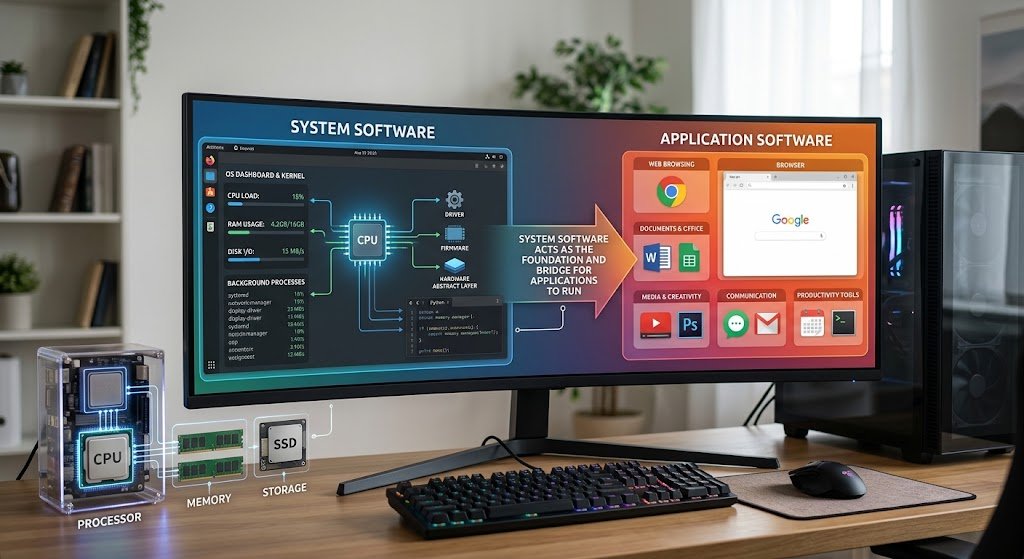
All computers, cell phones, tablets and digital devices require software for them to do anything useful. Software is instructions that tell hardware what to do and software enables users to communicate with technology, whereas hardware is the physical structure of a computer system. The software can be broadly classified into two types: System Software and Application Software. While their functionality is distinct, they complement each other to provide a comprehensive computing experience. By focusing on the difference between system software vs application software, the student, professionals and common users will get to know how a computer works and why some programs are essential for the computer to run properly.
The easiest way to think of the difference is that application software are the programs that will be used by the user to perform a particular task, while system software are the programs that are used to manage the computer hardware and to provide an environment for the other programs to interact with. Without the system software, the computer cannot function properly, and without a system environment, the application software cannot function. The difference between system software and application software is explained in terms of their purpose, functionality and examples to help in better understanding of the topic.
Many people use application software every day, such as games, office programs, and mobile applications, but they wouldn’t be possible without the support of the system software. They are both a vital component of the modern computer, and understanding how they work together can help to provide a deeper understanding of software fundamentals.

What Is System Software?
System software is a type of software that controls the operation of computer systems and resources, and makes the systems available for use by application software. It works at a lower level of the computer system and serves as a communication link between the hardware components and user applications. For every program that is opened by a user, the system software is responsible for making sure that the program can use the resources it needs, including memory, processing power, storage, and input/output. Computers could not perform tasks with their hardware or could not give the user an easy-to-use interface without system software.
One of the most significant features of System Software is that it is always running in the background. System Software – These are programs that run on the computer system in the background when the computer is started and keep the computer running smoothly. It offers functionality like managing memory, organizing files, security measures, device communication, and system performance. As a result of this responsibility, system software is referred to as the backbone of a computer system.
Typically, system software is written to closely interface with a particular set of hardware architectures. Examples of system software include operating systems, device drivers, firmware, and utility programs. They make sure that components of the hardware are able to communicate with each other and that the application software is supported to run properly.
Types of System Software
Operating Systems
The most identifiable type of system software is called the operating system. It coordinates all the activities of a computer and gives the computer user an interface with which to communicate with the hardware. At the start of every computer’s operation, the Operating System is loaded into the computer’s memory and takes control of the computer’s operations.
Some of the common operating systems are Linux distributions, macOS, Microsoft Windows, Android, and iOS. While each OS has its own unique features, interfaces, security mechanisms, and more, they all have one thing in common: they are responsible for managing hardware resources and allowing software applications to run.
The operating system, for instance, manages memory when the user opens a word processor, controls processor use, deals with input devices like the mouse and keyboard and controls access to files. Many background tasks are performed by the operating system to run the application, and the user may only see the application window.
Device Drivers
Another critical system software is device drivers which enable the operating system to communicate with the hardware devices. There are numerous components for computers such as printers, graphic cards, keyboards, network adapters, audio devices, etc. Instructions have to be written to tell each device what to do with the operating system.
For instance, a printer driver enables the OS and applications to send documents to the printer properly. The computer may detect the device, but be unable to make it work properly without the correct driver.
Firmware
Firmware is a specialized system software that is embedded into hardware devices. It offers a set of basic instructions that help the hardware to get started and carry out basic operations. Commonly used in mobile devices like phones, routers, cameras, and motherboards.
Firmware is different from traditional software in that it is tightly linked to the operation of hardware. Firmware updates can enhance the performance of the device, address security vulnerabilities, or introduce new capabilities.
Utility Programs
Utility programs are the computer system software that is used to maintain, protect, and optimize the performance of a computer. They assist in controlling system resources and troubleshooting any technical issues.
Some examples of utility software are anti-virus software, disk cleanup, backup software, file compression and system monitoring software. They provide enhanced reliability, security, and efficiency while ensuring the general health of a computer system.
What is an application software?
Application Software: These are the programs designed to accomplish a specific task or an activity. While system software is for managing hardware and system operation, application software is targeted towards user needs. These programs enable users to write documents, access the internet, communicate, manipulate images, and work professionally, as well as handle financial matters.
Application software is that software that runs on top of system software. This implies that applications must have an operating system and other system resources to operate. The operating system gives the user the environment he/she needs, and the application does what the user asked for.
Today, application software can be so diverse that it seems there are no limits to what is possible. Uses applications to manage financial aspects, customers, interactions, and data analysis. Students apply applications to research, learning and productivity. People use applications for fun, social networking, shopping and to organize their own lives.
Types of Application Software
Productivity Software
Productivity software enables users to perform everyday tasks in the workplace and in school. These applications enhance the efficiency by offering tools to create, edit, organize and share information.
These can include word processing, spreadsheet, presentation and note taking software applications. Examples include Microsoft Word, Microsoft Excel, and presentation software such as Google Docs. Productivity software is vital for businesses, enabling them to create reports, analyze data, and collaborate with others.
Web Browsers
Web browsers are application software that can be used to view and interact with websites and services on the Web. They transform web documents into something that can be displayed and manipulated by the user.
Common ones include Google Chrome, Mozilla Firefox, Microsoft Edge and Safari. Network hardware, the display of the graphics and management of the computer resources are achieved by the use of system software, particularly the operating system, in the browsers.
Multimedia Software
Multimedia Applications are software used to create, edit and play digital media like videos, audio and pictures. Content creators, designers, businesses, and entertainers make extensive use of these applications.
These could be video editing software, photo editing programs, music players, and graphic design software. They need to use a considerable amount of system resources, particularly processing power and memory, in order to perform complex multimedia tasks efficiently and effectively.
Business Software
Business Applications are used to facilitate the operation of a business, to analyse and to enhance productivity. These programs involve accounting systems, customer relationship management tools, enterprise resource planning software, and communication programs.
For instance, a business can utilize money management software to monitor monetary transactions or client administration software to handle customer connections. These applications can help organisations to streamline processes and make informed decisions using the available data.
Entertainment and Gaming Software
Entertainment applications offer fun via games, streaming and digital media services. Video games are one of the most intensive applications for the use of resources, as they will make use of the more sophisticated graphics processing, sound management and network connectivity.
Gaming Applications require a great deal of system software to utilize the characteristics of the hardware components (graphics card, processor, storage, etc.).
Differences between system software and application software
Purpose and Function
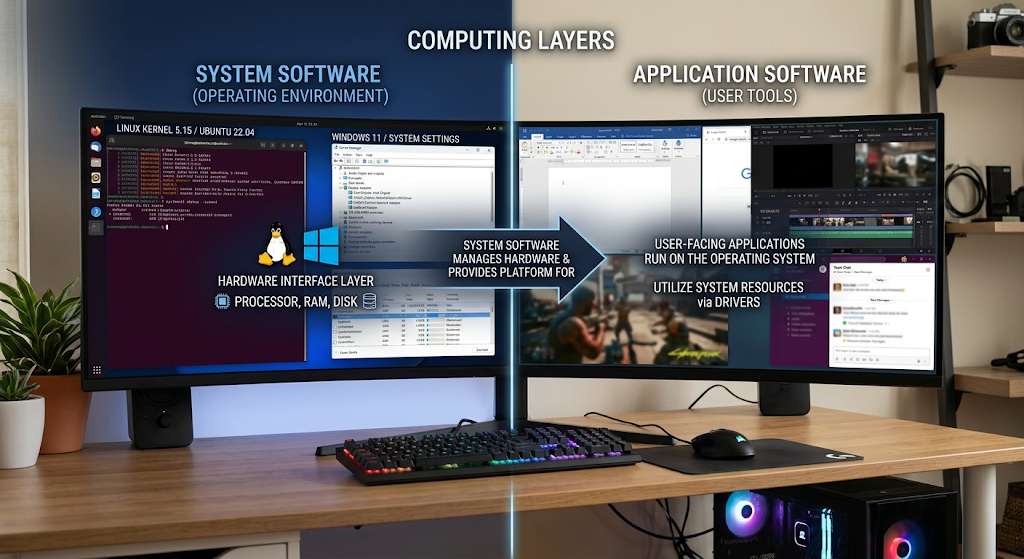
The main difference between these two types of software, system software and application software, is their function. The purpose of system software is to govern and control hardware resources, and to offer a platform for other software programs. Application software is designed to assist the user to accomplish a particular job.
For instance, Windows is system software which controls the hardware and gives the environment for running programs. Microsoft Word – it is an application software used for creating and editing documents.
User Interaction
Most of the system software does not involve much direct interaction between the users. Most of the system processes are hidden from users and are carried out automatically.
Application software is the kind of software that needs the person’s direct interaction with it. Users launch applications, enter directions and receive outputs according to the tasks they desire to accomplish.
Dependency
Application software requires the use of system software. A web browser without an operating system to control and coordinate memory, processor, and hardware communications is not possible.
But application software is not dependent on system software as it can function without the system software to manage the computer.
Installation and Updates
Typically, system software is installed when the device is set up and is used for critical security, performance and hardware compatibility upgrades. Users can install and remove application software from the computer, based on their preferences.
A computer might always need an operating system, while the user may decide to install a video editor, game or an accounting program.
How application and system software work together
System software and application software are NOT separate systems that work independently. Rather, they operate in a multi-layered fashion. The hardware is at the lowest level, system software controls the hardware, and application software enables user interaction with the computer.
Different operations a user can perform on the application, such as opening a document or playing a video, trigger requests to the operating system. The OS then ‘talks to the hardware components’ and does the job. This process is rapid, enabling users to enjoy smooth and responsive performance.
In an example, the application software asks to use video files, audio output and display resources when it is playing a video in a media player. The operating system is in charge of them, and it ensures that the processor, memory, speakers and screen perform properly.
Real World Example of System Software and Application Software

There are many examples in the modern world in both software categories. This relationship is clearly shown in a smartphone. Android or iOS is the system software that controls hardware like processor, camera, touch screen and storage. Like WhatsApp, Instagram, YouTube, and mobile banking apps, applications run on top of the operating system to deliver certain services.
Operating systems like Windows, macOS, or Linux serve as the system software for personal computers. The users then install applications liking web browsers, office applications, design applications, and games as per their requirement. This connection is also the key to the business world, through servers, databases, enterprise applications and cloud computing.
Importance of Software Categories
Knowing the difference between system software and application software aids the users to make informed choices for selecting, maintaining and troubleshooting technology. It defines the difference between program essentials such as needed to operate a computer, and optional programs for particular purposes.
This knowledge is useful for students in a computer science educational stream, as it forms the basis for their knowledge of operating systems, programming, computer security, software development, and other related fields. It is useful for the everyday user to read and understand common technical problems including “An application may fail to function when the operating system is outdated.
Organizations are also able to plan their technology investments by using software categories. To build efficient digital environments, businesses need to take into account both system-level infrastructure and user-centric applications.
Conclusion
Application software and system software have related and different functions in today’s computer systems. System Software is software that controls the basic operations of the computer and hardware resources and supplies the foundation for the functioning of programs. Application software is designed to assist users in doing specific things, such as making documents, surfing websites, handling businesses and participating in amusement.
Both are mutually dependent and are not interchangeable. Application software has no environment on which to run without system software. If users didn’t have means to perform meaningful activities then computers wouldn’t be very useful without the application software. Combined, these two forms of software can provide the full computing experience that drives personal devices, business systems and digital technology today.