Cloud computing has transformed the usage of computing resources by both individuals and organizations including the education sector, namely schools. Users can get many of these resources from the Internet as cloud resources rather than buying and maintaining them themselves, rather than the server, storage device, apps, networking, etc. they purchase and maintain. But cloud computing is not one homogenous type of environment. Organizations have a range of options for deployment based on their needs for ownership, access, security, cost, performance, compliance and control.
These four different deployment models of cloud are public cloud, private cloud, hybrid cloud, and community cloud. Every model has its own method of organizing and provisioning computing resources, and each model has its pros and cons. Familiarity with these differences aids students, technology novices, and business owners in making decisions for choosing cloud for a specific use of computing or organizational resources.
What are Cloud Deployment Models?
Cloud deployment models are the ways a user or organization owns, manages, accesses and shares cloud computing infrastructure. They identify the location of computing resources, who can access them, who is responsible for managing them, and how much control an organization has over its environment. There are four popular models namely public cloud, private cloud, hybrid cloud, and community cloud. In terms of the infrastructure, the public cloud is typically used by several customers through a cloud service provider, and the private cloud is used by one organization. A hybrid cloud setup that integrates both private and public clouds to enable data and applications to run across both when needed. A community cloud is built to meet specific needs, including security, regulatory, operational, and industry-specific needs. With these models, organizations can select a cloud architecture to fit their technical and business requirements.
It’s especially important to understand the major cloud deployment models as the right model depends on the situation of the organization, and not just the newest or most popular technology. A small company that requires inexpensive web hosting might not have the same needs as, say, a hospital that has to deal with sensitive records, a university that is working on research, or a government agency operating under strict regulations. For organisations, the public cloud can offer scalable resources without making such large investments in hardware. Private environments can provide more control of infrastructure and data. Hybrid environments can offer flexibility between various cloud settings, and community clouds can be used for groups that have similar needs. These differences are best understood when you look at who owns it, who has access to it, how it is secured, the cost, and the applications.
Public Cloud
Public cloud is a cloud computing system that shares infrastructure and computing resources with other users of the cloud service provider. The provider owns or runs the infrastructure, such as servers, storage systems, networking equipment and data center facilities, and customers usually pay for the resources and services they consume. Users need not necessarily be aware of the physical location of the hardware that is used for their applications as the provider is responsible for the provision of the infrastructure.

The public cloud services can encompass virtual machines, databases, file storage, application hosting, development platforms, artificial intelligence services and so much more. This model is popular as it can help organizations save on hardware investments whilst needing to allocate computing power based on their fluctuating needs.
The provision of public clouds along with their accessibility.
One of the most significant aspects of the public cloud model is ownership. The cloud provider will provide access to the underlying infrastructure and the individual customers will get controlled access to the services that they have purchased or subscribed to. While the infrastructure is logically separated from the data of the customers, the resources are shared at the provider level since many customers can share the same resources.
Public clouds can typically be reached via the internet and interfaces offered by providers, enabling authorized users to access applications and services from various locations. This accessibility feature is especially helpful when businesses have remote workers or students working from other locations, or when organizations need to deploy apps to users in various areas. The provider also manages numerous infrastructure tasks, allowing customers to focus more on their applications and business operations than on managing the physical servers.
Security and Cost of Public Clouds
Security of the public cloud is a combination of the provider and the customer. Cloud providers generally have in place very thorough security measures on their infrastructure, and the customer is responsible for configuring their accounts, applications, identities, permissions and data correctly. Beware moving an application to a public cloud doesn’t mean it will be secure. Even if the underlying infrastructure of a storage service is well protected, there are risks that can be created through poorly configured accounts and/or excessive user permissions.
One of the big draws of the public cloud is that organizations may not need to commit to significant capital expenditures on hardware and pay only for the services and use that they choose. But when it comes to using up a lot of computing power, storing a lot of data, or sending a lot of information, costs can mount up. Good resource management is therefore crucial to ensure predictable cloud expenses.
Most Typical Scenarios for Using Public Cloud
Public clouds are well suited for a wide variety of applications where flexibility, scalability and the need for relatively rapid deployment are significant. Public cloud infrastructure is ideal for running applications for startups without building their own data centers, and for established companies to deploy websites, databases, software development, analytics, backups and more. Cloud-based applications have the potential to support collaborative work, online learning, and research projects in educational settings, and can be used to develop and test applications in development environments.
Additionally, public clouds can be used for applications with variable needs for computing power, as resources themselves can be scaled up and down as needs evolve. For example, an online service could need more resources when it’s busier and less resources when it’s less busy. The flexibility provided by the public cloud makes it a viable option for businesses that value convenience and scalability.
Private Cloud
A private cloud is a cloud computing system that is used by one organization only. A private cloud is a cloud infrastructure that is dedicated to a single organization, compared to a public cloud, which is shared among several different organizations. The infrastructure could be in the organization’s premises, or provided by an external company, but the infrastructure is dedicated to the organization. In addition to offering greater control over infrastructure and policies, private clouds can offer capabilities like virtualization, automated resource provisioning, centralized management, and self-service access.
This is a suitable option for organizations with extreme security needs, niche technical needs, compliance regulations, or processes that demand high levels of control. The challenge is, though, that with increased control comes increased responsibility as the organization may have to navigate more infrastructure, security, maintenance, and operations costs.
Ownership of Private Clouds, and Accessibility
A private cloud is typically managed by a single organization, though the specific ownership of the hardware and the tasks involved in running the cloud can differ. An organization can own & run the infrastructure, or use a third party infrastructure provider to provide and manage a dedicated environment. Access is typically limited to approved users of the organization or approved partners and applications. This limited access can be beneficial if workloads include sensitive data, or if an organization has strict internal policies to follow.
The environment is dedicated, and administrators can set up the infrastructure based on their organization’s requirements. But such customization can demand specific skilled people and technical skills. So, it’s important for organisations to think about whether they have the expertise and resources to effectively manage and secure a private cloud.
Security and Cost of Private Clouds
Security is one factor that is frequently a basis for private cloud environments. A private cloud can offer more flexibility and control of network architecture, access policies, data management, configuration of infrastructure, etc. But the private cloud setup isn’t necessarily considered 100% secure. Proper system design, software updates, identity management, monitoring, backups, and other administration practices are still required for security.
Another drawback to private clouds is that the organization may have to purchase or maintain its own servers, storage devices, networking gear, software, data center facilities, and staff members. These costs can be warranted if the organization needs significant control and/or has regulatory and operational needs that justify this. That’s why it’s important to assess the organization’s long term needs when making this decision, rather than assuming increased control always leads to more overall value.
Common use Cases of Private Cloud.
Organizations using sensitive data or those with very specific computing needs may find private clouds an attractive option. Financial institutions, government organizations, research institutions and healthcare-related organizations as well as large enterprises may have workloads with specific access control requirements and/or infrastructure policies. Another scenario in which a company might choose to use a private cloud is when they have applications with specific configurations that are challenging to put in place in a shared environment.
Private clouds may be advantageous for businesses with consistent workloads and budgets to support the investment in extra infrastructure. They might also offer more control over internal development and testing environments. However, there is a need to consider if a private cloud is really needed, as having dedicated infrastructure can be technically, financially and administratively intensive for organizations.
Hybrid Cloud
Hybrid cloud refers to a combination of two or more types of cloud services, typically a private cloud environment and a public cloud environment, where workloads and data can be deployed across the cloud environments as needed. Flexibility is the central theme of the hybrid concept. An organisation does not need to have all applications and datasets in one environment. Rather, it can run some workloads in a private environment and use public cloud resources for other tasks.
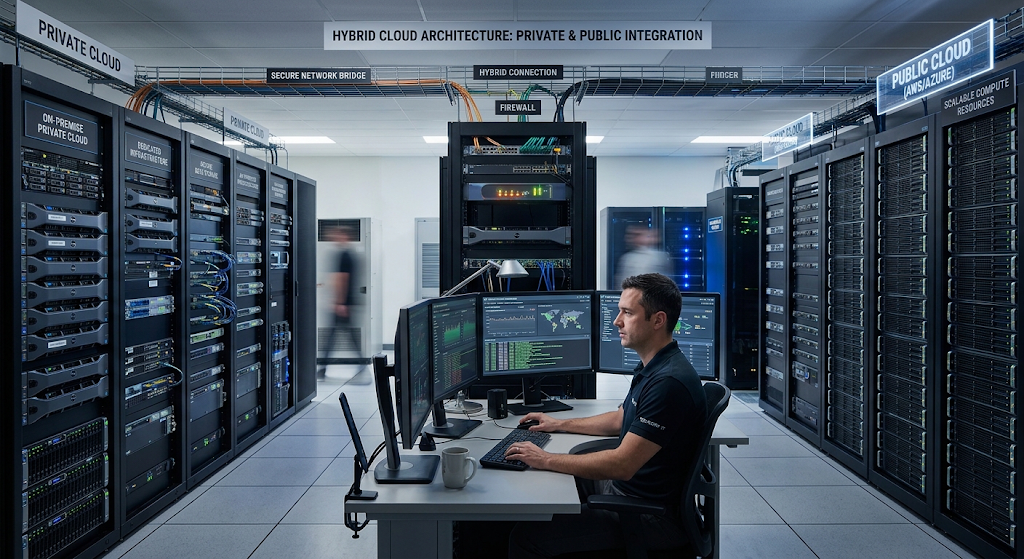
For instance, an organization may store sensitive systems in a controlled private cloud environment while testing applications, gaining extra computing resources or other less sensitive workloads provided by a public cloud. For a successful hybrid environment, the various environments need to be effectively networked, secured, monitored and integrated with identity management to ensure reliable working.
Ownership & Accessibility of Hybrid Clouds
The ownership and access to hybrid clouds is more complicated due to mixing environments. The private portion could be a private owner or a private cloud provider, and the public portion is a public cloud service provider. Depending on organizational policies and technical needs, users and applications are allowed to use resources in both environments. This way, businesses can place workloads where they’re right and not into the same infrastructure as everything else.
The hybrid cloud, however, may be more complex to manage as teams need to synchronize systems across the different platforms. All aspects of network connectivity, authentication, application dependencies, data movement, and monitoring must be carefully managed. The agility of hybrid cloud is useful, but it also adds to the complexity of the architecture and the management process.
Security and Cost of Hybrid Clouds.
Security a hybrid cloud demands uniformity of policies in coupled environments. An organization should know the location of data, what people are allowed to see, how applications are communicating among environments, and how security controls are applied to those components of the architecture. A hybrid approach may be used to maintain a more controlled environment for workloads in particular that are sensitive to such changes, while also leveraging public cloud for workloads where it makes sense.
Cost wise, hybrid cloud can offer opportunities to strike a balance between investing in infrastructure and using public cloud. When demand for more capacity arises, an organization can save on expanding its private infrastructure by utilizing resources on the public cloud. There are, however, other costs that can come into play when deploying hybrid cloud, such as networking, integration, management tools, security and the costs of replication. One has to plan carefully to make sure that flexibility doesn’t cost too much.
Organizations that run a combination of workloads that require various characteristics are best suited to hybrid cloud. A business can have private networks with critical internal systems and public cloud services for their customer-facing applications or development efforts. Alternatively, hybrid environments may be a perfect solution for organizations that are progressively moving from traditional data centers to cloud-based systems.
Rather than replacing all; they can migrate selected applications, running existing systems. A second potential application is to utilize the public cloud resources on an as-needed basis to complement private infrastructure – when demand spikes and exceeds a private cloud’s capacity. This can be a way to increase capacity without having to end up buying enough hardware for infrequent high traffic periods. For organisations needing control with scalability, hybrid cloud can be a great alternative.
Community Cloud
A community cloud is a cloud system for a particular community of organisations with shared needs. A community cloud is designed for a specific group of users that share common operational, security, compliance or business requirements, rather than serving the general customer base, as with a public cloud or be used by one organization, as with a private cloud. Based on the design of the environment, members of the community can share infrastructure, policies, and management responsibilities.
This model may apply to other organisations in the same industry or institutions that must adhere to the same regulations. For instance, a cluster of organizations that share similar data protection needs might choose to deploy a shared cloud environment built on shared data protection needs. Community clouds are not as prevalent as public, private, and hybrid clouds, but can be beneficial in certain situations.
Ownership and Accessibility of Community Clouds.
The ownership of a community cloud may be shared. The infrastructure can be co-managed by the participating organizations, be run by a third party provider or be managed in some other organizational structure that has been agreed to for the community. It is generally not available to the general public, but is available to those who belong to some defined community or population. The size of this limitation permits the environment to be planned in terms of common needs. For example, the participating institutions might reach an agreement on access policies, security requirements, data management procedures, and operational practices.
The problem is that the organizations need to come up with ways of governing the environment. Shared decision making can be complicated by budget, technical capacity, priorities, and risk tolerance differences. Establishing governance arrangements and responsibilities for participating organisations is therefore a key issue for a successful community cloud.
Security and Cost of Community Clouds
Policies and infrastructure can be developed to support common needs of the community and thus enable community cloud security. The community can develop common security standards and controls rather than build individual security solutions for each member. But the division of security functions remains an issue to be resolved, particularly with multiple organizations using jointly provided infrastructure and services.
Cost may be spread across the community and that, in turn, will help lighten the load on one organization if it builds a comparable special area on its own. Meanwhile, setting up governance, shared infrastructure, and coordinating participating organizations can lead to increased administrative tasks. The financial gains thus will be dependent on the numbers of participants, infrastructure design, management arrangements and the specific requirements of the community.
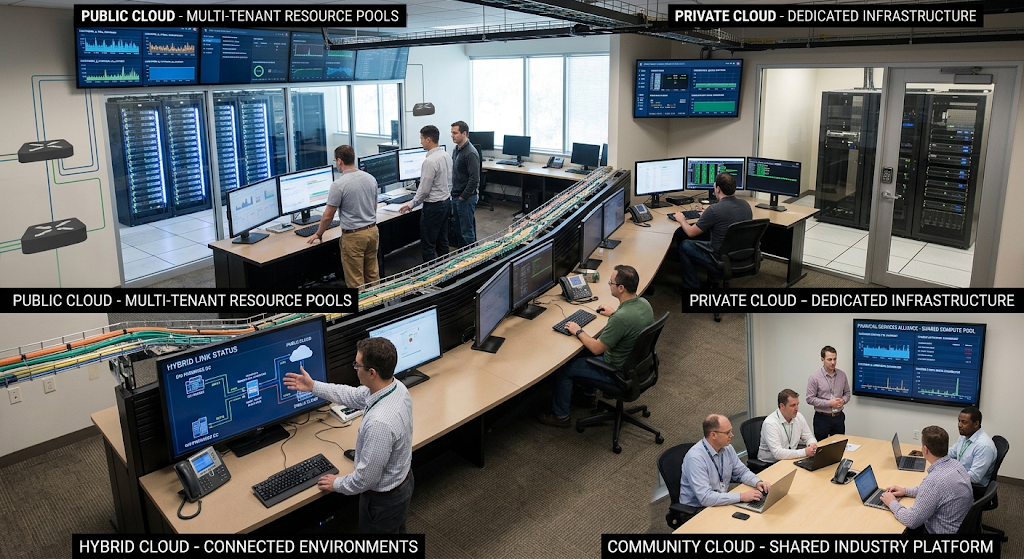
Public vs Private vs Hybrid vs Community Cloud
The primary differences between the four cloud deployment models are: Resources are organized, shared, controlled and accessed differently in each model. Advantages of public cloud infrastructure include reduced infrastructure management, scalability, and accessibility, while the infrastructure is provided by an external source and is shared by multiple customers. Private cloud infrastructure is unique to an organization and can offer more customization and control, but can be more expensive to invest in and manage.
Hybrid cloud integrates various types of environments to give flexibility to the organization when it comes to distributing loads based on needs. Community cloud offers a place for sharing infrastructure and governance and is designed for a specific set of organizations that have similar requirements. Since work load sensitivity, budget, regulatory requirements, scale, technical expertise, etc., is very different for each organization, there is no overall best model.
When deciding on a cloud deployment model, it is important to start by evaluating an organization’s true needs, before assuming one is better than the other. The sensitivity of the data, regulatory requirements, workload, budget, internal technical understanding, access requirements, scalability, and the degree of control desired are important considerations for businesses. Public cloud services can be a good choice for small businesses that don’t have substantial technical resources.
Private cloud may be a good choice for an organization that has strict requirements for dedicated infrastructure. Hybrid cloud could be a good fit for a company that requires both controlled environments and cloud scalability. Community clouds can be considered for organizations that have similar industry needs. Future expansion should also be taken into account as a cloud architecture that is successful for a small organisation can change as work loads, users and data volumes grow.
Strengths and Weaknesses of Cloud Deployment Models
These are the different combinations of control, cost, access, security, flexibility and complexity that each cloud deployment model offers. Costs are typically high with public clouds, and the customer has less direct control over the underlying infrastructure. Private clouds offer more control and customization, but also higher up-front and operational costs for implementation and management. The flexibility that hybrid clouds offer comes from the ability to link various cloud environments, but the architecture may be more complex to secure and manage.
Community clouds can provide opportunities for organizations with similar needs to work together for a shared environment, yet good governance and coordination is required. By becoming familiar with these perils, organizations can prevent selecting a cloud model due to claims or assumptions. The technology choices should be linked with the measured organizational needs, and the cloud strategy should be revisited whenever there are changes in the organizational needs.
Conclusion
There are a variety of ways in which cloud computing resources are deployed, including public, private, hybrid, and community clouds, and knowing their differences is important when learning about the latest technology. Public cloud is suitable for when scalable, accessible, and lower infrastructure management costs are desired. Private cloud may be worth the investment if a company needs more control, customization or specific infrastructure. Hybrid cloud can provide a mix of environments for organizations to balance control with flexibility, especially when workloads have varying requirements.
Community cloud is built for groups with particular operational, security and/or compliance requirements. The process of choosing a cloud deployment model should include thoughtful consideration of ownership, access, security, cost, scalability, technical ability, and use cases. Students, business owners, and technology novices can leverage these factors to better decide which types of computing and organizational needs cloud environments can meet.