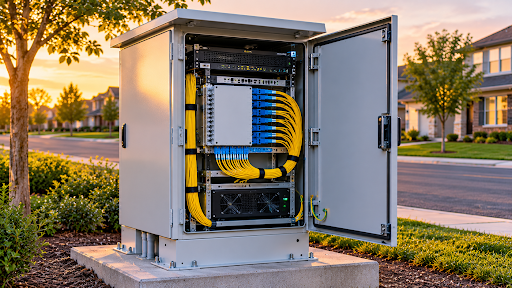
A telecom cabinet on a roadside looks simple. It is a metal box with a lock. But inside it sit radios, switches, power supplies, batteries, and fiber that a whole neighborhood depends on. If that box overheats in July or floods in a storm, people lose service.
This guide is about picking the right box before that happens. It covers ratings, cooling, power, security, mounting, and the small details that separate a cabinet that lasts 20 years from one that gets replaced in five.
What Outdoor Telecom Cabinets Actually Do
An outdoor cabinet protects equipment from the weather, from tampering, and from temperature swings. It also gives technicians a clean place to work.
Most cabinets house some mix of these.
- Active gear such as OLTs, routers, switches, and radio units
- Power systems including rectifiers, batteries, and surge protection
- Passive gear such as fiber patch panels, splice trays, and splitters
- Monitoring devices for temperature, door alarms, and power status
Cabinets show up everywhere in US networks. Wireless carriers and tower companies, including operators like Crown Castle, use them at small cells and base stations. Cable and fiber providers use them at distribution points. Utilities and cities use them for traffic systems and sensors.
Start With the Environment, Not the Catalog
The best cabinet for a mild coastal town is not the best cabinet for a desert highway. Before comparing models, list what the site will throw at it.
Heat and sun
Direct sun can push the inside of a closed metal box far above ambient air temperature. Electronics have limits, and many run best under about 104 degrees Fahrenheit. Light colors, sun shields, and good cooling all help.
Cold
Batteries lose capacity in the cold, and some gear will not start below freezing. Northern sites often need heaters and insulated walls.
Moisture and flooding
Rain, snowmelt, and condensation all matter. Cabinets in low spots may need elevated bases or sealed cable entries.
Salt and corrosion
Coastal sites and roads treated with de-icing salt are tough on metal. Aluminum and stainless steel last longer than painted steel in these places.
Dust and sand
Desert and agricultural sites need filtration or fully sealed designs, since dust can clog fans and coat circuit boards.
Vandalism and vehicle strikes
Roadside cabinets get hit. Heavy gauge walls, bollards, and good locks are cheap insurance.
Write these down, then use them as filters. It keeps you from buying more cabinet than you need, or less.
Understanding NEMA, IP, and GR-487 Ratings
Ratings can look like alphabet soup, but they answer simple questions.
NEMA ratings are used in North America. A few common ones.
- NEMA 3R handles rain, sleet, and ice on the outside. It is not designed for hose-directed water or dust.
- NEMA 4 adds protection against windblown dust and hose-directed water.
- NEMA 4X adds corrosion resistance, which suits coastal and chemical environments.
IP ratings come from the IEC standard. IP65 means dust-tight and protected from water jets. IP66 handles stronger jets. Many products list both NEMA and IP ratings.
Telcordia GR-487 is a telecom-specific standard for electronic equipment enclosures. It tests things like rain, wind, corrosion, vibration, and temperature. Westell’s Boxer 10 outdoor cabinets, for example, are described as NEMA 4 rated and third-party tested to GR-487 by independent labs. If a cabinet will carry carrier-grade equipment, GR-487 compliance is a good sign.
UL 50E and NEC rules may also apply depending on the install. Check with your local authority having jurisdiction.
Cooling Options for Outdoor Network Cabinets
Heat is the top killer of outdoor electronics, so cooling design matters most. There are four main approaches.
Passive cooling
No fans, no power. The cabinet relies on convection and its own surface area. It suits low-power gear such as passive fiber distribution or small equipment with low heat load. It is quiet and cheap but only works for modest heat loads.
Filtered fan cooling
Fans pull outside air through a filter and push it across the equipment. This works well in mild climates, though filters need regular replacement and the design is weaker in dusty or wet places.
Heat exchangers
A heat exchanger moves heat from the inside air to the outside air without mixing them. The design keeps interior and ambient air separate while still cooling the cabinet. That keeps dust and moisture out. Many telecom cabinets use this approach, including Westell’s Boxer line, where a 30 RU model is offered with a 99 W per degree Celsius heat exchanger option.
Air conditioners
For high-power equipment or hot climates, an outdoor air conditioner is the strongest option. Outdoor cooling units from Vertiv range from about 380 W up to 4.5 kW in capacity. The tradeoff is higher cost, more power use, and more maintenance.
If you search for an outdoor telecom cabinet with AC, you are usually looking at a cabinet designed to carry an air conditioner on the door or roof, often paired with a heater for winter.
Likewise, an outdoor network enclosure with a fan is the lowest-cost active cooling option, which suits smaller deployments with a moderate heat load.
Add the in-content image here, right after the cooling options section.
Sizing the Cabinet the Right Way
People often size cabinets by the equipment they have today. That works until the next upgrade.
- List every device that will go inside and its rack units (RU).
- Add power and battery space. Batteries can take as much room as the electronics.
- Allow cable routing room for fiber, power, and grounding.
- Add at least 20 to 30 percent spare capacity for future gear.
- Check rail width. Most use 19-inch rails, but some telecom gear needs 23-inch.
- Plan service clearance so technicians can open doors and reach the equipment.
Westell’s lineup gives a feel for the range, from 5 RU slide cabinets up to 44 RU cabinets with 19- or 23-inch rails. Compact boxes suit small cells and edge nodes. Larger ones suit remote terminals and hub sites.
Power, Batteries, and Grounding
A cabinet is only as reliable as the power feeding it.
- AC or DC power. Many telecom sites use -48 VDC, while others use 120 or 240 VAC. Match the cabinet’s power design to the gear.
- Battery backup. Decide how many hours of runtime you need. Batteries need ventilation and temperature control.
- Surge protection. Install protection at the power entry and on any copper lines. Raycap and others make products built for this.
- Grounding and bonding. A solid ground reduces damage from lightning and electrical faults. Follow NEC and manufacturer instructions.
- Generator or solar hookups. Some sites need ports for portable generators, which is worth planning from the start.
Leave room for power meters and disconnects if the utility requires them.
Security and Access Control
Cabinets are often outside the fence, in public view. A few features help.
- Multi-point or three-point locks that resist prying
- Tamper switches that send alarms when a door opens
- Hidden hinges and anti-pry door edges
- Shielded padlock designs that block bolt cutters
- Electronic locks with audit logs for larger networks
Add a sign with a contact number. It helps if someone finds the cabinet damaged or open.
Mounting Options and Site Prep
How a cabinet is mounted affects its life as much as its walls.
- Pad mount. A concrete pad keeps the cabinet level, off the ground, and clear of splashing water.
- Pole mount. This suits small cabinets in tight spaces or along aerial routes.
- Wall mount. It works for building sides and small facilities.
- Underground vaults and handholes. These fit passive splice points but not heat-producing gear.
Whichever you pick, plan conduit entries, drainage, and a gravel base. Seal every cable entry with proper glands or fittings, since that is where water often gets in.
Where to Find Telecom Cabinet Manufacturers
The market includes large telecom suppliers and smaller specialty makers.
- Westell makes the Boxer line of aluminum outdoor cabinets with several cooling options.
- Delta offers outdoor cabinets with heat exchangers and integrated power. Its ESOF001-EAB series lists an operating range of -10 to 50 degrees Celsius.
- Vertiv supplies cabinets, shelters, heat exchangers, and air conditioners.
- Charles Industries and Raycap serve carrier and utility builds, including cabinets and protection gear.
Ask any manufacturer for test reports, drawings, and lead times. If you need a broader mix of enclosures, cabinets, and passive hardware from one source, a supplier of outdoor telecom cabinets can match enclosure and cooling options to your site.
Lead times can stretch during busy build seasons, so order early. For wider project support across hardware and design, some teams work with a partner that offers communication infrastructure solutions rather than piecing everything together.
A Quick Example
Say a regional ISP wants to place a street cabinet for 500 homes in a hot, sunny climate.
- Equipment includes an OLT chassis, a small switch, batteries for four hours of backup, and a fiber patch panel.
- Total heat load is moderate, but sun exposure is heavy.
- The site is a roadside pad with occasional flooding.
A sensible choice would be a NEMA 4-rated, GR-487 aluminum cabinet with a heat exchanger, a light color finish, a sun shield, and a raised pad. The cabinet would include a heater for winter, a tamper switch, and room for 25 percent more gear.
A cheaper NEMA 3R steel box with a basic fan might work for a year. By the second summer, filters would clog, equipment would run hot, and failures would start.
Maintenance That Pays for Itself
Even great cabinets need attention.
- Inspect twice a year for rust, cracks, and damaged seals.
- Replace filters on fan-cooled units on a schedule.
- Test heaters and fans before winter and summer.
- Check batteries for swelling, leaks, and capacity.
- Clean the interior and look for insects or rodent signs.
- Check grounding and connections for corrosion.
- Update labels and records after every visit.
A short checklist saves a lot of trouble over the years.
Common Mistakes to Avoid
- Buying on price alone and skipping test data
- Choosing a size that leaves no room for growth
- Ignoring solar load and ambient temperature extremes
- Using passive cooling for gear that runs hot
- Leaving cable entries unsealed
- Skipping tamper protection on roadside sites
Questions People Ask
What is the difference between an enclosure and a cabinet?
A cabinet usually has rack rails and room for multiple devices. An enclosure can be smaller and simpler, such as a wall box for a single device.
Do I need a weatherproof outdoor rack?
Only if you are placing a rack inside a shelter or cabinet. A rack on its own is not weatherproof, so it needs a rated cabinet around it.
Are outdoor weatherproof cabinets for electronics all the same?
No. Ratings, cooling, and materials vary a lot. Check NEMA or IP ratings and any telecom standards that apply.
How long should an outdoor telecom cabinet last?
Quality aluminum or stainless cabinets can last 20 years or more with basic maintenance, while cooling parts and batteries need earlier replacement.
Final Thoughts
A good outdoor cabinet is boring in the best way. It sits there, keeps equipment cool and dry, and nobody thinks about it. Choose by environment first, then rating, cooling, power, and security. Plan for growth, and keep up with simple maintenance.
Do that, and the cabinet will protect your network instead of becoming the weak link in it.