A computer system can seem like a single intelligent machine, but it is actually a large number of different components that have to continually pass information back and forth with one another. Each of the processor, memory, storage devices and input/output peripherals has a specific function and cannot operate efficiently without a good communication system. While people have to communicate by using roads and signals, computers need buses, I/O systems, and interrupts to facilitate the flow of data and synchronization of activities. Such as the speed at which instructions are executed, information accessed and external devices responded to by a computer.
If you know the way your computer components talk to each other, you can begin to see why processor speed is not the only way to determine how fast your computer will perform. Even with a robust CPU, it’s essential to have streamlined memory and peripheral connections to ensure top-tier performance. The communication topologies within a computer rely on a number of key concepts such as system buses, data buses, address buses, control buses, input/output organization, interrupts, and direct memory access (DMA). These technologies are interdependent to provide modern computing.

Understanding the Computer Bus System
The computer bus is a communication channel for different components of a computer to share information. A collection of electrical connections or communications lines through which signals flow among the processor, memory and peripheral devices. In a computer network, a bus is used for the communication between various components of the network as a common pathway, which makes the design of the network simpler and less complex.
The concept of buses in computer organization helps understand how these communication paths are fundamental to computer architecture. A bus is a defined way to move various types of information: data values, memory addresses, control instructions. If there were no buses, each component would have its own connection, leading to increased size, cost and complexity of computer systems.
There are several factors that influence the efficiency of a computer bus such as its width, its speed and its architecture. The width of a bus is the number of bits carried at a time. For instance, with a 64-bit data bus, 64 bits of data can be sent at a time, which means that the data bus moves more per transfer cycle than it does in a narrower data bus. The speed of these transfers depends on the speed of the buses and the structure of the bus architecture by which different components share access to the buses.
In modern computers, more than one bus is used rather than one bus. This way, the performance can be improved because each part of the system can communicate asynchronously with each other. For instance, one high speed communication path for a processor to communicate with memory, and other communication paths for storage devices and other peripheral devices.
Main Communication Highway (System Bus)
A computer’s main communication link is the system bus, which links the central processing unit (CPU), the main memory and other major parts of the computer. It is the basis on which instructions and data to be executed by a program is transferred. The system bus is used for the CPU and memory to communicate with each other when an instruction is to be retrieved or a result is to be stored.
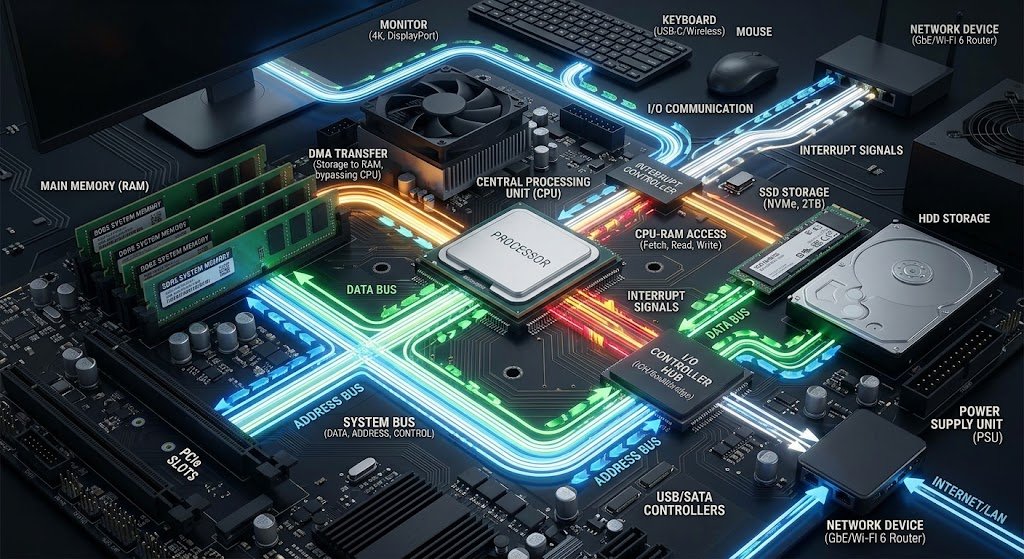
Typically, a system bus consists of three components: a data bus, an address bus, and a control bus. All of them have different functions, but they complete all of the communication operations within the computer. If the CPU needs to read data from memory, the address bus is used to determine the address of the memory to be accessed, the control bus will signal a read command, and the data bus will return the data to the CPU.
Computer performance can have a significant effect on the design of the system bus. The wider and faster the bus the more information can be transferred in a shorter time. However, better bus performance brings engineering problems too, as communications must be faster, which means better synchronization, better signal quality and more sophisticated designs.

Data Bus: Get Information From One Component to Another
The data bus is the pathway along which the actual data that are being transferred are transported between the components of a computer. This information can be in the form of instructions for programs, numbers, text, pictures, or other digital data that the computer would process. The data bus is used to carry information between the CPU and memory or an input/output device when the CPU is interacting with these components.
The width of the data bus dictates the amount of data that will move at one time. The larger the data bus the more bits that can be transferred at once, potentially increasing overall performance. For example, a 64-bit data bus processor can move more data per clock cycle than a processor with a narrower data bus.
Data bus can be used for transferring data both to and from the CPU and can be used for transferring data to and from other components. The data bus carries information from the processor to the memory location when the processor is saving the information in memory. Data moves from memory to the processor when it is being read.
The data bus is crucial for the movement of data but not for where the data is going. The data bus is responsible for that, along with the address bus, which provides accurate communication.
Address Bus: Identifying Data Locations
When a memory location is read, it is specified by an address.An address is used to identify a data location.
The address bus carries memory addresses, which are used to determine where data is to be accessed for input or output. Each piece of information in a computer’s memory has a particular address, and addresses are what the processor uses to find the right information.
The address bus typically only moves data in one direction, unlike the data bus. Address Bus is used by CPU to send addresses to memory or I/O devices to fetch data from memory or store data in I/O devices. An example of this is when a program needs a specific instruction, the processor will send the memory address of the instruction through the address bus, and the memory unit will send the information stored in the memory location.
The address bus’ width dictates the size of the maximum memory space that can be directly addressed by the computer system. The wider the address bus, the more unique addresses it can have, and the larger the amount of memory the computer can hold. It is one of the reasons why the modern day computers can manage a lot more memory as opposed to the previous ones.
The address bus is an important part of the organization of the system, as it helps to ensure that the data is delivered to the correct destination. If the addresses are wrong, the information might be delivered to the wrong address, leading to errors and failure of programs.
Control Bus: Coordinating Communication Activities
This course will cover how to coordinate communication activities on the Control Bus.
The control bus coordinates and controls the activities of various computer components. The data bus conveys information, the address bus points to a location and the control bus conveys control signals instructing components to what to do.
Some of the commands sent as control signals are read, write, interrupt requests, clock signals, and activation of devices. These signals are used to communicate in an organized way between components. An example of this is when the CPU requests information from memory, the control bus sends a signal to memory indicating that the CPU requires information.
Without the control bus, the components inside the computer would not be able to work as they should. If there are no control signals, more than one device may try to talk at once or do the wrong operations. The control bus is the system which regulates the communication.
Input/Output Systems: Introducing the Computer to the World
Input/output (I/O) systems are used to enable computers to talk to external devices like computers, printers, storage devices, network equipment, monitors, and keyboards. The CPU and memory work for internal processing, but the I/O devices allow users and other systems to communicate with the computer.
The I/O system consists of hardware controllers and software that control communication between the processor and other devices. The I/O controllers assist in converting instructions from the computer to the connected device and vice versa, because each device uses a different speed and mode of communication.
For instance, a keyboard provides input when a key is pressed on it. These signals are then sent to the keyboard controller which turns them into digital data interpreted by the processor. Likewise, a display controller translates the processed data into signals which can be displayed on a screen.
Efficient I/O management is important due to the fact that peripheral devices are typically slower than the CPU. If it’s not organized, the processor will be spending precious time waiting for the devices to finish the job.
Memory-Mapped I/O vs Isolated I/O
There are various ways in which computers communicate with input/output devices.
There are two basic methods: memory-mapped I/O and isolated I/O, which organize communications differently for the processor to interact with peripherals.
Memory-Mapped I/O
Memory mapped I/O is the method of assigning the input/output device memory addresses. These devices are used with the same instructions that are used for normal memory. This means that the CPU is able to read and write to the I/O devices using standard memory operations.
Simplicity is one of the benefits of memory-mapped I/O. The processor treats devices like memory locations, making it possible for a uniform communication method to be used by programmers and hardware designers. This is also a more flexible method of programming as normal memory instructions can control peripheral devices.
Memory-mapped I/O allocates part of the address space to devices, however. This implies that certain memory addresses are utilized for communicating with the hardware rather than for normal program data storage.
Isolated I/O
Isolated I/O (I/O mapped), employs a separate address space for input/output devices. Special instructions are used by the processor to communicate with peripherals rather than typical memory instructions.
The benefits of isolated I/O are that the memory address space is not allocated for devices, meaning that they do not occupy typical memory locations. But, it does need extra instructions and hardware support, potentially complicating system design.
Both are employed in computer systems and depend on the architecture of a processor and what the processor is designed to accomplish. In modern systems, combinations of different communication methods are often utilized to guarantee efficiency and compatibility.
Interrupts: Getting the CPU’s Attention
Interrupts are signals that can temporarily suspend the normal operation of the CPU and request immediate attention from the hardware/software. They address a big issue in computer design: the ability of devices to communicate with the processor without having to be constantly monitored.
If interrupts were not in use, the CPU would have to periodically inspect all the devices to see if they need service. This is known as polling and is a waste of CPU time since the CPU is checking devices that may not need to be checked.
Interrupts allow the device to inform the processor when it is needed. For instance, when a key on the keyboard is pressed, the keyboard controller will interrupt the CPU. The processor stops the current process and processes the input from the keyboard and then resumes the previous process.
Interrupts enhance the efficiency of a system by enabling the CPU to concentrate on more useful processing, rather than constantly checking on hardware devices. Interrupts play a crucial role in modern operating systems, especially when it comes to multitasking, communicating with devices, and responding to real-time events.
Improving Data Transfer Efficiency: Direct Memory Access (DMA)
DMA, or Direct Memory Access, is a method which enables specific hardware components to send and receive data from and to memory without needing the constant supervision of the CPU. DMA is particularly well-suited for applications where a lot of data is sent and received, like storage devices, Network adapters or multimedia devices.
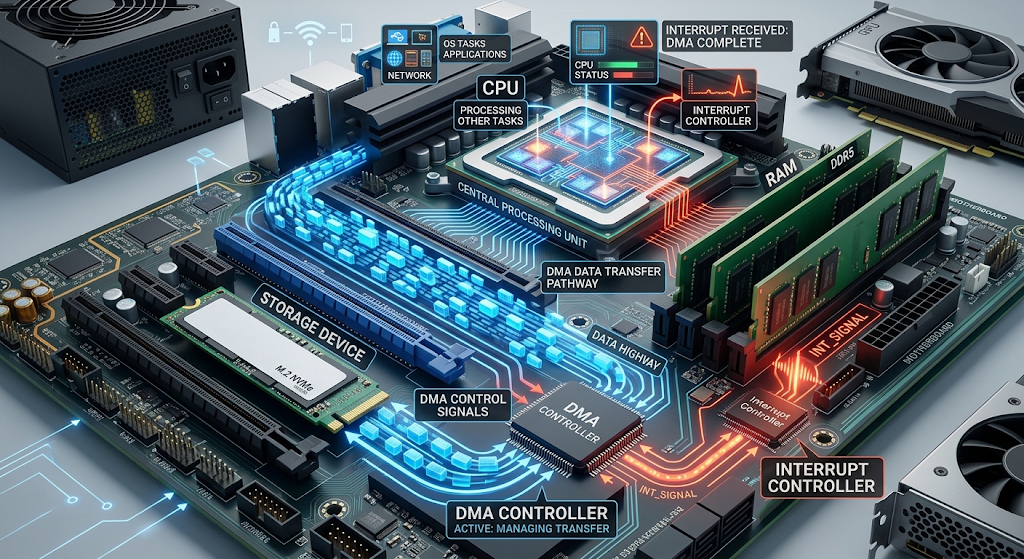
In normal data transfer, the CPU takes care of every step of the process. This demands processor time and decreases the overall performance of the system. Using DMA, the DMA controller handles the transfer and the CPU can carry on with other processing.
For instance, if the data to be transferred is large, the DMA controller can move it from storage to memory while the processor executes other programs. After the transfer is done, the DMA controller interrupts the CPU.
DMA allows a significant increase in performance, since it eliminates the need for the CPU to work unnecessarily, and devices can communicate with each other and memory at a higher speed. It is a crucial technology in today’s computing world, where significant amounts of data have to be processed in a timely manner.
How Do Buses, I/O Systems, Interrupts and DMA Work Together
All these technologies must work together to enable the communication system of a computer. The information transfer pathways are buses, external devices are connected through I/O systems, large quantities of data can be moved through DMA, and efficient communication signals are provided by interrupts.
These systems are designed to function in concert when a user is using a computer. The processor will, for instance, communicate with storage hardware via buses and I/O controllers when saving files. When lots of data has to be transferred, DMA can move the data while the CPU is working on other tasks. At the end of the operation, an interrupt tells the processor that the operation has been completed.
In modern computers, such coordination occurs millions or even billions of times per second. While often hidden from users, these processes are vital to the operation of computing systems that are fast, reliable and responsive.
Conclusion
Efficiently communicating is one of the pillars of modern technology which all the computer components need to achieve. A communication structure, known as system buses, data buses, address buses, and control buses, enables processors, memory, and devices to exchange information. The input/output systems deliver interfaces between computers and external devices, and how the processors interact with peripherals can be through memory mapping or isolation.
Interrupts and DMA further increase computer efficiency by minimizing the amount of CPU involvement when processing events from hardware, and also by enabling the computer to respond more quickly to incoming events. These technologies work together to form a coordinated system of communications within each computer system. These concepts offer insight into computer architecture and help to understand how components cooperate to achieve the performance and functionality of modern devices.