Introduction
It can be more than selling products or services to be a small business owner. Business owners also have to produce correct invoices, keep the follow-up on the overdue bills, keep records of expenses, manage taxes and track funds. The right invoicing software can help make these tasks easier by consolidating all billing activities in one digital system. Rather than manually prepare invoices in a spreadsheet or word processor, companies can produce specialized invoices, e-mail them, track them for payment, and automate regular billing processes. The outcome can be a more efficient and streamlined method of being paid. There are several different invoicing platforms, however, selecting the best requires more than just pricing, and an eye on how the software will fit the business now and as it expands.
While it’s true that the most popular features and lowest advertised price is not always the best invoicing software for small businesses, it is certainly a good starting point. Whether it’s a few invoices a month for a freelancer or inventory connections and accounting integrations for a larger company, there’s a simple, affordable solution. Therefore, it is important for businesses to research software and evaluate it on key criteria such as functionality, usability, cost, scalability, security, and integration with existing systems. Some platforms are just for invoicing and others are for invoicing, accounting, and other financial management duties. It can be helpful for a business to know these differences so that it doesn’t end up paying for a feature that it doesn’t need and can continue to manage its billing efficiently.
What Should Small Businesses Look for in Invoicing Software?
Business owners should first determine what features are most important to their business before deciding to compare individual platforms. A great invoicing system should help you to create, send, monitor and organize invoices with ease and without a need to have an advanced accounting knowledge. The customizable invoice template feature is especially beneficial, as it lets companies place their logo, details concerning their payment conditions, tax information, and preferred branding. A professional invoice will also give a business a more professional look, and allow customers to easily know what they are being charged for. For instance, Sage offers customizable invoice templates and offers the option to keep track of sent, paid, and overdue invoices.
Easily Manage Invoices and Recurring Billing.
Customization is crucial because there are several businesses with various billing needs. A consultant can charge for their time on the job, or an online retailer might require product descriptions, quantities, discounts, taxes and shipping costs. The best invoicing software will give users the ability to modify invoice formats, payment terms, due dates, currency, discounts and other relevant data without having to rebuild the invoice each time. Recurring billing can be very beneficial for businesses that bill their customers on a recurring basis like subscription businesses, maintenance providers, membership organizations, consultants and service providers. Recurring invoicing can automatically create invoices to a specific date in a month, as opposed to having to do it manually each month. This minimizes the amount of work being repeated and decreases the risk of missing a billing for a customer.
To Enhance Payment Process and make Collections Faster.
If it’s an invoice, the business needs to be paid, and therefore, payment processing is a significant element in the purchase decision. There are some invoicing platforms that will enable customers to make an instant payment from a link that’s placed on the invoices, which decreases the steps between invoicing and paying. It’s important to compare the payment methods accepted, transaction fees, settlement time, the currencies accepted, and if payment data is automatically synced with outstanding invoices. Reminders can be huge, and they can be automated. The software can send reminders before or after a customer’s payment is due, avoiding the need for manual outreach to each one of these customers. This can alleviate business owners from a lot of time spent chasing payments and more time devoted to serving the customers and expanding their business.
Track Expenses and Support with Tax.
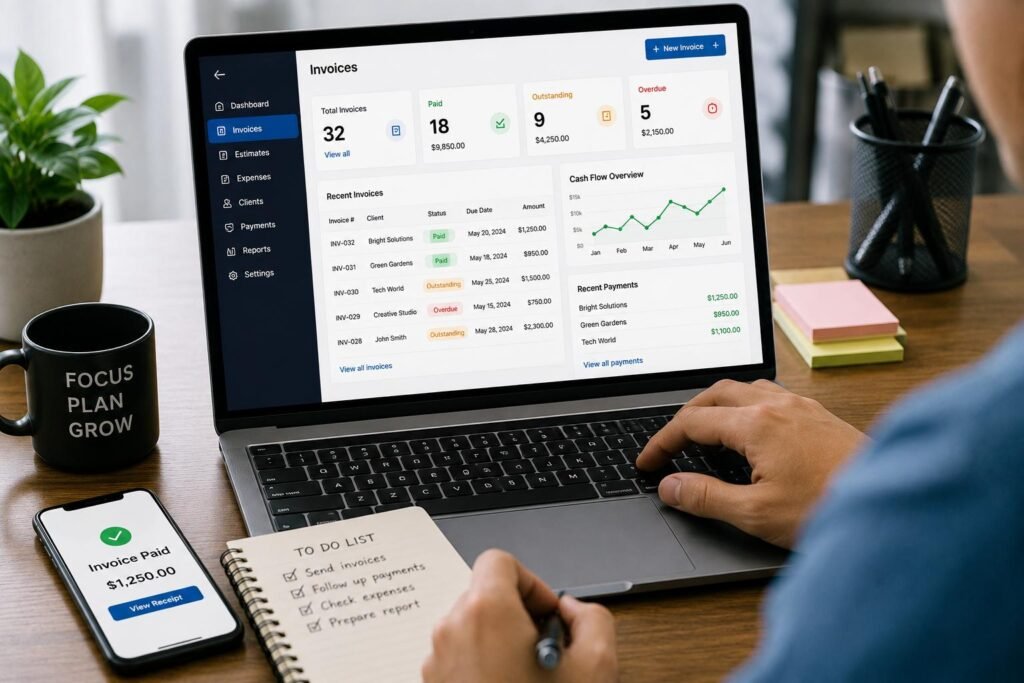
The practice of invoicing cannot be compartmentalized as it is connected to other sales, expenses, taxes and cash flow. Expenses tracking software can also assist companies in documenting expenses and can be used to compare them against the revenue in a single platform. Certain will enable users to classify their expenditures, upload receipts, connect financial accounts or even produce reports that are very useful for bookkeeping. Other factors to take into account are tax support, especially for businesses that require VAT application or detailed financial records. For instance, sage’s Nigerian accounting software provides functionality around VAT and reports that include customers, suppliers, accounts, banking, tax and more. However, businesses should not rely on any platform to have the same tax rules and reporting requirements as those relevant to their location, and should check beforehand.
Implementing Automation and Workflow Management
Invoicing software can be transformed into a business-management tool with the help of automation. Recurring invoices, automatic payment reminders, scheduled emails, automatic payment recording, expense categorization and invoice status updates are helpful automation capabilities. The more often a business completes a task, the greater the value can add to automation. If, for instance, a business has 50 recurring customers, they may end up saving a lot of time to the administration side if the software generates and sends out invoices automatically. Automation can also eliminate the risk of human error since there is no need for information to be duplicated from one document to another. But there are times when companies should not automate without looking at processes. Accurate customer information, prices, tax information, terms and dates are still required for automated invoices. The ideal systems feature automation along with a sufficient amount of control that business owners can assess key transactions.
Integrations and Mobile access
Integrations are crucial to the success of invoicing software, as they must connect to the other apps that the business uses. A company can have a payment platform, accounting software, customer relationship management software, inventory software, payroll software, time tracking software or an e-commerce software. Should these systems be unable to communicate with each other, employees may need to re-enter the same information multiple times which is both an added burden and an opportunity for error. Businesses should also make sure that the software is seamlessly compatible with their core applications, and if it is part of integration, confirm whether that’s part of the subscription or an extra cost. It is also common for entrepreneurs who don’t have a traditional office setting to need mobile access as well. Cloud-based platforms can enable users to make invoices, make sure that payments are due and outstanding as well as track fiscal data remotely or if meeting clients.
Comparing Popular Invoicing Software Options
You can’t pick a single winner as each platform is geared towards a particular type of small business. For businesses that desire invoicing in addition to accounting features, Sage Business Cloud Accounting might be a good choice. It has features such as invoice generation, invoice tracking, VAT management, quotes and estimates, multiple currencies and mobile access among others in Nigeria. Businesses should check on the latest price and promotions on its Nigeria website as Sage’s Start plan for USD 12.33/month + VAT and Standard plan for USD 23.67/month + VAT could change in the country. It’s especially pertinent for companies that are looking to expand their invoicing needs to encompass more of a bookkeeping and financial management system, rather than just a simple invoice creator.
Another alternative that has a major emphasis on freelancers and service businesses is FreshBooks. It has several plans that feature such things as invoicing, tracking expenses, and estimates, as well as collecting payments, financial reporting, and scanning receipts and tracking project profitability (depending on plans). It has a tiered pricing system based on features and client limits and the regular prices are currently on its website so businesses shouldn’t only be basing their decision on temporary discounts. But, Zoho Invoice has a different story as its core invoicing software is free of charge. It has a number of features listed, such as Customizable Invoices, Recurring Invoices, Payment Options, Automated Reminders, Expense Recording, Time Tracking, Customer Portals, Reporting and Integrations with other Zoho Applications. It is because of these differences that companies must be careful when deciding which of the readily available offers to choose, since they are not all the same and it is not necessary to take the lowest advertised one.
Factors Determining the Price of Invoicing Software
The pricing may differ greatly based on the provider, customers, the number of users, the features, billing frequency and more. For some, there is no cost for their plans (with basic invoicing) and for others, the monthly fee to get a paid plan begins at a relatively low cost and can rise in a variety of ways depending on the needs of the business, such as adding users, customers or features to their plan, increasing their reporting capabilities, or adding unlimited customers. The fees for payment processing typically are not included with subscription fees and may be a substantial expense for businesses that conduct a lot of transactions. For example, FreshBooks charges with each separate payment-processing fee in addition to software subscription fees. Therefore, companies should consider the overall cost as opposed to subscription costs only. The low cost platform may end up being the more expensive platform once the payment fees are added, the number of users increases, integrations are added, premium features are added or customer limits are increased. Also, before signing up for an annual subscription, be sure to check out free trials.
How to Choose the Best Invoicing Software for Your Business
It’s best to begin with the business’s real invoicing procedure. For a freelancer that sends 5 invoices every month, those are all they require: customizable templates, payment links, expense tracking, reminders, and mobile access. As a company grows, with dozens of customers, time tracking, project management, accounting integration and detailed reports may become necessary. The larger the company gets, the more you will need recurring invoices, multiple users, time tracking, project management, accounting integration and detailed reports. A retailer might focus on inventory integration, tax calculations, product information and payments. It’s important for businesses to identify their core functionality, extra benefits and ancillary functionality and compare these across providers before making a decision. They should then test shortlisted platforms in a real world situation – e.g. producing an invoice, sending the invoice to a customer, capturing a payment, sending a reminder, correcting an invoice, generating a report. This test can often bring to the surface issues with usability that a feature list may not.
The extent of security, support and scaling should also come into play. Businesses should inquire about the business’s security measures for financial information and customer data, authentication methods offered and how the customer information is stored. When an invoice doesn’t get sent, a payment is not added to the books or a customer needs help understanding a financial report, reliable customer support is valuable. The importance of scalability is due to the fact that when a company has several years of customer records and transactions, changing platforms can be an issue. Therefore, the best software will need to be scalable enough to accommodate growing invoices, more users, new payment options and more complicated financial needs, without unnecessary complications. Other factors for businesses to consider include cancellation terms, data-export features, backup policies and the ability to easily move data should they wish to switch providers.
Conclusion
The key to selection of the best invoicing software for small businesses is striking a balance between functionality, affordability, simplicity and future needs. Having the ability to tailor your invoices, use recurring billing, accept payments, track expenses, provide tax assistance, automate your billing process, integrate with other systems and access them via mobile devices can minimize billing-related administration. But not all businesses will require all of the features. A freelancer might need a simple ecommerce solution, whereas a growing business may require invoicing that is related to accounting, expenses, customers, inventory and reporting. All costs associated with each solution, such as subscription fees, transaction charges, extra users, and premium features should be taken into account before deciding.
The best option of course is the one that best suits a business’ existing operating style and possesses the potential for future expansion. When evaluating software, integrations, pricing options, and bill and collection capabilities, small business owners can prevent unnecessary costs from their software. What’s more important, they can ditch the manual invoicing altogether and come up with something that will make the invoice sending clearer, outstanding payment tracking easier, financial information organization more convenient and timely payment more pleasant. If businesses are looking to enhance their financial processes, it may be a sensible selection to purchase the right sort of invoicing software, so that they can be extra efficient and more effective cash-flow managers.
Get more well researched information about Best invoicing software for small businesses here.