
What Is a Database Migration?
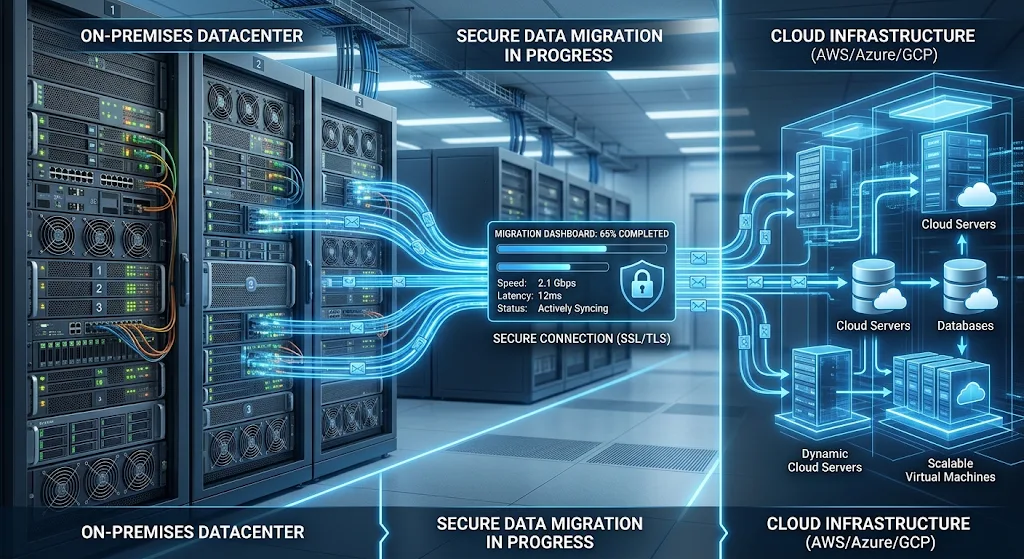
A database migration involves moving a database, along with all data records, configurations, and applications, from one place to another. This may be moving a database from on-premise to a cloud environment, between different cloud providers, or between different database management systems. To ensure a smooth Database Migration to Cloud, organisations should carefully plan the migration process.
Considerations including compatibility, security, costs, and maintenance must be made before the migration approach is determined. By understanding these requirements, businesses can make informed decisions to successfully migrate their databases whilst protecting data and keeping business running smoothly.
Common Challenges in Database Migrations and Best Practice
There are several challenges businesses should consider when migrating databases between different environments.
Understanding these will allow businesses to create efficient solutions to reduce unexpected issues. Below are 10 common challenges faced in database migrations.

1. Data Loss
Data loss can be a significant issue in database migrations. Large databases may store crucial data about customers, financial data, staff members, stock information and more. If errors occur during the extraction, transfer or import of data, data may be lost, incomplete, duplicated or become corrupt. This may be caused by unstable connection speeds, insufficient storage space, incorrect configuration of the migration, or unsupported data formats within the database.
Even if most data is transferred successfully, slight differences may be noticed between the two databases, which may cause issues in business. For example, in a retail business, not all customer orders/payments may have been migrated correctly causing discrepancies in sales data and stock information.
Best Practice:
Before starting a database migration, businesses should ensure there is an appropriate data backup strategy in place. Full back up of the source database allows data to be recovered in case any unexpected issues arise during migration. Businesses should compare data in the source and target database to confirm that the amount of data, structure of tables, total amount of transactions, and key data values match. Tools such as checksums and data validation can be used to find differences between data in the source and target database. If data in the source database is being updated during migration, change data capture (CDC) can be used to track and replicate the new data to ensure that the target database is kept in sync with the source. Trial migrations can be performed with copies of the live database to identify any potential issues. These actions can help ensure data accuracy in the target database and reduce the risk of losing key data.
2. Compatibility Issues
Compatibility issues can occur during database migrations between different platforms, database engines, or versions. Whilst many database management systems support SQL, the syntax, data types, indexes and administration features within each can differ. For example, during migration between Oracle Database and PostgreSQL, certain procedures, triggers, functions and custom SQL commands may not be able to run in the target database.
The type of characters used, date formatting, handling of transactions and authentication between the source and target database can cause incompatibility in how applications interact with the database. If these issues are not identified in advance, errors may appear in applications, incorrect results may be obtained or applications may be unable to interact with the new database.
Best Practice:
Before deciding on the target database platform, businesses should make sure compatibility is assessed. Database administrators should assess which database engine, version, data types, SQL queries, procedures, triggers and application dependencies exist in the source database. Tools for automated compatibility assessment and schema conversion can be used to identify unsupported features and suggest suitable alternatives. Within AWS, the Database Migration Service can support migrations to different database platforms. The schema conversion tool can also help in heterogeneous database migrations. Microsoft also provides migration assessment and conversion tools for migrating databases to Azure. However, whilst automation can assist in conversions, care should still be taken manually in some areas. Converted database elements and queries within applications should be tested to avoid compatibility issues.
3. Downtime
During database migration, applications may be disrupted. When performing certain types of data migration, the source database may need to be paused to allow data to be transferred and validated. This can cause downtime of key services for customers, staff and partners. For example, in an online shopping database, order processing may be disrupted during migration.
If a financial institution, healthcare organisation or logistics business can no longer gain or update data within their applications, issues may occur within business operations. The length of downtime depends on size of data, speed of connection, complexity of migration and how data is transferred. If migration times are not well planned, customer satisfaction, productivity and revenue may be impacted.
Best Practice:
Choose a migration approach depending on acceptable downtime. If the database is non critical, it may be better to perform it during a weekend, holiday, or period of less activity. However, if applications are expected to have continuous uptime, an online database migration should be considered with real-time data replication. Using change data capture means that any new transactions added to the source database can be replicated into the target database without stopping the source database. Before changing applications to the target database, administrators should confirm that all data has been properly replicated and that data in both databases matches. A clear cutover plan should be created to indicate when the migration will occur, who is responsible, how communication will occur, and what recovery options are in place. This will reduce any disruption to services and keep business running smoothly.
4. Schema Differences and Conversion Issues
Differences in database schema between source and target databases can be a challenge, especially when migrating between different database engines. For example, migrating from Microsoft SQL Server to PostgreSQL may require changes to identity columns, procedures, functions, triggers, and data types.
Different ways of managing relationships, constraints and transactions in different database platforms can impact application functionality. If the database schema is not fully converted, data may not align with the structure in the target database. Queries or data accessed from tables may also cause errors in applications due to differences in behaviour in the new database.
Best Practice:
Before migration, document current database schemas. Database administrators should identify what table structures, relationships, primary/foreign keys, indexes, views, procedures, and triggers need conversion. Tools can be used to allow for automatic conversion of schemas, however complex database elements may need changes manually. Application queries should also be reviewed to allow compatibility with the target database. Try migrating a small database, run tests on migrated schema, and fix any errors before migrating full data. Unnecessary changes to database structures should be avoided. Making several large changes can make the project overly complex. By carefully planning database schema, data can be well organised and applications can continue to function as expected.
5. Security Risks
Database migrations can introduce new security risks. Sensitive data such as customer information, financial data, staff details, business documents and login credentials may be at risk if data is not appropriately secured. If network connections, user permissions, exposed database endpoints and weak authentication are misconfigured within the migration, unauthorized access may occur.
If data is moved between on premise infrastructure and cloud infrastructures, security risks may be introduced if current access controls have not been reviewed. Businesses must also consider legal requirements relating to data security, data privacy and data storage. If sensitive data is exposed during migration (despite all records being migrated), it cannot be classed as a successful migration.
Best Practice:
Ensure appropriate security measures are in place before migrating any live data. Data should be encrypted during transit through secure networks, and at rest through appropriate encryption in the database. Role based access control should be applied, and only necessary permissions should be given to staff involved in migration. To add extra security, multi-factor authentication, secure password management, private network connections, and monitoring can be implemented. Before completing the migration, businesses should review security in cloud environments, firewall rules, access to back ups and auditing within databases. Sensitive data should be handled appropriately according to data privacy requirements. Any unnecessary copies of sensitive data should be securely deleted once they are no longer needed. Security assessments should be carried out before, and after, migration to identify any vulnerabilities and ensure databases are protected.
6. Unexpected Performance Issues
Performance may be different in the target database compared to the source database. Differences in network speed, storage performance, computer resources, database configuration, and resource allocation within cloud infrastructure may occur. For example, if a large transactional database is moved to a cloud environment, queries that are frequently run may be slower in the target database due to different index configurations or insufficient computer resources.
Applications may also be slower if they are interacting with databases in distant regions within the cloud. In some cases, differences in query optimisation, memory management and transaction processing may also impact performance in the new database. These issues can make applications less responsive and may cause issues for users requiring quick access to business data.
Best Practice:
Performance metrics in the source database should be identified before migration and compared to those in the target database. Key metrics to consider include query run time, number of transactions processed, CPU usage, Memory usage, Storage performance and network latency. Once migration is complete, database configuration, indexes, connection pooling, and frequently run queries should be checked. Appropriate cloud resources should be chosen for the workload, rather than just depending on the size of the database. For example, large numbers of daily transactions may require different computer resources to a reporting database which runs large analytical queries. Performance tests using realistic workloads can be completed to see if any bottlenecks are present within the new environment. After migration, continually monitoring performance allows resources to be adjusted to ensure consistently good application performance.
7. Unexpected Costs
Migrating databases into the cloud may introduce unexpected costs. Although physical infrastructure does not need to be purchased and maintained, several costs can occur. Data transfer, storage within cloud, database licensing, computer resources, migration software, professional support and application changes may incur costs. Large databases may also require temporary resources to extract data, convert data, test and synchronise data.
Higher running costs may also occur if overly large database instances are chosen, or if resources are not monitored carefully. If migrating between cloud environments, data transfer costs should be considered. Additionally, running costs may be increased if multiple environments are maintained during migration.
Best Practice:
Before choosing a cloud platform for migration, businesses should put together a detailed cost plan. Costs to consider include assessment of database, preparation, data transfer, conversion, testing, temporary resources, cloud subscription costs and running costs. Costs should be compared between AWS, Microsoft Azure and Google Cloud, taking into consideration storage, computer resources, back up, licensing and data transfer costs. Cost calculators can be used to give an indication of what costs may be incurred, however depending on workloads and resource usage, costs may vary. Businesses should also set alerts to monitor unexpected increases in cloud usage. Choosing appropriately sized resources and removing any unnecessary temporary resources after migration can help manage costs. By regularly reviewing costs, long term savings can be gained from cloud modernisation.
8. Poor Planning
Poor planning can cause issues at all stages of a database migration. If organisations do not understand the structure of the current database, dependencies within applications, storage requirements, or business requirements before migration, some database elements may be missed, applications may be incompatible, unexpected infrastructure requirements may be required, and delays may occur. For example, if a business is planning to migrate their main customer database, it may not be realised that several internal applications, reporting systems and automated processes rely upon data from this database.
As a result of poor planning, some applications may become inoperable. Poor planning can also mean that a realistic timeline is not set, the right amount of staff is not assigned, and appropriate recovery processes may not be in place.
Best Practice:
A thorough assessment should be completed to get a full understanding of current databases. Assessments should include identifying what database engines, versions, data volumes, workloads, application dependencies, security requirements, and limitations in infrastructure exist. Databases should be categorised according to how crucial they are to business, complexity, and readiness for migration. Critical databases may need more thorough testing and specific migration strategies compared to less crucial databases. Clear goals, budgets, responsibilities, timings and acceptable downtime should be set. Including database administrators, cloud architects, developers, security professionals and business stakeholders will ensure that key requirements are considered. Having a clear migration plan will make the migration easier to complete, and reduce the chances of unexpected issues.
9. Limited Network Resources
The speed of a database migration can be heavily influenced by network resources. Large databases may be moved from on premise to within the cloud, which requires sufficient bandwidth, stable connections, and secure network settings. If businesses have limited internet access, data may take a long time to transfer, migrations may be interrupted or delays in synchronisation may occur.
If databases are in different geographical locations, network latency may occur meaning communication between the source and target databases may be slow. For example, if a large amount of operational data (several terabytes) is being migrated, the amount of data may be too great to fit within the available network capacity to meet the required migration time. This can be more difficult if data is continuously being added to the source database during initial data transfer.
Best Practice:
Before migration, network requirements should be assessed. Assessments should include bandwidth, latency, firewall settings, routing, stability, and geographical location of target database. If a very large amount of data is being transferred, appropriate private connections may be considered, or approved physical data transfers. Compressing data and optimising data transfer can also reduce the amount of data sent across networks. In online migrations, administrators should check if lag in data replication is occurring to see if the target database is keeping up with changes in the source database. Sufficient time should be allocated in the migration schedule to transfer data, synchronise and validate data. Reliable network resources can be prepared to reduce delays.
10. Insufficient Testing
Even if data has been successfully migrated, issues may occur in applications once they interact with the target database. If testing is not done thoroughly, missing data, incorrect permissions, broken relationships, incompatible queries and performance issues may be missed.
For example, if an employee database is successfully migrated, but stored procedures were not converted correctly, payroll reports may show incorrect totals. Similarly, an application may be able to connect to the new database, but encounter errors when processing complex relationship based transactions. Without adequate validation, these issues may occur within business operations.
Best Practice:
A comprehensive testing and validation plan should be put in place. Data accuracy, database schema integrity, compatibility with applications, correct permissions, transaction processing, security and performance using realistic workloads should be tested. Key data and total transactions should be compared between the source and target databases. User acceptance testing should be performed by users or teams within the business who regularly use the applications. Once migration has been completed, database activity, error logs, resource usage and application performance should be monitored. Until the new database has been thoroughly validated and approved, the original database should be available according to the agreed recovery plan. These steps will allow issues to be found early, and ensure that the migrated database meets business requirements.
Common Migration Strategies
Depending on the infrastructure currently in place, business requirements, application requirements, and available resources, different migration strategies may be applied.
Lift and shift, replatforming and database refactoring are three popular migration strategies. These strategies vary in amount of technical adjustments, cost and complexity.
- Lift and Shift
In a lift and shift migration, there is little change to the database system or structure. The database and configuration are simply moved to virtual machines or infrastructure within the cloud. For example, a Microsoft SQL Server database hosted on on-premise servers may be moved to a Microsoft SQL Server virtual machine within Amazon EC2 or Azure Virtual Machines. As very little change occurs to the DBMS and configuration, this can be a quicker and simpler migration than significantly modernising databases.
This type of migration would be suitable for organisations looking to rapidly move away from physical data centres, or to reduce the maintenance needed for on-premise infrastructure. It allows businesses to retain existing applications and make little changes to their architecture. However, not all benefits of having a managed database in the cloud will be achieved. The organisation may still have to manually install, update, back up, set security and maintain the infrastructure. Consider whether the benefits of a quick migration outweigh the burden of retaining some manual processes.
- Replatform
This type of migration involves some changes to the database within the new environment, to gain benefits of managed services and infrastructure. Replatforming may involve changing how the database is hosted, upgrading versions, changing configurations or switching to managed database services. For example, a PostgreSQL database hosted on premise may be migrated to Amazon RDS for PostgreSQL, Azure Database for PostgreSQL or Google Cloud SQL for PostgreSQL. Although the DBMS itself has changed very little, benefits of managed infrastructure allow for easier maintenance, monitoring, backing up and scaling of the database.
Replatforming would be suitable for businesses wishing to modernise their database systems without making significant changes to their applications. As managed database services are utilised, less administration is required in maintaining the database and infrastructure. However, differences in supported features, configuration, resource limits and availability of services must be considered. Some applications may require changes to connect correctly to the new managed database. Care must be taken to ensure compatibility and assess performance. Replatforming is a good balance of speed and modernisation, and so would be a good option for many businesses wishing to move traditional databases to a cloud environment.
- Refactor
Significant changes may be made to a database to make use of modern technologies. This may include changing schemas, replacing bespoke features of the database, splitting large databases into smaller pieces, or switching to a new database management system. For example, a traditional relational database may be partially migrated to cloud native databases or managed services in order to better suit future workloads. Changes may be made in how information is retrieved, processed and stored.
Refactoring can give long term benefits for databases, including better scalability, easier integration, increased flexibility and compatibility with modern application structures. However, more development, testing, technical knowledge and money is typically involved in a refactor compared to lift and shift or replatforming. Care must be taken to understand dependencies and business logic in applications before making significant changes. It is often best to implement changes to databases in phases to modernise individual parts. Although this may be a slower option, refactoring can solve issues in outdated database structures, and allows a database to be implemented that can support changing business needs.
Examples of Database Migration in Major Cloud Environments
Major cloud service providers provide database migration services to enable businesses to migrate data from traditional infrastructure or other databases.
Although the services provided by different cloud environments will vary, they commonly allow assessment, migration, replication, conversion and monitoring of data.

- Migration to AWS
AWS provides several database services and migration services. AWS Database Migration Service can be used to migrate from popular database systems including Oracle, Microsoft SQL Server, MySQL, PostgreSQL, and MariaDB. Homogeneous and heterogeneous migrations can be supported. Homogeneous migrations allow migration between the same databases, whereas heterogeneous migrations allow migration between different databases. A MySQL database in on-premise infrastructure could be migrated to an Amazon RDS for MySQL instance or Amazon Aurora instance. Ongoing replication can also be performed with AWS DMS so that changes in the original database can be migrated whilst migration is in progress.
Schema conversion tools are available to assist with migration. If the database is being moved from Oracle Database to a PostgreSQL compatible database, such as Amazon Aurora, changes may be required to stored procedures, functions and database objects to allow application functionality. With Amazon RDS, managed database services can be taken advantage of, reducing administrative tasks. However, care should be taken to understand which features are supported, limits in migration, database licensing and security requirements for the target database. Thorough testing is required to ensure that migrated databases support application and business functions.
- Migration to Microsoft Azure
Microsoft Azure provides database migration services allowing for migration of traditional database workloads into Microsoft Cloud. Microsoft SQL Server databases can be migrated to Azure SQL Database, Azure SQL Managed Instance or SQL Server on Azure Virtual Machines. Migration of open source databases such as PostgreSQL and MySQL is also possible. Microsoft also provides resources to make database migration easier. Businesses can understand what compatibility issues may be present in their current infrastructure and prepare databases for migration. This is a useful tool for businesses using Microsoft technologies, so that database infrastructures can be modernised without making significant changes to applications.
For example, if a company is currently using Microsoft SQL Server in physical data centres, they may first analyse databases to understand requirements. They may wish to move to Azure SQL Managed Instance. The migration team can analyse the database for compatibility, prepare the target infrastructure, migrate data and test application connectivity. Different migration scenarios can be performed using the Azure Database Migration Service and Microsoft migration tools, including online and offline. It should be understood which source/destination combinations are supported according to the DBMS and service as migration capabilities vary. A consideration of security, performance requirements, backup methods and licensing considerations can allow for a more effective migration.
- Migration to Google Cloud
Google Cloud provides database services to allow businesses to modernise their data infrastructure. Migration of databases for MySQL, PostgreSQL, SQL Server and Oracle can be completed using Google Cloud Database Migration Service. Databases can be migrated from on premise or other environments into Cloud SQL or AlloyDB for PostgreSQL. During supported migrations, data can be synchronised. An initial migration can be performed, and continuous replication completed to minimise downtime in applications.
For example, a PostgreSQL database hosted on premise can be migrated to Cloud SQL for PostgreSQL. The source database can be prepared and the target database infrastructure can be set up. Secure connections can be established, and data can be migrated. Once migration has started, continuous replication can be completed to capture changes made to the database. Once the target database is ready, the migration can be completed. If migrating from Oracle or SQL Server to PostgreSQL, schema and code conversion may be required as different structures and features are supported in each database. Conversion tools are provided by Google to assist with database migration for supported scenarios. However, once conversion has occurred, administrators should check that objects have been correctly converted and test applications to ensure a smooth transition. In this way, companies can modernise their infrastructure whilst ensuring data consistency.
Key Stages of Database Migration
Careful planning of a database migration is required to ensure its success. Depending on the database and desired migration plan, the exact steps may vary.
However, the below steps should be followed:
- Assess Current Database
Before beginning a migration, analyse the current database. Database administrators should be aware of which DBMS is in place, the version of software, storage requirements, table structure, volume of transactions, application dependencies and security requirements. Consider which databases are critical to daily operations, and which can be migrated with less disruption.
This information allows organisations to understand compatibility issues, estimate migration costs, and choose suitable cloud services. For example, if there are multiple SQL Server databases in a company, some may be suitable to be moved to Azure SQL Database while others may require SQL Server on Azure Virtual Machines due to application dependencies.
- Create a Migration Plan
With the database assessed, a migration plan can be created. This should include goals for the migration, a timeframe, budget, roles for people, and the technical aspects. The plan should include details of the chosen target platform, migration tools, acceptable downtime, testing requirements and recovery methods. Decide whether a single large migration or multiple smaller migrations will take place.
Critical databases may have to be migrated at different times to reduce disruption to important services. Roles for database administrators, developers, cloud engineers and security teams should be clearly defined to ensure appropriate attention is given to each stage of the migration. Including a written plan allows organisations to track progress, and easily adapt to unforeseen issues.
- Clean Data
Before migrating data, clean data to remove any issues in the database. Common data issues include duplicate data, incomplete customer information, mismatched date formats, invalid data and old data. Without cleaning these issues, they can cause inaccuracies in reporting, affect performance and reduce database reliability. Consider whether any data is outdated and whether it should be kept in line with company and legislative requirements.
Cleaning data prior to migration improves efficiency of data storage, and makes validation easy. However, original backups should be kept in case data is accidentally removed. Any approved changes made to data should be documented.
- Prepare Target Database and Convert Schemas
Before migrating data, prepare the target database. Choose appropriate resources, storage, versions of databases, network settings, security and back up methods. Create required database structures. Any incompatible objects in the schema should be converted.
This could include changing data types, indexes, stored procedures, triggers and application queries. If migrating between the same DBMS, less changes may be required. If migrating between different DBMS, more changes and testing may be required. Preparing the target database will mean that migration does not face delays.
- Backup Source Database
It is very important to make a good backup of the database before migration. This means that if something goes wrong during migration, or unexpected issues arise, data can be recovered. A full backup of the source database should be made. Ensure that data can be recovered from the backup. Depending on the database, this may include transaction logs, configuration details, database objects and other elements.
Consider how often additional backups may need to be made during migration. Having a protected backup of the source data means that in case of unexpected technical issues, important data can be recovered. Backups should be included in the migration plan, until the new database has been fully validated and approved for production.
- Perform a Test Migration
To understand whether the migration plan works, without impacting production systems, perform a test migration. Using a copy or a sample of the original database, understand how quickly data can be migrated, whether schema has been correctly converted, data is correct, application compatibility and performance in the target database. This can highlight issues in migration.
For example, it may be identified that some stored procedures need amending or that greater storage space is required in the target database. Based on the results of the test migration, changes can be made to settings, documentation and the project timescale. Successfully completing a test migration can increase confidence in the method and reduce the risk of unexpected issues occurring in production.
- Migrate Data
Once preparations and tests have been completed, data can be migrated. Data can be exported/ imported, migration can be performed using managed services, or continuous replication can be used. If the database must remain live in the source during migration, change data capture can be used to synchronise new transactions between the two databases.
Throughout migration, check progress, network performance, any errors in databases, and delays in replication. Do not make unnecessary changes to configuration during migration. Once migration is near completion, confirm that all required information has been migrated, and any remaining changes have been synchronised.
- Validate Migrated Data
Once data has been migrated, thorough validation should be carried out to ensure that data in the new database is accurate and can support desired application functions. Check that the number of records match, relationships between tables match, constraints match, transactions are handled correctly, users have correct permissions, and applications function correctly. Check that key financial figures and reports match with those from the original environment.
Performance can be tested to ensure that the new database can handle realistic workloads. If issues occur, they should be resolved before redirecting all production applications to the new database. Technical staff and relevant users within the business should be involved in validation to ensure that although the database may appear to be working correctly, it does not produce incorrect results for the business.
- Final Cutover
At this point, applications will begin using the migrated database. Before cutover, confirm that data has been synchronised between source and destination databases, and that all key validations have passed. Migrators should follow approved cutover timescales. Connection settings for applications may need to be updated, and the new database should be closely monitored.
Users who are impacted by this change should be informed. Clear processes should be put in place so that issues can be reported. If severe issues occur, the migration plan should specify whether the organisation can revert to the original database. A carefully managed cutover will prevent conflicting transactions, and ensure applications are moved to the new database in an organised fashion.
- Monitor New System and Optimise
Even after applications have connected to the new database, monitoring should be carried out to identify performance issues, security vulnerabilities, storage limits and unexpected resource usages. Check logs, query times, replication, backups, and costs of resources in the cloud. Indexes may need to be changed, databases configured differently, resources changed and application connections adjusted to optimize performance.
If new features in database management are unfamiliar to database managers, appropriate training should be given to employees. Only once the organisation is confident that the new database is stable, and recovery requirements are met should the original database be decommissioned.
Choosing a Migration Strategy
Depending on the complexity of the database, application dependencies, budget, business goals and acceptable downtime, different migration strategies may be appropriate. If speed of migration is important and little change to database architecture is required, ‘lift and shift’ may be appropriate. If reducing maintenance of infrastructure and largely retaining current application functionality is important, ‘replatform’ may be appropriate. However, if databases are outdated and the business would like to significantly modernise them, ‘refactor’ may be appropriate. Different levels of technical difficulty, cost and long term benefits will be required for each migration strategy. Businesses should carefully consider these factors to decide on the best strategy.
Consider the importance of the databases, and potential impact of a failed migration. If the database is used for internal reporting only, it may be acceptable to have scheduled maintenance. However, if it is used for customer transactions, continuous availability may be required. Consider the size of database, network capacity, security requirements and capabilities of the cloud provider. If a company uses Microsoft SQL Server already, services in Azure may be appropriate for certain migrations. If a company is looking for managed databases compatible with PostgreSQL, they may consider AWS or Google Cloud. A structured assessment of databases and comparison of services will allow businesses to choose a migration strategy which provides a good balance between complexity, reliability and future infrastructure requirements.
Conclusion
Migrating databases is a key step in digitally modernising a business. It allows businesses to move away from traditional infrastructure and take advantage of cloud services, managed databases, and scalability. However, many issues can occur during migration, including data loss, compatibility issues, application downtime, schema conversions, security vulnerabilities, changes in performance and unexpected costs. To overcome these issues, careful planning, database assessment, data cleansing, reliable backups, appropriate tools and thorough testing should be considered. Appropriate migration strategies should be chosen based on current infrastructure, application requirements and business goals.
Although database migration services are available in AWS, Microsoft Azure and Google Cloud, choosing a cloud provider does not guarantee a successful migration. It is important that data integrity is maintained, sensitive information is protected, performance is monitored and application functionality is validated. By following best practice for database migration, and having a clear recovery plan, businesses can reduce risk within operations. A well managed database migration means that a flexible, secure and scalable infrastructure is created, meaning that future business growth can be supported.