Introduction
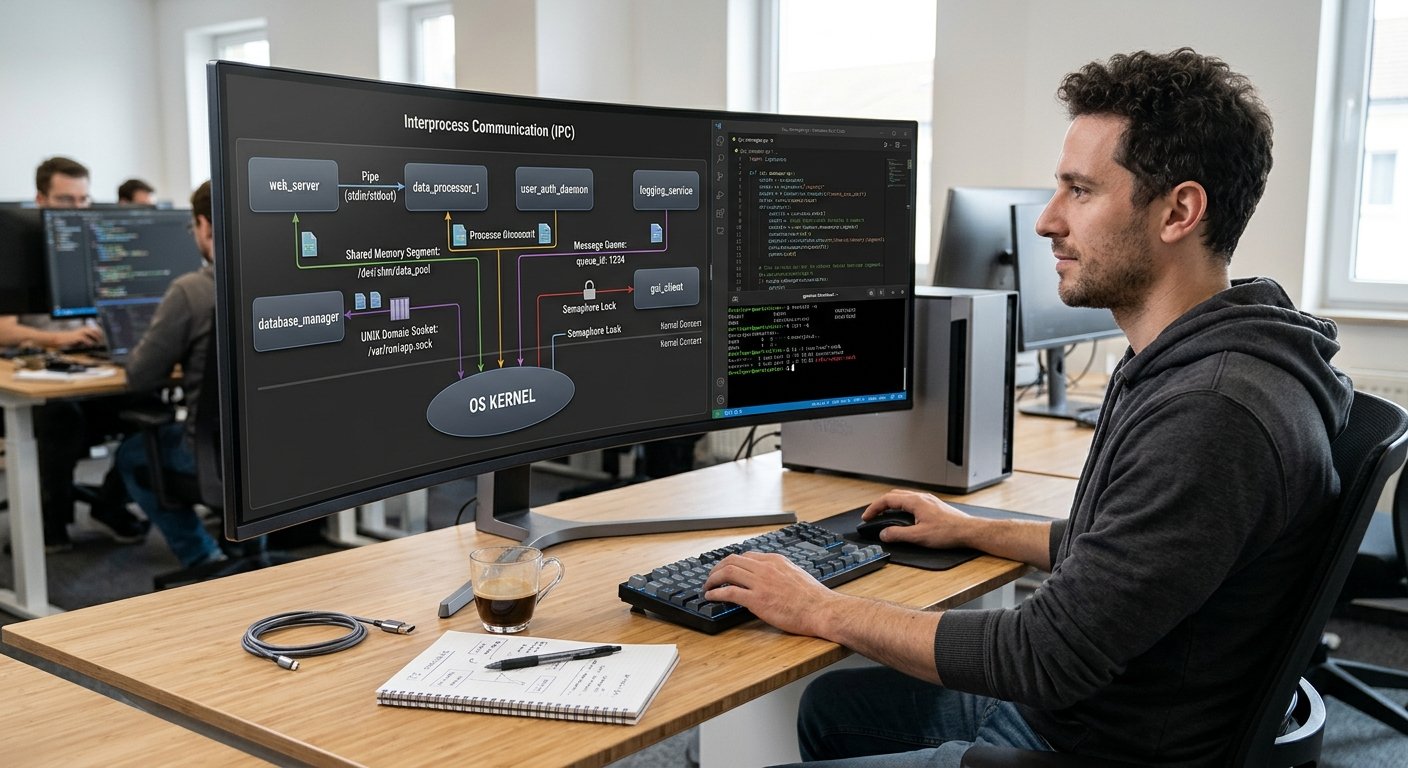
All applications running on a UNIX/Linux system require the OS to be able to interact with the hardware, manage memory, create processes, read from files, and network. However applications do not usually interact directly with the hardware or perform privileged operations. They instead interact with the kernel of the OS through System Calls.
System Calls allow the application to safely interface with the kernel of the OS. Knowing how system calls for file operations work is important as applications will need to create, open, read, write, and close files. Knowing how System Calls work means you can create more robust applications, understand how the OS works, and troubleshoot issues when interacting with the OS.
Understanding the Relationship Between User Space and Kernel
What Is User Space?
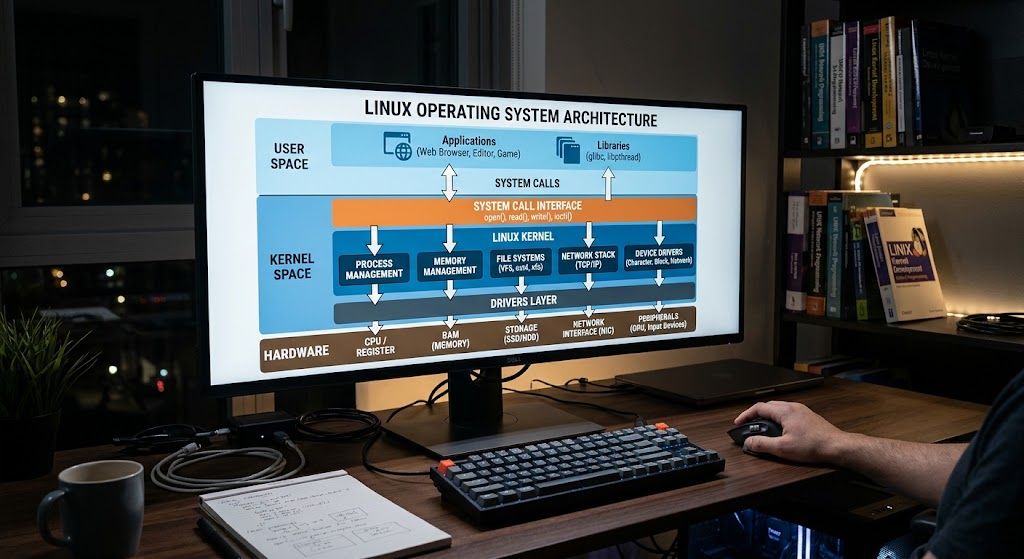
User space refers to the area of memory where normal applications and user level programs run. These include text editors, web browsers, command line tools, databases and more. The applications running in user space have limited access to system resources.
This is to keep the system secure. The applications can only request resources from the OS through controlled interfaces. For example, text editors can’t directly access the storage medium. They would need to request the OS to perform the file operations.
What is Kernel Space?
Kernel space refers to the area of memory where the kernel of the OS runs. The kernel manages vital system resources such as CPU scheduling, physical memory, storage devices, networking interfaces, and processes. The kernel has privileged access to hardware instructions.
Any application that requires a service from the OS will trigger a transition to kernel mode on the processor. The kernel will complete the requested operation and return the result back to the application. This keeps applications secure by ensuring they only have access to the required OS services.
How applications communicate with the kernel
Applications can communicate with the kernel using System Calls. Typically applications will utilize an interface to make a system call. This is done through programming libraries. Most commonly applications will use the C standard library. When making a system call, the arguments will be prepared and the processor will transition to kernel mode.
The kernel will look at the request, complete any valid and allowed operations, and return the results. For example, when a program makes a read() call, the kernel will attempt to read data from the file descriptor.
What are System Calls in UNIX?
System Calls are interfaces that allow user space applications to request a service from the kernel of the OS. System Calls are an important aspect of UNIX/Linux system programming. Common System Calls include open(), read(), write(), close(), fork(), execve(), mmap(), and socket functions. Each system call will perform a specific operation and follow certain rules to pass arguments and return results.
For example, applications can use the open() function to request access to a file. They can use the read() function to read from a file. They can use the write() function to write to a file or other supported location. Understanding System Calls will allow developers to utilise OS resources more effectively.
System Calls vs Standard Library Functions
System Calls and standard library functions are very similar. A system call is a request made to the kernel of the OS. A standard library function provides re-usable functionality. These functions may run entirely in user space or internally make use of one or more System Calls. For example, printf() is a standard library function in C. This function will format the output and will commonly internally use the write() function. fopen() provides an interface to open files. This function will typically internally use the open() system call. It is important to understand the difference between the two. Standard library functions often provide extra functionality such as buffering. System Calls will give more direct access to OS resources. You should choose the correct interface depending on how much control you want.
| Feature | System Calls | Standard Library Functions |
| Purpose | Request services from the kernel | Provides re-usable functionality |
| Execution | Uses kernel | May run entirely in user space |
| Examples | open(), read(), write(), close() | printf(), fopen(), strlen() |
| Performance | May cause transition to kernel | Can avoid kernel transitions |
| Functionality | Provides OS services | Provides high level interfaces |
| Error Handling | Typically returns -1 and sets errno | Varies per function |
Common Types of UNIX System Calls
UNIX System Calls can be grouped into different categories. These include file management, process management, memory management, communication, and security/permission management. These allow developers to perform complex operations by providing a consistent interface. For example, a database application may use file management System Calls to access stored records.
They may use process management System Calls to create background workers. They may use memory management System Calls to manage data. They may use networking System Calls to communicate with remote clients. Understanding these System Calls will provide a good foundation for UNIX system programming. Many advanced applications will use multiple types of System Calls to perform everyday tasks.

1. File Management
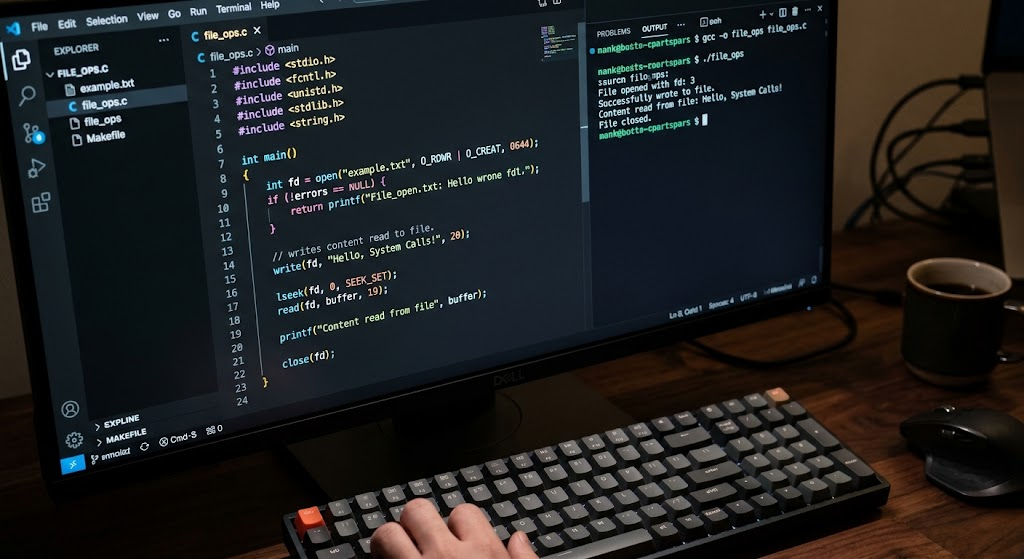
File System Calls allow applications to create, open, read, write, modify, and close files. Almost all applications will need to store data permanently or read previously stored data. UNIX systems use file descriptors to represent open files.
These are small, non-negative integers allocated by the OS. The standard file descriptors are 0 (standard input), 1 (standard output), and 2 (standard error). Developers will commonly use the open(), read(), write(), and close() functions. These allow direct access to files.
open()
The open() function requests access to an existing file or creates a new file if the correct flags are passed. It will return the file descriptor. Developers can specify what access they want. This includes read only, write only, and read/write. Additional flags can be used to create files, truncate existing content, and append data. Permissions can also be passed when creating a file. However they may be restricted based on the processes umask.
Example:
#include <fcntl.h>
#include <stdio.h>
#include <unistd.h>
int main() {
int fd = open(“example.txt”, O_RDONLY);
if (fd == -1) {
perror(“open”);
return 1;
}
printf(“File opened successfully.\n”);
close(fd);
return 0;
}
In this example, the application is requesting to read only from example.txt. If the request is successful then open() will return a valid file descriptor. If the file doesn’t exist or the application doesn’t have access, then open() will return -1. The errno will also be set. The return value should be checked as attempting to perform actions on an invalid file descriptor will cause additional errors.
read()
This function will read data from an open file descriptor and place it into a buffer provided by the application. The arguments specify the file descriptor, the destination buffer, and maximum number of bytes to read. This function does not guarantee to read all the requested bytes.
It may not read all the bytes due to the end of the file, interruption, or based on the resource. A return value of 0 means the end of a regular file has been reached. A return value of -1 means there was an error. The number of bytes should be checked.
Example:
#include <fcntl.h>
#include <stdio.h>
#include <unistd.h>
int main() {
char buffer[100];
int fd = open(“example.txt”, O_RDONLY);
if (fd == -1) {
perror(“open”);
return 1;
}
ssize_t bytes = read(fd, buffer, sizeof(buffer) – 1);
if (bytes == -1) {
perror(“read”);
close(fd);
return 1;
}
buffer[bytes] = ‘\0’;
printf(“File content: %s\n”, buffer);
close(fd);
return 0;
}
This program opens a file and reads a portion of the data. The buffer has one extra byte to allow for the null terminator. As this function does not automatically convert the read data into a C string it is important to check the return value. Developers should know if the read was successful, reached the end of the file, or had an error.
write()
This function will write data from an application buffer to an open file descriptor. This is commonly used to store data to files, output to terminals, and send data. The arguments specify the file descriptor, address of the data buffer, and number of bytes to write. This function may not write all the requested data. This is important to note when using sockets, pipes, etc. Reliable applications should check the return value and continue to write any remaining data.
Example:
#include <fcntl.h>
#include <stdio.h>
#include <unistd.h>
#include <string.h>
int main() {
const char message[] = “Hello from UNIX system calls!\n”;
int fd = open(“output.txt”,
O_WRONLY | O_CREAT | O_TRUNC,
0644);
if (fd == -1) {
perror(“open”);
return 1;
}
ssize_t bytes = write(fd, message, strlen(message));
if (bytes == -1) {
perror(“write”);
close(fd);
return 1;
}
printf(“Data written successfully.\n”);
close(fd);
return 0;
}
The open() function will create a new file called output.txt. If it already exists then the previous content will be removed. The write() function will write the message into the file. The permission value requests read/write for the owner and read for the group and others. This value may be restricted by the process umask. This example shows basic error handling but real applications should also handle partial writes.
close()
This function will free up a file descriptor once the application has finished using it. It is important to close file descriptors as the OS will have a limited number of file descriptors available for each process and overall. If an application constantly opens files without closing them they will eventually run out of resources and errors will occur when trying to access additional files/communication. This will also allow the kernel to free up any resources. However developers should know that this does not guarantee that data has been written to a permanent resource. Additional synchronisation may be required if the application requires more durable writes.
Example:
#include <fcntl.h>
#include <stdio.h>
#include <unistd.h>
int main() {
int fd = open(“example.txt”, O_RDONLY);
if (fd == -1) {
perror(“open”);
return 1;
}
if (close(fd) == -1) {
perror(“close”);
return 1;
}
printf(“File closed successfully.\n”);
return 0;
}
This program shows a basic example of opening and closing a file descriptor. Once close() has been successfully called the application should no longer use the file descriptor. Descriptors are particularly important to manage in servers and long running applications that deal with many files.
2. Process Management
Process management System Calls allow applications to create, run, manage, and terminate processes. A process is an instance of a running program. UNIX provides several important functions for managing processes. These include fork(), execve(), wait(), and exit functions. These allow processes to create child processes, replace the current program, and manage the execution of processes.
For example, a command line shell will use process management functions to run external commands and wait for them to complete. Knowing how processes work will allow developers to create applications that can run multiple tasks, background processes, and split complex tasks into individual processes.
fork()
The fork() function will create a new process based on the calling process. The original process is known as the parent. The new process is known as the child. Once this function has been successfully called both processes will continue to run from the next instruction after the call. However the return values will differ. The parent will receive the child process ID and the child will receive 0. This is commonly implemented in modern UNIX-like systems using copy on write memory. This means physical memory pages will not be copied until they need to be modified.
Example:
#include <stdio.h>
#include <unistd.h>
#include <sys/types.h>
int main() {
pid_t pid = fork();
if (pid < 0) {
perror(“fork”);
return 1;
}
if (pid == 0) {
printf(“This is the child process.\n”);
} else {
printf(“This is the parent process.\n”);
}
return 0;
}
execve()
The execve() function will replace the current process image with a new program. This is different to fork() as it doesn’t create another process. The arguments specify the path to the executable, an array of command line arguments, and an array of environment variables.
This is commonly used after fork() as the parent process may want the child to run another program. For example, a shell can create a child process using fork(). It can then call execve() to run the requested command. If this function is successful it will not return to the previous program.
3. Memory Management
Memory management System Calls allow applications to request, and manage memory from the OS. All running programs will need memory. This can be for instructions, variables, buffers, etc. UNIX provides functions such as mmap() and munmap() to manage memory.
There are other methods to change the size of data segments in a process. Memory mapping is useful if applications need to treat files as if they are part of the memory. Instead of making many requests to read small amounts of data from a file, the application can map the file into the virtual address space. This is useful for large files, shared memory, and some performance sensitive applications.
mmap()
This function will create a mapping between a section of virtual address space in a process and an object. This will return the start address of the mapped section. The application can access the memory based on the requested protection. This can be used to map files, anonymous memory, and shared memory between processes. The arguments specify the requested address, length of mapping, protection, mapping flags, file descriptor, and offset in the file. When mapping files you should consider the file permissions, protection, and whether changes should be shared between processes.
Example:
#include <stdio.h>
#include <fcntl.h>
#include <unistd.h>
#include <sys/mman.h>
#include <sys/stat.h>
int main() {
int fd = open(“example.txt”, O_RDONLY);
if (fd == -1) {
perror(“open”);
return 1;
}
struct stat st;
if (fstat(fd, &st) == -1) {
perror(“fstat”);
close(fd);
return 1;
}
if (st.st_size == 0) {
printf(“File is empty.\n”);
close(fd);
return 0;
}
char *data = mmap(NULL, st.st_size,
PROT_READ, MAP_PRIVATE,
fd, 0);
if (data == MAP_FAILED) {
perror(“mmap”);
close(fd);
return 1;
}
printf(“Mapped file successfully.\n”);
munmap(data, st.st_size);
close(fd);
return 0;
}
This example opens a file and uses fstat() to get the size of the file. It will then map the file into the virtual address space of the process. The application has requested read only access and is using MAP_PRIVATE to create a private mapping. The munmap() function is used to unmap the memory. When accessing the memory you should remember that if you go outside of the valid area of the file you may experience memory access issues.
4. Networking
Networking System Calls allow applications to communicate with other processes and computers. UNIX provides socket functions to allow communication via protocols such as TCP and UDP. Common functions include socket(), bind(), listen(), accept(), connect(), send(), and recv(). These are essential for creating web servers, messaging systems, distributed applications, and network monitoring. For example, a server can create a socket and bind it to a network address. It can then listen for connections and accept requests from clients. A client application can use connect() to communicate with the server. Knowing how networking System Calls work will allow developers to manage resources and troubleshoot connection issues.
| System Call | Purpose |
| socket() | Creates an endpoint for communication |
| bind() | Binds the socket to a local address |
| listen() | Marks a connection oriented socket as listening for connections |
| accept() | Accepts incoming connections |
| connect() | Connects to a remote endpoint |
| send() | Sends data via a socket |
| recv() | Receives data via a socket |
5. Security & Permission Management
Security and permission management interfaces allow applications to manage how they access resources from the OS. UNIX uses a permission system to assign owners and permissions to files and directories. This determines what users can do with the resource. Applications can use functions such as chmod(), chown(), and access() to view or change certain permissions.
Interfaces such as setuid() and setgid() are used to manage process credentials with the correct privileges. This helps to protect sensitive information and stop unauthorized operations. Developers should understand how permissions work as an application may fail to access a resource even though the file exists. This can be because the effective user/group credentials don’t have the correct permissions.
UNIX System Calls
There are multiple reasons that system calls can fail, for example if you do not have sufficient permissions, the file doesn’t exist, there aren’t any available resources, invalid arguments are given, or the system call was interrupted. Many of these errors can be communicated in UNIX systems using return values and an errno variable. For many system calls, if you successfully perform the system call you will receive a positive integer. If an error occurs you will get a -1 returned and the errno variable will be set to an error code that describes the error. Some common error codes are:
- ENOENT – No such file or directory – The file does not exist.
- EACCES – Permission denied – The process does not have the correct permissions.
- EBADF – Bad file descriptor – An invalid file descriptor is used.
- ENOMEM – Not enough memory – The system could not allocate any memory.
- EINTR – Interrupted system call – The system call was interrupted by a signal.
- EMFILE – Too many open files – The process has too many file descriptors.
- EEXIST – File exists – The file already exists.
Using errno and perror()
The errno variable can be used to provide extra information to aid you if there is an error raised by some library functions or system call wrappers. It can be found in the errno.h header file. It contains an error number representing the last error that occurred for the current thread. You can use the perror() function to print a human readable error message, or use the strerror() function to provide a human readable string to represent the error code. This can help when debugging as it will tell you what the error is due to, for example if there were no resources available, permission issues or some other OS issue. However, you should only check the errno variable if your function has returned an error as the variable will not always be reset on a successful call.
Example:
#include <stdio.h>
#include <fcntl.h>
#include <errno.h>
#include <string.h>
int main() {
int fd = open(“missing.txt”, O_RDONLY);
if (fd == -1) {
printf(“Error: %s\n”, strerror(errno));
perror(“File operation failed”);
return 1;
}
return 0;
}
UNIX File Permissions
UNIX File Permissions are used to determine which users will be able to access certain files and directories. Every file generally has an owner, a group belonging to it, and permissions for the owner, group and others. These permissions can be read (r), write (w) and execute (x). If the file is a normal file then the owner will be able to read (view) the contents of the file, write (modify) the contents of the file and execute the file if it is an executable.
If the file is a directory then the owner can list the contents of the directory, modify the contents of the directory and search/access the contents of the directory. This will allow you to understand why any errors are occurring due to permissions.
Permissions
You can represent the UNIX permissions either as symbols or octal numbers. For example, if the file has a permission of 0644 then the owner will have read and write permissions whilst the group and others have read permissions. If the file has a permission of 0755 then the owner will have all permissions and the group and others will have read and execute permissions.
You can change the permissions of a file using the chmod() function or using the chmod command in the terminal. You should be careful when changing the permissions to ensure that you do not give unnecessary access which may cause sensitive information to be revealed. The application should only have the minimum permissions required to do what it needs to do.
Tracing System Calls Using Strace
System call tracing can be used as a way of debugging your application. A popular tool for Linux is strace. This will show you all the system calls being made by a process. It will show any arguments being passed to the system calls and the return values. This can help you understand what the application is doing, and can show you when any system calls are failing.
If your application is having issues opening a configuration file, you can see what file is being accessed by looking at the filename. This helps when trying to understand what is going on within more complex applications.

Using strace
1. Trace a program
strace ./program
This will run your program and show you all the system calls being made.
2. Trace file related calls
strace -e trace=openat,read,write,close ./program
This will only show you the selected system calls related to files.
3. Save to file
strace -o trace.log ./program
This will save the trace information to a file called trace.log.
4. Trace a running process
strace -p 1234
This will trace the process with the ID 1234. You need to have permissions to do this.
Using strace to Diagnose Issues
If your application is having issues accessing a file repeatedly then you can look at the openat() calls to see what file is being accessed and what error the kernel is returning. If your application seems to be hanging then you can use strace to see what it is waiting for, for example input, reading from a socket or some other system call. You can also see if any unexpected processes are being created, memory mapping is happening or network calls are taking place.
Whilst strace can provide you with useful information, if your application is doing a lot of operations (for example thousands) then the information can become quite lengthy. To combat this you can filter out specific system calls and save the information to a file.
Common Issues When Using System Calls in UNIX
When developing applications using system calls you need to be careful with how they work with the OS. A common issue when using system calls is partial reads/writes. The kernel may not send the expected amount of bytes. Another issue can be managing your file descriptors. If your application is creating lots of files, sockets or child processes then this could cause issues.
You may encounter permission issues meaning even though you are doing something valid you are unable to. When using memory mapping you must be careful to respect the size and protections of the mapped memory. Finally, system calls can be interrupted by signals. You will need to handle the EINTR error correctly if you can retry the call.
Best Practice for Using System Calls
To help create reliable applications in UNIX you should:
- Always check the return value – Check what the system call returns before using any file descriptors, memory addresses or process IDs.
- Handle errors – Use the errno variable, perror() function and strerror() function to identify where the error is occurring.
- Free up file descriptors – Free any files or sockets you are no longer using.
- Handle partial reads/writes – Do not assume the read/write functions will always return the expected amount of bytes.
- Respect File Permissions – Only request the permissions you need.
- Check mmap() return values – Ensure you are not exceeding the valid memory range.
- Trace system calls – Use strace if your application is not behaving as expected.
- Avoid unnecessary system calls – Use the right amount of buffering and manage your resources efficiently.
By doing this you will create applications that are easier to maintain, debug and run on UNIX like systems.
Conclusion
Programming using system calls in UNIX gives you an understanding of how your application interacts with the kernel of the OS. System calls allow you to perform vital operations within your user space programs such as files, processes, memory, network and security without having full access to the hardware. This is done using functions such as open(), read(), write(), close(), fork(), execve() and mmap(). Understanding the difference between system calls and standard library functions will help you determine which functions to use for your application.
Using error handling, managing your permissions and tracing your system calls using tools like strace will help you identify any unexpected behaviour. By understanding these concepts you will be able to create efficient, secure and reliable UNIX applications. This will also give you a better understanding of how the OS manages resources and runs programs.