It is important to recognize that performance is not just about how fast data moves over a network.It is essential to understand that performance isn’t only about the speed at which data moves across a network.
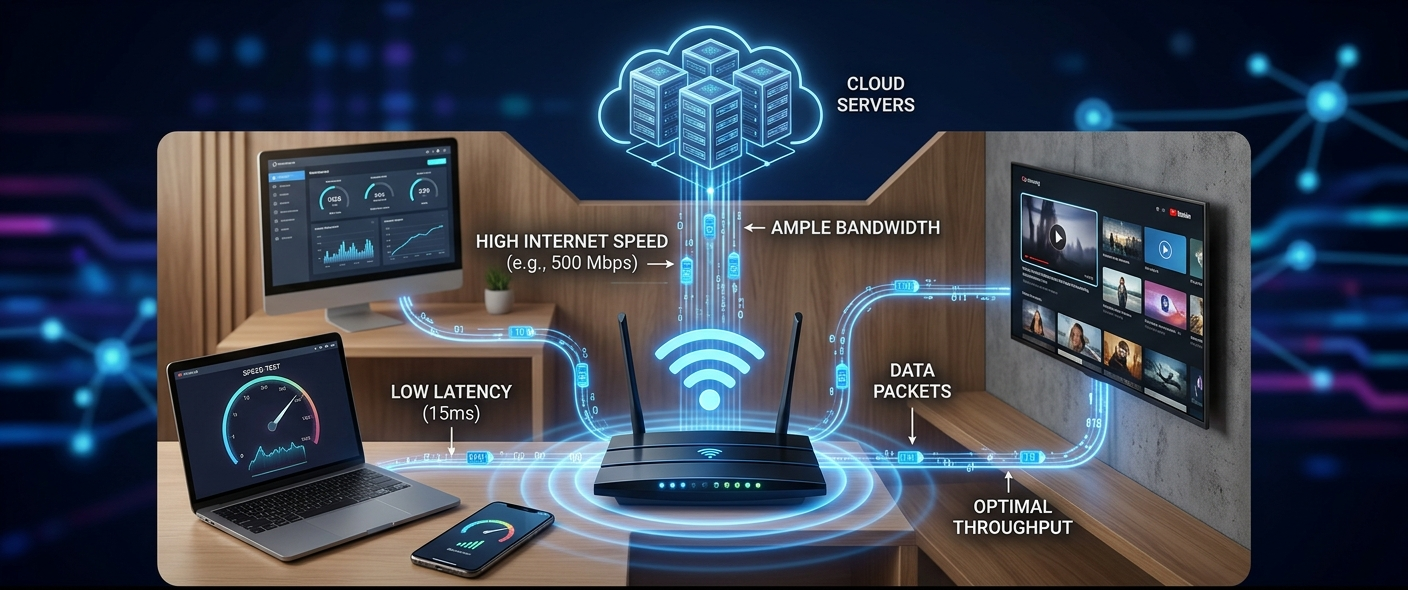
One of the most common frustrations of today’s technology users is Internet connection issues. A video can buffer, a site can take longer to load, a game can lag or even freeze and a video call can freeze without warning. All of these issues can be referred to as users saying that their “internet speed is slow,” but there are multiple reasons why the internet slows down. Bandwidth, speed, latency, ping, jitter, and throughput can all be used interchangeably, but they are all referring to a different aspect of the movement of data over a network.
It’s essential to grasp these concepts as a fast web plan does not always indicate a seamless online experience. High bandwidth doesn’t necessarily mean high speed if it is unstable or has high latency. Likewise, a low latency network with numerous devices vying for bandwidth will not perform well. Understanding the significance of each measure and the interactions between the measures will enable users to seek out problems, select an internet plan that fits their needs, and enhance their overall experience with the network.
What is the Internet speed?
One of the most misused networking terms comes with internet speed. Internet service providers typically refer to maximum connection speeds when they offer 100 Mbps, 500 Mbps or 1 Gbps internet connection. Internet speeds are usually measured in megabits per second (Mbps), or how many millions of bits of data can be sent per second of the internet.
High Internet speed enables users to comfortably carry out data-intensive activities. For instance, large file downloads, streaming HD videos, participating in online meetings, and cloud applications depend on the availability of higher speeds. The speed of the internet connection does not mean that the connection is responsive. An advertised high-speed connection can be slow due to congestion, poor network equipment, distance from servers or unstable wireless signals.
The difference between download speed and upload speed will also affect internet speed. Download speed refers to the speed at which data can flow from the internet to a user’s device, and upload speed refers to the speed at which data can be sent from the user’s device to the internet. Download speed is crucial for many activities, including watching videos or surfing websites. But uploading videos, sending large files and video conferencing are also important uploads aspects.
What Is Bandwidth?
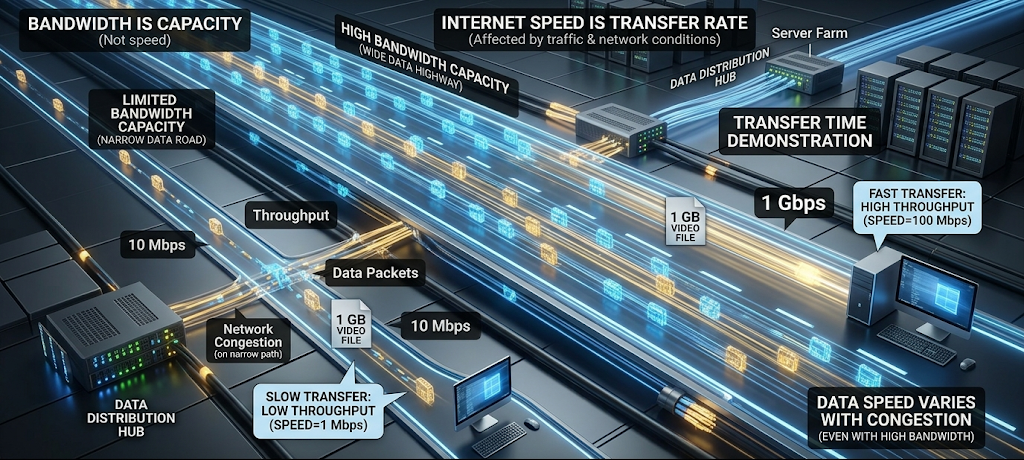
Bandwidth: The maximum capacity of a network connection. Like a highway’s number of lanes that indicate how many vehicles are able to drive on the highway at one time, it indicates the amount of data that can pass through a connection at one time. A bigger highway means more traffic, more bandwidth means more data transfer.
A household with more than one smartphone, computer, smart TV, gaming console and security camera consumes more bandwidth than a single-user household. The more devices using the network, the less bandwidth will be available for each one. This can lead to slower speeds, particularly if there are multiple devices playing videos, downloading files, or using online applications.
Don’t think that always means faster data transmission speed. Rather, it refers to the network’s capacity. Although a high-bandwidth connection might accommodate numerous users and activities, other elements, including latency, signal strength, and server speed, can also influence the real-world experience. That’s why a higher bandwidth Internet connection does not always mean faster service.
What Is Throughput?
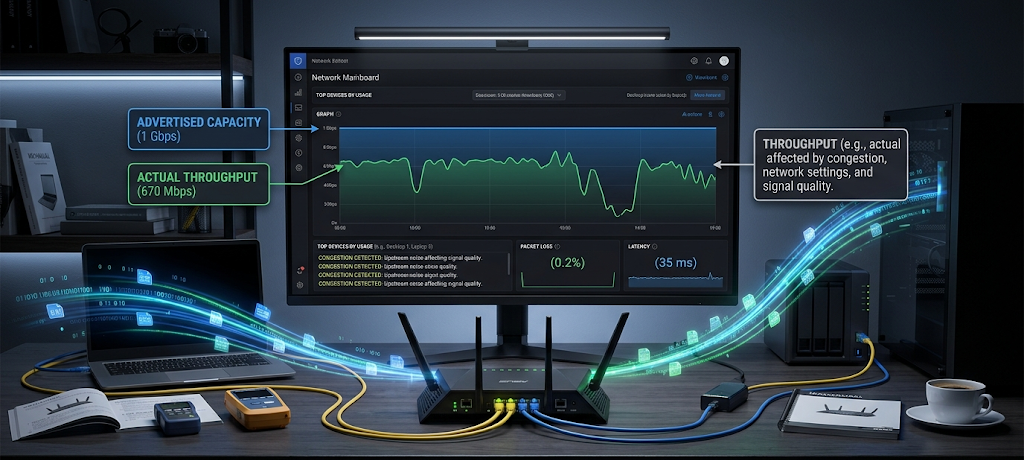
Throughput is the actual quantity of data that is transmitted successfully over a network over a given period of time. Bandwidth is the best possible, throughput is the actual performance experienced by users.
For instance, an internet connection might be capable of 500 Mbps bandwidth, but only 350 Mbps might be able to be transmitted due to network congestion, hardware limitations, interference, or other factors. Real networks are not ideal so the throughput may be lower than the advertised speed.
Factors affecting throughput range from network equipment performance to the number of devices connecting to the network, to distance between devices and servers, to data transmission efficiency. Even with a strong internet plan, the cable, router or weak Wi-Fi signal can limit the throughput.
When users don’t always get the speed they are promised by their Internet Service Provider, understanding throughput helps give them a better idea of the issue at hand. The advertised speed is the tops of the connection, while throughput is the speed that the user gets during normal use.
So, what is the difference between bandwidth and speed?
The terms bandwidth and speed are often used interchangeably, but they actually mean different things. Bandwidth is the number of bits that can be transmitted through a network and speed is the rate at which data moves through a network. When people talk about “the internet speed” they are often referring to both of these in their conversations.
It’s helpful to think of a water pipe. Bandwidth is similar to the width of the pipe as it influences the amount of water that can be carried at a time. Speed is analogous to the speed of the water in the pipe. A bigger pipe can supply more water flow, but it does not necessarily mean that the water moves faster.
The difference for anyone who uses the internet is that just putting more bandwidth doesn’t fix everything when it comes to connection issues. When latency or network instability are major problems, upgrading to a faster plan will likely have little impact on performance. It works better to understand what the problem is than just buying a more expensive internet package.
What Is Latency?
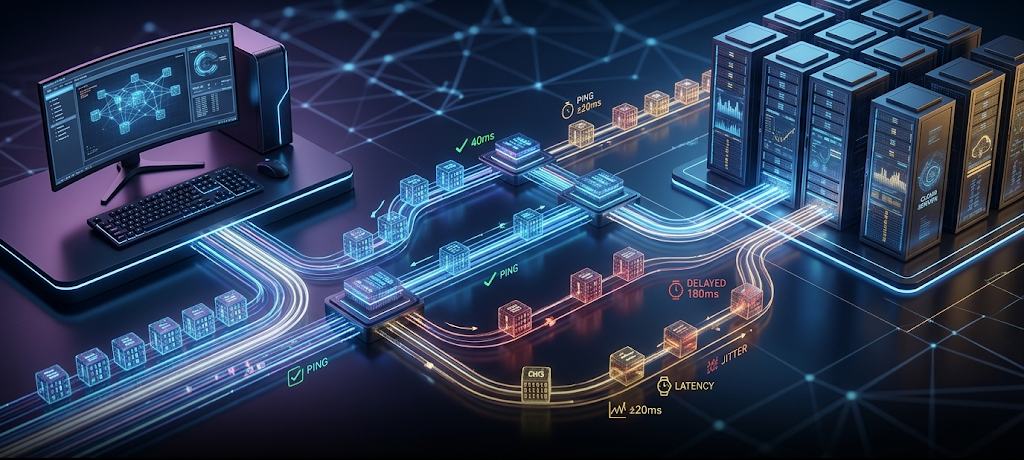
The time taken for data to move from one location to another on a network is called latency. Typically given in milliseconds (ms). Bandwidth is concerned with volume of data while latency deals with the delay in sending a request and receiving a response.
Low latency is important for activities that require immediate responses. Low latency is crucial for online gaming, video conferencing, voice communication, and money transfers as it can impact the experience. High latency can give a sense of sluggish performance despite having a very high bandwidth.
One of the factors that have an impact on latency is physical separation of devices and servers. A piece of data that is sent across continents always takes longer than a piece of data that is sent to a near server. Latency can also be affected by network congestion, routing issues and substandard connections.
A user might have a 1 Gbps internet connection but lag in opening a website or playing online games due to high latency. This is an example of why bandwidth is just one aspect of network performance.
What Is Ping?
Ping – a measurement of the latency between a device and another location in the network. Ping measures the time it takes a small data packet to get to a certain location and bounce back.
In the online gaming world, rapid reaction time is crucial, which is why Ping is often in discussion. A low ping is where the device and server communicate rapidly with one another and a high ping will create noticeable delays. High ping is known as “lag” to gamers, as actions could seem laggy.
However, ping is not only important for gaming. It also impacts video calls, remote work apps or cloud services. When your ping is high, your voice doesn’t sound natural because you are not able to hear the response right away.
When testing ping, you can test different servers and see if there is a problem there or if there is a problem elsewhere on the internet. If only some services have a high ping, it might not be a problem with the user’s internet connection, but with a specific service.
What Is Jitter?
Jitter is fluctuations in latency as a function of time. Latency refers to the average delay for data to be transmitted, while jitter refers to how variable that delay is.
If it is considered a stable connection, it will have a constant latency of 30 milliseconds. However, there may be jitter, where the connection could be somewhere between 20, 80, 150 milliseconds. Such random fluctuations result in jitter.
Jitter has an important impact particularly on real-time communication. High jitter can result in a break in voice, images may freeze or the conversation may become hard to follow during video calls. Data packets can also not be received at regular intervals, which can result in unpredictable reactions from online games.
Possible reasons for jitter include network congestion, wireless interference, overloaded routers, or internet service provider issues. There are ways to minimize jitter, such as decreasing the number of connecting devices, enhancing the Wi-Fi signal and connecting via cable.
What Are the Causes of Slow Internet?
There may be various reasons why the internet is slow. The internet may be slow for a number of reasons.
A lot of people feel that slow Internet means they have to get a faster Internet plan! There are numerous possible causes of performance issues in a connection. Users will be able to solve problems more effectively rather than making unnecessary upgrades when they know the causes of various failures.
Network congestion, too many devices on the network, outdated hardware, weak wi-fi signals, background apps, and ISP issues are some of the common reasons for causes of slow internet. If you have a device that is downloading files automatically, backing up to the cloud, or downloading large files, then you may be using up a lot of bandwidth without realising it.
Distance and interference also impact wireless networks. Signals can be weakened by walls, electronic devices, other Wi-Fi networks and physical barriers. Even the fastest internet plans may not be fast enough when the router is a long distance from the devices that are used frequently.
An older networking infrastructure is another frequent problem. Some older routers will not have support for newer Wi-Fi standards and speeds. A replacement with the new generation of hardware can enhance the performance, stability, and coverage.
How to Diagnose Your Network Performance Issues
This is a new book by Anthony Pogba, a renowned computer network specialist, that examines how to identify your network performance issues.

Run an Internet Speed Test
The first step to solving connection issues is to measure actual performance. Internet speed tests will give you data on download, upload and, in some cases, latency. Testing throughout the day can help determine if performance varies due to network congestion.
Users are advised to check test results against their Internet plan. If the actual velocities are significantly below normal, there may be a problem with the service, equipment or network configuration.
Check Connected Devices
Excessive number of devices can cause bandwidth to be shared. Network resources can be used by a smartphone, a smart TV, a computer, a gaming system, and a smart home device.
Reviewing the list of devices connected to the router could be helpful in discovering unknown devices or unnecessary connections. If the devices are not being used, they could be causing issues and disconnecting them may provide an instant speed boost.
Test With a Wired Connection
While Wi-Fi may be convenient, it can create other issues like interference and loss of signal. Connecting a device to the Ethernet cable can help identify whether the problem is with the Internet connection or the wireless connection.
If the performance is significantly better connected via the wire, the issue could be related to Wi-Fi coverage or the location of the router and wireless interference.
Restart and Update Network Equipment
Modems and routers may suffer short-term problems when they are left on for extended periods. Sometimes, these devices can be restarted and resume to normal performance.
Also, remember to update the firmware of your router, as updates can enhance security, stability, and compatibility with new devices.
Several Ways to Improve Your Internet Connection
Usually, enhancing internet performance involves dealing with the issue instead of just concentrating on speeding up the internet. Users can enhance their network by ensuring the routers are positioned strategically, limiting the number of unnecessary devices connected to the network, implementing up-to-date network equipment, and securing their Wi-Fi networks.
If you have a lot of people using a home network, increasing bandwidth can be beneficial. But users need to think about latency too, particularly if they play online games or video calls or do anything real-time.
If a device needs to be connected to Ethernet for critical operations, it can help in achieving better performance. Wired connections are also often preferable to wireless connections for gaming consoles, desktop computers, and workstations, as they do not suffer from some of the limitations of wireless connections.
Conclusion: Understanding What Really Affects Your Connection
Mentioning the conclusion is hardly a surprise. Talk about conclusion is no surprise.
The speed of the internet service is not the only factor that determines the performance of the internet. Bandwidth is the amount of data moving through a network, throughput is the actual amount of data that moves, latency is a measure of how long it takes something to reach the other end of the network, ping is a measure of how long it takes a connection to respond, and jitter is a measure of how stable a connection is. All of these contribute to creating a good or bad online experience.
A high-speed internet connection with high latency can sometimes feel slow, and a slower connection with high stability can be adequate for most activities. Some of these differences are important to know about and to understand how to identify network problems, so that users can make better choices when selecting their internet plans, equipment, and troubleshooting techniques.
Rather than just wondering, “Why is my internet slow?” users should look at the big picture of their network performance. Bandwidth, speed, latency, and throughput are all concepts that are important to understand, and which can help you create a faster, more reliable, and more efficient internet experience.