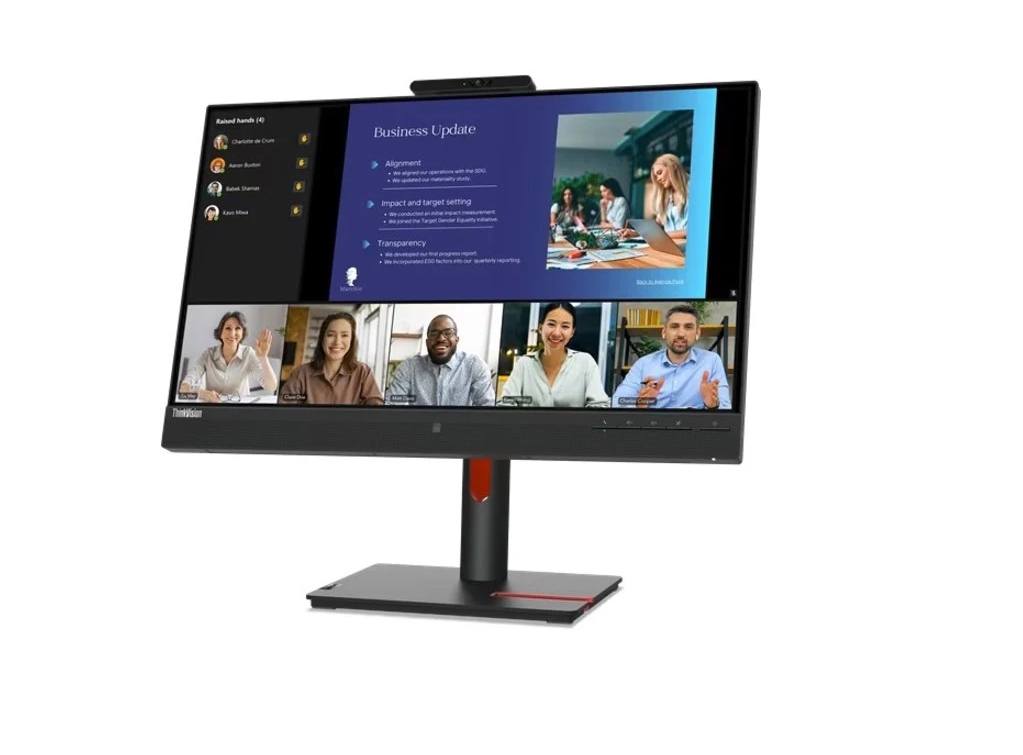
A 24-inch monitor remains one of the most versatile display sizes, striking the perfect balance between screen real estate and desk footprint. In 2025, Lenovo’s 24-inch lineup continues to lead with models tailored for productivity, creative work, and even casual gaming. This guide explores the core features of Lenovo’s 24-inch monitors, highlights the standout models, and helps you select the best option for your specific needs.
Lenovo monitors 24 inch offer the perfect balance of size and performance for home and office use. With vibrant Full HD displays, sleek designs, and wide viewing angles, these monitors enhance productivity and entertainment. Lenovo monitors 24 inch are ideal for multitasking, video streaming, and professional work environments.
Key Features to Look For
Before diving into specific models, it’s important to understand the essential features that distinguish a great 24-inch monitor:
- Panel Type
- IPS (In-Plane Switching): Offers wide viewing angles (178°/178°), accurate colors, and stable contrast—ideal for office work and content creation.
- VA (Vertical Alignment): Higher contrast ratios for deeper blacks, suitable for mixed-use scenarios and casual media consumption.
- TN (Twisted Nematic): Faster response times (1–5 ms) but narrower viewing angles, often reserved for budget gaming setups.
- Resolution & Pixel Density
- Full HD (1920×1080): Standard on most 24-inch monitors, providing around 91 PPI (pixels per inch), which yields crisp text and clear images at normal viewing distances.
- UHD/4K (3840×2160): Rare at 24″ due to cost and scaling challenges, but available on a few premium models for professionals needing extreme detail.
- Refresh Rate & Response Time
- 60 Hz – 75 Hz: Standard for business and general use.
- 100 Hz – 165 Hz: Popular in Lenovo’s gaming-oriented “G” series, offering smoother motion and lower input lag.
- Response times of 1–4 ms: Essential for motion-sensitive tasks like gaming or video editing.
- Connectivity
- HDMI & DisplayPort: Essential for modern PCs and laptops.
- USB-C: Offers video, data, and up to 65 W power delivery—perfect for single-cable connections to Ultrabooks.
- USB Hub: Built-in USB-A/USB-C ports for peripherals streamline desk setup.
- Audio Out or Integrated Speakers: Useful when external speakers aren’t available.
- Ergonomics & Build
- Height, Tilt, Swivel, and Pivot Adjustments: Support healthy posture and multi-monitor configurations.
- VESA Mount Compatibility: Enables wall or arm-mounting for maximum flexibility.
- Eye-Care Technologies: Lenovo’s TÜV Rheinland-certified flicker-free backlights and Low Blue Light modes reduce eye strain during long workdays.
- Additional Features
- Built-in Webcam & Microphone: Found on “T24m” models for hybrid work and video conferencing.
- KVM Switch: Allows control of two PCs with a single keyboard and mouse—a boon for multitaskers.
- Integrated Privacy Shutter: Secures the camera when not in use.
Best Uses & Configurations
1. Corporate & Home Offices
Choose the T24i-30 or T24m-20 for their ergonomic flexibility and USB-C docking. A dual-monitor setup with two T24i-30s delivers ample screen real estate for spreadsheets, documents, and web conferencing, while the T24m-20 adds seamless camera integration for video calls.
2. Creative Professionals
While 24″ often defaults to Full HD, the P24h-20’s QHD panel offers sharper detail and greater workspace—ideal for photo editing, graphic design, and CAD. The built-in KVM switch streamlines workflows between a design PC and a general-purpose machine.
3. Casual & Competitive Gaming
The Legion Y24g-30 combines a fast 165 Hz refresh rate, 1 ms response, and G-SYNC support—crucial for tearing- and stutter-free gameplay. Its aggressive styling and subtle RGB lighting make it a focal point of any gaming desk.
4. Education & Remote Learning
Budget-friendly L24i-30 models provide reliable Full HD quality with tilt stands, perfect for students and educators. Paired with a webcam and headset, they transform any desk into a virtual classroom environment.
5. Multimedia & Entertainment
An IPS-based Full HD monitor like the L24i-30 or T24i-30 excels at video streaming and casual photo viewing, thanks to wide color gamut and consistent contrast. Integrated speakers on select T-series models reduce cable clutter.
Tips for Optimizing Your 24″ Lenovo Monitor
- Color Calibration: Use Windows’ built-in calibration tool or free utilities like DisplayCAL to achieve accurate colors, especially when doing photo or video work.
- Blue Light Reduction: Enable Lenovo’s Low Blue Light mode for evening use to minimize sleep disturbances.
- Cable Management: Route power and video cables through the stand’s built-in clips to keep your workspace tidy.
- Monitor Positioning: Aim for the top third of the screen at eye level, at an arm’s length distance (~50–70 cm).
- Multi-Monitor Layouts: Match panel types to avoid color and brightness imbalances. Uniform bezels on ThinkVision models create seamless sightlines.
Experience seamless teamwork with the ThinkVision T24mv-30 – Smart Collaboration with Lenovo Monitors 24 Inch. Featuring a built-in 1080p webcam, dual-array microphones, and USB-C connectivity with 65W power delivery, it simplifies video calls and docking. Enjoy crisp IPS visuals, ergonomic adjustments, and integrated speakers for enhanced productivity and collaboration.
The ThinkVision 23.8 inch Monitor – T24mv-30 is a high-performance, Full HD display designed for productivity and seamless video conferencing. With a 1920×1080 resolution, IPS technology, and ultra-thin bezels, it delivers crisp visuals and wide viewing angles. Integrated features like a built-in webcam, dual microphones, and stereo speakers make it ideal for virtual meetings and remote work setups. Certified for Microsoft Teams, the T24mv-30 offers hassle-free communication. Multiple connectivity options, including HDMI, DisplayPort, and USB-C, ensure versatile device compatibility. With its sleek design and ergonomic adjustments, this ThinkVision monitor enhances both your workspace aesthetics and day-to-day efficiency.
Conclusion
Lenovo’s 24-inch monitors in 2025 cater to diverse needs—from business professionals demanding ergonomic design and video conferencing tools, to gamers craving high refresh rates and swift response times, and creatives seeking higher resolutions and color accuracy. By focusing on panel technology, connectivity, ergonomics, and specialized features, you can select the perfect 24″ Lenovo display to supercharge productivity, entertainment, or competitive play. Keep these guidelines in mind, and let your new monitor unlock a sharper, more comfortable viewing experience.