In today’s data-driven, hyper-connected world, the decision to use a wire or a wireless signal is at the core of the entire technological experience. Whether you are an IT architect working to design a powerful enterprise backbone or you’re a homeowner seeking to kill the “dead zones” in your basement, it’s no laughing matter. The architecture has changed significantly in the past decade, with Ethernet getting towards 400Gbps and Wi-Fi moving towards multi-gigabit. Before making a decision, it is essential to understand and compare wired and wireless networking technologies with respect to data integrity, environmental interference, and long-term infrastructure investment. In this article, we’re going to take a deep dive into how these systems work, break down their performance indicators, and explore their security measures – making sure your network is not just functional, but future-proof for the next 10 years of digital innovation.
Understanding the Basics: The Architecture of Connectivity
The Wired Foundation: Reliability Through Physicality
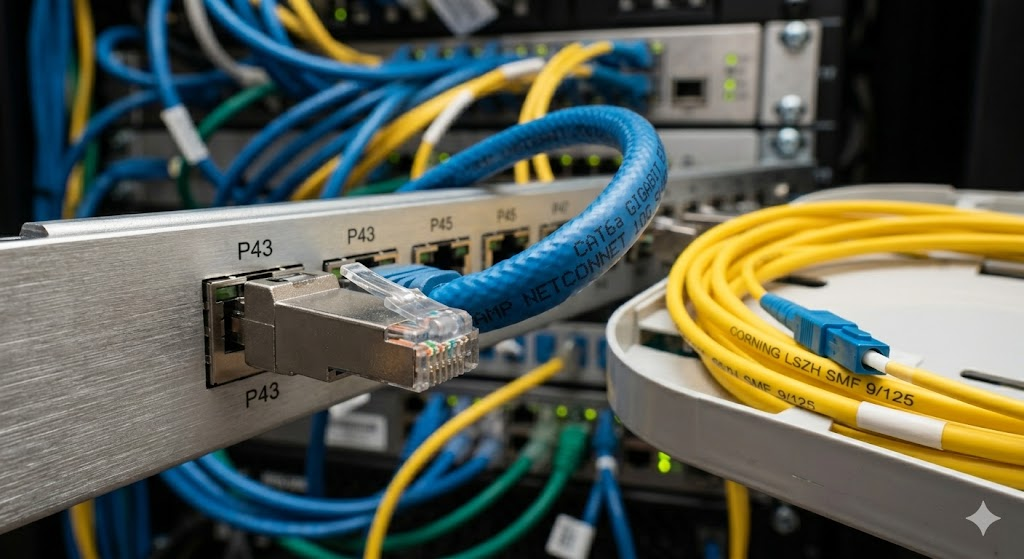
Wired networking, often based on Ethernet cables (Cat6a or fiber) is the benchmark of reliability for mission critical applications. The key concept for a wired system is that the signal is contained in a medium that is separate from the rest of the world; in effect, this cuts out most of the noise that bedevils over-the-air transmission. Wired networks create a private “highway” for data, unaffected by competing radio frequencies, microwave ovens, or the presence of thick concrete walls. This physical containment offers an increase in consistency, mathematically better than wireless, which is the preferred option for data centers, financial institutions as well as professional gaming setups, where every millisecond of latency can make a huge difference in the final result.
Freedom and Agility, the Wireless Revolution
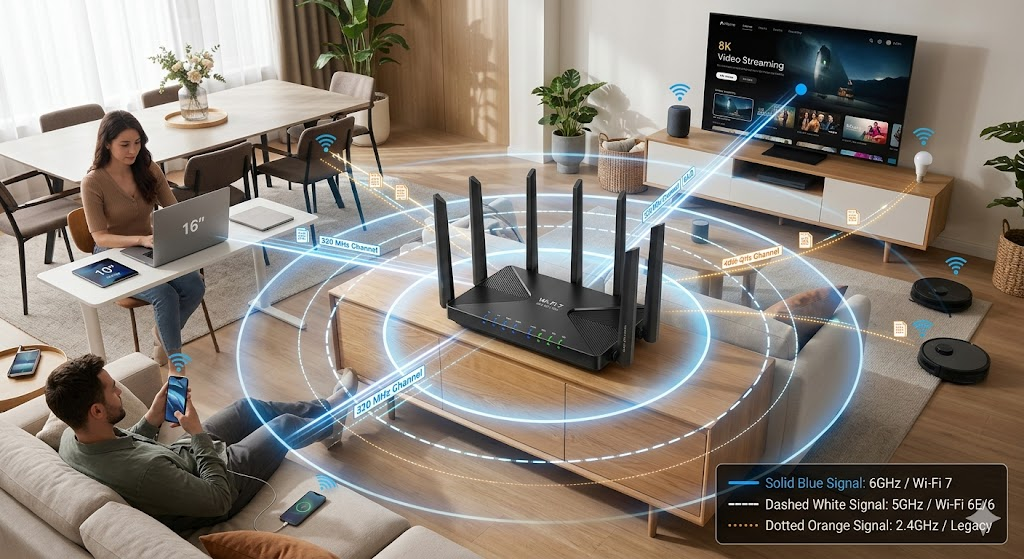
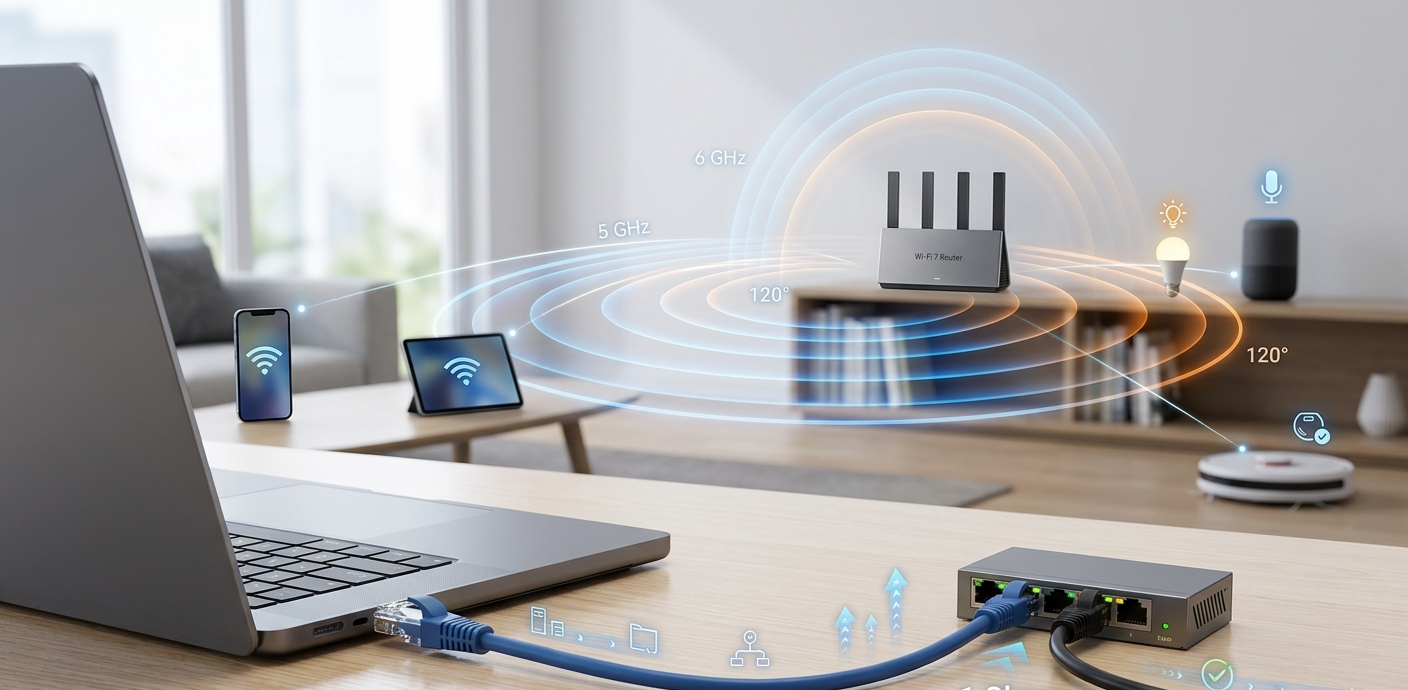
In contrast, wireless networking (Wi-Fi) works by transmitting packets of information across the air using a set of specific radio frequencies such as 2.4GHz, 5GHz and the recently adopted 6GHz. The big attraction of wireless technology is the freedom it brings, and the ability to overcome the limitations of physical wires. In today’s office or smart home, it’s not a luxury anymore to be able to move from one room to the next without losing a connection. Wi-Fi technology has experienced exponential growth and enhancements in throughput and capacity since the early 802.11b days and has continued to advance to the state-of-the-art Wi-Fi 7. The situation of sharing the medium (air) with other devices in the same vicinity means that wireless networks are susceptible to “collisions” and getting degraded signals, which requires complex management algorithms to ensure stability in high-density environments.
Performance Analysis: Speed, Latency, and Throughput
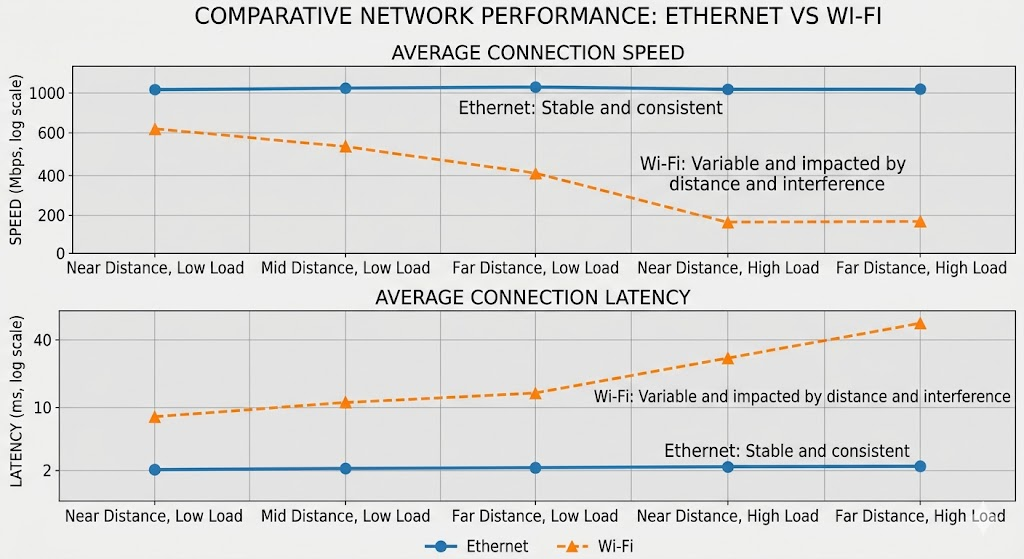
There are two types of bandwidth, deterministic and shared. Performance is divided into the concepts of “burst speed” and “sustained throughput”, when looking at performance. Wired networks offer a predictable environment with a considerable amount of bandwidth allocated to the connection between the switch and the device. For example, a 10Gbps Ethernet port will always be able to achieve close to its rated speed even if other devices are connected to the same switch, as long as the backplane does not become a performance bottleneck. Wireless, on the other hand, is a “shared medium.” If a WiFi 6 router broadcasts 4.8Gbps, that’s the combined bandwidth of all connected devices. In addition, Ethernet is a “full-duplex” protocol, which means that it can transmit data and receive data at the same time on the same channel, while wireless is a “half-duplex” technology, as the device can only send data, or it can receive data, but not at the same time on the same channel.
The Latency Factor of Modern Applications
A data packet’s latency, or “ping,” is the amount of time it takes to get to its destination and back. Low latency is more important than speed for certain applications, such as high-frequency trading, competitive e-sports, or remote surgery. Wired connections usually have latencies of less than 1ms on local hops, as there is no modulation/demodulation or contention for the airtime. Wireless connections, however, have greater ‘jitter’ and higher base latency because of the difficulties with managing a wireless environment. This includes “clear channel assessment” which delays a device from transmitting until the airwaves are still. Wi-Fi 7 adds Multi-Link Operation (MLO) to help mitigate this delay but it can’t truly compete with a direct copper or fiber link in terms of the responsiveness and speed of a direct connection.
Physical Security, and the “Air Gap”
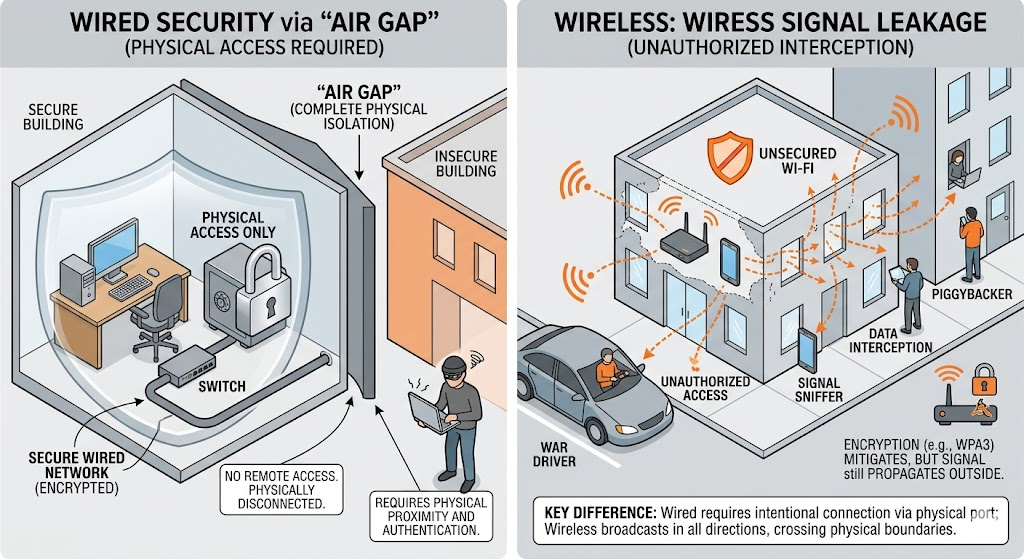
Wired networks have a much smaller “attack surface” from a security perspective. In order to intercept data on a wired network, a malicious user typically must have physical access to the building or the cabling system. This form of natural barrier will prevent someone from being able to plug into your wall jack if they don’t have the proper plug. They can’t sniff your packets without the proper plug. That is how high-security government facilities and banks use “air-gapped” wired systems or encrypted fiber lines. In a wired environment, network administrators can activate only those physical ports they intend to use, and can disable the rest of the wall outlets to make sure no unauthorized hardware can connect to the network fabric. This first layer of security is very difficult to be avoided as it requires a physical presence which can easily be seen through security cameras and employees.
The Issues of Wireless Spaces and Encryption
Wireless networks are generally more susceptible since signals travel through walls and into public areas such as parking lots or surrounding apartments. This “bleeding” of the signal has the potential of allowing a person to pick up the encrypted data packets from a great distance with a high gain antenna. However, some measures have been taken to combat this, such as the use of strong encryption systems like WPA3. WPA3 is much more secure than the previous versions, but is still a software-based approach to protecting against a broadcast signal. Wireless security is an ever-evolving battle between encryption methods and brute-force attacks or de-authentication attacks. Moreover, the “Evil Twin” scenario, an attacker creating a fake hotspot with the same name as a trusted network, is only a problem in wireless networks and demands much greater care and vigilance on the networks that people use.
Scale and Deployment Expenses
One drawback to wired networking is the expense and complexity of the initial setup. However, due to the nature of the existing architecture, there is a considerable amount of work, special tools and sometimes building changes needed to install miles of Cat6a cable. Cable trays, patch panels, cooling for server closets, and space for switches need to be taken into consideration. The “cost per port” for an enterprise means the number of hours needed to pull wire through ceilings and walls, as well as the price of the hardware. Furthermore, after being installed, a wired network is fairly “static.” If you add 10 more people to your staff without adequate wall jacks, then you have to repeat the costly cabling job. Such rigidity has a downside as it makes it challenging for wired-only spaces to grow quickly in an unpredictable business environment.
Wireless Mesh with Fast Scaling
Wireless networks are great for its scalability and simple setup. Capacity additions to an existing wireless network are often as easy as plugging in an extra Access Point (AP) or setting up a mesh node. This enables businesses to grow their footprint in minutes instead of weeks. As part of a modern “Bring Your Own Device” (BYOD) workplace, wireless technology is the only means of supporting hundreds of smartphones, tablets and laptops without arriving at a state of cable chaos. High-end enterprise wireless (such as Wi-Fi 6E controllers) can be costly, but can often be more economical for general office connectivity for the savings in labor and infrastructure. There is a catch, however, as the number of wireless devices grows the “noise floor” also increases, which means more costly equipment will be needed to control the congestion.
Use Case Scenarios: When to Use Which
The Home Environment: A Hybrid Approach
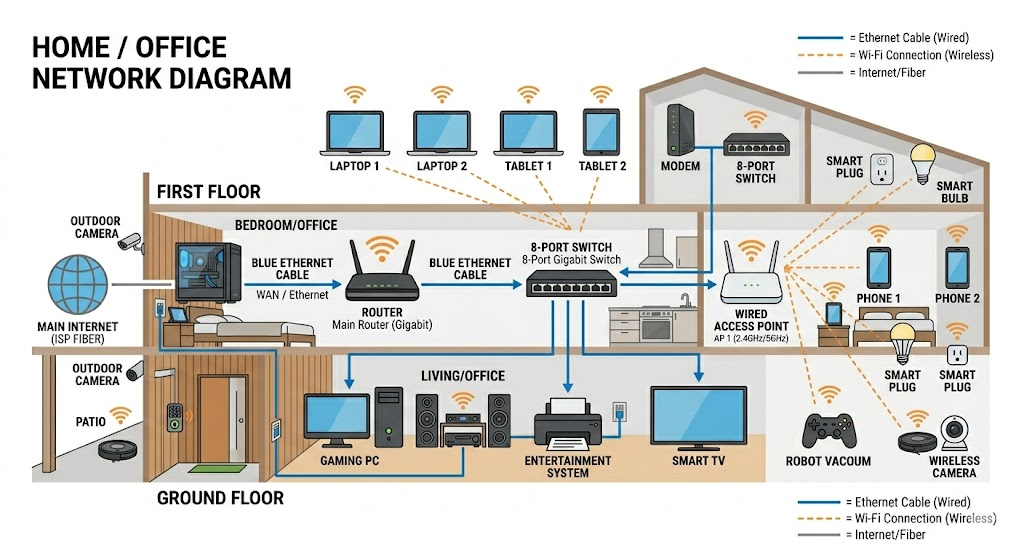
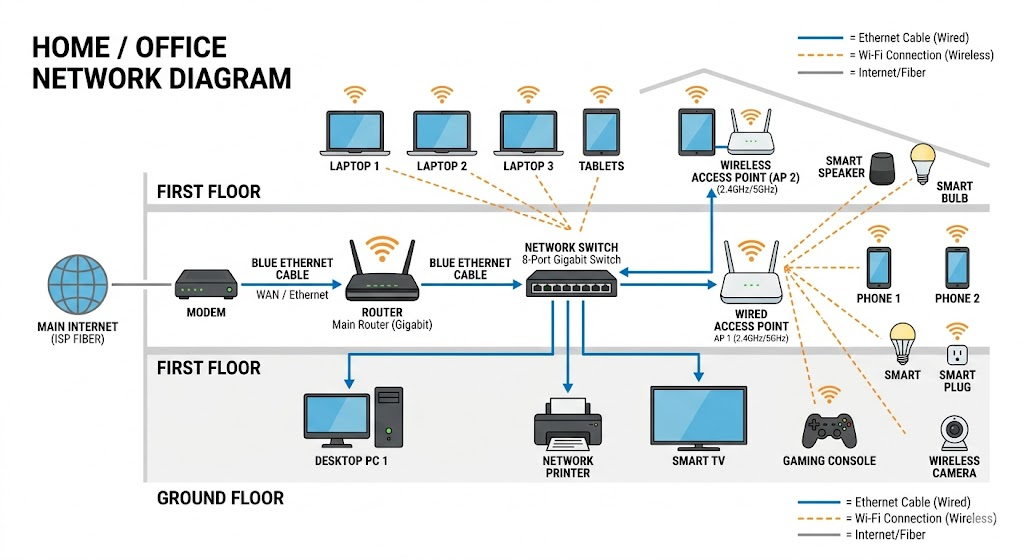
For most of today’s modern houses, the best approach is a hybrid one, balancing performance and convenience. To guarantee a smooth performance and to free up bandwidth on the wireless bands, high bandwidth, stationary devices like 4K smart TVs, gaming consoles and home office workstations should be connected via Ethernet. This frees up the Wi-Fi for mobile devices such as smartphones, tablets and smart home sensors (Internet of Things). The “heavy lifters” will reduce the competition for airtime with your wireless devices, resulting in a better user experience for all the family. Between the two worlds, technologies such as Powerline Adapters or MoCA (Multimedia over Coax) can deliver a “wired like” experience with existing electrical or cable TV wiring.
Enterprise and Industrial Applications
The selection in an enterprise comes down to the requirements of the department. Wired 10GbE is essential for creative teams that are dealing with huge video files, as it will help avoid slowdowns during rendering and file transfer tasks. A strong Wi-Fi 6/7 deployment, and the ability to move between desks and conference rooms without interruption, is more beneficial to sales and administrative teams during these times. In industrial environments, like automated warehouses, for stationary robotic arms, there is often nothing to be done to avoid the issue of malfunctions caused by interference, so wired connections are used instead. For mobile picking robots, the solution is to use private 5G networks or what is known as “industrial Wi-Fi” that can provide continuous wireless connectivity to the central server as the robot is navigating the facility.
The Future of Wi-Fi: Wi-Fi 7 and Beyond
The Convergence of Speed
Looking ahead, the world of wired and wireless is converging, but isn’t quite merging. Wi-Fi 7 is bringing with it some new capabilities such as 320MHz channel widths and even 4K-QAM (Quadrature Amplitude Modulation) that could push the theoretical speed of Wi-Fi 7 up into the tens of gigabits. This opens wireless up as a much more sensible solution for high-speed applications that were all Ethernet until now. As wireless speeds go up, though, the “backhaul”–the link from the wireless access point to the remainder of the internet–must go up too. This is because the future of wireless is dependent on a much stronger wired foundation. The evolution of one technology directly drives the need for the other since you can’t have the 10Gbps wireless experience at an access point that’s connected to a 1Gbps wired port.
The Role of Fibre and Private 5G
The next step in networking is to take fiber optics further into the LAN and the emergence of private 5G. In high risk and high performance settings, fiber to the desk is now a reality, with virtually unlimited bandwidth and protection from all electromagnetic interference. On the wireless side, private 5G networks are an alternative to Wi-Fi in large-scale applications such as a stadium or shipping port, delivering extended range and more advanced hand-off features to moving devices. As these technologies become more evolved, the divide between “local” and “wide area” networks is becoming increasingly fuzzy, but the question of whether to transmit the bits through a controlled physical medium or out in the open air will remain a key one in the design of any network.
Comparison Summary Table
| Feature | Wired (Ethernet/Fiber) | Wireless (Wi-Fi/5G) |
| Reliability | Very High; No interference. | Moderate, susceptible to loss of signals. |
| Latency | <1ms; very consistent. | 5ms – 50ms, variable jitter. |
| Security | High: Needs to be physically present. | Moderate; Depends on encryption. |
| Mobility | None; fixed location. | High; seamless roaming. |
| Setup Cost | High; labor and cabling. | Moderate; hardware focus. |
| Scalability | Complex, new wiring is required. | Easy; software/AP expansion. |
Wired vs. wireless networking isn’t an either-or decision, it’s a strategic integration challenge. Where absolute security, speed and uniformity are required, the physical cable is unbeatable. The foundation of the internet, and essential for any high performance environment. The modern world, however, requires mobility, and the rapid advances of wireless technology have turned it into a powerful and capable first means of connection for the large majority of people.
When building your network, select a high-quality wired backbone for the most critical assets and a high-quality wireless access point for a mobile workforce and smart home needs. Knowing the pros and cons of each medium lets you create a network that is both quick and secure and is capable of meeting any data-related innovations of the future. Keep in mind that the ideal network is one that doesn’t need to be considered or thought about; one where the invisible signals and the secret wires flow together in perfect harmony.