
Introduction
With software development, there is continuous change. New features are added, bugs get patched, performance gets enhanced, security settings are adjusted and old code is tweaked according to the new requirements on a regular basis. As the project expands, managing all these changes becomes harder and harder, particularly if more than one developer is working on an application simultaneously. If teams are unable to trace changes back to any previous versions of a project, or are unable to understand why a certain change has been made, they may end up overwriting valuable code. That’s where version control systems come into play. They offer a framework for developers to control changes to their code, keep track of project history, work together effectively and minimize the dangers involved in software development.
A version control system is a technology that keeps track of changes to files over time, enabling developers to see earlier versions and compare changes, and to roll back to earlier versions to recover from changes as needed. It’s a widely adopted idea in software engineering due to its benefits of organizational structure, accountability, and collaboration. Tools like git are essential for teams to manage any project from personal use to enterprise applications. The developers can try out new concepts in a safe manner, keep multiple copies of software, manage the development process cohesively without impacting the advancement of other developers.
What is Version Control
Version control is a system for tracking, managing and organizing changes in digital files, particularly source code files within software development projects. It enables developers to keep track of changes that have been made, who has made them, why, and if there are issues, roll back to previous versions of a project. Version Control is an essential tool for software development practice today, offering reliable ways to handle complex development processes. The details of the concept of version control illustrate how these systems can be used to keep multiple different versions of files and coordinate the work of multiple contributors.
Prior to the widespread use of version control systems, developers would maintain multiple copies of files for various versions, like “project-final,” “project-final-update,” or “project-final-new-version.” This can work for smaller projects, but can get messy when projects have thousands of files and lots of people contributing. Version control systems address this issue by keeping track of all the changes made and automatically arranging them. Developers can use commands and tools that record changes in a structured database, rather than saving copies of the text files manually.
Version control does not apply just to software. It can also be used to document; create web content; create configuration files; and for other digital items that need to be updated frequently. It is however particularly useful in computer programming as software projects are continually changing. Developers have to be sure they can experiment with concepts, work with team members, and get it wrong without wrecking everything.
What are Version Control Systems and why do Developers need them?
Identifying change in software projects.
The most crucial advantage of a version control system for developers is tracking changes. All changes in a project can be recorded and a timeline created of the evolution of the software. This history enables developers to see what has changed in the past, when it was introduced and why. Version control systems allow developers to compare changes between various versions of a file without having to manually find a listing of the changes.
In professional software development scenarios, where applications can change frequently, tracking changes can be especially crucial. A developer creating a new feature could inadvertently cause a bug in the existing functionality. The team can use version control to review the last changes made, determine which one is causing the issue, and check back to a previously working version if necessary. This capability gives a safety blanket for developers, which means they can continue to enhance software without fear of irreparably harming the project.
Working with other developers.
Typically, no one person is responsible for the creation of modern software projects. For large applications, teams of developers, designers, testers, and system administrators are likely to be required to work together. If there was no version control, it would be very difficult to collaborate as people would be able to make conflicting changes to the same file. Version control systems offer features to enable team members to work on different parts of a project without losing contact with the others.
The developers can work on separate branches while making changes without impacting the main project, and they can come together through controlled processes to make improvements to the main project. Each team member can look at the other person’s code and discuss modifications to make it more updated; then when it is new code, each member can check that the code is appropriate to the project and standards. This teamwork approach enhances software quality and increases the productivity of the software development teams.
How to restore previous versions of code
Version Control Systems also have one other big advantage: they allow for the recovery of previous versions of a project. When developing a software product, there are times when using experiments and trying new things isn’t always going to yield the desired result. Important functionality can be accidently removed, errors can be added or a previous solution may be superior. Version control enables them to go back to an earlier state without losing any valuable work they did.
This recovery feature is similar to a software project’s safety system. Developers don’t have to worry about making a mistake since previous versions are kept. This is particularly helpful in large projects with many changes that are complex.
How to use a Version Control System
Repositories: The Foundation of Version Control
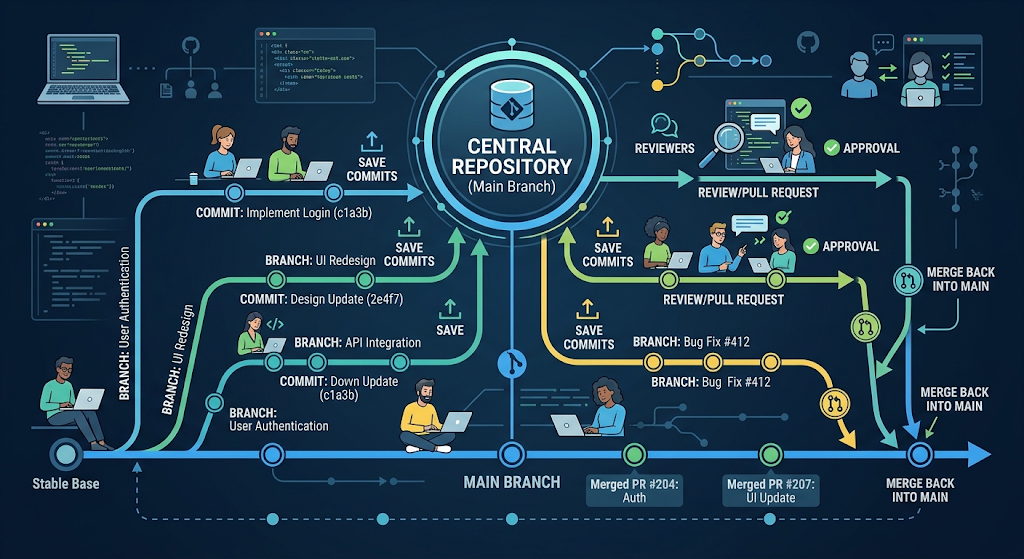
A repository is the place where a project’s files, history and version information are stored; it is usually referred to as a repo. It carries all the traces of the changes that have occurred during the development process. The developers are involved in updating the repository, accessing older versions, and sharing code with other members of the development team.
Repositories can be located on the developer’s computer or be hosted on online servers. Local repositories enable developers to work on their own, whereas remote repositories enable collaboration by providing a common location from which developers can upload and download changes. There are several services that many millions of developers around the world use for hosting and managing software projects, including those used for Git repositories.
Once a developer makes changes to a project, the version control system starts tracking changes in the project. Each update can then be tracked, audited and controlled via different commands and workflows.
Commits: Recording Changes
Commit is a snapshot of changes to a project that is stored. A developer can make commits at any point in the development process to preserve a particular state of development. Every commit contains a description of the changes, the person making the changes and the time of the changes. Typically, short messages to explain the intent of each commit, with other developers being able to understand the history of the project.
Good commit practices come into play since it makes project management easier. Typically, developers will make smaller changes, each in its own commit, rather than a single, massive one with many unrelated changes. This helps the user to easily see how the software has changed over time, as well as review the code and locate issues.
Branches: Managing Different Development Paths
There are two distinct ways to develop the branches:
Branches enable developers to develop a project separately to work on different aspects without impacting the primary codebase. For instance, if a new feature is being added to the login, and its developers need to make a new login branch, they can do so, but the rest of the developers will be able to continue on the main application branch.
Branches are one of the most powerful features of Git (which enable parallel development). Teams can develop branches of new features, bug fixes, testing, and experiments. After making the changes and reviewing them the changes can be merged into the main branch.
The advantage of using branches is that there is less risk of putting unfinished code or experimental code into a project which is in a stable state. This way, developers can do more work and maintain the software quality.
Why do developers use Git?
Git is a distributed version control system designed to assist software project management. Unlike centralized systems, Git allows each developer to have a full copy of the repository, which has its complete history. This allows the developer to work without an Internet connection, locally make commits, and sync changes when they get online to a remote repository.
The fast, flexible and powerful branching capabilities including speed and flexibility are the reasons why Git has become the most popular version control system in software development. It was built to deal with small personal projects as well as very large code bases with millions of lines of code. The developers use Git many professional development teams do.
Local and Remote Repositories
There are two types of repositories with regard to Git – local and remote. A local repository is a developer’s machine and is used to make changes, create commits and work with branches without any need for the internet. A remote repository is a repository that is stored on a remote server, which can be used for sharing work with other developers.
Once the developers finish developing their changes locally, they push the changes to a remote repository from where other developers can pull the changes. In the same way, changes made by other developers can be pulled from the remote repository to give the developers their updates. This way everyone remains on the same page and works together effectively.
Different Terminologies for GIT
Git Repository
The project folder that Git tracks is a Git repository. It includes files being built, commit information, branches and project history. The initial step for a Git-managed project is likely the creation of a repository.
Git Commit
A Git commit is a snapshot in time that captures the development process. They record the changes that were made at a specific point in time and can be replayed by developers at a later time. The commit messages should be meaningful so the team can understand the purpose of each commit.
Git Branch
A Git branch is a totally independent path of development, based on a project. Branches are used for developers to add a feature, improve or fix a bug while maintaining the stable version of the software.
Git Merge
A merge is a way to put changes into another branch from another branch. When a developer finishes a new feature, he or she could merge the feature branch into the main branch to integrate the new features into the formal project.
Pull Requests
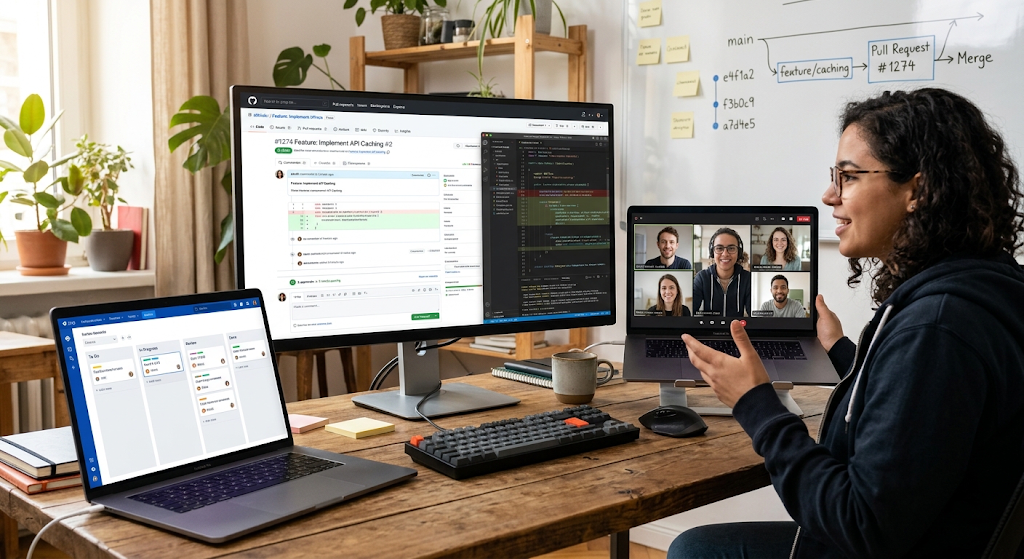
Pull Requests (PRs) are a way to ask for changes to be considered and merged into another branch. Pull requests are often used in professional teams as they enable developers to review code, make suggestions for improvement, and ensure that any changes are quality checked before being merged.
Conflict Resolution
Conflicts are when it is not possible to automatically merge changes, as they have been made by different developers to the same section of a file by Git. In this case, the conflicting parts will need to be reviewed by hand by the developer, to be determined which parts to keep and which to change, and then the developer will need to update the code before the merge is complete.
For novices, conflicts may appear hard to deal with, but they are a part and parcel of collaborative development. One of the skills that one needs to learn when using Git is how to handle conflicts.
Common Developer Git Workflows
Feature Branch Workflow
One of the most popular work flows that developers use is the feature branch workflow. Each time a developer is working on a new feature, they make a new branch. Once done, they hand in the branch for review and it is then integrated into the main project.
This workflow ensures stability of the primary codebase with several developers developing concurrently. It also makes for organized development since each branch is a particular task or improvement.
Git Flow Workflow
Git Flow is a formalized process which utilizes various branch types for various purposes such as features, releases, and maintenance. It is commonly employed in projects where there are controlled release cycles and careful management of production versions.
Forking Workflow
Often the forking workflow is used in open source projects. Developers make local copies of existing repositories, enhance it and push the changes back to the original project via pull requests. This enables a lot of people from around the world to contribute without making changes to the main repository.
How developers use Git in real projects
Writing and reviewing code.
Better code quality with Git – developers can preview changes before they are merged into the main project. Teams can review new code, find issues, and propose enhancements via commits and pull requests.
Professional software development requires code review, it enables consistency and mitigates the release of errors to the production environment.
Team Collaboration
With the number of developers working together, Git offers a shared system that lets people coordinate their work. Everyone can work from a variety of places, oversee their own work and merge their efforts into one application.
Today many companies use Git due to its ability to enable remote work and development teams spread across the world. It enables developers to work with others in various countries and keep track of project development.
Open Source Development
The software organisation Git has made a huge impact in the development of open-source software. Thousands of developers make contributions to the public projects by creating branches, submitting pull requests, and reviewing improvements. This is a cooperative approach to the development of a strong software solution for communities.
Several Advantages of using Git and Version Control
Developers have a lot of benefits to gain from using Git and version control systems. They enhance co-operation, preserve project history, allow experimentation, and facilitate software maintenance. Developers can be confident because they know that whatever changes they make will be logged and if they need to go back to a previous version, it’s available.
Version control also helps to ensure that everyone on the team is on the same page. All changes are documented, so developers can see what decisions were made about the project, and which features were being worked on. This openness is useful in small groups, and large companies.
Usual problems beginners might encounter with git
While Git is capable of doing a lot, there are certain concepts that can be hard to grasp for new users. When learning software development, commands, branches, merges and conflict resolution can be complicated. With some practice and knowledge about the fundamental concepts, however, using Git can be a lot easier.
A few common mistakes are writing vague commit messages, making commits directly on the main branch or forgetting to resolve conflicts well. By learning good Git habits early, developers avoid these issues and are better team members.
Elements of good practice in the use of Git
There are a few best practices that developers can follow to enhance their Git experience. They should write meaningful commit messages, commit small and focused changes, keep their branches up to date and avoid committing unneeded files. Having repositories that are organized helps to smooth out collaboration and minimize confusion.
Understanding the purpose of various git commands is also important for the developer and not just memorizing them without knowing what.Understanding the purpose of various git commands are important too and not just memorizing the commands without knowing what. By understanding how Git operates with changes, developers can better use the system to solve problems.
Conclusion
In today’s software development landscape, version control systems are integral to managing code changes, collaborating with teams, and safeguarding valuable code. The flexibility, speed, and functionality of Git like repositories, commits, branches, merges, and pull requests have made it the preferred tool for many developers.
Students and novice programmers must learn how to use Git to become proficient software developers. Learning version control terms helps you join real-world projects, contribute to open source projects, and collaborate with developers in a successful manner. Version control will continue to be a crucial technology for developers to build, maintain, and enhance their software applications efficiently, as software evolves.