
Introduction
Disasters can happen at any time and generally, they do not announce themselves. Computers and documents can be lost during a fire, important equipment in a flood, or a system crash can make files and applications inaccessible. Small businesses can suffer from lost income, customer dissatisfaction, and loss of reputation even for brief periods of downtime. The loss of personal documents, photos, financial records and important digital files can also cause serious issues for families. Many people think if they have backups, it is sufficient but backups only address one problem. It takes a recovery process to understand what needs to be done, who’s responsible and what needs to be done to get back to normal as soon as possible.
A disaster recovery plan is a clear path to using technology and equipment and important information in a disaster. During an emergency, businesses and families can take steps to reduce the chaos and avoid damage without making hasty decisions. A good practical disaster recovery plan – a plan that works in practice – clarifies why and how important data will be protected, the recovery priorities, the responsible parties, and will test whether the plan really works. From cyber attacks to hardware failures, natural disasters to human error, preparation is the key to getting through the crisis quickly or slowly.
What Is a Disaster Recovery Plan?
A disaster recovery plan is a formalized disaster recovery procedure that restores critical systems, data, and operations following a disruptive event. It’s not just a document that tells you where your backups are kept. Rather, it has been designed to answer practical questions, including who needs to be the first to gather information, what devices or services are critical, who makes decisions, and what should happen immediately following a disaster. This might involve resetting customer databases, accounting software, communication tools, or websites, among other things, for a small business. For families, it may mean that the lost and missing pieces of their history, including personal papers, medical records, insurance documents, and important photos are found.
The primary objective of a disaster recovery plan is to minimise downtime and the loss of data. If there is no plan, people may end up wasting valuable time to seek information, contacting the wrong people or attempting random recovery methods that can make matters worse. A good plan is an order that is established during a stressful situation, offering instructions for the order. It gives business owners, staff and family members more time to focus on restoring the core functions of the business and not on figuring out what to do next.
Step 1: Determine Which Risks Could Cause Disruption to Your Life
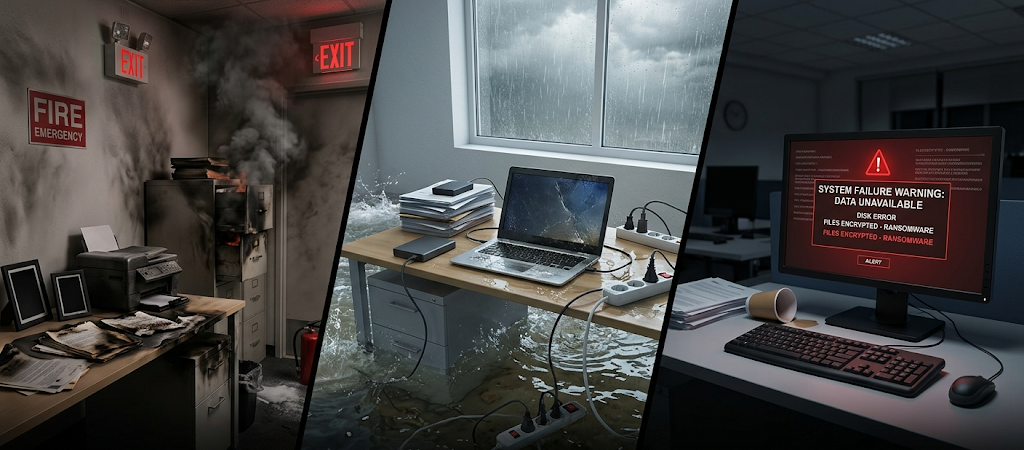
The first step in developing a disaster recovery plan is to know what disasters may impact your business or home. To develop a recovery strategy, we need to be aware of the risks faced and what we should do about them. Common risks include natural disasters, such as floods, storms and fires, and technology-related issues, such as ransomware attacks, hardware failures, software errors and accidental file deletion. Basic errors like loss of the laptop, damage to storage media can cause big troubles if important information is not safe.
Small businesses should think about the impact each disaster event may have on day-to-day business. For a restaurant, these payment systems, inventory data, and customer communication channels are critical to their business. A home business can use a computer, Internet and cloud applications. It is important for families to consider personal information that would be hard or impossible to replace, such as identification documents, financial records, school records, and family memories stored on a digital device. Being able to identify threats early can help you create recovery plans that suit your individual needs rather than a generic solution.
Step 2: Decide Which Data to Prioritize

Not all data has the same level of importance. A major error in planning for recovery is that folks assume that all the files are of equal priority. Ranking information to the point of disaster recovery is important for a successful plan as it will help you prioritize the information that is vital to your operations, security, and daily life. The business needs to determine what data is directly related to its operation such as customer data, financial records, employee information, operating systems, databases, websites, and critical software configurations. These resources may be necessary for the business to provide services to customers or to do certain tasks.
It is also important for families to make a list of personal information priorities. These files can contain important information such as passports, identification documents, insurance records, educational documents, tax records, medical records and legal paperwork. Personal photos and videos can also be useful as they are difficult to replace. Once you have located the key data, group it into categories including critical data, important data and low priority data. The most important info should be given the best protection and recovery, and less important files can be recovered if needed, at a later time.
Step 3: Develop a Backup Plan for Recovery
Backups are a key element of disaster recovery, but they have to be done right. Just copying files to a different location does not guarantee that we will recover successfully. What we see is that a strong backup strategy should put in place multiple copies of important info in different places. This may be local back ups on external drives, cloud based back ups, and off site copies protected from online threats. The goal is to have that if one back up method fails out, there is another which still works.
In terms of what is appropriate for businesses and families to do — they should also pay attention to how often backups take place. As for info that changes daily like customer info or financial transactions, those may require very frequent backup. And for files which hardly change — you don’t have to pay as much attention. Also it is important to check that backups are working right because damaged or incomplete backups may give a false sense of security. A recovery plan is of no use if the actual data which is stored does not restore when you need it to.
Step 4: Set Recovery Time Objectives (RTOs)
Recovery Time Objectives (RTOs) which are also known as recovery point objectives determine how fast a system or service should recover post disaster. Setting these time goals which are right for each situation helps to identify which systems require attention immediately and which can wait. For instance a small business may determine that their payment system must be back online within a few hours which is not the case for archiving which may wait for a few days. Also a family may prioritize access to financial information over restoration of entertainment files.
RTO’s see which of the present recovery options are practical for their situation as not all systems go back online at the same time. As you set your RTO, think of what level of down time is bearable and what issues present itself when a service is out. A shorter return to operation usually requires more preparation, better tech, and at times greater cost. But by knowing what the required speed of recovery is you allow your business and family to put resources in the areas which will see the greatest results.
Step 5: Put Together an Emergency Contact List

A disaster recovery plan also should have a full contact list which includes all parties that may become involved in the recovery. In an emergency these contacts may not be available via normal means or memory of employees so having this info at hand is very important. Business contact can also include employees, managers, tech support, internet service providers, software vendors, insurance companies, and emergency services.
Families must put together a list of key contacts which includes out family members, our insurance companies, banks, schools, health care providers, and technical support which we trust. We should keep current phone numbers, email addresses, and other methods of contact for each person listed. The list has to be saved both in digital and physical form which is to say in a file as well as printed out or on a portable flash drive in case the computers or internet go down. Also we should specify which contact to go to first in which order which in turn will help to avoid delays and improve the efficiency of the response.
Step 6: Determine Recovery Roles
A disaster recovery plan is most effective when all team members are aware of their roles. Before the disaster which is yet to happen we put in place what each person is to do which in turn removes confusion and see to quick resolution of issues. In a small business one person may be that which contacts vendors, another which handles data restoration, and a third which reports to customers. Also it is important that employees know who has the say in decision making and what actions they should take in the immediate wake of an incident.
In families it is also true that tasks may be given out based on what each member does best. One person may take care of communication with insurance companies, another will deal with organizing key documents, and another will take charge of tech recovery. These should be simple and easy going tasks. We do not want to put in place very complex protocols but at the same time we must see to it that all that needs to be done is in fact done in a stress which is already present.
Step 7: Develop Step by Step Recovery Plans
A disaster recovery plan must put in place detailed procedures for returning to normal which should cover what happens right after a disaster, how we assess damage, and how we get systems back up. In the first stage we see to the safety of personnel, work to prevent any more damage, and we assess what resources we have at our disposal. The second stage is about getting back critical systems, recovering key data, and testing that all is working as it should.
For instance after a computer system crash what we do is identify the cause. At times we will replace the damaged hardware, we install the required software, we restore files from backup and we check that applications are working correctly. In the case of a flood or fire we may have to move operations to another site, replace equipment and restore access to online services. With detailed procedures we reduce mistakes and see faster recovery.
Step 8: Test Out the Disaster Recovery Plan Often

A disaster recovery plan is a live document which must be updated regularly. Continuous testing is a must to prove out the plan’s effectiveness. We find that many of the issues which present in a crisis are due to out of date info, missing backup materials, or procedures which no longer work with present tech. But when you put the plan to the test you also identify what needs to be improved which in turn makes your business or family better prepared.
Testing includes actions like restoring from backups, checking emergency contact info, going over recovery procedures, and running practice scenarios. Also businesses may do recovery drills which see how employees respond in disaster situations. For families it is a good idea to see if important docs can be accessed and restored. After each test, update the plan with what was learned. A recovery plan should evolve as technology, responsibilities, and personal or business needs change.
Disaster Recovery Plan Pitfalls to Avoid
One issue is that we see backups as a fix in and of themselves. While backups are a key element, in the absence of recovery procedures they may not put things back to normal fast. Also we see that which info is a priority goes unattended to. Trying to go after all at once may waste resources when what we really should be doing is focusing on the critical systems which need immediate attention. Also people tend to forget to update their plans which in turn happens when we change our equipment, software, staff, or storage solutions.
Also we see that which is a very large scale not to test out recovery procedures. A plan which has never seen a dry run may present issues which only present them themselves in a real emergency. At which point contact details may be out of date, password access may fail, or backup files may not work at all. Regular review and practice of the plan is what helps keep it useful and reliable.
Conclusion
Creating a disaster recovery plan is a very effective step that small businesses and families can take in order to protect themselves from unforeseen disruptions. While it may not be possible to prevent disasters, we can do a great deal to prepare for them. By doing a risk assessment, which data is most important to you, setting your recovery time goals, having contact information at the ready, designating roles, and regularly testing out your plans you can put in place a very reliable recovery system.
The goal of disaster recovery planning is to protect info but also to get back to normal life and operations as soon as we can. As we see with a broken computer, natural disaster, or large scale system failure what a clear plan does is remove uncertainty and put in place a practical solution. Spending a few hours today in preparation may prevent days, weeks, or even months of disruption down the road.