
Social media managers juggle countless tasks every day. From scheduling posts to tracking engagements and creating campaigns, the workload can quickly become overwhelming. If your work spans across multiple apps, this means higher costs and lower productivity across the board.
According to Sopro, more than 85% of marketing professionals use AI for content creation, and about 45% use it for brainstorming and idea generation.
This is where streamlined workflow tools come in. They help reduce repetitive tasks, automate routine processes, and improve productivity. More importantly, they help you make decisions faster so you can focus on creativity and strategy.
In this article, we’ll explore what workflow automation tools are and how you can use them to save time and reduce costs.
What are workflow tools?
Workflow tools are software solutions that help you coordinate, automate, and manage daily tasks. They can simplify complex processes by centralizing your tasks and apps in one place. This means everyone on your team knows what has to be done, why, and when.
For social media teams, this means you can focus more on the tasks that actually make a difference—like creating content and split-testing campaigns—instead of manually tracking each step of the process.
These tools offer several benefits.
First, they provide real-time updates and reporting, meaning changes are immediately visible to everyone. This dramatically reduces the lag that typically leads to miscommunication, delayed replies, or missed updates.
In social media marketing (SMM), each lag that you can eliminate is a crucial win.
Posts that get approval can be published in minutes. An announcement of a new client means onboarding starts within the hour, and the content team knows they can expect new briefs for that client.
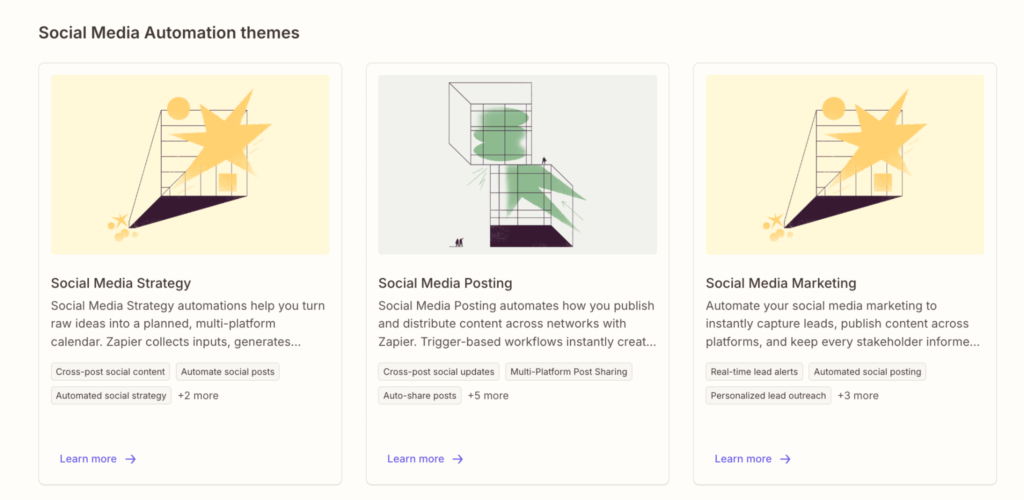
A split test that beat the control by an unexpected margin? When workflow tools share and use this data, everyone can start thinking about applying that winning split test to their campaigns.
Secondly, these tools often come with intuitive and user-friendly interfaces. You don’t need to have any technical expertise to set up these workflows. Gone are the days when you needed to wait months for developers to implement the necessary changes.
Thirdly, most workflow automation tools prioritize integration. They can work seamlessly with platforms like Google Drive and Google Sheets, which many teams already use. They also integrate with no-code solutions like Make and Zapier. This means you can automate as much as possible so you and your team can focus on what’s important.
For example, if you ever need to edit or fill out a document while working on a campaign, knowing how to type on a PDF can save you a lot of hassle. Instead of converting files or dealing with clunky workarounds, you can type directly into the document and make necessary changes in seconds. This comes in handy for approvals, content calendars, or team reports that need quick updates. Combine this with your other tools, and suddenly, you’re streamlining part of your workflow.
Imagine a scenario where your workflow tool automatically logs a post into a centralized platform every time you schedule a post, updates the team’s calendar, and even sends a reminder to the person responsible for monitoring post engagement. This kind of integration capability eliminates the need for repetitive manual updates and minimizes the risk of human error.
Digital efficiency can still be slowed down by offline bottlenecks, especially when campaigns involve shipping PR kits or influencer packages. Many teams now integrate courier services directly into their content calendars so products reach creators exactly when campaigns launch.
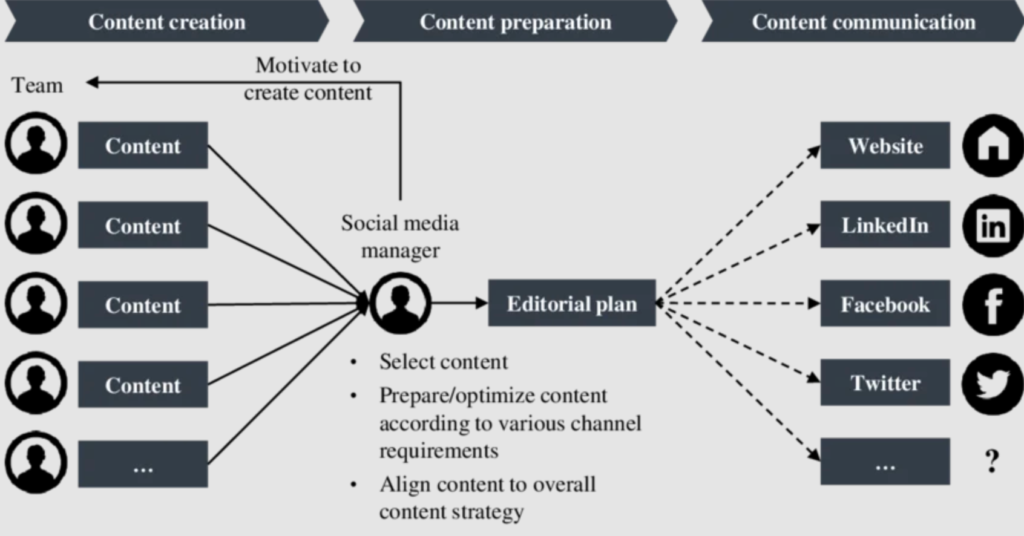
Here’s a visual example of a content workflow. All the paths, assignees, and reports can be automated with streamlined workflow tools:

Streamlining repetitive tasks and implementing custom workflows
One of the biggest challenges for social media teams is dealing with repetitive processes. These tasks, like scheduling posts, updating status reports, and monitoring comments, can take up a significant portion of your day.
However, with the right workflow tools, you can automate many of these business processes, freeing up valuable time to focus on strategy and creativity.
1. Identify routine tasks
Take a look at your daily operations. List the repetitive manual tasks that occur every day or week. For instance, if you spend a lot of time scheduling posts across multiple platforms, that’s a great candidate for automation.
Once you have your list, think about which tasks can be fully automated. For the rest, think about the human touchpoints that your team needs.
2. Create a custom workflow
The next step is to build custom workflows that mirror your existing processes with automation.
For example, if your agency is managing a high-impact campaign for a Tour of Normandy, the workflow should handle a large amount of visual assets, historical data, and influencer tags.
Here’s what you should consider:
- Approval processes
- Dependencies and relative due dates
- Assignees and workflow watchers, such as the team managers
- Status changes
- Comments and notifications
- Reporting
With a project management workflow tool, you can set up a custom process where each piece of content is automatically routed to the relevant team for review. Once approved, it then moves on to the next stage. This speeds up the business process and creates an audit trail to help track any changes or delays.
Then, you can integrate this tool to work with others, pass on data, or fetch reports and share them with your team. For example, Keyhole and other scheduling tools allow you to plan, schedule, and organize posts ahead of time. Streamlining your content process means that once the content passes approval, it’s sent to Keyhole for scheduling without further delays.
3. Don’t forget the human element
Remember that most workflow tools aim to automate and support human oversight, not replace it entirely.
A case example is AI content generation. It can be a great tool for generating content ideas, drafting bullet points, or analyzing competitors’ social media posts. But if everyone uses it to generate content without extensive editing, most content will sound the same. Social media followers and customers will notice and lose interest because everyone ends up saying the same thing in the same way.
So, use workflow tools and automation to automate repetitive tasks and shift human effort to focus more on creative decisions and strategy.
This approach improves efficiency and ensures that the quality of your content isn’t compromised by over-automation.
Practical strategies and best practices
Optimizing your workflow is more than just setting up the right tools. It’s about adopting strategies to make these tools work best for you. Here are some practical tips to ensure you get the most out of streamlining your workflow.
Pilot testing
Run pilot tests with small groups before rolling out a new workflow, especially if you manage a large team. This allows you to gather feedback and make adjustments without disrupting the process.

Objectives of pilot testing
Encourage your team members to share their experiences on what worked, what didn’t, and where they think improvements can be made.
For instance, you might realize that the design team uses two or three tools to design a campaign, but these can be consolidated and streamlined into one, like Canva.
Review and optimize
Set aside some time each month to assess what’s working and what isn’t. Perhaps you’ll discover that certain approval steps in your workflow are redundant or that new tools in the market can further simplify the process.
A regular review helps keep your system efficient and responsive to any changes in your team’s needs.
Avoid over-complexity
Creating workflows with multiple steps, checklists, and sub-tasks can be tempting. But most of the time, simplicity makes things easier for everyone. Overcomplicated processes can lead to confusion and slow down operations. Focus on streamlining the critical tasks first, then gradually add more advanced features only if they provide a clear benefit.
For example, start with a basic approval process and later integrate dynamic features that adjust based on engagement metrics or time-sensitive triggers.
This balance also helps you integrate real-life insights without making many changes to your workflow.
Say, for example, you’re using automation to handle crisis management during major campaigns. You can integrate historical insights, social listening, and campaign monitoring to predict forecasts. Then, link these to your workflow management tool by creating custom fields to track the work on each campaign or keep a record of the customer sentiment.
Sudden spikes can flag the issue, trigger an alert, and immediately inform the crisis management team. In the meantime, the management tool automatically updates the custom fields for reporting and review. This can minimize potential damage and allow the team to address the issue before it escalates.
This is what sentiment analysis looks like when using Keyhole:

Leveraging advanced features
Once you set up the basics, the next step is to introduce advanced features that will help you adapt and make decisions quickly.
For example, consider introducing goals in your workflow management system that integrate with the SMM tools. This will help you get a high-level overview of all your team’s goals, whether that’s campaign metrics, content optimization, or organic growth.
Streamlined workflows don’t just save time, they accelerate growth. When content calendars, approval flows, and analytics live in one ecosystem, teams can focus on scaling visibility rather than chasing tasks. That efficiency becomes critical when getting more followers on Instagram, where consistent posting and fast feedback loops drive momentum.
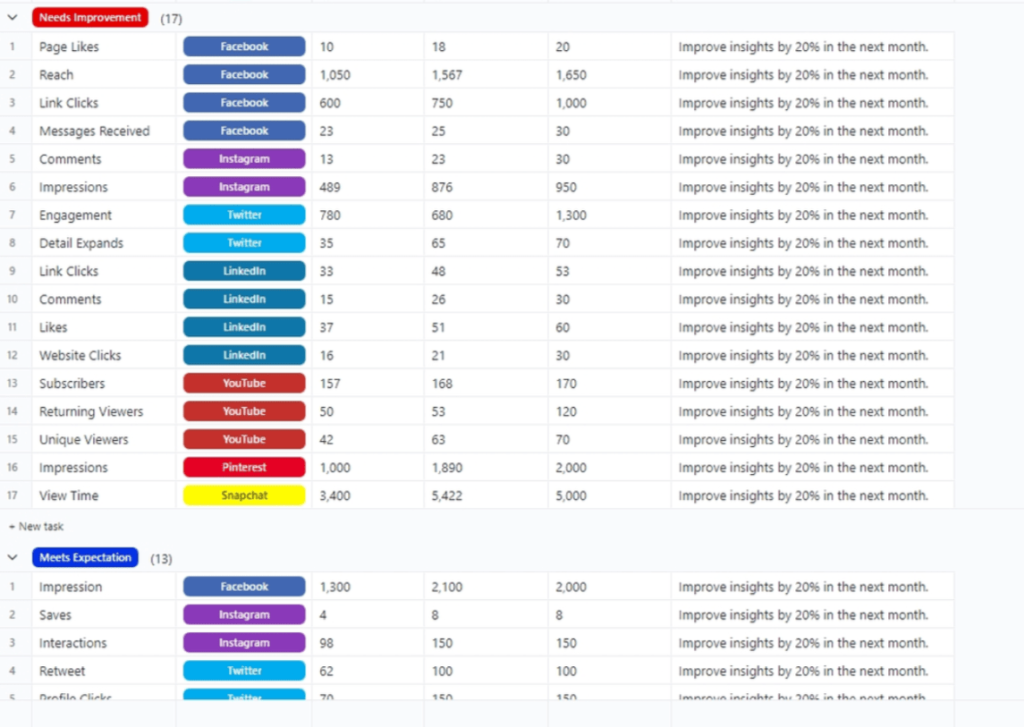
(This is a preview of ClickUp’s social media analytics template.)
Final words
Social media can be incredibly fast-paced, especially when competitors produce hundreds of pieces of content and split tests monthly.
Streamlined workflow tools give social media managers an advantage. They cut down on repetitive tasks and simplify daily operations. By automating routine processes and integrating your other applications for real-time updates, these tools allow you to focus on high-value tasks: creating winning campaigns, identifying trends, and engaging authentically with your audience.
One way to start streamlining is by adopting tools and processes that improve how your team manages content, approvals, reporting, and campaign coordination.
If you’re looking to explore more practical insights on improving team productivity, business processes, and digital workflows, Dutable regularly publishes guides and resources that help organizations operate more efficiently in modern digital environments. Exploring their content can give you additional strategies for optimizing workflows and improving team performance.
Frequently asked questions
1. How do workflow tools help reduce repetitive tasks for social media teams?
Workflow tools automate routine tasks such as scheduling posts and compiling data from a wide range of sources. This minimizes manual input and reduces the risk of human error, freeing up time for more strategic work.
2. What are the key steps to setting up custom workflows?
Start by identifying the repetitive tasks in your daily operations. Then, choose a workflow automation tool that integrates well with your current platforms. Finally, design and test your custom workflows. Make sure to gather feedback and refine the process until it meets your team’s needs.
Author bio:
Kristina Iavarone
Kristina is a content writer and editor at uSERP, with a passion for building long-lasting relationships with B2B and B2C clients through content and SEO efforts. Her work has appeared in Medical News Today, Healthline, and GetYourGuide, and when she’s not working, she’s either at a café or exploring new places with her husband.