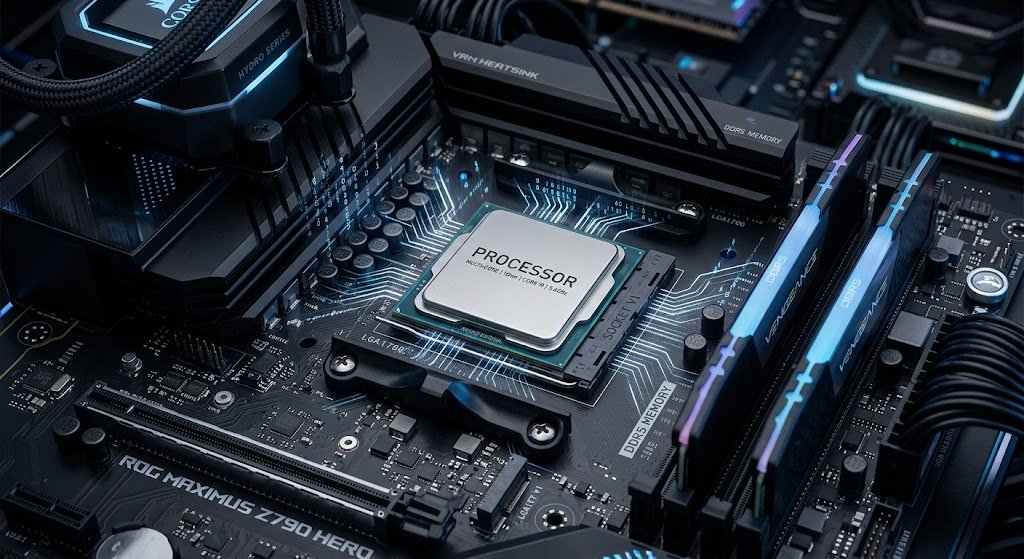
The CPU is a component of a computer that executes the basic operations, and a computer can perform billions of operations per second but every operation it performs starts with a simple process in the CPU. The CPU is sometimes referred to as the brain of a computer because it sends instructions to the computer and processes data and controls the activities between the various hardware parts. The operation of a CPU may appear complicated, though, due to the minute electronic components and their high speed within the CPU. To understand how a CPU works, it is essential to know about the instruction cycle also called the fetch-decode-execute cycle. This cycle describes the way in which a processor fetches instructions from memory, decodes the instructions, executes instructions, and sets up the memory for the next instruction.
The CPU is merely a machine and cannot act as a human brain in thinking or understanding information. Instead, it follows a set of instructions, which are contained in a machine language. All applications, whether a web browser or a video game, are eventually translated to a string of binary instructions that the processor can execute. These instructions instruct the CPU on what to do, what the data to use is, and where the results will be stored. The CPU carries on the fetch-decode-execute cycle over and over, which enables modern computers to execute complex programs efficiently and smoothly.
By decoding the inner workings of a CPU, students, developers, and tech enthusiasts can gain insight into what’s occurring behind each click, command, and application start. The processor looks like a tiny little chip on the motherboard, but on the inside, there are millions or billions of transistors, registers, control circuits, and processing units. Modern computing is possible because of the CPU’s ability to execute instructions quickly and accurately.
What is a CPU and why is it important?
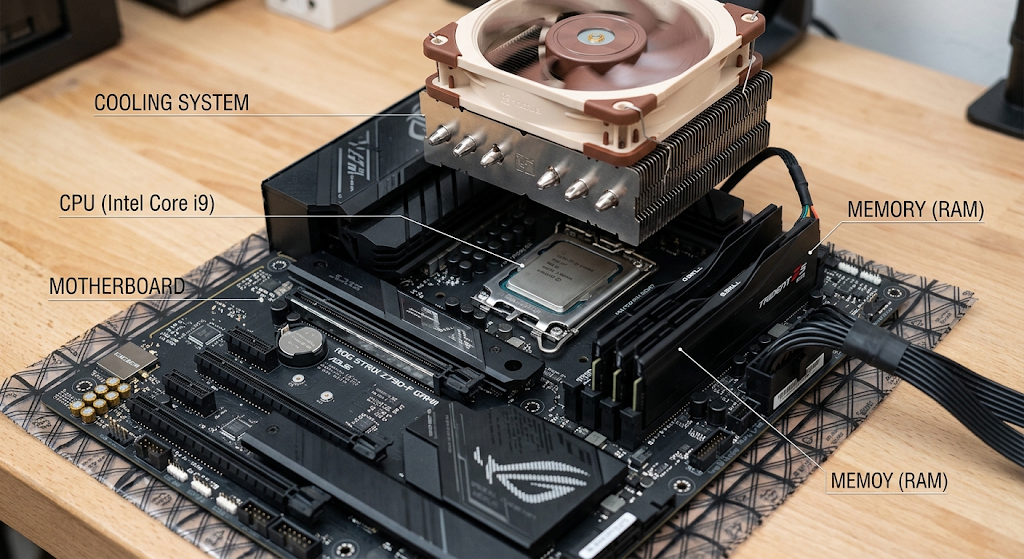
In a computer system, the central processing unit is the most important part that is used for performing instructions. It is controlled by computer programs, calculates, processes information and passes it on to other components of the computer. If a computer doesn’t have a CPU, it would be unable to execute commands in software or be able to do much else. The CPU is the main controlling unit in a computer that directs the instructions to be performed, while other items like memory, storage devices, and graphics processors have lesser effects on performance.
Modern CPUs have some key components that are used to process information. The control unit controls the flow of instructions and signals between components. Arithmetic logic unit (ALU): Carries out arithmetic operations and logical comparisons. Registers are very fast temporary memory cells to store instructions, addresses and data that are being processed by the CPU. Cache memory holds the most frequently used information in order for the processor to access it more quickly than from the main memory.
If you want to learn more about processor functions and processor architecture, you can read about it in the resource: How does a CPU work? (explanation of the role of CPU in modern computing systems). Each of these is involved in the processing of an instruction in a specific way, which helps to follow the steps of the fetch-decode-execute cycle.
The Fetch-Decode-Execute Cycle Explained
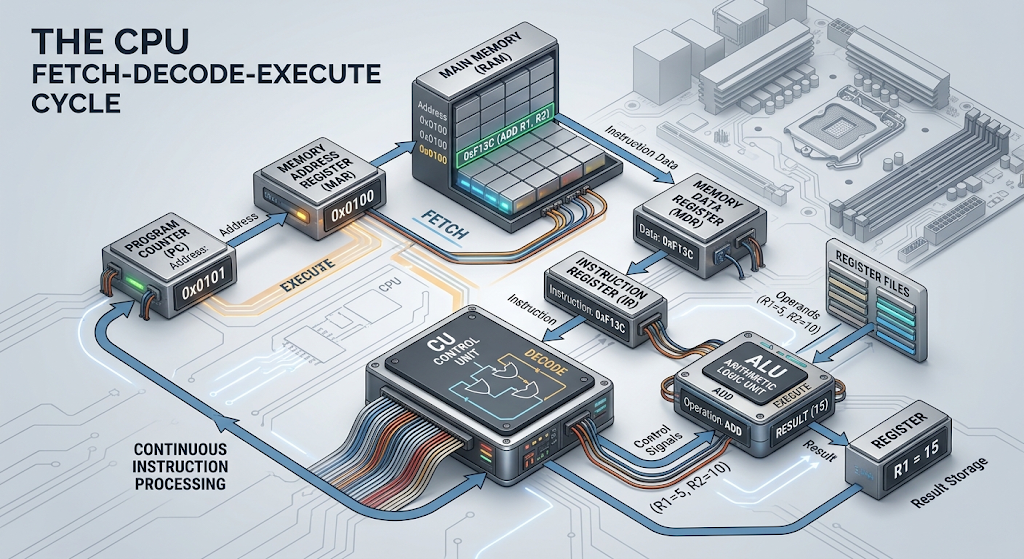
A CPU can execute programs by repeating a sequence of operations known as the fetch-decode-execute cycle. All instructions executed by the computer are similar to this. The processor takes an instruction from the memory, decodes it to understand the instruction, and then executes the instruction. Once the CPU has completed one instruction, it will execute the next, and so on.
This process is repeated millions or billions of times a second, but each cycle is carefully orchestrated. Special registers and communication ways are used by the CPU to monitor instructions and data. The components that are generally included are the Program Counter (PC), Memory Address Register (MAR), Memory Data Register (MDR), Instruction Register (IR), Control Unit, and Arithmetic Logic Unit (ALU).
The cycle can be represented graphically as follows:
Step 1: Fetching the Instruction
The first step in the instruction cycle is the fetch stage. In this phase, the CPU fetches the next instruction in the program to be executed from the computer’s main memory. The most important role that the Program Counter (PC) holds is that it contains the address of the next instruction to be executed. At the start of a new cycle, the CPU will examine the value in the Program Counter to see where the next instruction is stored.
The address of the next instruction in the program to be executed is placed in the Memory Address Register (MAR). The MAR is a temporary register used to indicate the memory address to which the CPU wants to go. The computer then looks in its memory for the instruction at that address and returns the instruction to the CPU. When retrieved, the instruction is stored in the Memory Data Register (MDR) that is used to temporarily store data moving between the CPU and memory.
Once the instruction has been delivered to the MDR, it goes to the Instruction Register (IR). Instruction Register holds the current instruction; the CPUs prepares to understand and execute the current instruction. The Program Counter is typically incremented to the address of the next instruction while this is happening. This enables the CPU to execute instructions sequentially until they are altered by a program command.
Fetching might seem straightforward but is highly coordinated, comprising a number of components. The CPU needs to correctly locate the memory address, gather the proper binary instruction, and prepare it for interpretation. If anything is done wrong in this phase, then the wrong operation may be performed.
Step 2: Decoding the Instruction
The CPU will fetch and then move to the decode stage. In this phase, the Control Unit fetches an instruction from the Instruction Register to check if the instruction is correct and decides what action to take. The machine language which computers use is done in a series of binary digits. The task of the CPU is to read this binary pattern and turn it into helpful control signals.
Typically, a machine instruction is a combination of an operation code, or opcode, and operands. Instructions typically consist of an operation code (opcode) and operands. For instance, the opcode could contain logic to add two numbers, move data from one place to another, compare two values, etc. The teaching could also include details of the location of the data that is required.
The Control Unit directs the CPU to perform the necessary functions according to the instruction being executed. The Control Unit will tell ALU to do the calculations if the instruction calls for it. When there is data movement in the instruction, it is responsible for communication between registers and memory. This stage functions as a translator which translates the instructions of a computer program into instructions that can be executed by the computer hardware.
The decoding process is carried out very rapidly because CPUs are designed to execute many instructions per second. Advanced processors also employ such methods as pipelining, where multiple stages of several instructions may occur concurrently to boost performance.
Step 3: Executing the Instruction
The execution stage is the stage in which the CPU carries out the requested action in the instruction. The exact operation is dependent on the type of instruction being processed. In the case that the instruction calls for addition, the values needed for addition are given to the Arithmetic Logic Unit, and the Arithmetic Logic Unit works out the answer. If it is an instruction that requires data to be stored, the CPU stores data in an appropriate memory location or register.
The ALU performs numerous mathematical and logical operations. It can add, subtract, compare and make decisions (such as if X is greater than Y or less than Y). These operations are important because nearly all computer operations are made up of calculations and decisions of some sort.
For instance, if a user launches a calculator app and types in a mathematical formula, the CPU performs instructions to input the mathematical formula, run the calculations, and then output the result. A user watching a video will have instructions being executed on the CPU to control data flow, application controls, and communicate with other hardware components.
Once executed, the result can be placed in a register, stored in memory or passed to some other component. After the CPU completes this instruction, it repeats the fetch-decode-execute process and continues to process.
CPU Registers: The Fastest Storage Inside the Processor
The registers are one of the crucial components of the CPU as they serve to temporarily store information very quickly. Registers are inside the processor and data can be accessed almost immediately by the CPU, as compared to regular memory. Registers increase speed and efficiency since the processor often requires information when it is performing instructions.
There are a number of registers with specific functions on the instruction cycle. The Program Counter is used to store the address of the next instruction to be executed from the memory. Memory locations being accessed are stored in the Memory Address Register. The Memory Data Register is a register that temporarily stores data being transferred between memory and CPU. The next instruction to be executed is held in the Instruction Register. The other general-purpose registers hold temporary data that is used for calculations.
The registers are much faster than main memory, but have limited capacity, so they are critical for high performance computing. Today’s processors have numerous registers to efficiently process multiple instructions.
How an Instruction Cycle Animation Would Look
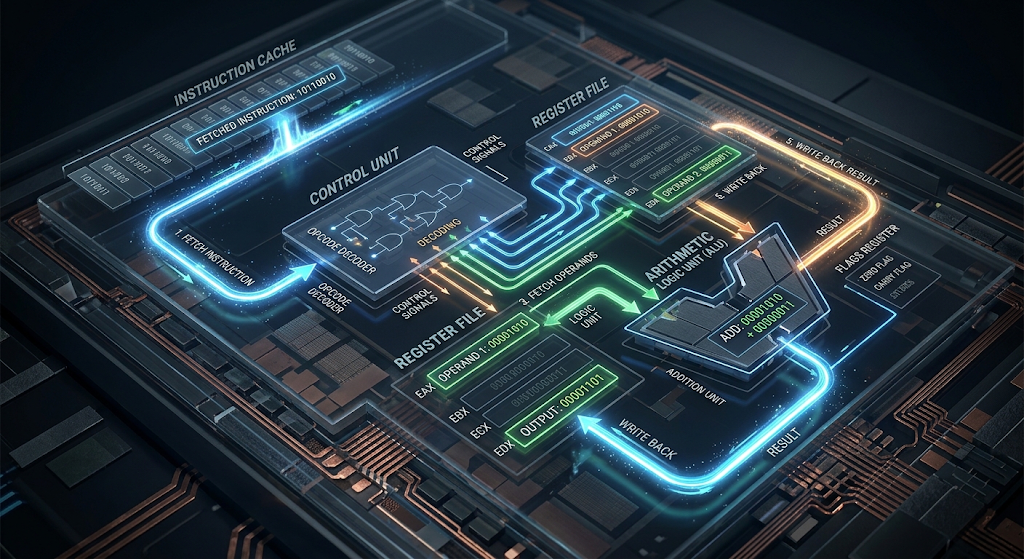
If you drew an animation of the CPU cycle, you would be able to show information flowing in and out of a variety of parts. The program counter points to the next instruction to be executed. The address then goes to the MAR, indicating that the CPU wants to get data from the memory unit. The teaching goes back through the MDR and into the Instruction Register.
The Control Unit then emphasizes the decoding process, where the CPU decodes the instruction. Lastly, the requested operation is executed by the ALU or other processor element. The result is stored and the animation will restart at the Program Counter when the CPU enters the next cycle.
This visual approach allows the process to be understood more easily as it is pretty obvious that a CPU is not doing a single large action. Rather, it is following a number of small steps in a systematic fashion over and over at amazing speeds.
The Importance of the CPU
CPU performance is determined by a number of factors, such as speed, architecture, the number of cores, cache size and efficiency in the processing of instructions. The number of cycles a processor can perform per second is called its clock speed and is typically expressed in gigahertz (GHz). But just because it has a higher clock speed doesn’t necessarily indicate a faster CPU as modern processors are built using more sophisticated designs to boost performance.
Multiple CPU cores enable processors to perform several processes simultaneously. For instance, a computer with multiple cores can be used to run multiple applications in the background which can run on the computer while using high demand software. Cache memory also helps in speed up the performance, and the CPU can easily access the frequently used data.
Processor manufacturers are making ever more improvements to the design of CPUs, shrinking the transistor size, increasing the energy efficiency, and finding more efficient ways to handle parallel processing. The enhancements enable today’s devices, including smart phones, laptops and servers, to function with increasingly greater complexity.
Conclusion: The Brain of the Computer
The CPU is one of the most crucial inventions in modern technology that enable computers to execute instructions and do useful work. A simple method of understanding the operation of processors is the fetch-decode-execute cycle. The fetch stage is when the CPU accesses the memory for instructions. When it comes to decoding, it will understand what those instructions are. It executes the desired operation during execution.
It is an atomic-level process, it is very fast; but at the heart of it is simple: the CPU keeps reading instructions, interpreting them, and then executing them. Learning the concept of registers, Program Counter, MAR, MDR, Control Unit and ALU can make anyone’s life easier when they learn what happens inside the computer, every time software is executed.
The study of the working principle of CPU is the base for the understanding of computer science, programming, computer hardware designing and modern technology. Whether it’s basic math or AI-driven systems processing millions of times a second, these core functions are integral to all digital experiences.