Introduction
In the field of computing what we see is that effective problem solving is a key responsibility of programmers, software developers, and system analysts. Today’s computer systems are at a great scale which may include many processes, variables, and user interplays. This scale of complexity requires developers to have methods in place to present ideas in an organized manner before development begins. One of the best ways out of that is through the use of visual tools such as flowcharts and decision tables. Visual aids are used to better comprehend algorithms, workflows, and decision making processes. Instead of to do away with written out explanations or walls of code we have diagrams and structured representations which in turn simplify complex systems. Also these tools improve communication between team members, reduce errors, and make systems easier to maintain.
Flowcharts present a visual display of processes by which we see the order of actions in a system. Also we have decision tables which present in a structured format the set of conditions and actions. In software engineering, system design, database management, cyber security, business applications and many other computing fields they are very much used. As technology progress systems are becoming more complex. We see that without proper planning and organization software projects may turn out to be confusing, inefficient and hard to manage. We use visual problem solving tools which help developers to break down large problems into smaller more manageable elements. In this article we discuss what flowcharts and decision tables are, why they are important, what they are used for, their pros and cons as well as to what extent they are put to practice which we also will present how they improve clarity and efficiency in computation.
Understanding Flowcharts
Flow charts present a picture of a process or an algorithm. They use symbols which are connected by arrows to display the order of operations and the direction of flow. Flow charts in turn allow programmers and analysts to see how a system works before they begin to code. Flowcharts are a great tool which presents complex logic in a simple form. Instead of wading through large blocks of text or in depth source code, developers can use the diagrams to at a glance see how a process is structured.
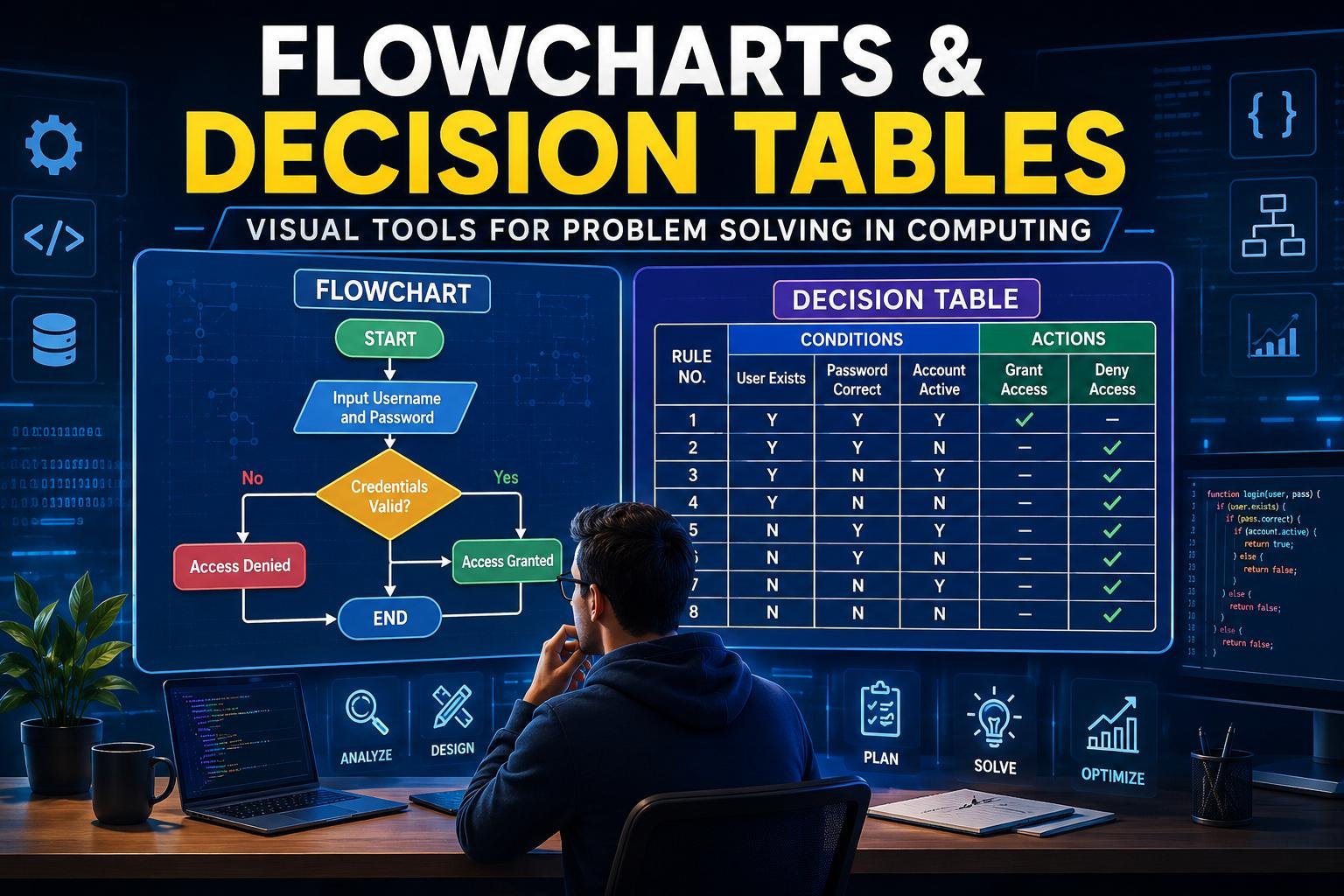
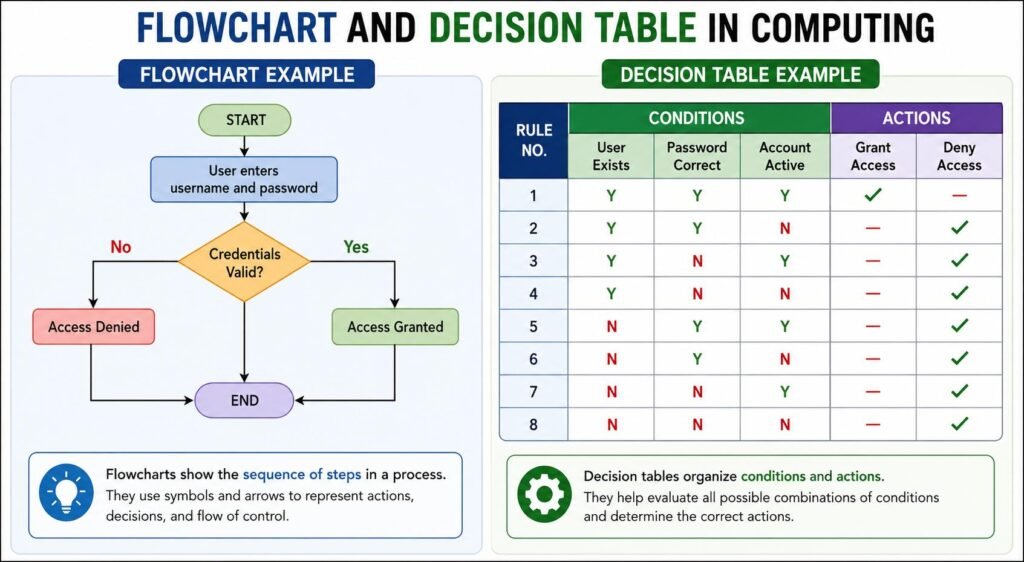
In flowcharts we see that different symbols are used for different actions. Ovals typically present the start or end of a process, rectangles do for instructions or operations, diamonds for decisions and arrows which show the direction of flow. These symbols make flowcharts a universal language which is easy to interpret. For instance look at a basic login which takes place in a computer program. The user inputs a username and password which the system in turn checks for accuracy and access is either granted or denied. In a flowchart this full process may be depicted with decision points and directionally labeled arrows. This makes the system easier understand technical and non-technical users.
Flowcharts are put into different groups based on what they are used for. We have system flowcharts which display how data travels through a computer system, also we have program flowcharts which pay attention to the logic of software programs. For another we use process flowcharts which depict the flow of work in organizations, and data flowcharts which show the path of info as it enters the system, move through it, and leaves it. Each flowchart type is for a different purpose, but all of them aim to improve in terms of understanding and communication in computing projects.
Importance of Flowcharts in Computing
Flow diagrams are a key tool in that they improve clarity in the fields of software development and system analysis. In the field of software we see that there are large sets of information and complex logic which developers work through at times; flowcharts help to put this in a visual context. Flow charts present an excellent way to improve communication. In many projects not all team members are into programming languages. Managers, clients and designers may not put in time to learn code, but they do spend time looking at diagrams. Thus flow charts are used as a great tool for team wide discussion.
Flow charts are also a useful tool in algorithm development. Before writing code, developers can create a flowchart to plan out the steps which will solve a problem. This also helps to see if the logic is right before the coding stage. Another great benefit is error detection. In flowcharts missing steps, incorrect conditions, or unnecessary repetitions are easy to see out. By the visual trace of the process issues are brought to light early which in turn prevents large scale issues down the road.
Flowcharts also do what is to easy software maintenance. Many software systems are updated on a regular basis and as such future developers will at times try to make sense of how the old system worked. A flowchart which is a visual representation of the logic makes updates and troubleshooting a simpler task. Flowcharts also serve to improve documentation. They give a permanent visual representation of how a system works which in turn is useful for training, maintenance, and future development.
Understanding Decision Tables
A decision table is a structure which represents conditions and the actions associated with those conditions. In the area of systems which have many rules or outcomes which play off each other, decision tables are very useful. Unlike flowcharts that focus on process flow, decision tables present decision making logic. They put conditions and actions in a way that simplifies complex rules.
A decision matrix which is what a typical decision table is also includes conditions, which is what the criteria are, the possible results for each of those conditions, and the action which will take place. For example in a banking system we may see which customers are eligible for a loan which is determined by their income level and credit score. A decision table puts all of these out in very clear terms which also includes the results of all possible condition combinations. Decision tables are a great tool which put to rest confusion in large scale rules based systems. Instead of penning down extensive lists of conditions in natural language, developers are able to present info in a structured and methodical way.
Uses of Decision Tables in Computing
Decision tables are a common feature in info tech because many systems include decision elements. They also which out to developers for dealing with complex business rules. In the business setting decision tables are used frequently. Companies which have many rules related to payments, discounts, customer eligibility, and access permissions in their systems do so. Decision tables in this context also help to present the rules in a clear manner.
Decision tables also see an increase in accuracy. We look at all possible condition combinations which in turn decreases the chance of us leaving out important scenarios. This is very much the case in systems which see financial loss or security issues as a result of errors. In also the area of software testing decision tables are very useful. Testers use them to develop test cases which cover all base cases which in turn will ensure that software performs as expected in various scenarios.
Decision tables also do a great job at simplifying logic design. In programming we see that as nested conditions grow they become hard to manage and to understand. Decision tables on the other hand give you a much neater and more organized way to present decision logic. Database systems often use decision tables. Permissions, validations, and access controls are presented via structured decision making tools.
How Flowcharts and Decision Tables work together.
Although we see flowcharts and decision tables as different tools what we find is that in computing projects they are put together. Each of the tools addresses a different issue and by using them in conjunction we see a better system design. Flow charts do a great job at showing the step by step action in a process which in turn decision tables do better at which very complex rules and conditions play out. As a team they present a full picture of how a process works and how it makes decisions.
For instance at an online shopping site we see flowcharts which map out the customer journey from product choice to payment. Also we have decision tables which determine shipping rates, discounts or delivery for which customer location and order value is a factor. By using these tools developers improve clarity, also reduce errors and at the same time design systems more efficiently.
Advantages of Flowcharts
Flowcharts present many benefits in computing and software development. One large benefit of flowcharts is that they use symbols and arrows which make them easy to read as compared to walls of text which are typical in instructions or code. This in turn makes them a great tool for both new and experienced users.
Flowcharts also present a better way to analyze problems. We see that they allow developers to study the process of operations and at the same time identify weak points or inefficiencies in a system. Another advantage is that by creating flowcharts prior to coding developers may put their thoughts in order which in turn reduces error at the implementation stage.
Flowcharts also promote teamwork. Also because they are easy to interpret team members from different departments may work together better. Debugging is also made easier by flowcharts. At the point when an issue arises developers may use the visual representation of the process which the flowchart provides to quickly identify the problem.
Limitations of Flowcharts
Flowcharts are useful at what they do but also have some drawbacks. Creating in depth flowcharts for large scale systems is a time intensive task. In the case of complex software applications which may have many integrated diagrams, that effort may be quite extensive.
Flowchart updates may also be an issue. Upon large scale changes to system logic developers may have to rework large elements of the diagram. In large systems we see that which we present as very in depth diagrams tend to become overcrowded and hard to read. Flowchart also gives a big picture of a process. They do not go into all technical details for implementation.
Advantages of Decision Tables
- Decision tables are very useful in presenting complex decision making systems.
- One benefit is that of clarity. Decision tables structure out conditions and actions which in turn makes rules more understandable.
- They also see to it that all possible combinations of variables are covered which in turn reduces errors. This also helps developers to not leave out important scenarios.
- Decision tables are a great asset in software testing which is for creating in depth test cases.
- Maintenance is also done via decision tables. For changes in business rules developers are able to update the table without re writing large amounts of code.
- Also decision tables improve on consistency in decision making systems. We see that the same rules are applied each time which in turn reduces inconsistency and confusion.
Limitations of Decision Tables
Decision tables also have some weaknesses. Large decision tables may also present the issue of maintenance as the number of conditions grows to large numbers. As the rules set within the table increase in quantity the structure may become very complex.
Decision tables do not either present sequence of operations well in contrast to flowcharts, they do not which of process actions happens first.Another issue is that which do not have good design decision tables tend to create confusion instead of clarity. Developers must structure them carefully for accuracy.
Role of Visual Tools in Programming
Visual aids are a key element in today’s programming and system design. They enable developers to turn abstract concepts into tangible structures. At the beginning programmer’s level visual tools do that which is great. Many which are new to programming find it is easier to grasp algorithms through diagrams as opposed to written code.
Visual aids also improve collaboration between software development teams. Within a project different professionals are able to put forth ideas more effectively via the use of shared visual content. Productivity goes up which is a result of developers using visual planning tools that in turn identify and resolve issues at the early stages of design. In agile software development which is a practice of frequent system updates visual tools are used. Teams are able to quickly update diagrams and tables which reflect change in requirements.
Flowchart and Decision Table uses in the real world.
Flow charts and decision tables are used in many fields and computing environments. In the field of banking we see that decision tables which are used for evaluating loan apps, verifying transactions, and detecting fraud. Also we use flowcharts which serve to depict transaction processes and customer service operations.
Healthcare systems present as flowcharts which model patient treatment protocols and emergency response processes. Also we see decision tables to determine what treatments are appropriate and medical recommendations. Ecommerce platforms use flowcharts for online shopping processes, payment systems, and order tracking. Decision tables determine discounts, delivery options, and promotional offers.
Educational software which uses flowcharts to present lesson structure and which includes decision tables that personalize learning based on student performance. In the area of cyber security we also see these tools in action. Flow charts shows detail authentication procedures and decision tables which manage permissions and threat responses.
Difference between Flowcharts and Decision Tables
In computing although these tools are related they have different roles.
- Flow charts present the order of events in a process, on the other hand decision tables present which conditions trigger what actions. Flow charts use graphically represented symbols which are connected by arrows, also decision tables structure the presented information.
- Flow charts are best for workflows and algorithms, but decision tables do better with complex decision making logic.
These differences which in turn help developers choose the right tool for a given problem.
Best Practices for Flowchart and Decision Table Use.
In some cases developers may follow best practices which apply to the use of visual tools in computing.
First out that designs should be simple and clean. Overly complex diagrams and tables defeat the purpose of visual representation.
Second, the use of standard symbols and formats is required. This in turn improves readability and communication.
Third, visual tools must be kept current as systems grow.
Also in that it is important to use visual tools in conjunction with written documentation. Diagrams and tables should support the text instead of doing away with it completely.
During the pre-implementation stage developers should test the logic of flowcharts and decision tables.
Computing’s role in Visual Problem Solving Technologies.
The outlook for visual problem solving tools in computing is very good. Today we see in modern development platforms the introduction of automated diagram generation, intelligent modeling systems, and collaborative visualization. Artificial intelligence is at play in system design. We have tools which are able to produce flow charts from source code or which develop decision tables out of business requirements.
Cloud based collaboration tools which see different location based development teams working in real time on diagrams and system models. In spite of the progress in technology the base function of flowcharts and decision tables is the same. They still put complex systems in simple terms, improve communication, and support better problem solving.
Conclusion
Flow charts and decision tables are integral to problem solving in the field of computing. They assist programmers, analysts, and system designers in presenting info graphically and in that which is complex made simple. Flow charts break down processes and algorithms out by displaying the step by step action, meanwhile decision tables do put in order conditions and actions in a structured way. These visual tools which improve communication, reduce errors, enhance documentation and which in turn support better software design are used in many industries including banking, health care, education, cyber security and e commerce as they bring more clarity and efficiency.
Although there are issues with both tools their pros out step their cons. As we see computing systems grow and change flowcharts and decision tables still have value in the design and improvement of software systems. Through use of these visual tools which may include diagrams and tables developers are able to produce better organized, more accurate, and easy to maintain software systems.
Get more well researched information about Flowcharts and Decision Tables here.