Ambient lighting used to be a colour wheel on a remote control. The products that sell well now are driven from a phone, and that shift changes what a buyer has to evaluate. The controller, the protocol and the addressable logic matter more than the number of colours advertised, because a two hundred fifty six colour palette is easy and stable wireless control is not.
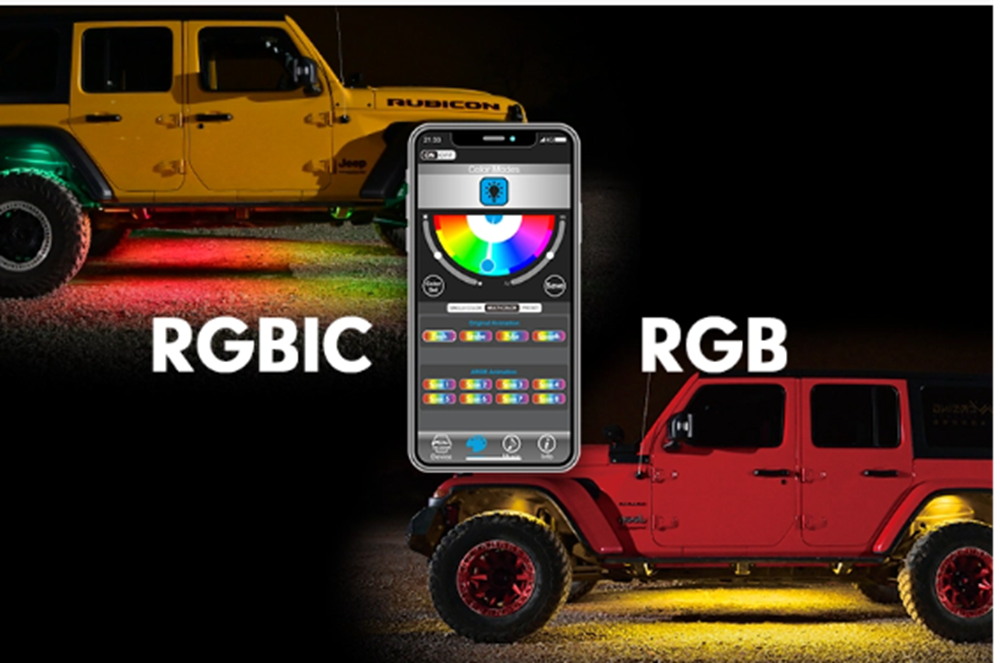
Two technologies cover most of the market. Traditional RGB drives all LEDs on a circuit with the same signal, so the strip can display one colour at a time across its whole length. RGBIC is addressable: the controller divides the strip into segments and drives each one independently, which is what allows several colours to be lit simultaneously and gradients to move along the strip. That single difference explains why RGBIC kits can show a flowing effect while an RGB kit of the same length can only change colour as a unit.
Inside the software, four modes carry most of the value. Static colour selection sets one tone or a sequence. Dynamic mode cycles effects such as fading, jumping or flowing along the strip. Music mode ties brightness and colour change to an audio input, which is only as good as the microphone and the sampling rate behind it, so it tends to look sluggish on cheap controllers. Brightness control matters more than buyers expect, because an interior light that is too bright at night destroys the driver’s adjusted vision.
The pairing layer is where quality becomes visible. A Bluetooth product has to survive a car that starts, a phone that moves out of range and a module that loses power mid-command. The reliable behaviour is automatic reconnection and a last-known state restored on power-up, rather than a strip that stays dark until someone opens the app again. Buyers testing samples should cut power repeatedly and time how long reconnection takes, since that is the complaint that generates support tickets after retail launch.
Control software now comes in two shapes. A branded application ties the product to a manufacturer’s identity, which suits retail shelves and builds repeat recognition. A neutral application carries no logo and can be reused inside a customer’s own programme, which is what distributors and private-label brands usually want when the same hardware is sold under several names. TRENT supports both, with the car atmosphere lamp control app handling RGB and RGBIC ambient kits, smart headlight kits and off-road or rock-light products, and with the unbranded option available so the same firmware can sit inside different business programmes.
App control has also moved beyond the interior. On selected smart headlight kits, the same pairing drives a colour-temperature range from a warm 3000K to a cool 6500K, so a driver can shift toward a warmer beam for rain and fog and back to white for open road. That is a genuinely useful function rather than a novelty, because a warmer beam scatters less in water vapour, but it puts real requirements on the driver electronics: switching temperature means switching which LED channels are powered, and the beam has to stay inside the headlamp’s optical envelope while doing it.
For anyone building a multi-product line, the coordination problem is software, not hardware. When one application has to command seven different lighting items, each with its own Bluetooth module, current draw and packaging requirement, the product logic, the compliance paperwork and the production calendar all have to converge before a retail channel will accept the launch. That is why app development gets quoted as part of the lighting project rather than treated as firmware someone adds later, and why an integrated build typically takes longer to sample than a fixed-colour lamp.
A short evaluation checklist covers most of the risk. Confirm whether the strip is addressable or single-channel. Pair the product, kill power, restore it, and measure reconnection. Walk out of range and back. Set the brightest mode and read the interior display. Run music mode from a low-quality source, not just a clean studio file. Then ask what the application looks like when it updates, and who is responsible if it stops talking to the module.