
Introduction
The efficient management of processes is a key element in modern computer systems which are tasked to run programs, allocate resources and perform multiple processes concurrently. Process management is a fundamental, vital part of UNIX based systems that provides an independent way of executing applications, communicating between programs and reacting to system events. The OS will keep track of the processes when a user logs into a terminal, executes a command, starts a background service, or launches an application.
It is significant to understand how this works for software developers, system administrators and programmers who develop reliable applications. UNIX offers a number of ways to control processes, such as process IDs, system calls (fork(), exec(), wait()), and signals which let processes react to special events. These mechanisms operate in a cooperative manner to regulate the execution of the programs, coordinate the activities and maintain the stability of the system.
What is Process Management in Unix?
Process management is the function of an operating system which is used to create, schedule, monitor, control and terminate the running programs. A process in UNIX is an instance of a program that is running. A program stored on a computer is just a set of instructions; once the operating system copies the instructions to memory and starts running them, they are a process. Every process runs in its own execution environment and this consists of memory space, processor information, open files, and other resources it needs to carry out its tasks. These resources are managed by the UNIX kernel and the way processes share the CPU time is determined by the kernel. This enables multiple programs to run concurrently, even if the computer is underpowered.
Process management also includes the relationship of processes with each other and controlling their interaction. An example of this is the shell that runs inside a terminal to process commands: the shell may spawn a new process to run a command while it waits for more commands to be typed in. The operating system keeps track of the running process, monitors its execution, and collects its exit status when it finishes. Processes can also generate other processes, communicate with each other in other ways, and react to events, like termination requests. The features listed above make UNIX appropriate for multi-tasking systems, servers, development machines and automated applications required to perform multiple tasks consistently.
How to Use Process Identifiers (PIDs)
Each process operating on a UNIX system is assigned a Process Identifier, or a PID. A PID is a number that is used by an operating system to identify a process. It can be used by the kernel and system admins to identify specific processes for monitoring activity, signaling or for tracking performance issues. For instance, if a user executes a command like ps, the system would show him some information about the running processes, including who owns them, the processes status, the command they are executing, and the PID. The getpid() system call can also be used to get the PID of a running program. This identification system can enable you to control a process without getting it mixed up with other processes running on the same machine.
The following C program shows how to get the process number:
#include <stdio.h>
#include <unistd.h>
int main(void) {
printf(“Process ID: %d\n”, getpid);
Now display the parent process ID by calling printf(“Parent Process ID: %d\n”, getppid());
return 0;
}
In this example, getpid() will return the identifier of the current process, and getppid() will return the identifier of its parent process. A process that creates another process is called a parent process. These identifiers are helpful when looking at process relationships, debugging applications and tracing background processes. Developers can also use commands like ps, top and pgrep to check the processes from the terminal. Developers should not assume that a PID is an identifier of a process that is destined for completion; PID can be reused at some point in the future when processes terminate.

Create Processes with fork() in UNIX.
In the UNIX process management one of the most significant system calls is fork(). It can make a new process (child process) using an existing process. The parent process is now the original process and the new process has a new PID and starts execution from the point of where fork was called. The child process starts with many properties from its parent process, such as a copy of its memory, environment variables and open file descriptors. Most modern UNIX-like systems employ copy-on-write (COW) techniques: shared memory pages are shared until one of the processes changes them. This is more efficient than having to duplicate each memory page as the system creates each process.
The fork() system call returns different values based on its location of execution. If it returns a negative number, process creation fails; if it returns 0, the code is being executed in the child’s process; and if it returns a positive number, it is the PID of the child process in the parent process. These return values are used by the developers to decide what instructions to perform by each of the processes.
For instance, let’s look at the following example:
#include <stdio.h>
#include <unistd.h>
#include <sys/types.h>
int main(void) {
pid_t pid = fork();
if (pid < 0) {
perror(“fork failed”);
return 1;
}
else if (pid == 0) {
printf(“Child process:\n”);
printf(“Child PID: %d\n”, getpid());
}
else {
printf(“This is the parent process.\n”);
printf(“Child PID: %d\n”, pid);
}
return 0;
}
If this program is run, then both parent and child will execute their own portions of the code. They do not run in a predictable order; the order in which they run depends on the operating system scheduler. This illustrates how UNIX can be used for multitasking, that is, one program can spawn another process which runs a different task.
Using exec() to run Programs
A program might want to start a new process with fork(), but start a different application. UNIX offers a family of calls as a way to do this: the exec() family of system calls. The functions are used to change the program image of the current process to another executable program image. exec() does not create another process, as does fork(). Rather, the same process ID is used to execute the process, but it is running a different program instruction. This is a typical configuration used by command-line shells when users type commands in because the shell can spawn a child process, and then exchange the child process’s program with the command requested.
The exec() family consists of functions like execl(), execv(), execlp() and execvp(). They vary primarily in the way program arguments are passed, and in whether the PATH variable in the environment is scanned for the executable. The execvp() function takes an array of arguments, and looks through the available command directories.
This is an example of how a child process can run another program:
#include <stdio.h>
#include <unistd.h>
#include <sys/types.h>
int main(void) {
pid_t pid = fork();
if (pid < 0) {
perror(“fork failed”);
return 1;
}
if (pid == 0) {
char *args[] = {“ls”, “-l”, NULL};
execvp(“ls”, args);
perror(“execvp failed”);
return 1;
}
printf(“Parent process continues running\n”);
return 0;
}
This example creates a child process with the fork() system call. The child then calls execvp(), which will change what it is running to ls -l, which prints the list of items contained in the directory in a long format. If execvp(3) is successful, then the code after the call is not run. Otherwise, the reason for the failure is displayed by the error-handling statement. This method can be helpful if you are creating command interpreters, automation tools and applications that require the launching of external programs.
Understanding the wait() System Call
If a child process is created by a parent process, the parent process might need to wait for the child process to complete its execution before it can perform another operation. UNIX offers one system call to enable this type of process synchronisation: wait (). The function suspends the parent process until any of the child processes die. Once the child has completed its task, the parent will get a notification of the child’s status of exit and the operating system will free up any remaining resources bound to the child’s terminated process. A child that is terminated may be found in the process table as a zombie process if no waiting is done. It is therefore important to have the wait() function to ensure proper parent-child relationship and to avoid unnecessary entries in the parent process table.
The below C program demonstrates how to use wait():
#include <stdio.h>
#include <unistd.h>
#include <sys/wait.h>
#include <stdlib.h>
int main(void) {
pid_t pid = fork();
if (pid < 0) {
perror(“fork failed”);
return 1;
}
if (pid == 0) {
printf(“Child process is running.”);
sleep(2);
printf(“Child process has finished. \n”);
exit(0);
}
else {
wait(NULL);
printf(“Child terminated parent continues.\n”);
}
return 0;
}
The parent process in this example creates a child, and then pauses until the child exits. The child waits for 2 seconds before completing the child’s execution. The parent continues when the child has left. The wait() function will also accept a pointer to an integer to return the child’s termination status. The value may be checked by the macros WIFEXITED() and WEXITSTATUS(), which are available for use by the developer. UNIX also has a function called waitpid(), which gives more control over synchronization of processes for applications that must wait for a specific child.
The UNIX States of Processes and Their Life Cycle.
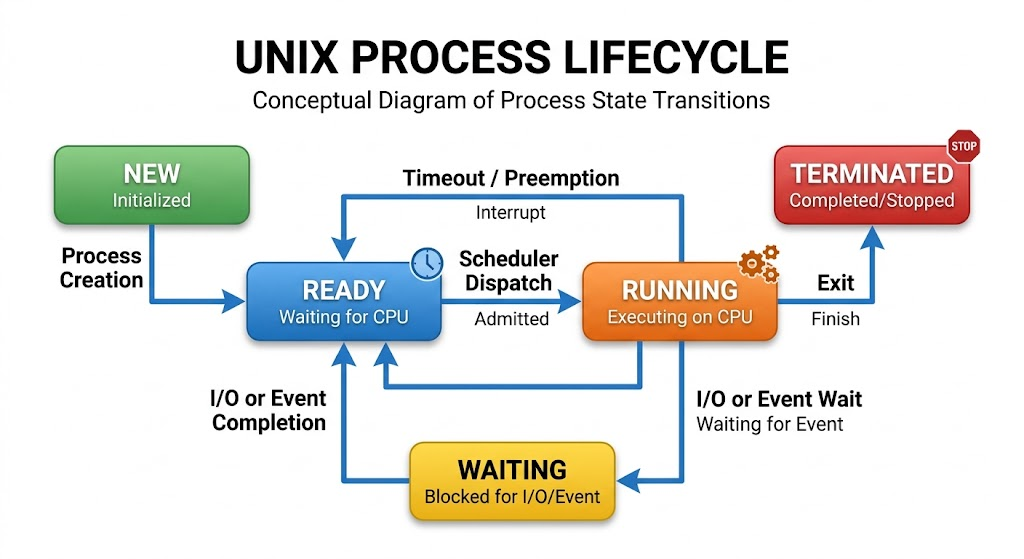
Processes in UNIX have different states when they run. These states are used by the operating system to track process activity and identify processes that are ready to run on the CPU. A new process is normally in an initializing state and not ready for execution until it has been created. If it is ready to run and it is waiting for processor time, then it is considered runnable. When the scheduler gives it CPU time, it goes to the running state. Another situation where a process can become blocked is if it has to wait for something to happen, like waiting for data to be read from a file or for an answer from a different system resource. Once the necessary event is triggered, the process can be made runnable again.
Eventually a process is placed in a terminated state either because it has completed its execution or because it has been asked to terminate. However, its exit information might be kept for a short period of time so that the parent can retrieve the exit status. That’s why process management is more than just starting and stopping programs. The operating system should also have to handle process transitions, resource management, and information about parent/child relationships. These states allow developers to explore programs that seem “frozen,” use up resources unexpectedly and without termination, or terminate improperly.
There are several common UNIX process states:
Running: The process is running on the CPU.
Runnable: The process is waiting for the CPU to be available for execution.
Sleeping: The process is waiting for an event or resource before continuing.
Stopped: The process has been suspended for a short time, usually by a signal.
Zombie: The process has been terminated but the parent process hasn’t retrieved the process exit status.
Process states can be analyzed by commands like ps aux, ps -ef and top. These commands offer useful information in an investigation of system performance issues and in the investigation of unexpected processes consuming resources.
The Zombie and Orphan Processes.
In UNIX process management, there are two important concepts: zombie process and orphan process. A zombie process is a process that has already finished but has not been removed from the process table from its parent because it is not retrieved by its parent on exit. The process itself is not running anymore, but the operating system still has some information about the process, allowing the parent process to get information about how the child process terminated. Typically zombie processes do not use much CPU time or memory, but only take up process table entries. Zombies can build up if an application repeatedly spawns children without collecting their exit statuses, and can eventually cause process management issues.
An orphan process is a process whose parent dies first. An orphan process can run a program normally and be doing its job, unlike a zombie. Traditional UNIX systems adopt orphaned processes as part of the system’s initialization process (PID 1). The modern Linux systems can use another process that was configured as a subreaper to adopt the descendants that became orphans. The exit status is picked up by the adopting process at the end of the orphan’s life. It’s important to understand the difference because zombies mean that the status of the terminated child has not been collected, orphans are running processes (as opposed to zombies) that have lost their parents.
Zombie processes can be prevented by calling wait() or waitpid() to retrieve the exit status of a child process. Applications that spawn multiple child processes may also need to exercise some care when dealing with notifications of terminations, so that all the child processes are reaped. The ps command can be useful in identifying zombie processes which are typically listed as having a Z state when investigating problems related to the process. In long-running applications, supervision and clean-up of the processes are important for preventing unwanted process table entries and simplifying the maintenance of the applications.
Signal Handling in UNIX.
Signals are notifications that UNIX uses to notify processes about specific events. They are a way to communicate with each other in which the operating system, users, and other processes can ask a process to do something. Example: If the user types Ctrl+C in a terminal, the terminal driver typically sends a SIGINT signal to the process group of the foreground process. Other signals may be used to signal to a process that it should terminate, that a child process has changed state or that an operation has reached an exceptional condition. Signals are especially effective for managing background tasks, for interrupting other processes, and for coordinating processes without having to communicate with them all the time.
The following are a few of the commonly used UNIX signals:
Signal
Purpose
SIGINT
Requests interruptions like Ctrl+C.
SIGTERM
Sends a graceful termination request to a process.
SIGKILL
Causes a process to stop; cannot be caught or ignored.
SIGSTOP
Disables a process which cannot be caught or ignored.
SIGCONT
Resumes a stopped process.
SIGCHLD
Notifies parent of change of state of child process.
SIGHUP
Traditionally means a terminal hangup, services can also use it to ask for configuration reloading.
The UNIX operating system provides for the definition of signal handlers for signals that can be caught. Signal Handler: It’s a function called when the process is receiving a specific signal. The sigaction function is often considered a more reliable version of signal to handle signals in C programming than signal. When writing handlers, developers must be careful that only some operations are safe to be carried out in the handler. For instance if an ordinary function like printf() is being called from a signal handler, it may cause unpredictable behavior. It’s safer to set a volatile sig_atomic_t flag, and then let the main program react to the notification.
This is a simple example of a signal handler:
#include <stdio.h>
#include <signal.h>
#include <unistd.h>
volatile sig_atomic_t received = 0;
void handle_signal(int signum) {
received = signum;
}
int main(void) {
struct sigaction sa = {0};
sa.sa_handler = handle_signal;
sigemptyset(&sa.sa_mask);
sa.sa_flags = 0;
if (sigaction(SIGINT, &sa, NULL) == -1) {
perror(“sigaction”);
return 1;
}
printf(“To send SIGINT, press Ctrl+C.\n”);
while (!received) {
pause();
}
printf(“received signal: %d\n”, (int)received);
return 0;
}
In this program, the handler is attached to SIGINT via sigaction(). Pressing Ctrl+C triggers the handler to write the signal number to the memory buffer; the handler does not immediately perform complicated actions. Then, the main program tests the recorded value and leaves the wait loop. It can be used to create applications that can gracefully handle shutdown requests or interruptions.
Key Differences between Processes and Threads
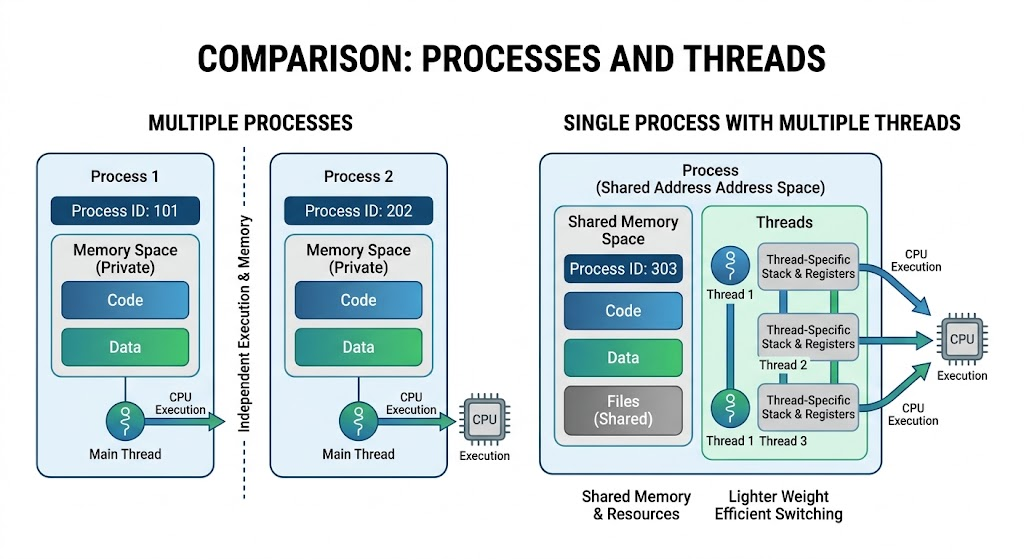
Processes and threads both run tasks, but in different ways for managing memory and resources within the system. A process is a self-contained execution environment that contains its own virtual address space and resources related to the process. A thread is a segment of a process that operates on its own. Each thread has its own execution state and stack, as well as accessing memory and global variables and many other resources. This is where threads prove useful in applications that require multiple operations to run at the same time and efficiently exchange information between them. As processes are generally more independent, it may be easier to contain a fault as memory corruption in one process is less likely to directly impact another process.
For instance, a web server may have multiple processes running, each servicing a subset of requests, or multiple threads per process, each servicing multiple clients in one process. Threads may share memory without having to use the same kind of inter process communication techniques as are used by processes. The downside to shared memory, though, is that it suffers from problems like race conditions, in which two or more threads try to access or update data at the same time at an unexpected time. To coordinate access to shared resources, synchronization objects like mutexes, condition variables and semaphores might be needed by the developers. Pipes, sockets, shared memory, and message queues are also options for processes to communicate.
They have several key differences, as shown in the table below:
Feature
Processes
Threads
Memory
Typically are running separate virtual address spaces
Share their process’s address space
Resource usage
Generally needs more resources.
Uses resources less than average
Communication
Frequently needs IPC mechanisms
Can communicate via shared memory
Isolation
More isolation of execution environments
Fewer delays between process steps
Creation
Usually made using fork()
Typically made using pthread_create()
Failure impact
Separated from other processes.Isolated from unrelated processes.
The whole process can be compromised if the thread fails to work properly.
Processes or threads – which to use, it depends on application needs. Processes are good where there is a need for strong isolation, independent execution or separate program environments. Use threads for multiple tasks that require sharing of data and frequent coordination. A few applications implement both methods to achieve a well-rounded performance, reliability and resource management.
Examples of Programming in C
It is easier to comprehend the various process-management mechanisms in UNIX if they are illustrated with actual programming examples. When writing applications that communicate with the operating system, developers frequently use process creation, program execution, synchronization and signal processing. A command-line application, for example, can fork itself to run another program in the child process, and wait for the child’s termination before printing the final output. Many UNIX utilities and automation tools are based on these operations. These functions are different for each individual system call, but they are all interrelated to give a structured way of managing program execution.
Take, for instance, this example that involves the use of fork(), execvp() and waitpid():
#include <stdio.h>
#include <stdlib.h>
#include <unistd.h>
#include <sys/types.h>
#include <sys/wait.h>
int main(void) {
pid_t pid = fork();
if (pid < 0) {
perror(“fork”);
return 1;
}
if (pid == 0) {
char *args[] = {“date”, NULL};
execvp(“date”, args);
perror(“execvp”);
_exit(127);
}
int status;
if (waitpid(pid, &status, 0) == -1) {
perror(“waitpid”);
return 1;
}
if (WIFEXITED(status)) {
printf(“Child exited with status: %d\n”,)
WEXITSTATUS(status));
} else if (WIFSIGNALED(status)) {
printf(“Child terminated by signal: %d\n”, sgnl);
WTERMSIG(status));
}
return 0;
}
In this case, the parent process generates a child process with the call to fork(). The child uses execvp() to change to the date program, and the parent uses waitpid() to wait for the particular child. The parent checks after termination if the child terminated normally or by signal. If the new program cannot be executed, the _exit() function will be used, which is not performing some of the clean-up actions performed by the C library’s exit() function after a fork. This is a typical pattern which is followed by shells and applications that want to run external commands and report back on the result.
Compile the program; save it as process_example.c and use:
Run this program as follows: gcc process_example.c -o process_example
Run it with:
./process_example
The program prints out the current time and date, and then the status of the child’s exit.
Common Process Management Errors and Troubleshooting
Process management errors can affect application performance, system stability, and the reliability of UNIX-based services. Developers need to understand common problems so they can identify their causes and apply appropriate solutions. One frequent issue is a failed fork() call, which may occur when the system reaches its process limit or runs out of available resources. Another problem is a failed exec() call, which can happen when an executable file does not exist, lacks the necessary permissions, or cannot be located through the system’s PATH. Incorrect use of wait() can also cause synchronization problems, while failing to collect child exit statuses can result in zombie processes. These issues can be investigated using system utilities and appropriate error-handling techniques.
Some common process management problems include:
- Fork failures: These occur when the operating system cannot create another process. Developers should check error messages, process limits, and available system resources.
- Exec failures: These happen when a requested program cannot be executed. Checking executable paths, file permissions, and environment variables can help identify the problem.
- Zombie processes: These appear when parent processes fail to collect the exit statuses of terminated children. Using wait() or waitpid() helps prevent this issue.
- Orphan processes: These occur when a parent terminates before its children. Applications should use appropriate process supervision and cleanup strategies.
- Deadlocks: These occur when processes or threads wait indefinitely for resources held by one another. Developers should review synchronization logic and resource dependencies.
- Unresponsive processes: These may result from blocked operations, resource exhaustion, or programming errors.
UNIX provides several tools for investigating these problems. The ps command displays process information, while top provides a continuously updated view of system activity. The pgrep command helps locate processes by name, and strace can trace system calls on Linux systems to reveal where a program encounters problems. Developers should also use perror() and inspect the errno value when system calls fail. Combining these tools with proper error checking makes troubleshooting more effective and helps developers build applications that handle unexpected situations reliably.
Why Process Management Is Important
Process management plays an important role in maintaining the performance, reliability, and responsiveness of UNIX-based systems. Modern applications rarely perform just one operation at a time. Servers, databases, automation tools, and background services often need to execute several tasks simultaneously while sharing available system resources. The operating system uses process scheduling and resource allocation to ensure that applications receive the CPU time and memory they need. Without effective process management, programs could interfere with one another, consume excessive resources, or remain active when they are no longer needed. Proper process management allows developers to build applications that operate efficiently even when handling multiple users or performing several operations at once.
Several areas demonstrate why process management is particularly important:
1. Server Applications
Web servers and application servers frequently handle requests from multiple users simultaneously. Process management allows these applications to create, monitor, and terminate execution units responsible for handling incoming requests. Depending on their architecture, servers may use multiple processes, threads, or asynchronous event-handling systems.
For example, a server can isolate certain workloads in separate worker processes to improve fault containment. If one worker encounters a problem, other workers may continue operating. Effective process management also helps servers control resource consumption and maintain reliable service during periods of increased traffic.
2. Background Services
Background services are programs that perform tasks without requiring continuous interaction from users. Examples include logging services, database services, scheduled maintenance tasks, and network monitoring applications. These programs often operate for extended periods and must respond appropriately to system events.
UNIX process management provides mechanisms for starting, monitoring, and stopping these services. Signals such as SIGTERM allow administrators or service managers to request graceful shutdowns, giving applications an opportunity to finish important operations and release resources before terminating.
3. Automation Tools
Automation tools frequently execute commands and scripts to perform repetitive operations. For example, a backup application may create separate processes to copy files, compress data, and verify completed operations. Process management allows these tasks to execute in a controlled manner and provides mechanisms for monitoring their completion.
Using fork(), exec(), and waitpid(), developers can create automation programs that launch external commands and collect their results. This makes UNIX particularly useful for system administration, scheduled jobs, software deployment, and other automated workflows.
4. Operating System Performance
Efficient process management helps operating systems distribute available resources among competing applications. The scheduler determines which runnable process or thread receives CPU time, while memory management controls how applications use available memory. These mechanisms help prevent one program from unnecessarily occupying system resources and affecting other applications.
Proper process cleanup also reduces the accumulation of unnecessary process table entries and helps maintain system responsiveness. For developers, understanding these mechanisms makes it easier to identify performance bottlenecks and design applications that use system resources responsibly.
Best Practices for Efficient UNIX Process Management
Developers should follow established practices when creating applications that depend on UNIX process management. One important practice is checking the return values of system calls such as fork(), exec(), and waitpid(). These functions can fail, and ignoring their return values may cause applications to continue operating with incorrect assumptions. Error-handling functions such as perror() provide useful information about failures and make debugging easier. Developers should also ensure that child processes are properly monitored and that their termination statuses are collected. This prevents unnecessary zombie processes and helps maintain clear relationships between parent and child processes.
Another important practice is choosing the appropriate execution model for each application. Processes are useful when separate memory spaces and stronger isolation are required, while threads are often more suitable when tasks need to share information frequently. Developers should also manage signals carefully, using reliable interfaces such as sigaction() and avoiding unsafe operations inside signal handlers. Applications that create multiple threads should use synchronization mechanisms to prevent race conditions and other concurrency problems. In addition, unnecessary processes should be avoided because creating and managing too many execution units can increase resource consumption. Monitoring tools such as ps, top, and system call tracing utilities can help developers identify problems before they affect application reliability.
Other useful practices include:
- Always check the return values of system calls.
- Use wait() or waitpid() to collect child process statuses.
- Handle signals appropriately, especially termination requests.
- Close unnecessary file descriptors in child processes.
- Use threads when shared memory and concurrent execution are beneficial.
- Avoid creating unnecessary processes or threads.
- Monitor CPU and memory consumption regularly.
- Use appropriate synchronization mechanisms when working with concurrent threads.
- Test applications under different workloads to identify resource management problems.
- Implement graceful shutdown procedures for long-running applications.
Following these practices makes process management more predictable and helps developers create UNIX applications that are easier to maintain, troubleshoot, and scale.
Conclusion
UNIX process management provides the foundation for executing programs, coordinating tasks, and allocating system resources efficiently. Through mechanisms such as fork(), exec(), and wait(), developers can create new processes, execute external programs, and synchronize parent-child operations. Process identifiers make it possible to identify individual processes, while process states help the operating system monitor their execution. Understanding zombie and orphan processes is equally important because proper process cleanup prevents unnecessary process table entries and improves application reliability. Signals provide another essential mechanism by allowing programs to respond to interruptions, termination requests, and other system events.
Understanding the differences between processes and threads also helps developers choose suitable execution models for their applications. Processes provide greater isolation, while threads allow multiple execution paths to share resources within the same program. These concepts are particularly important when developing server applications, background services, automation tools, and other software that performs multiple operations. By using appropriate system calls, handling errors correctly, monitoring resource consumption, and following established programming practices, developers can build efficient and reliable UNIX applications. A strong understanding of process management ultimately makes it easier to troubleshoot operating system problems and develop software that performs consistently in multitasking environments.