Introduction
Today we see that what modern computing does is to use networks which tie in users, applications, servers, databases, storage and cloud platforms. As opposed to stand alone physical computers, what we are to see is that companies are creating settings in which computing resources are shared and accessed across integrated systems. Virtualization is at the heart of this approach. What it does is take a single physical computer or server and out of that create many independent virtual computing environments which each run their own operating system and applications.
Also these virtual systems are able to interact with other virtual as well as physical systems via virtual networks and our physical network infrastructure. In the world of net-centric computing virtualization thus is a key element for efficient resource sharing. By the way, virtualization separates computing environments from the base physical hardware. What we are to see is that companies are able to put in place systems faster, get better out of their infrastructure, and change to meet variable work loads without at every turn going out and buying more physical machines.
Understanding Virtualization in Net-Centric Computing
Virtualization is a technology which puts forward the concept of a virtual version of a computing resource instead of each work load to have direct access to physical hardware. A physical server which has enough processing power, memory, storage and networking capacity can be divided into many virtual units. Each environment may function as an independent computer which in fact is not the case as multiple environs are using the same physical infrastructure.
This approach changes the traditional software to hardware relationship because apps no longer have to be permanently installed on a physical machine. In network centered computing this separation is a great value because virtual environs can be put on the network, made to use shared services, databases, storage systems and other compute resources. Also virtualization makes it easier to move, copy, change size of, or totally replace computing environs when the organization’s requirements change.
How Virtualization Improves Flexibility
Virtualization reports high marks in terms of the flexibility it brings to the table which is one of its key benefits. We see that organizations are able to spin up virtual machines for diverse applications without the need to install a separate physical server for each workload. A development team for instance may put in place a test environment for a new application at the same time that a different virtual machine on the same host is supporting a different service. As requirements change admins are able to adjust resource allocation or provision additional virtual environments instead of redesigning the entire physical infrastructure.
This is a prime example of how virtualization improves flexibility which in turn allows computing environments to better adapt to variable workloads. Also virtualization is a great solution when it comes to the issue of testing out different operating systems or software sets. Since virtual environments are isolated from each other, teams are able to play around with systems which at the same time protect production workloads from interference.
Virtual Machines and Shared Physical Infrastructure
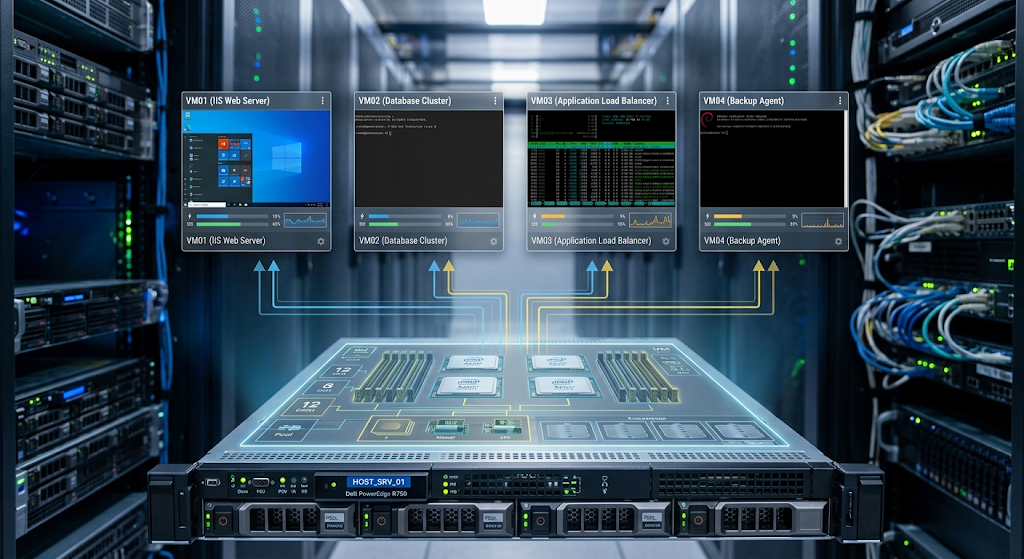
A virtual machine which we also refer to as a VM is a software based environment which runs on a physical host system. It has a virtual processor, memory, storage, network interfaces and an operating system which gives applications the feel that they are running on a dedicated computer. But in reality the physical resources are shared with other virtual machines hosted on the same server. For example a single physical server with many processor cores and a large amount of memory may host many virtual machines at the same time, each VM gets a certain allocation of those resources.
While the virtual machines present themselves as separate entities which is not the case in terms of the physical infrastructure they are dependent on. This setup allows companies to consolidate their work loads, reduce the number of physical servers used, and also get better out of the computing capacity which may otherwise go unused.
Components of a Virtual Machine
A virtual machine includes many elements which together produce a full scale computing environment. We have the virtual CPU which is the processing element, also we have virtual memory which is the temporary workspace for the OS and applications. Virtual storage is where the OS files, applications, databases and other info are put. Also we have the virtual network interface that which the VM uses to get out into other systems via a virtual or physical network.
The guest OS runs within the VM just as an OS would run on a physical computer. To the application these elements present themselves as the hardware of a stand alone computer. What is key is that virtualization software which is the gate keeper for the physical resources. This abstraction which is created allows for many VM’s with different settings to exist on the same physical host at the same time also giving each a separate identity for their work.
The Role of Hypervisors
A hypervisor is a key component in a virtualized computing environment as it controls virtual machines and their access to physical resources. The hypervisor is in between the virtual machines and the base hardware which also provides the elements for multiple operating systems and work loads to share a physical server. When a virtual machine asks for processing power, memory, storage access, or network communication the hypervisor plays a role in that request to the physical resources.
Also we see that there are 2 main types of hypervisors. Type 1 which runs directly on physical hardware and is very much at home in server and data center environments, and Type 2 which runs on top of a standard host OS and are used for desktop testing and development. Also we note how virtualization via the hypervisor puts a layer of separation between the virtual and the physical.
Managing Multiple Virtual Machines
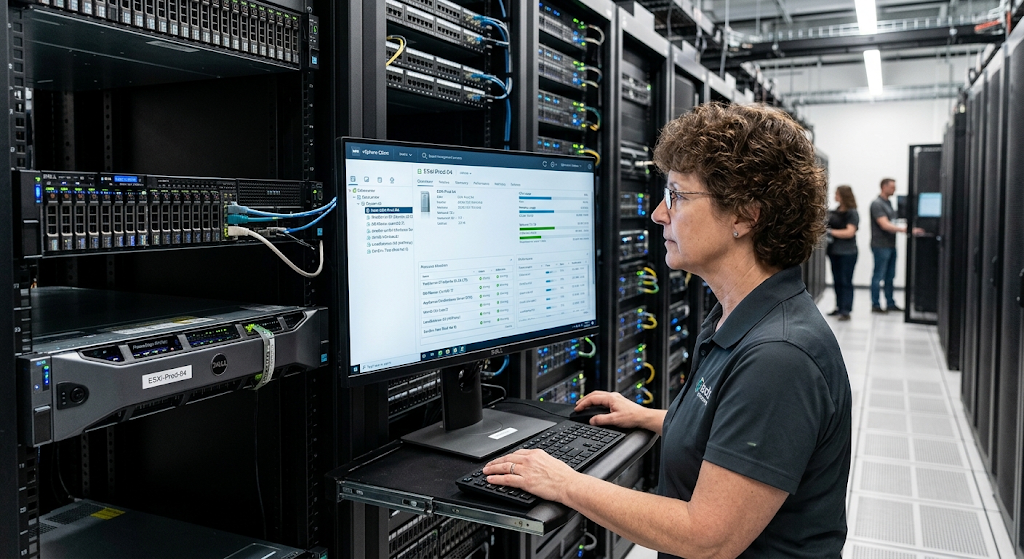
A large aspect of what a hypervisor does is to enable many virtual machines to run on the same physical server at the same time without 039s of interference. It is tracking which virtual machines which are which and is giving them access to CPU, memory, storage, and network as per their set up and the needs of the workloads. Also if one virtual machine is requiring more of the processing power at a given time the hypervisor is in there to re-allocate available CPU to that which needs it most while still seeing to it that other machines have what they require.
Also virtual machine isolation is a key feature which means that applications in one VM should not usually be able to access another039s memory or files without proper permissions or networking setup. This management layer also makes server consolidation a reality and gives admins the chance to better control how physical compute power is doled out to different network connected workloads.
Virtual Networks and Network Resource Connectivity
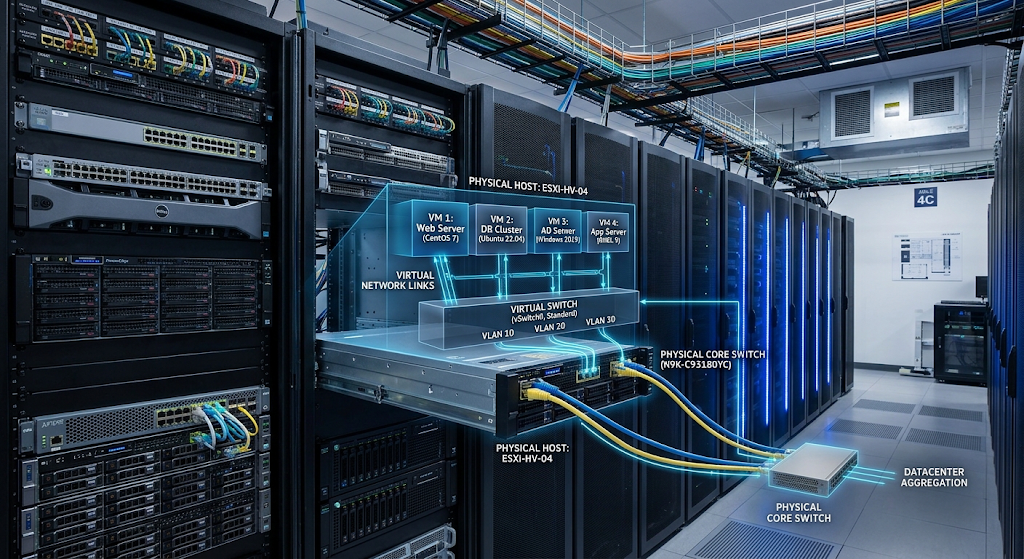
Virtualization isn’t limited to processors and memory. Also we see virtualization in networking which in turn creates logical communication platforms that run on the shared physical network infrastructure. A virtual network may include virtual switches, virtual network interfaces, virtual routers and other software defined networking elements. These elements make it possible for virtual machines to talk to each other and to the external physical systems. For example a virtual switch may connect many virtual machines on the same host and at the same time provide what are in effect paths to physical network interfaces.
Also it is up to admins to put virtual networks which separate workloads by function or security needs. Thus development systems, application servers, databases and management systems may run on the same physical infrastructure but in different logical network settings. Virtual networking thus takes the benefits of virtualization which were seen at the level of the individual computer and applies them to the communication systems which tie them together.
Connecting Virtual and Physical Networks
In broad based net-centric computing systems virtualized environments must play a role. A virtual machine may require access to an external database, to a corporate network for user connection, to another server, or to a cloud based service. The physical network interface of the host server is what the virtual environment ties into the physical network infrastructure. Virtual switches and related networking elements handle traffic flow between virtual machines and physical network interfaces.
Also it is the admin’s job to put in place network segmentation, routing, access controls and other policies which in turn control what sort of traffic is allowed. This integration which also includes the bootstrapping of virtual private networks within physical ones makes virtualization a fit solution for use in which applications run on many servers, in many data centers and in the cloud. The virtual and physical networking layers in this model work together to produce a structure in which workloads may communicate and at the same time be put into their proper logical places.
Resource Allocation in Virtualized Environments
Resource distribution is what determines how physical compute resources are doled out to virtual machines and their work loads. A physical server has finite resources which admin personnel must determine what amount of CPU power, memory, storage, and network bandwidth each virtual environment gets. If resource allocation is done poorly some virtual machines may see performance issues while at the same time other resources go unused. Virtualization platforms thus supply tools for setting resource limits, reservations, priorities and other controls.
Admins are able to track resource use and change allocations as workloads vary. This is very true in data centers which host applications that do not have the same resource needs throughout the day. Some systems may see predictable peaks in activity, while others may require more capacity at short notice. By dynamic management of resources virtualization helps organizations scale up or down without having to maintain a separate physical server for each level of work load.
Improving Resource Utilization
Traditional physical servers at times run under full use which isn’t the case when we buy a machine for a certain application which in turn may have more processing power or memory that which the application needs. Virtualization puts forward a solution which is to have many work loads run on the same physical host which has unused capacity. Instead of having many under-used servers which is what we may have, an organization can put together compatible work loads into fewer physical machines which at the same time have separate virtual environments.
This in turn improves overall resource use as computing capacity is shared out among work loads which have different use patterns. Also we see a chance to reduce the amount of physical equipment in a data center although the actual results will depend on the work load, licensing issues, hardware needs and operational policies. For effective consolidation we do need to monitor the systems as putting too many work loads on one host may cause a resource issue. Thus the goal is not just to put in as many VMs as possible but to get a good balance between use, performance, reliability and availability.
Virtualization in Data Centers
Data centers are a primary environment which sees great benefit from virtualization. In a modern data center you may find large scale use of servers which support websites, databases, enterprise applications, storage systems, development platforms, and network services. Without virtualization each workload may require its own physical hardware which creates issues related to space, power, maintenance, deployment and hardware utilization.
Virtualization which puts many workloads on the same physical server is what enables us to overcome these issues. Also with virtualization admins are able to create virtual machines for each service and tailor them to fit specific needs. Also virtualized data centers may put in place high availability solutions which in the event of hardware failure will move or restart workloads to other hosts if the virtualization platform and architecture support it. These features in turn allow companies to have more flexible computing environments.
Virtualization and Cloud Computing
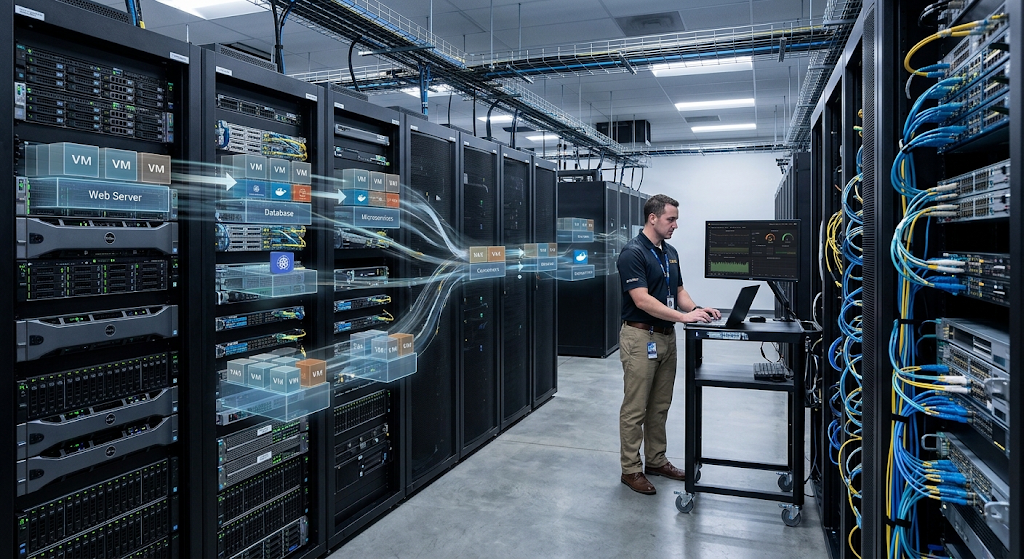
Virtualization is a key element of cloud computing which is required for cloud providers to offer many of their customers access to computing resources out of shared large pools of physical infrastructure. Virtual machines are made, configured, resized and managed via software that in turn allows cloud platforms to present computing capacity which in turn do not require each customer to have their own physical servers. A customer may ask for a virtual server with a certain amount of CPU, memory, storage, and networking which then the cloud provider runs off of their physical infrastructure.
Virtualization creates separation between different workloads and also is what enables the flexible distribution of resources across very large infrastructure pools. But virtualization is only one piece of the cloud computing picture. Also at play are orchestration, automation, storage systems, networking, monitoring, security, and service management technologies. Thus virtualization is better seen as a key technology that is part of the larger cloud computing architecture.
Benefits for Scalability and Flexibility
Scalability also is an important aspect of what virtualization brings to network centered settings. As the base of users, applications, or transactions grows, it is to that which organizations may add onto their computing resources. With a physical only infrastructure they are to purchase, install, configure and connect new servers which is a great deal of time. Virtualization into that picture simplifies this by its ability to put forward virtual machines on available infrastructure when we have the resources to do so.
Also the ability to re-size virtual machines or to move workloads between hosts as they see fit is given to them. In large scale environments virtualization works with automation and orchestration platforms to put forth resources based on pre determined policies. This is not to say that physical capacity is done away with but what it does is present that which is available more flexibly. Thus virtualization supports environments in which computing resources have to be able to adapt to variable work loads instead of being permanently tied to individual physical machines.
Virtualization for Development, Testing, and Deployment
Virtualization is also used at all stages of software development and deployment. Developers require that their environments closely reflect production in order to test applications as they will perform in the real world. It is expensive and hard to maintain separate physical machines for each development, testing, and staging environment. Virtual machines which are separate from one another but have specific OS’s, software versions, network settings, and resource allocations are what teams use.
Also developers can work in an env which is a mirror of production at the same time the live environment is running. Once testing is complete virtual machines may be changed, reproduced or done away with without that which is live being affected. Also virtualization supports application migration because when workloads are put in virtual which are compatible they may be more easily moved between physical hosts or infrastructure platforms. This in turn leads to more consistent and smooth deployment.
Challenges and Considerations of Virtualization
Virtualization does bring many benefits but also presents issues which organizations have to be aware of. A physical server which is home to many virtual machines becomes a key point of failure which may affect many work loads if we do not put in place adequate redundancy measures. Also we see that resource contention plays out when you have too many virtual machines which are all trying to use limited CPU, memory, storage or network at the same time. Also in virtual environments admins have to have knowledge of the virtual layer as well as the physical infrastructure which supports it.
Security is an issue which requires careful configuration as what goes wrong in virtual management, virtual networks, or admin access can bring down many work loads. Also license issues and software compatibility also play into the cost and what is feasible with virtualization. What we see is that organizations require monitoring, backup plans, security measures, capacity planning and appropriate recovery strategies. Also virtualization is not a one size fits all solution to infrastructural problems; its value is in the thought out design and on going management.
Security and Isolation in Virtualized Networks
Security issues are of great importance in the case of many computing environments which are part of the same infrastructure. VMs are to run independently of each other which is the design goal but it is the admin’s job to set up proper permissions, network controls, storage access, and management interfaces. Virtual networks may be broken up which in turn will prevent some sensitive systems from free communication with all other workloads. For instance a database may be put on a network which has restricted entry while public facing app systems may run in a different network.
Also admin interfaces must be secured in that control over the virtualization platform may give large access to the hosted systems. Also we should look into regular reports which note atypical resource use, unexpected network traffic, or config changes. In all we should have strong security at both virtual and physical levels. We want to keep the flexibility of virtualization but also see to it that our shared infrastructure isn’t used as a base for unneeded security issues.
The Future of Virtualization in Network Centric Systems
Virtualization is going to play a key role as computing becomes more of a distributed and network centric affair. We see present day infrastructure which is a mix of traditional data centers, private clouds, public cloud platforms, edge systems, containers, software defined networking, and automated management tools. Virtualization in this large scale environment provides a great abstraction layer for which we separate workloads from physical machines.
In the future we will see more focus on automation, intelligent resource management, workload mobility, and infrastructures that are very responsive to change. At the same time what we will also notice is that companies will have to deal with very complex relationships between virtual machines, containers, networks, storage and cloud services. Also in the ongoing growth of these tech we see virtualization is not just about creating virtual computers but is a part of a larger trend towards very flexible and software defined computing infrastructure.
Conclusion
Virtualization has redefined how we put together and share computing resources in network centered settings. Via virtual machines, hypervisors, virtual networks, and resource allocation systems which we have at our disposal many independent computing environments which run on shared physical infrastructure. This does see to which extent we improve hardware use, we simplify deployment, support growth and which also provides greater flexibility as workloads change. In data centers and cloud settings virtualization allows companies to put applications which particular physical machines aside and which they can manage the infrastructure via software.
Also virtual networking takes this a step further by which virtual work loads are made to communicate with each other and with physical network resources via controlled logical connections. Although virtualization brings in issues related to security, resource contention, availability and management which we may put out, with care in planning many of these issues may be addressed. As a whole virtualization is a key tech which we use to build adaptable, efficient and connected computing environments that support the ever growing needs of today’s network centered systems.