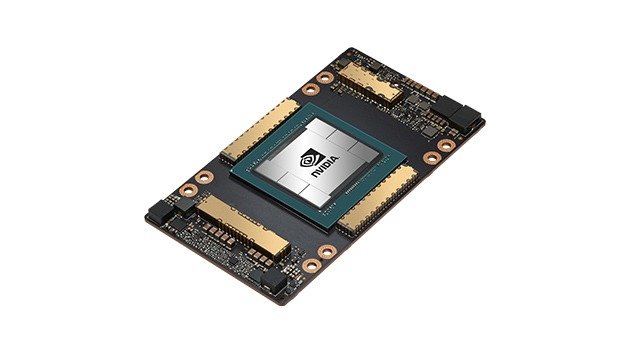
As AI workloads continue to grow in size and complexity, organizations have more accelerator options than ever, from consumer GPUs to the latest data-center platforms. Yet the NVIDIA A100 80GB remains an important option for businesses, researchers, developers, and infrastructure providers that need substantial GPU memory and enterprise-grade AI capabilities without necessarily moving to the newest generation.
For organizations evaluating an A100 for sale, understanding the A100 80GB’s architecture, memory capacity, workload suitability, scalability, and total cost of ownership is essential before making an investment.
What Is the NVIDIA A100 80GB?
The NVIDIA A100 Tensor Core GPU is based on NVIDIA’s Ampere architecture and was designed specifically for data-center workloads spanning artificial intelligence, machine learning, high-performance computing (HPC), and data analytics.
The A100 80GB is the higher-memory version of the accelerator, providing 80GB of HBM2e memory and more than 2 TB/s of memory bandwidth. NVIDIA designed the platform to handle large models and datasets while supporting multiple numerical precisions and specialized AI acceleration technologies.
The A100 is therefore quite different from a typical gaming GPU.
Its purpose is not primarily graphics rendering. Instead, it is designed for computational workloads where parallel processing, memory bandwidth, GPU-to-GPU communication, and workload isolation are important.
Why Does 80GB of GPU Memory Matter?
GPU memory is one of the most important specifications to consider when selecting hardware for AI.
A neural network’s parameters, intermediate data, batches, activations, and other computational information need to be stored and accessed during training or inference. As models become larger, insufficient GPU memory can become a significant limitation.
The A100 80GB provides twice the memory capacity of the original 40GB version. NVIDIA’s specifications list 80GB of HBM2e memory and approximately 2.04 TB/s of peak memory bandwidth for the SXM version.
This combination is important because memory capacity and memory bandwidth solve different problems.
Memory capacity determines how much data can reside on the GPU.
Memory bandwidth determines how quickly data can move between memory and the GPU’s processing resources.
For memory-intensive AI workloads, having both can be valuable.
Is the A100 80GB Still Suitable for AI Training?
Yes—particularly when the workload is compatible with its capabilities and the organization can acquire the hardware at an attractive total cost.
AI training involves repeated mathematical operations across large datasets. The A100 was designed specifically for this environment, incorporating Tensor Cores and support for AI-oriented numerical formats such as TF32, FP16, BF16, and INT8.
NVIDIA states that A100 Tensor Cores with TF32 can provide significant acceleration over the previous Volta generation, while automatic mixed precision and FP16 can provide additional performance for appropriate workloads.
For organizations training computer-vision models, recommendation systems, natural-language models, scientific models, or other deep-learning applications, the A100 can still provide substantial computational capability.
The key question is not whether the A100 is capable of AI training.
It is whether its performance and economics make sense compared with newer alternatives.
A100 80GB for AI Inference
Inference is another area where the A100 remains relevant.
Inference occurs when a trained model is used to produce predictions or generate results. This could involve an AI chatbot, recommendation engine, image-recognition system, fraud-detection application, or another machine-learning service.
Inference workloads often require a combination of compute performance and memory capacity.
The A100 supports multiple precision formats and NVIDIA technologies designed to optimize inference. It also supports Multi-Instance GPU (MIG), allowing a single physical GPU to be divided into multiple isolated instances. NVIDIA states that an A100 can be partitioned into as many as seven independent GPU instances.
This can be useful for organizations that need to serve several smaller workloads rather than dedicating an entire GPU to one application.
What Is NVIDIA MIG and Why Does It Matter?
Multi-Instance GPU is one of the A100’s more useful features for shared infrastructure.
MIG allows a compatible A100 to be partitioned into separate GPU instances with dedicated resources. NVIDIA describes the technology as allowing multiple users or workloads to share GPU acceleration while maintaining quality-of-service characteristics.
On the A100 80GB, MIG configurations can provide up to seven instances with up to 10GB of memory per instance, depending on the configuration.
This creates interesting possibilities for:
AI inference
Development environments
Model testing
Small machine-learning workloads
Shared GPU infrastructure
Multi-tenant environments
For an organization with several teams or applications, this can improve the utilization of an expensive accelerator.
A100 for Large Language Models
Large language models have become one of the most visible AI workloads, and GPU memory is particularly important for them.
A model’s parameter count, numerical precision, context requirements, batch size, and inference strategy all affect how much GPU memory is required.
An 80GB accelerator can accommodate substantially larger workloads than many mainstream workstation GPUs.
However, that does not mean every LLM will fit entirely within a single A100 80GB.
Large models may still require:
Quantization
Multiple GPUs
Tensor parallelism
Pipeline parallelism
Model sharding
Distributed inference
This is where the A100’s high-speed interconnect capabilities become relevant.
NVLink and Multi-GPU Scaling
AI workloads often extend beyond a single GPU.
When a model is too large for one accelerator or when additional compute capacity is required, multiple GPUs can be combined.
The A100 SXM platform supports NVIDIA NVLink with up to 600 GB/s of GPU-to-GPU bandwidth, while NVIDIA’s A100 platform can be integrated into multi-GPU HGX systems.
Fast GPU-to-GPU communication can reduce bottlenecks in distributed workloads and allow multiple accelerators to operate as part of a larger computational system.
This is one of the reasons it is important to evaluate the server platform, rather than looking only at the GPU.
A data-center GPU such as an A100 SXM is not equivalent to purchasing a conventional PCIe graphics card and installing it into an ordinary desktop.
Server compatibility, cooling, power delivery, interconnects, firmware, and chassis design all need to be considered.
A100 for Data Analytics and HPC
AI is not the A100’s only application.
NVIDIA designed the platform for a broad range of data-center workloads, including data analytics and high-performance computing.
GPU acceleration can be valuable for applications involving large datasets, simulations, scientific calculations, and other highly parallel workloads.
NVIDIA reports that the A100 80GB can provide significant performance improvements over the 40GB version on certain analytics and HPC workloads, with the larger memory capacity and bandwidth helping applications process larger datasets more efficiently.
This makes the A100 potentially attractive to organizations working in areas such as:
Scientific research
Engineering simulation
Financial modeling
Data science
Genomics
Computational chemistry
Large-scale analytics
A100 vs Newer NVIDIA GPUs
The biggest question in 2026 is naturally this:
Why buy an A100 when newer NVIDIA GPUs exist?
There is no single answer.
Newer architectures such as NVIDIA Hopper offer major advances. For example, NVIDIA’s H100 introduced fourth-generation Tensor Cores, FP8 support, Transformer Engine technology, and fourth-generation NVLink. NVIDIA has reported substantial performance improvements over A100 for certain large language model workloads.
This means organizations pursuing maximum possible performance on cutting-edge AI workloads should evaluate newer accelerators.
But newer does not automatically mean better value.
The A100 can remain attractive when:
The workload is already optimized for A100.
Existing software infrastructure supports it.
80GB of GPU memory meets requirements.
The organization values mature Ampere-era software compatibility.
Multi-GPU scaling is required.
Acquisition cost is significantly lower than newer hardware.
The performance requirements do not justify the premium for a newer accelerator.
In other words, the A100 should be evaluated on performance per dollar and total cost of ownership, not simply its position in NVIDIA’s product timeline.
Used and Refurbished A100 GPUs
Another reason the A100 remains interesting is the secondary enterprise hardware market.
Data-center GPUs can have a substantial acquisition cost when purchased new. Organizations with appropriate server infrastructure may therefore evaluate tested or refurbished accelerators as a way to reduce upfront capital expenditure.
However, buying used enterprise GPUs requires more diligence than purchasing a conventional consumer graphics card.
Buyers should verify:
Exact GPU model
Memory capacity
Form factor
SXM versus PCIe compatibility
Server compatibility
Physical condition
Operating history where available
Testing procedures
Warranty or return policy
Cooling requirements
Power requirements
This is particularly important with A100 SXM modules because they are intended for compatible data-center server platforms rather than conventional desktop systems.
Who Should Consider an A100 80GB?
The A100 80GB can make sense for organizations running workloads such as:
AI model training:
Deep-learning workloads that benefit from substantial GPU memory and Tensor Core acceleration.
AI inference:
Production applications requiring significant compute and memory resources.
Large-model experimentation:
Teams working with models that exceed the practical memory capacity of smaller GPUs.
Data analytics:
Large datasets and analytics pipelines that can take advantage of GPU acceleration.
HPC:
Scientific and engineering workloads that benefit from massive parallel processing.
Shared GPU infrastructure:
Organizations that can take advantage of MIG to divide resources among multiple workloads.
What Should You Check Before Buying?
Before purchasing an A100 80GB, evaluate the entire environment.
First, determine whether you need PCIe or SXM. These are not interchangeable form factors.
Second, calculate the GPU memory requirements of your workloads.
Third, determine whether you need one GPU or a multi-GPU configuration.
Fourth, verify server compatibility, power, cooling, networking, and interconnect requirements.
Finally, compare the expected performance and useful life of the accelerator against its acquisition and operating costs.
Final Verdict: Is the NVIDIA A100 80GB Still a Good Choice?
The answer is yes—but with an important qualification.
The NVIDIA A100 80GB is no longer NVIDIA’s newest data-center GPU architecture. Newer platforms provide substantial advances in areas such as transformer acceleration, FP8 performance, and GPU-to-GPU communication.
However, the A100 remains a capable enterprise accelerator with 80GB of HBM2e memory, roughly 2 TB/s of memory bandwidth, Tensor Core acceleration, NVLink, and MIG support.
For organizations that need large GPU memory, mature enterprise AI capabilities, multi-GPU scalability, or shared GPU resources—and can obtain the hardware at an appropriate price—the A100 80GB can still be a highly practical choice.
The smartest approach is therefore not to ask whether the A100 is simply “old” or “new.”
Instead, ask whether its memory capacity, compute capabilities, software compatibility, server requirements, expected workload, and acquisition cost align with your organization’s needs.
For the right workload and the right price, an A100 80GB can remain a powerful piece of AI infrastructure.
