The processor can’t efficiently work with a single type of memory as modern computers can perform billions of calculations per second. Memory technologies vary to offer varying degrees of speed, capacity, and cost. Instructions and data must be accessible to the CPU extremely quickly, but a computer made completely from the fastest memory would be prohibitively expensive and impractical. Computers, however, employ a combination of these types of memory — and store them in a structured format called the memory hierarchy.
The memory hierarchy simultaneously enables computers to maintain high performance and be affordable by storing the fastest and more expensive memory closer to the CPU and storing slower, larger and cheaper memory for long-term data retention. This multi-layered organization makes the most frequently accessed data available fast and allows for economically storing a high volume of data. The operation of these registers, cache, RAM and secondary storage explains how a modern computer can be so high performing and user friendly.
Memory Hierarchy in Computer Systems
Memory hierarchy refers to the hierarchy of various types of memory in a computer system by their speed, cost and storage space. The concept is possible because there is no single memory technology that can be both extremely fast, have unlimited capacity, and be very inexpensive. Fast memory devices are typically expensive, and provide limited storage capacity, whereas larger storage devices are slower but provide more storage capacity.
Each memory level is designed for a different purpose, ranging from very small and fast memories within the CPU to very large secondary storage devices which store files and applications. Any program that is run will automatically place information that is frequently used into closer proximity to the processor, minimizing delays and increasing the speed of the running program.
The hierarchy is usually represented in a pyramid, with the fastest and the smallest memory at the top, and the slowest and the largest memory at the bottom. The memory capacity decreases as you go down the pyramid, while the speed of accessing bits becomes slower, but their costs decrease. This kind of structure enables the computer to realise a near optimum combination of performance to price.
The concept of the memory hierarchy in computer organization explains how different memory levels are arranged to provide an effective balance between speed, capacity, and cost in computer systems.
Types of Memory used by Computers and why are they needed
Processors move through memory at a much faster rate than regular storage devices, so different types of memory are needed for a computer. Access to data from slower storage can cause a lot of delays because the CPU can execute instructions in a very short time. If all the information was being provided from a slow storage medium, then much of the processing power would be inefficiently utilized.
Multiple memory levels can resolve this issue by retaining the most frequently used data in quicker memory locations. There are memory technologies that are both small and expensive, such as CPU registers and cache, which are accessed very quickly because they store critical data, and there are larger memory technologies that are cheaper, which hold the programs, files and components of the operating system. These levels automatically update each other as the computer is used.
One of the primary motivations for the use of the memory hierarchy is the speed/cost relationship. Fast memory is so expensive and advanced technology in its uses that it cannot be used for storing a lot of data. Slower storage devices do have significantly more storage capacity and are much lower in cost. The computer designer can use multiple types of memory to form a powerful and inexpensive computer system.
The Memory Hierarchy Pyramid (fastest to slowest):
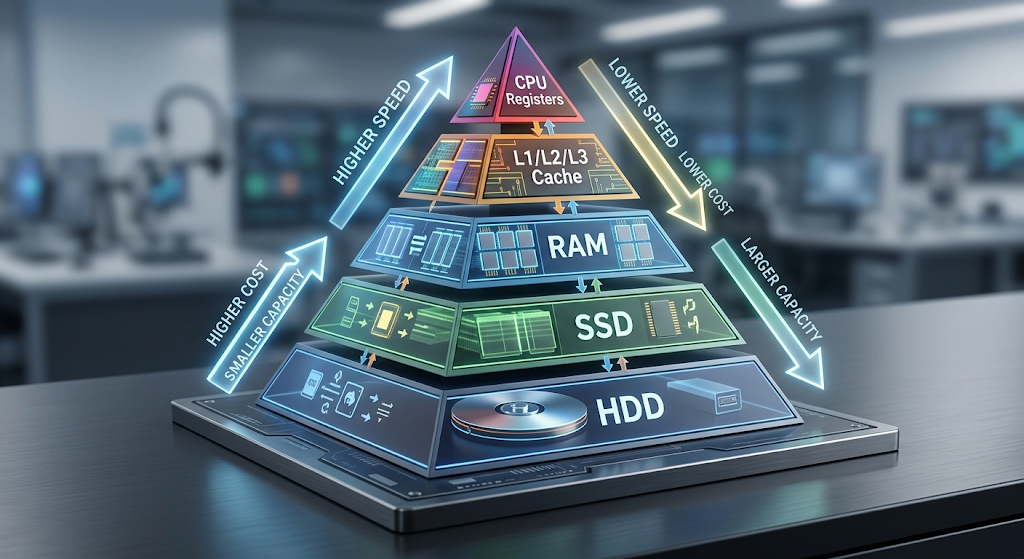
There are multiple levels of memory hierarchy. The levels offer varying degrees of speed, size and cost. The higher levels are closer to the CPU and thus can be accessed faster; the lower levels have more storage capacity.
Registers: The fastest memory in a computer.
The smallest and fastest memory in the CPU is the register memory. They store the data and instructions that are being used by the processor during execution. Registers are physically situated inside the processor thus it gives very rapid access in comparison with other types of memory.
The CPU has various registers, such as general purpose and special purpose registers, which hold temporary data and control operations, respectively. For instance, the program counter registers the next instruction to be executed, and the instruction register holds the instruction being executed.
Although registers are extremely fast, they have very limited capacity. However, the number of registers in a processor is limited, because if the number of registers is increased the CPU becomes more expensive and larger. They are not intended to carry a large amount of data, but rather to supply the most critical data that is needed for ongoing calculations.
The Cache Memory – The intermediary between CPU and RAM.
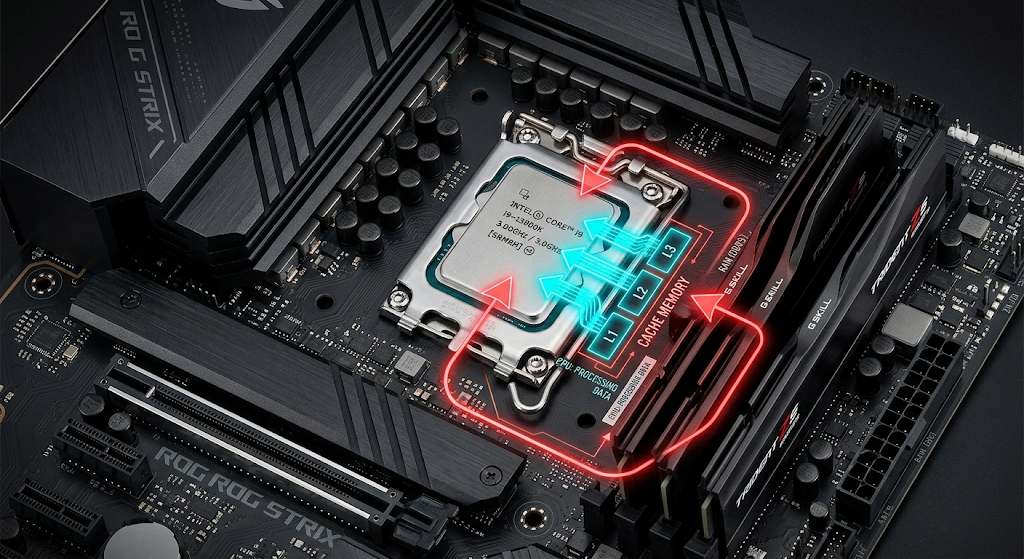
Cache Memory is a fast memory in between CPU and main memory. It is used to reduce the wait time for data to be taken from RAM by the processor. It keeps frequently used instructions and data in cache memory to be accessed by the CPU much faster than from main memory.
Modern processors typically have a number of caches: L1, L2, and L3. The smallest and fastest, the first closest to the CPU cores is L1 cache. L2 cache can be used to store more data, but with slightly lower speeds, while L3 cache has more capacity and may be shared across cores.
Cache is effective because most computer programs tend to access the same data and instructions repeatedly. The advantage of caching is that if that same information is used repeatedly, the processor won’t have to access it from slower memory repeatedly. This substantially enhances the system performance particularly when executing applications which need to execute many calculations or access data frequently.
Difference between Cache Hits and Cache Misses
The effectiveness of the cache memory relies a lot on whether the required data is already available within the cache. When the CPU can find the required information in the cache, it is called a cache hit. The processor can work without significant delay, since the access to the cache is very fast.
Cache Miss: When the data that is requested is not found in the cache. If this is the case, the processor has to move the information to a lower memory level, typically RAM. This process will take a longer time due to the fact that RAM is slower than cache memory. Once the data is retrieved, the computer may store an extra copy in the cache to speed up the processing of future requests.
One of the major objectives of processor design is to minimize cache misses. Modern CPUs employ state-of-the-art techniques and prediction methods to find out what information it is most likely to require next. Improved cache performance enables processors to have more time for instruction execution and less time waiting for data.
How locality of Reference works and why it is effective for caching.
The reason that cache memory works is that most computer programs exhibit a locality of reference. Locality of reference: Programs tend to access the same data over and over or access data that is stored nearby in a short period of time.
Locality can be of two types namely temporal locality and spatial locality. Temporal locality is the tendency of recently accessed data to be accessed again in the near future. You can use a variable repeatedly in a program within a loop, for instance. Having this variable in the cache makes it quicker to access if it is used again and again.
Spatial locality is when data that is close to data that has just been accessed is likely to be useful in the near future. Data structures like arrays are frequently handled in programs where the elements are accessed close to each other. As the computer fetches one piece of data into cache, it might also load some close data as it is likely to be needed next.
It is possible to get large performance improvements with relatively small cache memories by making them local. Although not all data a program accesses can be stored in the cache, the data it accesses most often can be stored there, and communication delays between the CPU and the RAM can be significantly decreased.
The Working Area of the Computer: Main Memory (RAM).
Random Access Memory or RAM is the primary memory employed by computers while operating. Holds the programs and data that the operating system and applications are using in the present moment. Files that are accessed by a user when opening up a program are loaded into RAM to be accessed by the CPU faster.
RAM offers more storage than cache, but is slower. It acts as an intermediate link between the primary memory (fast memory) and secondary memory (slow memory). Computers might have to use slower storage media to perform tasks if they do not have enough RAM.
The RAM is volatile memory, which means it is temporary memory and loses the information when the computer is turned off. For this reason, it cannot be used for long storage. Rather, it is temporary working space that enables the CPU to rapidly get to the working programs and data.
Secondary Storage of a Computer
Secondary storage is made up of solid-state drives (SSDs) and hard disk drives (HDDs) that are used for longer term data storage. Secondary storage is non-volatile, which means that when the computer is turned off the data will not be lost.
Secondary storage has a lot more capacity than memory that is closer to the CPU. These are devices to store operating systems, applications, documents, videos, and other files. Secondary storage is much slower than RAM, though, because it is intended to store information for extended periods of time and not just for quick access.
SSDs have improved computer performance by providing much faster access times than traditional HDDs. Even modern storage devices are slower than RAM and cache memory, though. This difference is the reason for storing frequently-used programs in RAM, rather than executing them directly from the secondary storage.
How Memory Hierarchy Enhances the Performance of the Computer
The purpose of the memory hierarchy is to ensure that the CPU accesses the most important data the fastest that it can. Computers predict what information they will need and move it to the faster levels of memory instead of searching through the large storage devices each time.
For instance, when a user runs an application, the OS loads the files that the application needs into RAM from a secondary storage device. During the program, instructions and data that are frequently accessed are stored in the cache and registers to be accessed even quicker. The continuous switching between these memory levels enables the CPU to perform efficiently.
If there were no memory hierarchy, the processors would have to wait a lot of time for data. This wait time is a significant performance drawback because the speed of modern CPUs is far greater than that of storage media. Memory hierarchy alleviates the problem by also introducing a number of levels of access between the processor and permanent storage.
The Future of Computer Memory Hierarchy
With more and more processors getting faster and faster, memory technology will have to evolve to meet the increasing demand. A new generation of memory technologies is being created to offer the speed of traditional memory and the capacity and cost of a storage device.
The ways in which computers manage data are still evolving with new advances in technologies like high-end solid-state storage, new types of non-volatile memory, and enhanced processor cache designs. New architectures with additional memory layers will be developed in the future, to decrease the difference between processing speed and storage speed.
The fundamental concepts of memory hierarchy will still be relevant, however. There will always be trade-offs in speed, capacity and costs, therefore different types of memory will be needed for computers. If the hierarchy is properly designed, the users will get fast performance without involving in using very costly hardware.
Conclusion
One of the most significant concepts in computer performance is computer memory hierarchy. Computers are a combination of registers, cache, RAM and secondary storage that makes them fast, yet capable of holding lots of data, and affordable. There are memory levels with different functions, the faster and smaller the closer the memory is to the CPU, the slower and larger the further memory is from the CPU, the more it is used to keep the data longer.
One of the most significant roles of cache memory is to apply locality of reference to store frequently accessed data near the processor. Cache hits provide very rapid access with a cache while cache misses show that a lower memory level is still required. All levels of the hierarchy work together continuously to ensure rapid and efficient processing of information by the computer.
Knowing about the memory hierarchy, we can understand why computers are so cheap and convenient to use and still manage to perform complex tasks. Today’s digital devices require high performance, which is achieved by the different types of memory technologies combined together.