The Foundation of Computer Networking
The Foundation of Computer Networking is designed for students who are new to networking. The Foundation of Computer Networking is for students who are unfamiliar with networking.
A computer network is a collection of interconnected devices that enable the sharing of information and communication. When people send an email, watch a video online, visit a site or move a file, complex networking occurs in the background in a few seconds. Many technologies and protocols work in concert, and for the novice entering the information technology world, it can be challenging to comprehend how these communication processes work. For this reason, experts devised networks concepts frameworks that describe the flow of data between devices in a network. There are several important models, including the Open Systems Interconnection (OSI) model, which segments network communication into seven layers. Each layer has a defined function, making it simpler to understand, design, troubleshoot and enhance computer systems.
The OSI model is not a physical device or software program. Rather it is a conceptual model that represents the process of information flow between computer systems across a network. It comprises seven layers starting from the physical transfer of data signals to the application layer that is directly accessed by the user. The OSI model breaks down networking functions into multiple levels, allowing networking personnel to locate problems more efficiently. For instance, if a user is unable to access a site, a network engineer can proceed to check the various layers to see if the problem is cable, network, addressing, transport protocol, or application services. This model is very useful to comprehend when you are studying networking, cyber security, cloud and/or IT support.
What is the OSI Model?
The Open Systems Interconnection (OSI) model was created by the International Organization for Standardization (ISO) in the late 1970s and officially published in 1984. Its primary intent was to establish a common ground for the communication between systems on networks. Prior to the OSI model, various companies have created their own networking systems, making communication between different technologies more complicated. The OSI model gave a common language for engineers and students to understand how networking works, no matter what manufacturer it was or what technology it was.
The model separates network communications into the following seven layers: Physical, Data Link, Network, Transport, Session, Presentation and Application. Every Layer serves a certain function and is connected to the Layer above and below itself. The lower layers are concerned primarily with the transfer of data via hardware and network connections, the upper layers are concerned primarily with preparing data for application(s) and user(s). The OSI model is not always followed by modern networks, but it is one of the best networking education tools to understand the relationship between networking technologies.
The TCP/IP model is another important networking model that students are taught in conjunction with the OSI model. The TCP/IP model is a simpler model than the seven-layer OSI model, and was designed around the protocols that drive the modern internet. The OSI model is primarily adopted as a reference model for learning and troubleshooting purposes while the TCP/IP model is widely used in actual networks. It is important to make the students familiar with both models so that they may come to understand the relationship between theoretical networking concepts and internet communication, especially practical.
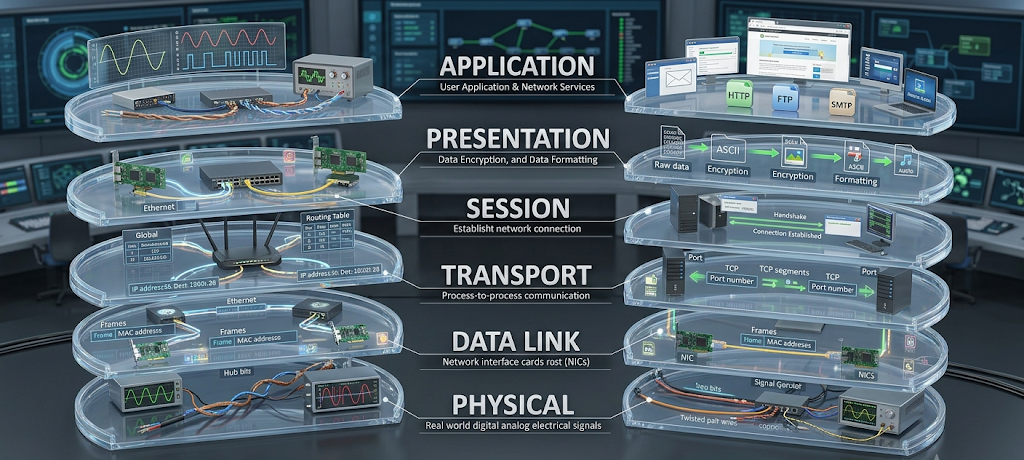
The OSI Model 7 Layers Explained
Layer 7: Application Layer
The Application Layer is the most top level of the OSI model, and the most user-friendly. It offers services directly to the applications that human beings use daily, including Web browsers, e-mail programs, online games, and file-sharing applications. This layer is not about the applications but about the protocols and services that enable software programs to send and receive information across a network. The Application Layer facilitates the browser to request information from the web server and then receive the requested information from the web server.
Examples of common protocols that belong to the Application Layer are: HTTP and HTTPS (web pages), SMTP (email communication), FTP (file transfer), and DNS (converts website names to IP addresses). For instance, when a student enters a web site name in a Web browser, the Application Layer assists in tracking down the server and requesting the Web page. If this layer didn’t exist, then user applications would not be able to have a standard method of communicating with network services. It is the connecting link between people and what is going on in the background.
Layer 6: Presentation Layer
The Presentation Layer is concerned with making data accessible and usable by various systems in an appropriate manner. This layer provides for the translation of information in the required format before it is passed to another device, because computers store and represent the information in different formats. It processes data, encrypts data, compresses data, etc., which are important in today’s digital world of communication.
A basic example of the Presentation Layer is converting data into a format that another computer will be able to work with. This layer can be used when a user sends an image to ensure that the image will be correctly displayed on the receiving device. Another significant function is encryption, which helps safeguard sensitive data from unauthorized access. For example, when someone makes an online payment, encryption mechanisms can be used to safeguard financial information as it moves over the Internet. Another advantage of compression is that it also helps to boost efficiency by shrinking file sizes, thereby enabling data to flow through networks faster.
Layer 5: Session Layer
The Session Layer coordinates sessions of communication between devices. A session is a time period during which two systems create, maintain, and terminate a relationship as they share information. This layer helps to keep communication organized and allows devices to keep exchanging data without losing track of each other.
In this case, during an online video call, the Session Layer assists in keeping participants connected. Communication can be temporarily interrupted, which can be managed using session-related functions to coordinate the exchange of information and manage the conversation. It is also responsible for managing communication checkpoints that enable systems to recover from some interruptions without having to restart the process. Many current networking systems are able to incorporate functions from the Session Layer with other layers, but this approach is useful for understanding connection management.
Layer 4: Transport Layer
The Transport Layer ensures reliable delivery of data from device to device. Permits information to be put across clearly, effectively and in the right sequence. This layer breaks down big data into smaller pieces called segments and coordinates the delivery of these segments to their target.
Transmission Control Protocol (TCP) and User Datagram Protocol (UDP) are two important protocols for this layer. Reliability is the focus of TCP, as it checks whether the data is there successfully or not and will ask for its retransmission if it is not. When you download a document, the parts of the document have to arrive correctly – TCP is used. UDP, on the contrary, gives top priority to speed rather than reliability and is typically employed for activities like on the internet gaming, live broadcasting, or data streaming, that requires speedy communication over perfect accuracy.
The Transport Layer also controls flow, preventing a faster sender from sending too much to a slower receiver. It is used to enable efficient communication between devices and is one of the primary factors in making network connections stable.
Layer 3: Network Layer
The Network Layer is responsible for determining how data travels from one network to another. It provides logical addressing, routing and the selection of the optimal path to reach the information. The most significant idea in this layer is Internet Protocol (IP), which gives unique addresses to the devices.
All devices with a connection to the internet are assigned an IP address that serves to identify the location of the device in the network. The Network layer looks at the destination address and determines which path the information should take through the various routers to the destination device. Most routers function at this layer since they route data packets between networks.
For instance, if the user is trying to access a website that is located in another country, the Network Layer is used to decide on the path through which the data packets will pass through various networks. If it wasn’t there, there would be no internet, since devices would not know how to send information.
Layer 2: Data Link Layer
The Data Link Layer deals with interaction among devices in the same physical network. It provides reliable data transfer between directly connected devices and control of access to the network medium. This layer maintains frames of data, and identifies devices by using hardware addresses known as Media Access Control (MAC) addresses.
Data Link Layer can be subdivided into two parts: Logical Link Control (LLC) and Media Access Control (MAC). The LLC provides for communication between the networking protocols and the MAC provides for access to the physical network. Network switches primarily work at this layer as they utilize MAC addresses to forward data to the proper device.
An actual example of this layer is a home wireless network. The Data Link Layer is used to ensure that data is sent to the right device in the same local area network as the laptop. It also finds some of the errors that can be made during the transmission process and can help ensure reliable communication.
Layer 1: Physical Layer
The Physical Layer is the bottom layer in the OSI model, representing the physical layer of the network and the actual transmission of the data signals. Covers hardware elements that are essential for communication such as cables, connectors, radio signals, network cards, electrical or optical signals.
At this layer, the data is translated to bits, whether by electrical signals, light signals or wireless communications. The Physical Layer is where devices like Ethernet cables, fiber optic cables and wireless antennas reside. The issue typically lies at this level if there is a problem with the network cable or the wireless signal is weak.
The Physical Layer – for instance, the transfer of electrical signals through an Ethernet cable when a computer is connected to a router. This layer is the easiest to understand conceptually, but is also very significant because all other layers of communication rely on a functioning physical layer.
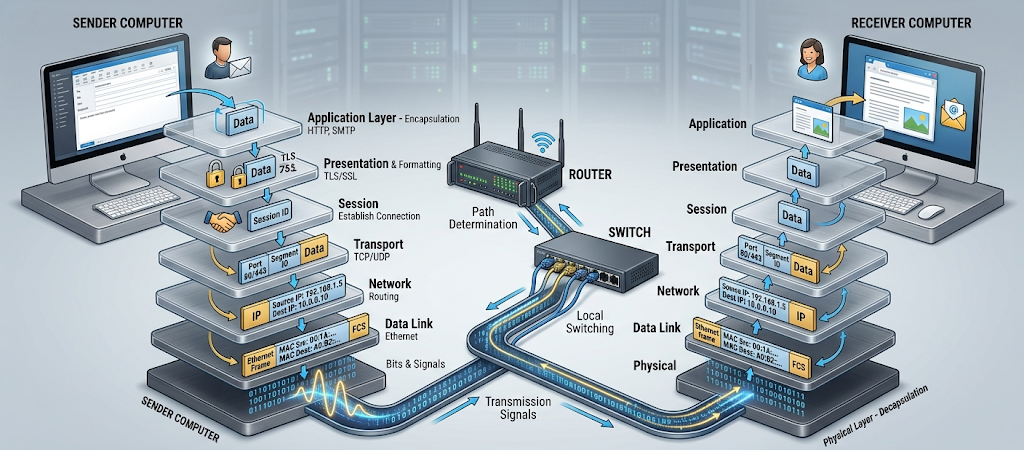
Data Flow Through OSI Model
The OSI layers are traversed in a certain sequence when information is transmitted over a network. The data sent by the user starts in the Application Layer and passes down through the Presentation Layer, the Session Layer, the Transport Layer, the Network Layer, the Data Link Layer, and the Physical Layer. The information added to the data in each layer is encapsulated. This extra information is used to assist the receiving device in correctly interpreting the data.
For instance, the Application Layer constructs the message request, the Presentation Layer formats and encrypts the information, the Session Layer establishes a connection, the Transport Layer breaks up the message into segments, the Network Layer writes addressing information into the message, the Data Link Layer forms frames, and the Physical Layer converts all of this into signals to be sent. The receiving device receives the information, and the reverse process occurs (decapsulation).
This multi-layered design ensures that networking is more structured and each layer is responsible for a particular function. Engineers can concentrate on one component of communication and not the whole system at once. That is why OSI model is useful for troubleshooting network issues.
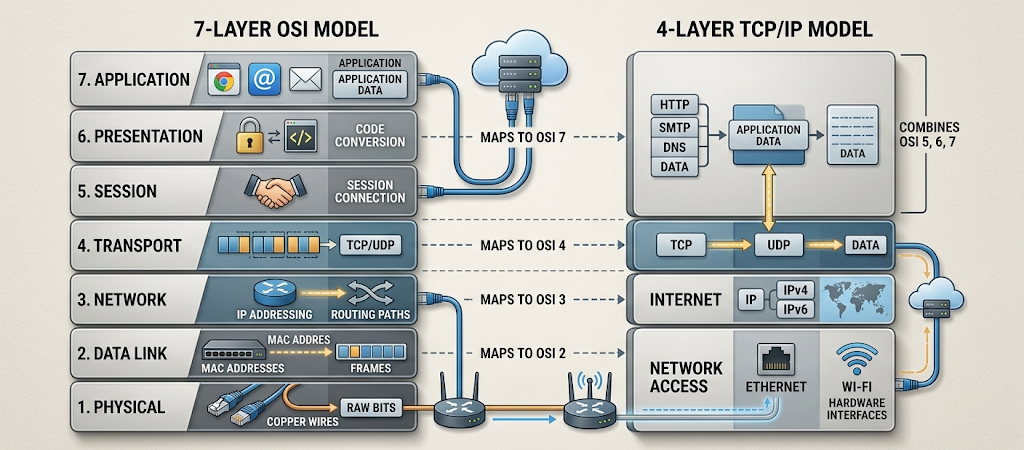
The OSI Model vs TCP/IP Model
While the OSI and TCP/IP models describe network communication, they are different. The OSI model has seven layers, and it was created as a general reference model. Internet communications follow the TCP/IP model which merges several OSI layers, and usually has four layers: Network Access, Internet, Transport and Application.
The OSI Application, Presentation, and Session Layers are grouped together in the Application Layer of TCP/IP. The Transport Layer is mostly the same, dealing with communication reliability and data transfer. The Internet Layer is responsible for activities such as the OSI Network Layer, and the Network Access Layer is responsible for activities such as the OSI Data Link Layer and Physical Layer.
The OSI model is very popular in the classroom, because it offers a detailed explanation of networking processes. The TCP/IP model is more practical because it’s the technologies that are used by the internet today. Students gaining knowledge of both models will be able to have a thorough knowledge of networking concepts, and link theory to practical networking systems.
Why the OSI Model Is Important for Students and IT Beginners
By familiarizing students with the OSI model, they will gain a solid understanding of computer networks. It will assist newcomers grasp how technologies operate in tandem, and will make steep networking concepts more accessible to learn. Students can take a look at each layer individually and learn what it does and how it works as a part of the networking process, rather than seeing it as a single, confusing process.
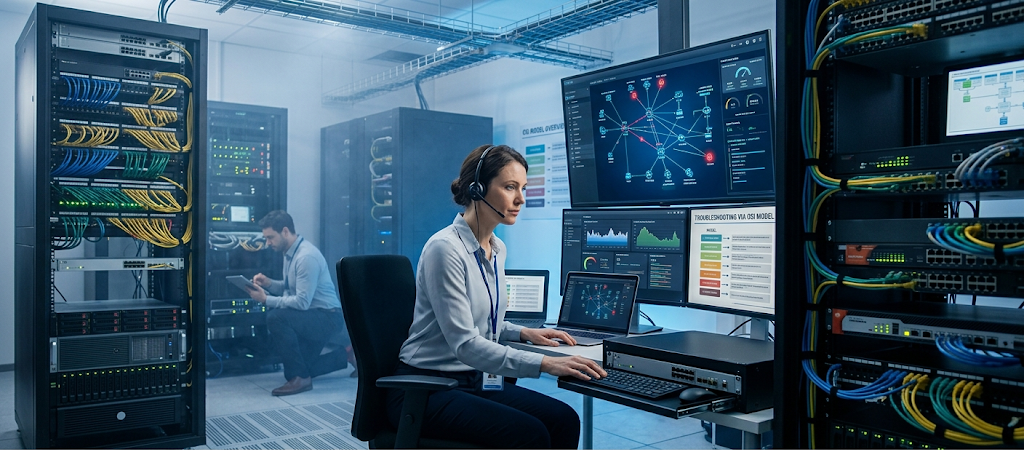
This model can also be used to troubleshoot. The OSI layers are an aid for IT professionals to detect network issues. For instance, if a computer cannot access a network, the technician can first check the Physical Layer for damaged cables or hardware, then work his way up the layers to determine the cause. This systematic approach allows timely and efficient problem solving.
The OSI model also can be useful for technology careers. There is a need for students to have knowledge of data transfer across networks when studying cybersecurity, cloud computing, network administration and software development. Many advanced IT concepts are built on the foundation provided by networking models.
Building a Strong Networking Foundation
The OSI model is one of the most crucial concepts for anyone starting into a computer networking career. It breaks up communication into seven layers to give a clear understanding of how data gets passed from device to device, and how various technologies are used together. From the Physical Layer which sends the signals, to the Application Layer which provides user services, each layer is crucial to good communication.
While the TCP/IP model is widely used in modern networks, the OSI model remains a valuable learning tool due to its comprehensive specification and its usefulness in troubleshooting. Those who have learned the seven layers can better analyze network systems, address technical issues, and delve deeper into the world of information technology, making them more capable of understanding the underlying mechanisms and potential solutions to complex IT-related challenges. Implementing knowledge on networking frameworks, such as the OSI model, establishes a solid basis for comprehending the digital world that joins all things with each other throughout the globe.