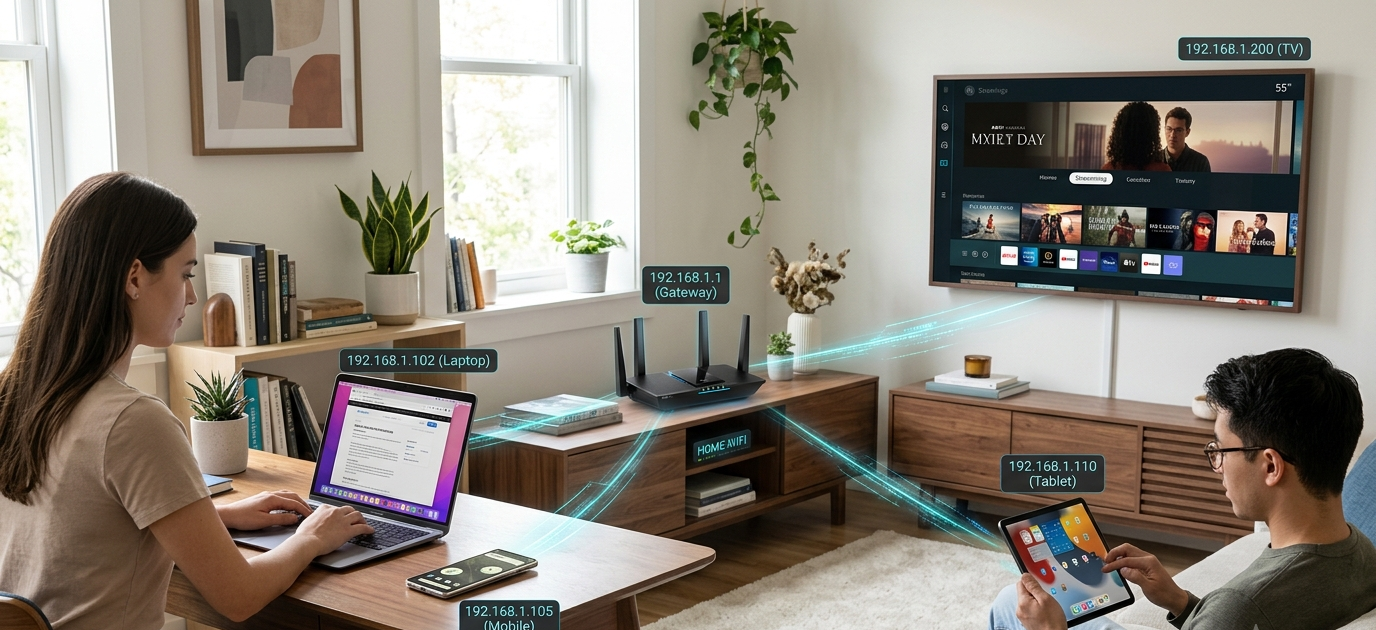
All devices on the internet or LAN must have an identity to which information can be directed. Whereas a house has an address for the postman and the parcel man so that they both get it right in sending the mail, computers, smartphones, tablets and smart television also have an address, an IP address, that they need to be addressed exactly to make sure that the mail goes to them. If there were no IP addresses, devices would not be able to communicate over a network, nor would they be able to send or receive data. As you navigate Web sites, watch a video online, read an e-mail or use a mobile app, your device uses an IP address to connect to the rest of the world.
Many use the Internet daily, but the concept of an IP address may sound somewhat confusing due to technical networking concepts. In general, though, it’s a very basic concept: an IP address is a unique number that is assigned to a device to help identify it on a network. It enables devices to identify and communicate with each other without a lot of effort. With billions of devices requiring a robust network to communicate with each other, share information, and utilize online services, IP addresses play a crucial role in the functioning of modern digital communication.
In this article, you will learn about what is meant by an IP address, why each device that is connected to the internet requires an IP address and the major types of IP address. We will be discussing in simple terms between IPv4 and IPv6, between public and private IP addresses, and between static and dynamic IP addresses, and how devices are identified and connected in an internet network even if you are new to it.
What is an IP address?
An Internet protocol (IP) address is a number used to identify the unique address of a device on a network. IP” refers to Internet Protocol, a collection of rules that enable devices to connect with each other via the internet or other communications networks. IP address identifies a device and information about where the data should be delivered.
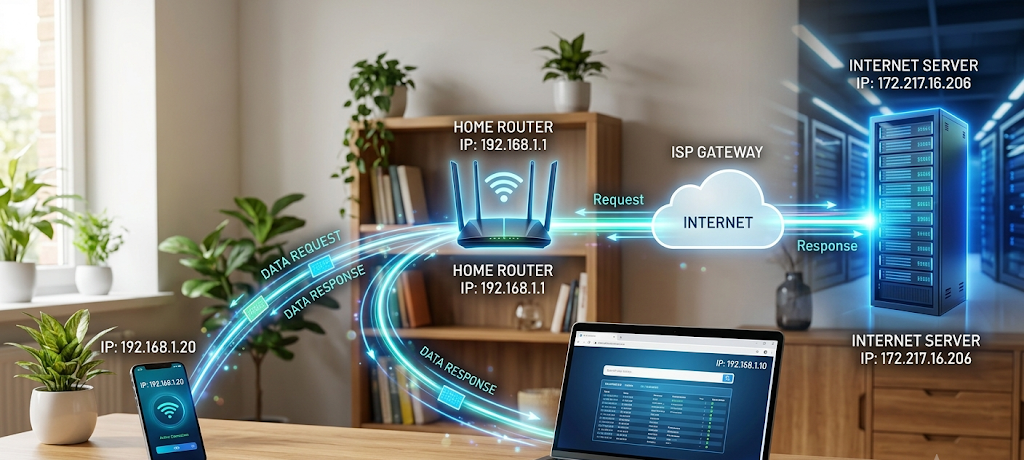
Every time that you log on to the web from your laptop, smartphone, or gaming system, your device gets an IP address. This address enables websites, online services and other devices to communicate with you. For instance, when you search for something online, your device submits a request to the web site’s server, which is identified by your IP address. Then the server will know where to send the information that is asked for.
Unlike a home address, an IP address doesn’t necessarily provide the exact physical address of the internet connection. Instead, it is used to detect the device in a network and to facilitate system-to-system communications. IP addresses are used by internet service providers, businesses, schools and organizations to control the connection and get the data to the right person.
All the devices involved in any communication over a network require some sort of identification. The Internet would not be able to coordinate billions of devices or give a person accurate information if there were no IP addresses. They help enable modern digital communication to run smoothly.
Why do all devices need an IP address?
Networks require identification to pass information from one device to another, and each device on the network must have an IP address. Now, try to think about sending a letter without the receiver’s address. The postal service would have no address to send it to. Likewise, in an online exchange of data, addresses are used to identify where data should be sent.
For instance, when you view a video on a streaming service, your device communicates with the company’s servers. Your request is processed by the server and the video is sent back to your device. Your IP address allows the server to find out where to send that information. Your device would not be able to communicate with other devices without an IP address.
IP addresses also assist networks to handle multiple gadgets. They can be smartphones or computers, smart speakers, printers or televisions, and they can be part of a home network. Each device must have its own address to be known by the router and to be able to receive the information. Having all the devices with the same address would create a network “confusion” and communications might be missed or misdirected.
Additionally, the IP address can help administrators to track, manage, and protect networks. IP addresses are used by companies to grant access and to monitor, troubleshoot and secure their system from unauthorized access. While users may not be aware of them while surfing the web, IP addresses have a huge influence behind the scenes.
IPv4 and IPv6
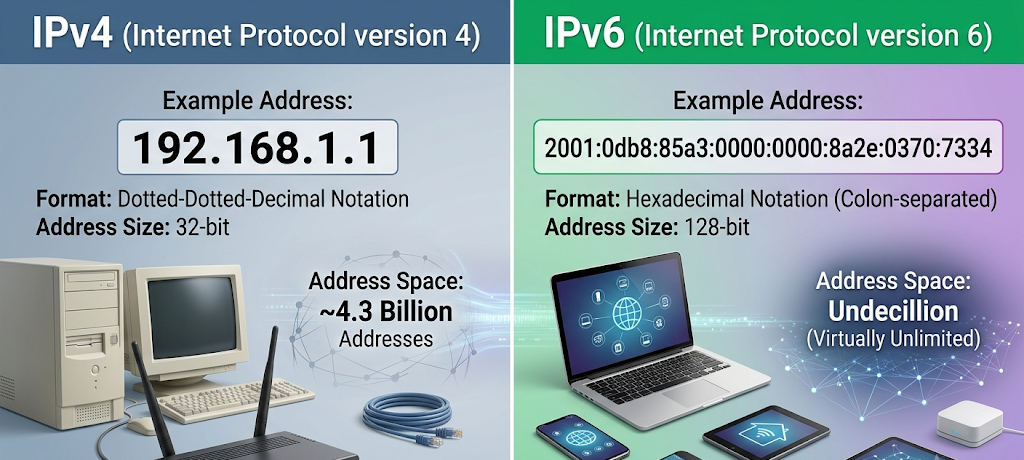
IPv4 (Internet Protocol version 4) is the standard version of the Internet Protocol used today, and IPv6 (Internet Protocol version 6) is the new standard version of the Internet Protocol used today. The two are fundamentally similar for they both provide addresses for devices, but different due to the number of addresses they support.
IPv4 is the older version and more widely used. It was launched when there were not that many devices on the Internet. IPv4 addresses are written as a series of four groups of numbers that are separated by periods. An example of an IPv4 address is 192.168.1.1. Numbers of 0 to 255 can be used for each group, which allows for billions of addresses.
As the Internet grew, more devices started to go online. The demand for IP addresses rose as a result of the influx of smartphones, smart home devices, computers, cars and other technologies. The available IPv4 space was running out, and the need for a newer system was needed.
To overcome this issue, IPv6 was developed to offer far more addresses. IPv6 has a longer format that is written using colons and letters. An example of an IPv6 address looks like 2001:0db8:85a3:0000:0000:8a2e:0370:7334. While the IPv6 addresses are more complex, they can support an overwhelming number of devices without exhausting the address space.
It’s crucial to understand that IPv6 was created as a replacement for IPv4. Although IPv4 is still widely used, IPv6 is gaining traction due to its enhanced addressability and network efficiency.
Key Differences between IPv4 vs IPv6
Address Availability
Between IPv4 and IPv4 we see that which is the address pool they present to users is the largest difference. IPv4 has a pool of around 4.3 billion unique addresses. At the time of its introduction this was a very large number, but what we did not account for was the growth in internet connected devices which in turn made that pool a deficient resource.
IPv6 has a vast address pool at its disposal. It is home to trillions of unique addresses which in turn is right for the ever growing number of world wide devices. This large pool sees to it that as technology advances and we connect more devices to the net we do not run into address issues.
Address Format
IPv4 and IPv6 addresses present differently. IPv4 is made of four decimal numbers which are spaced by breaks which makes it easier for humans to read. For example an IPv4 address may look like 172.16.0.1.
IPv6 which uses hex numbers separated by colons. Though it may look more complex in structure, the processing for it is very efficient. IPv4 was created to deal with the growth and scale of today’s internet.
Network Performance
IPv6 has better network performance. It was built for today’s internet which in turn we see implementation of features that do away with some of IPv4’s issues.
While many users may not see a great speed difference between IPv4 and IPv6 in day to day use, IPv6 does provide for better growth of the network and large scale communication.
Public and Private IP Addresses Explained
Another way to look at IP addresses is to break them out into public and private. Which type of IP address you see depends on what the device is doing. It will be public if the device is on the wide open internet and private if it is communicating within a local network.
What Is a Public IP Address?
A public IP address is one which is given out by an internet service provider (ISP) to a network. It is available on the internet and allows network access to the World Wide Web, online services, and other networks.
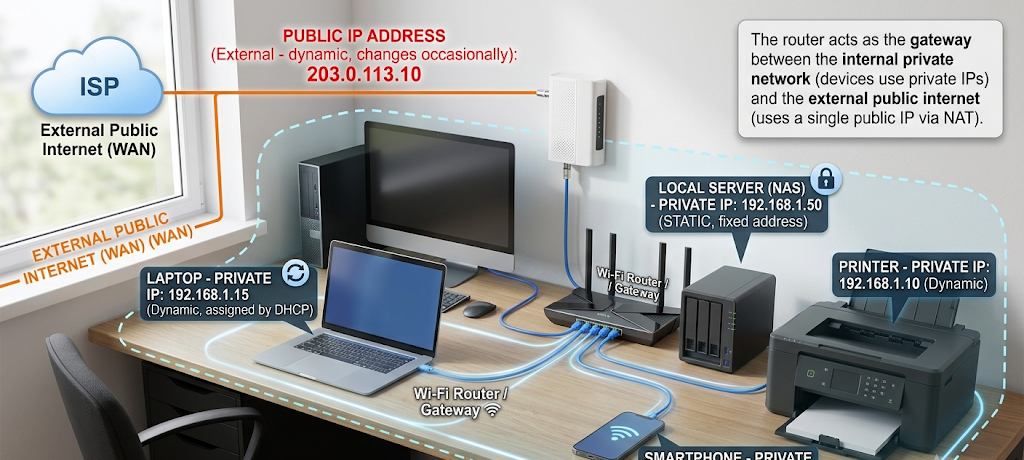
For instance, what you see as your home’s local network that is provided by your Internet service provider is assigned a public IP address. This IP is what the outside world sees as your home network when you are on the Internet. When you visit a website, it is logging this public IP address of your network.
Public IP addresses must be distinct at which no two different networks can have the same public address. If in fact there were to be the same public addresses in multiple networks, the internet would see it as a confusion issue which is also a cause for data to drop.
Businesses use public IP addresses for hosting of their websites, online services, and remote access systems. These allow external parties to connect to certain servers or resources.
What Is a Private IP Address?
Private IP addresses are used in local networks and do not have public access. In homes, schools, and offices devices usually are given private IP addresses by a router.
For instance, in your home network which is running on Wi-Fi each of your smartphone and laptop will be assigned a different private IP address. These addresses the router uses to recognize each device which in turn allows it to pass along info properly through the network.
Private IP addresses play a role in conserving public IP addresses as is made possible by Network Address Translation (NAT). Through this we see that in a home or office setting many devices are able to use a single public address to go online.
Static vs Dynamic IP Addresses
IP addresses also are of two types based on whether they are static or dynamic which in turn determines if they change or not.
What Is a Static IP Address?
A static IP is a permanent address that will only change if a manual modification is made. In the case of businesses, servers, and large organizations which require a consistent address for which their users can count on, static IP’s are used.
For instance , a company that runs a website may use a static IP address which in turn allows us to always connect to the same server. A static address which in turn makes management of services that require constant access easier.
Static IP addresses also typically require extra setup and may come at a higher price from the Internet service provider. Also they aren’t always required for home users.
What Is a Dynamic IP Address?
A dynamic IP is given out to devices and is subject to change at any time. In the home setting most internet users have dynamic IP addresses which is a result of our internet providers use of the Dynamic Host Configuration Protocol (DHCP) system.
When you connect your device to a network what the router does is give out an IP address. Should you disconnect and then reconnect at a later time you may notice a different address.
Dynamic IP addresses are a preferred choice which is due to the fact they are easy for providers to manage. Also they enable companies to reuse addresses which in turn allows them to assign a different, rather than a permanent, address to each user.
For tasks that include browsing the web, streaming video, and social media use dynamic IP addresses do it very well.
What role do IP addresses play in our everyday internet use?
Although many people don’t think twice about their IP address, it is a player in many of our online actions. We see use of IP addresses for which content to present to the user, improved security measures, and to determine the general location of the visitor. Also we see use of IP addresses in which to identify abnormal activity or to secure accounts.
Internet providers use IP addresses for customer connection management and network performance. In workplaces and schools admins use IP addresses to run networks and control resource access.
Also a single IP address doesn’t tell the full story. It identifies a network connection not a person. For an exact person to be determined from an IP address more info is needed.
Conclusion
IP addresses are at the core of what the internet does. They enable the connection of a multibillion piece network of devices that share info and use online services. Were it not for IP addresses, we would see the breakdown of sites, apps, and digital communication infrastructure.
Comprehending the fundamentals of IP addresses will improve your understanding of the Internet. IPv4 and IPv6 present the address which global devices use to connect, at the same time public and private IP addresses do which within local networks’ communication to the Internet. Static and dynamic IP addresses present in different models of managing device connection according to the requirements of the users and organizations.
As technology is growing and we see more devices getting connected to the network IP addresses will still be at the core of what makes digital communication reliable, efficient and secure. For the beginner that is just starting out with tech or the professional looking into networking, study of IP addresses is a fundamental piece to the modern internet puzzle.