
AI image generation has exploded in the past two years—but Midjourney isn’t the only game in town anymore. In fact, many creators are actively searching for better midjourney alternatives that are easier, cheaper, or more powerful.
After personally testing dozens of tools, I’ve narrowed it down to the 5 best midjourney alternatives in 2026—including both free and paid options. Whether you’re a beginner, marketer, or designer, this guide will help you pick the right tool fast.
Part 1. Why Do We Need Midjourney Alternatives?
What Is Midjourney and Why Is It So Popular?
Midjourney is an AI image generator that turns text prompts into highly artistic visuals. It’s especially known for its dreamlike, cinematic, and stylized outputs.
I’ve used it extensively—and yes, the results can be stunning. But once you go beyond casual use, its limitations become obvious.
Why Are People Looking for Midjourney Alternatives?
From my own experience and what most users report, here are the real-world reasons people need Midjourney Alternatives:
1. Midjourney is Not Beginner-Friendly
Midjourney still relies heavily on Discord workflows. Even with its web version, I found the learning curve frustrating—especially when compared to modern drag-and-drop tools.
2. Midjourney Expensive for Casual Users
There’s no meaningful free plan anymore. If you’re just experimenting, paying monthly feels unnecessary—especially when many MidJourney alternatives offer free credits or full free tiers.
3. What Creative Limitations Does Midjourney Have?
Midjourney is great at art—but not everything else.
I personally struggled with:
- Generating accurate text inside images
- Creating product-style realistic visuals
- Controlling fine details consistently
4. Midjourney Can’t Handle Video or Multimodal Content
This is the biggest gap.
Midjourney is image-only, while modern creators increasingly need:
- Image → video
- Text → video
- Multi-format content
This is where newer tools like Pollo.ai completely change the game.
5. How Do Content Restrictions Affect Creativity?
Midjourney’s filters can be strict. I’ve had prompts blocked that seemed harmless, which interrupts workflow and experimentation.
Part 2. What Are the 5 Best Midjourney Alternatives in 2026?
Quick Comparison Table
| Tool | Best For | Key Feature | Free Plan | Platforms |
| Pollo.ai | All-in-one AI creation | Image + Video generation | Yes | Web / iOS / Android |
| Leonardo.ai | Artists & game design | Custom models & assets | 150 tokens/day | Web |
| Adobe Firefly | Professional design | Photoshop integration | Limited credits | Web / Adobe apps |
| Ideogram | Text in images | Perfect typography | Weekly credits | Web |
| DALL·E 3 (Bing) | Free & simple use | Chat-based image creation | Free | Web |
1. Pollo.ai

From my testing, Pollo AI is easily the most versatile tool here.
My Experience:
I went from a simple prompt → image → animated video in minutes. No switching tools, no complicated setup.
Key Features:
- Image generation + AI video creation
- Text-to-video and image-to-video
- Extremely simple interface
- Fast output speed
Pros:
- All-in-one workflow (huge time saver)
- Beginner-friendly
- Supports multiple formats
Cons:
- Advanced controls are still evolving
Best For:
Creators who want more than just images—especially content creators and marketers.
2. Leonardo.ai
Leonardo.ai feels like it was built for serious creators.
My Experience:
I loved the ability to switch between models and generate consistent character designs.
Pros:
- High-quality artistic output
- Custom model training
- Daily free tokens
Cons:
- Interface feels slightly complex
- Best features are paid
Best For:
Game designers, illustrators, and advanced users.
3. Adobe Firefly
Adobe Firefly shines in real-world design environments.
My Experience:
The Generative Fill feature inside Photoshop is incredibly precise—perfect for editing real images.
Pros:
- Commercially safe outputs
- Deep Adobe integration
- Powerful editing tools
Cons:
- Less creative flexibility than others
- Credit-based usage
Best For:
Designers working in Photoshop or Illustrator.
4. Ideogram
Ideogram solves one of AI’s biggest problems: text.
My Experience:
It’s the only tool where I consistently got perfect spelling and layout in posters.
Pros:
- Best-in-class typography
- Clean design outputs
Cons:
- Limited free usage
- Slower generation queue
Best For:
Logos, posters, branding, and merch design.
5. DALL·E 3 (Bing)
DALL·E 3 via Bing is the easiest entry point.
My Experience:
I just typed natural language prompts—no prompt engineering needed.
Pros:
- Completely free
- Simple to use
- Great prompt understanding
Cons:
- Limited customization
- Fewer advanced tools
Best For:
Beginners and casual users.
Final Verdict: Which Tool Should You Choose?
If you want:
- All-in-one creation → Pollo.ai
- Artistic control → Leonardo.ai
- Professional workflow → Adobe Firefly
- Text accuracy → Ideogram
- Free simplicity → DALL·E 3
My recommendation: Start with Pollo.ai. It offers the most complete experience.
Part 3. If You Could Only Choose One—Why Is Pollo.ai the Best?
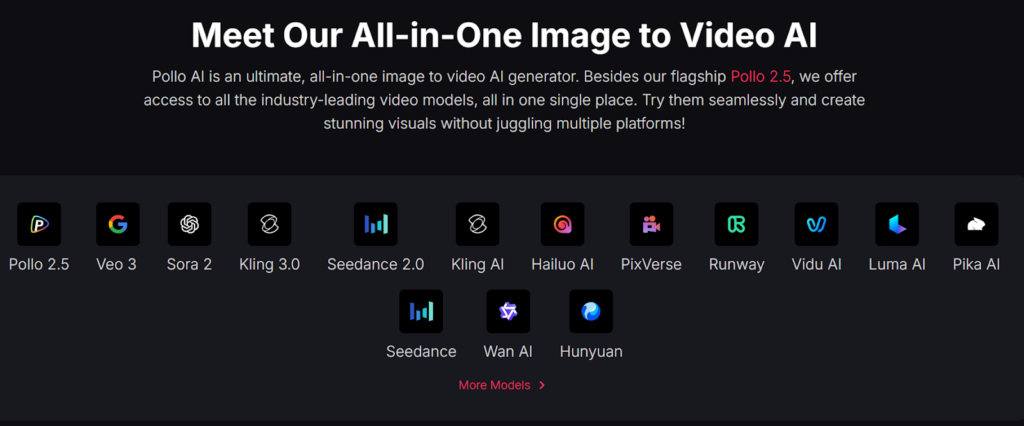
What Makes Pollo.ai Different From All Other Tools?
Pollo.ai isn’t just an image generator—it’s an AI video creation agent that integrates multiple top-tier models into one platform.
Instead of switching tools, everything happens in one place.
Why Do I Personally Recommend Pollo.ai?
Here are 4 reasons based on my actual usage:
1. Pollo.ai Save Time Across Workflows
I didn’t need separate tools anymore. Image + video + editing all happen in one flow.
That alone cut my content production time by more than half.
2. Pollo.ai is Easy to Use
No Discord. No commands.
Just type → click → generate.
Even on mobile (iOS & Android), the experience feels seamless.
3. Pollo.ai is More Powerful Than Image-Only Tools
Most tools stop at images.
Pollo.ai goes further:
- Turns images into videos
- Adds motion automatically
- Supports storytelling formats
This is crucial for TikTok, YouTube Shorts, and ads.
4. Balance Simplicity and Advanced Capability
Despite being beginner-friendly, it still delivers:
- High-quality visuals
- Fast rendering
- Consistent results
That balance is rare.
If you’re serious about content creation in 2026, image-only tools are no longer enough.
Pollo.ai is the closest thing to a complete AI creative suite right now.
Part 4. FAQs
What Are the Best Free Midjourney Alternatives?
The best free options include DALL·E 3 (via Bing) and Leonardo.ai, both offering strong image quality with no upfront cost. Free plans typically include daily or weekly credits.
Which Midjourney Alternative Is Best for Beginners?
DALL·E 3 and Pollo.ai are the easiest to use. They rely on natural language prompts instead of complex commands, making them ideal for first-time users.
Which Tool Is Best for Generating Text in Images?
Ideogram is widely considered the best for text rendering. It produces accurate spelling and clean typography, which most AI tools struggle with.
Can Midjourney Alternatives Generate Videos Too?
Yes—but not all. Pollo.ai stands out because it supports text-to-video and image-to-video, while most others are image-only.
Are These Midjourney Alternatives Safe for Commercial Use?
Adobe Firefly is the safest choice for commercial projects due to its licensed training data. Other tools may allow commercial use, but you should always check their terms.
Conclusion
Midjourney is still powerful—but it’s no longer the default choice.
The rise of Midjourney alternatives means you now have tools that are:
- Easier to use
- More affordable
- More versatile
If you want a simple recommendation:
👉 Start with Pollo.ai—it’s the most complete, future-proof option in 2026.
References
- Industry reviews of AI image tools (2025–2026 updates)
- First-hand testing of Pollo.ai, Leonardo.ai, Adobe Firefly, Ideogram, and DALL·E 3
- Public feature documentation and pricing pages of each platform


