Working out of a hotel room sounds convenient until it is time to sort through emails, show up to meetings, and push projects to the finish line on a tiny laptop screen. You end up switching between tabs, and somehow even the simplest tasks feel slower than they are supposed to.
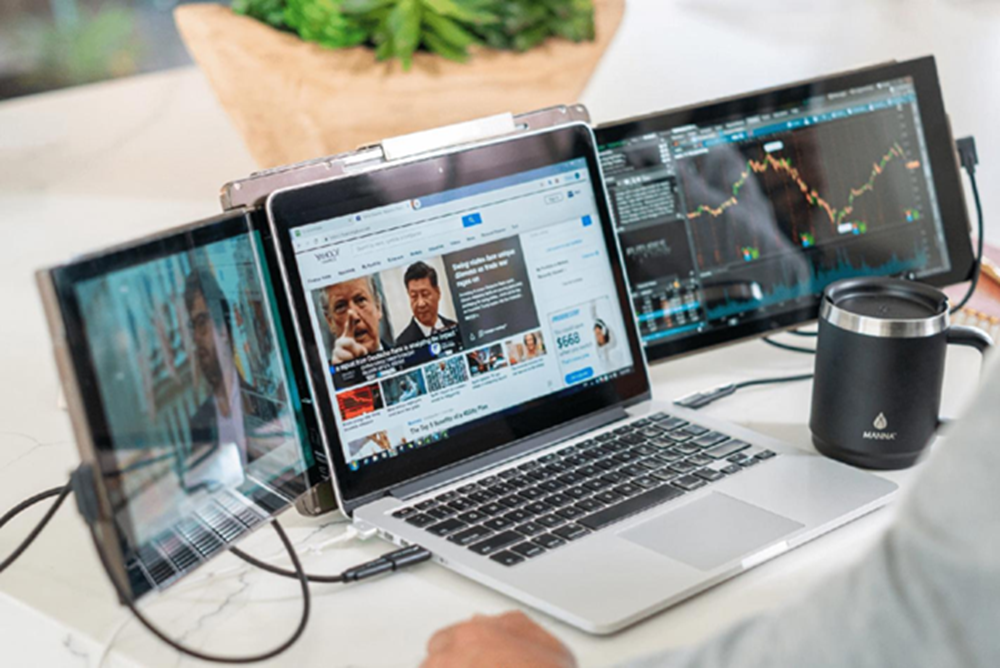
A second screen can make a noticeable difference when working away from home. Tools like the Mobile Pixels Trio laptop screen extenderhelp create a more comfortable setup without taking up much space in a travel bag.
The Small Laptop Screen Problem Follows You Everywhere
Remote work helps people stay productive from almost anywhere, but each location has its limitations, and you usually notice them pretty fast. For instance, hotel desks are often small, airport lounges can turn into a crowded little maze, and coffee shops rarely have the ideal setup. In these moments, your laptop becomes the whole office, not just a tool.
The challenge appears when several tasks need attention at the same time. A video meeting may be open while project notes sit in another tab. An email arrives while a spreadsheet still needs updating. Moving back and forth between windows interrupts concentration and makes work feel more complicated.
This is where a laptop screen extender starts to make sense. Instead of hiding important information behind multiple tabs, it gives remote workers more room to keep everything visible.
How a Second Screen Changes Your Daily Workflow
The biggest advantage of a second screen is how naturally it fits into everyday work.
Meetings become easier to manage because one screen can display the video call while the other holds notes, agendas, or supporting documents. There is less searching for files during conversations and fewer interruptions when someone asks a question.
Writing tasks also become smoother. Research material can stay open on one display while reports, presentations, or proposals are created on the other. Having both visible at the same time helps maintain momentum.
A second screen is also useful for routine work. Emails can remain open while projects continue on the main display. Documents can be compared side by side. Deadlines, calendars, and task lists stay within view instead of disappearing behind another window.
Why Portability Matters More Than Most People Think
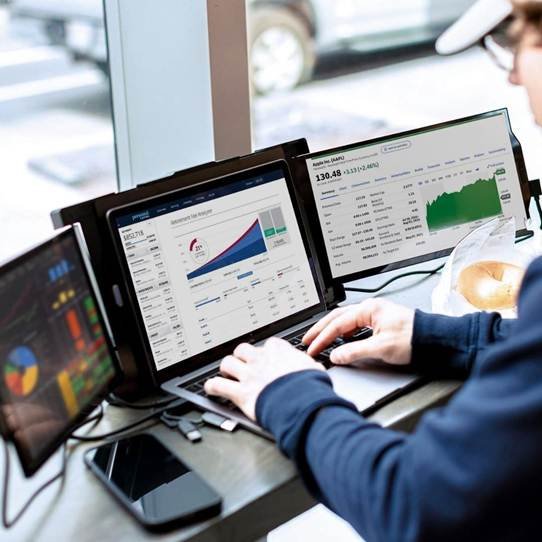
A traditional monitor is not practical for people who travel often. Carrying extra equipment quickly becomes frustrating when moving between locations.
Portable screen extenders solve that problem because they are designed with mobility in mind. Many fit neatly alongside a laptop and add very little weight to a backpack.
Setup is usually quick as well. A single cable is often enough to connect the display and begin working. That means less time adjusting equipment after arriving at a destination and more time focusing on the work itself.
Another benefit is consistency. The same workflow can be maintained whether the workspace is a hotel room, a shared office, or a dining table during a business trip.
Who Benefits Most From a Laptop Screen Extender?
A lot of professionals enjoy having more screen space. Freelancers, for example, often manage client contact while they’re still finishing the actual work that’s in progress. Consultants tend to crisscross between various places, and they need a setup that can adapt accordingly. Remote team members spend most of their hours switching between meetings, then jumping back into active tasks.
Content creators can benefit from a laptop screen extender by having their editing tools on one display and the source material on another. That extra room helps keep everything more organized, with a smoother workflow, and you don’t even need a permanent office.
A Smarter Way to Work From Anywhere
Remote work isn’t about being stuck to a single desk. With more and more professionals working from different locations, visual real estate is becoming valuable. Using a postable display, you can reduce the frustration that comes with a crumpled workspace and make your daily tasks easier to manage.