Music is a part of our daily lives. Sometimes we want to dance to fast beats, but other times, we just want to sit back, close our eyes, and relax. Have you ever heard a song on YouTube that sounds deeper, slower, and like it’s echoing in a large room? That is called Slowed + Reverb music.
In the past, you needed to be a computer expert to make this kind of music. But now, thanks to the Slowed & Reverb Studio, anyone can do it for free. This article will teach you everything about this amazing tool and how you can become a music creator in just a few minutes.
What is Slowed + Reverb? (Explained Simply)
Before we look at the tool, let’s understand the two main parts of this music style.
1. The “Slowed” Part
When we slow down a song, we reduce its “BPM” (Beats Per Minute). Think of it like a video moving in slow motion. The singer’s voice becomes lower and more soulful. It makes the music feel more emotional and calm.
2. The “Reverb” Part
“Reverb” is short for reverberation. It is the sound you hear when music bounces off walls. If you clap your hands in a big empty hall, the sound stays in the air for a second. This “spacey” feeling makes the music sound like a dream.
When you put these two together, you get a “Vibe” or an “Aesthetic.” It is the perfect music for late nights, rainy days, or long drives.
How to Use Slowed & Reverb Studio (Step-by-Step)
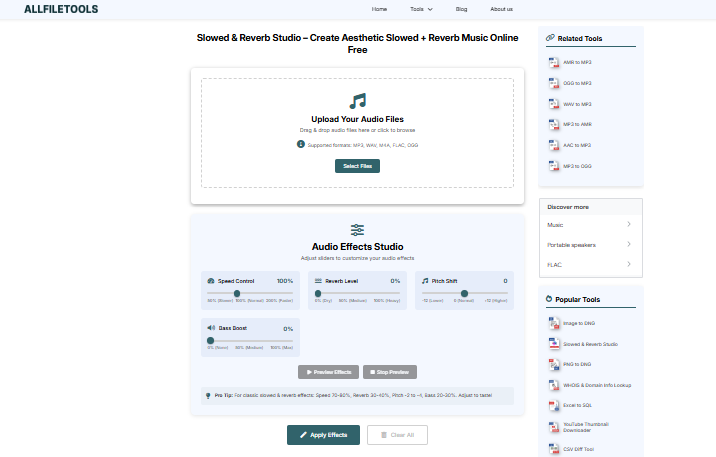
Using this tool is very simple. You don’t need to sign up or give your email. Just follow these five easy steps to create your masterpiece:
- Step 1: Open your web browser and go to the official Slowed & Reverb Studio tool on AllFileTools.com. And use this tool Slowed & Reverb Studio
- Step 2: Click the “Select Audio” or “Upload” button to choose the music file you want to edit from your device.
- Step 3: Use the Speed Slider to slow down the song and the Reverb Slider to add that dreamy echo effect.
- Step 4: Click the “Process” or “Convert” button and wait a few seconds for the tool to work its magic.
- Step 5: Click the “Download” button to save your new aesthetic Slowed + Reverb track to your phone or computer.
Why is This Music Style So Popular in 2026?
You might see Slowed + Reverb versions of every famous song on YouTube and TikTok. But why do people love it so much?
- It’s Great for Studying: Regular music can sometimes be distracting because it is too energetic. Slowed music stays in the background, helping students focus on their homework.
- It Helps with Sleep: The deep tones and slow beats act like a lullaby for the brain.
- It Feels Nostalgic: This music style often makes people think of happy memories. It has a “vintage” or “retro” vibe that feels very comforting.
- The “Aesthetic” Trend: On social media, people use this music to make their videos look “cool” and “moody.”
Features That Make This Tool the Best
When we talk about an “All-in-One” studio, we mean it. Here are the technical features explained simply:
High-Fidelity Audio Processing
The tool uses a special “pitch-shifter.” Normally, if you slow down a song, the voice sounds like a monster. But this tool keeps the voice sounding smooth and natural, just deeper.
Real-Time Editing
You don’t have to wait for the song to “process” to hear changes. As you move the sliders, you can hear the music changing instantly. This saves you a lot of time.
Mobile and Desktop Ready
Whether you are using an iPhone, an Android, or a Windows laptop, the website adjusts to fit your screen perfectly.
Tips for Making the Perfect Slowed + Reverb Track
If you want your music to sound like the famous “Lo-fi” channels on YouTube, follow these tips:
- Choose the Right Song: Sad songs, romantic songs, and R&B tracks sound the best when slowed down. Fast rap songs can also sound very cool and “trippy.”
- Don’t Overdo the Reverb: Too much reverb makes the song sound “muddy.” You want it to sound like a hall, not a deep ocean.
- Use Headphones: When editing, always wear headphones. This helps you hear the small details in the echo that you might miss on phone speakers.
- Check the Pitch: Sometimes, slowing down a song changes the “key” of the music. Make sure the singer still sounds good!
Is It Legal and Safe?
Yes! Using the Slowed & Reverb Studio is completely safe.
- Privacy: The tool processes your audio and doesn’t share your private files with anyone else.
- Safety: There are no hidden “viruses” or “malware.” It is a clean, functional web tool.
- Copyright Note: Remember, if you plan to upload your slowed song to YouTube, the original artist still owns the song. Always give credit to the original creators!
Frequently Asked Questions (FAQs)
Can I use this tool on my iPad?
Yes! It works on any device that has a web browser and an internet connection.
How long does it take to finish a song?
Usually, it takes less than 60 seconds. It is very fast!
Do I need to be a music expert?
Not at all. This tool is built for everyone—from kids to grandpas!
What is the best format to download?
MP3 is the best because it works on every music player and takes up very little space.
Final Thoughts: Start Your Creative Journey Today!
The world of music is changing. You no longer need a big studio or expensive equipment to be creative. With the Slowed & Reverb Studio, you are the boss. You can take any song and give it a whole new soul.
Whether you want to create a playlist for a rainy day, make a viral TikTok video, or just relax after a long day at school, this tool is your best friend. It is simple, free, and incredibly fun to use.
Try it out today and turn your favorite music into an aesthetic dream!
🔹 Explore more powerful file conversion and online utilities at AllFileTools –
🔹 For technical support, digital solutions, and expert services, visit LetDigitalFly IT Services –
🔹 Discover additional career and productivity resources at Resume Slip Builder –