While programming languages, algorithms, testing, debugging, and system architecture are all key to software development, communication is also a crucial component of the success of a software project. Often, developers have to tell someone how a system works, describe why a technical decision has been taken, give instructions for the installation of an application, document an API, or tell what has been changed in a new release. Technical writing makes these activities easier by organizing and making technical information understandable.
Technical writing is not about taking technical information out or simplifying explanations to the extreme. Instead, it’s about communicating accurate information in a manner that aligns with the expectations, objectives, and understanding of your target demographic. In the software development world, effective technical writing can prevent misunderstandings, enhance teamwork, streamline project maintenance, and aid other developers in using unfamiliar systems more effectively.
What is Technical Writing in Software Development?
Technical writing for software development refers to writing information that communicates about a software system, software development process, programming concepts, system, tools, or software decisions. Technical writing differs from creative writing, in that it is mainly accurate, clear, useful and structured. A developer can write documentation for a new application, describe an installation procedure, document an API endpoint, explain a configuration option, or document a way to solve a problem.
The audience could be professionals ranging from experienced programmers to novices, project managers, system administrators, testers, or end users; this will dictate the level of expertise of the writing. The first step in effective technical writing is to determine what readers want to do and then to give them the information they need to do it. A good document should give readers information in a timely manner without having to decipher complex sentences or trawl through irrelevant content.

Importance of Technical Writing to Developers
Technical writing is an important aspect of the software development life cycle as software is not usually developed, or maintained, by a single person. Documentation, code comments, specifications, guides, issue descriptions and release notes are used to communicate between development teams. If there is no documentation, developers can waste time asking questions, researching decisions made earlier, or getting a grasp of code they don’t know. Also, documentation can be of great help in case team members change, projects increase in size, or software has to be maintained months or even years after its initial creation.
Good technical writing can help save knowledge that otherwise may be lost when someone moves on to another project. It can also be used to communicate with technical and non-technical stakeholders what the system does and what are its limitations. So, technical writing is not an ad hoc activity that’s completed at the end of the programming stage, but rather a part of software engineering.
Key Principles of Professional Technical Writing
The key principles of professional technical writing are: clarity, accuracy, consistency, organization, relevance and audience awareness. Clarity involves readers being able to read what the writer is trying to say without wading through unnecessary complexities of language. Accuracy would refer to the technical information, instructions, examples, commands and explanations should accurately depict the software that is being described. Consistency is the uniformity of things in a document such as the same language, formatting, naming and explanations. An organization is useful to help the reader to go from one idea to the next and to find the information he/she needs when it is needed. Relevance is that documentation should contain information which is relevant to understanding or use of the documentation subject, and not bury the reader in unnecessary information. Lastly, developers should think about the audience they are writing for when they write: novices, veterans, system administrators, customers, or others. The principles are interconnected to create a practical documentation process instead of just informational.
Writing README Files
Commonly, a software project will have a README file as one of the initial documents that developers will come across. A README provides an introduction to a project, and provides information to the reader about the software and how to get started. Good README files can be used as a starting point for a project, containing a brief description of the project, how to install, set up, use, configure, and more. Typically a README will start with the project name followed by a brief description, and then proceed to discuss how to install or run the software involved in the project.

It may also contain examples, dependency information, commands available, environment variables, testing instructions, contribution instructions, licensing information and links to further documentation. Developers should document the most critical questions that any new contributor or user will have without having to read through the source code, in the README.
A Good README should contain the following information:
A good README should give a new reader the necessary information to understand the project and get some hands-on experience with it. The introduction should describe what the project is and, if applicable, the problem it addresses. The instructions for installation should specify the prerequisites and give commands in the proper sequence, and examples of usage should show how the software is typically used. When using or developing the system, consider documenting critical configuration needs, critical dependencies, supported environments, and known system limitations.
If the project welcomes contributors, it can direct these towards the project’s development setup instructions, testing procedures, coding standards, and contribution guidelines, as shown in the README. Sometimes screenshots and diagrams, examples and links can be helpful when the software is easier to understand. The objective, however, is not to put all project information in one file. A README should give a good introduction and when needed, refer the reader to more extensive documentation.
Writing Effective Code Comments
The other important form of technical communication, code comments, should be used sparingly. A comment should be used to give information which is not evident from the code alone. A comment might describe why a particular algorithm was used, explain an important limitation on an external system or describe an important business rule. It is generally not very helpful to repeat the words in the code. Generally, a statement like counter = counter + 1 is self-explanatory, so a comment like this is not needed to improve understanding but only makes the code more cluttered. When comments are not kept up, they can also become harmful. If the change in implementation is made without a corresponding change in the comment, the developers could get the wrong information. Good comments should thus provide explanatory context, reasoning, assumptions, or constraints, but not be a script of each line of code.
Keeping Comments Useful
When writing code that is not easy to understand, developers should ask themselves if the code can be made clearer without depending on comments to explain the code. It is not uncommon for software to be clearer by itself when it is named clearly, functions are structured clearly and sensibly, abstractions are sensible, and coding practices are consistent. If a comment is required, it should be brief and yet give the information that is needed. Comments are especially useful when the rationale for a decision can’t be discerned from the implementation.
For instance, a developer may explain why a workaround is necessary for some out-of-the-way reason, such as a limitation from an external service, or why a seemingly strange validation rule is required for some business reason. Comments should also be checked when code is modified to ensure that they are in sync with that code. The goal isn’t to post as many comments as possible, it’s to post the most useful comments possible. There’s a time and place for a lot of repetition, but it’s better to have a few accurate and meaningful comments.
Developing an Unambiguous Technical Specification
Technical specifications are a formal description of the functions, capabilities, and requirements a software system, feature, component or change is intended to perform. They are very helpful for projects when there are multiple developers, designers, testers or stakeholders who require an understanding of the project before implementation. A functional specification can include functional requirements, system behavior, architecture, interfaces, data structure, security requirements, performance requirements, dependencies, constraints, and acceptance criteria. Where the developer is writing the specifications the requirements should be distinguished from the assumptions and the statement should be as precise as possible.
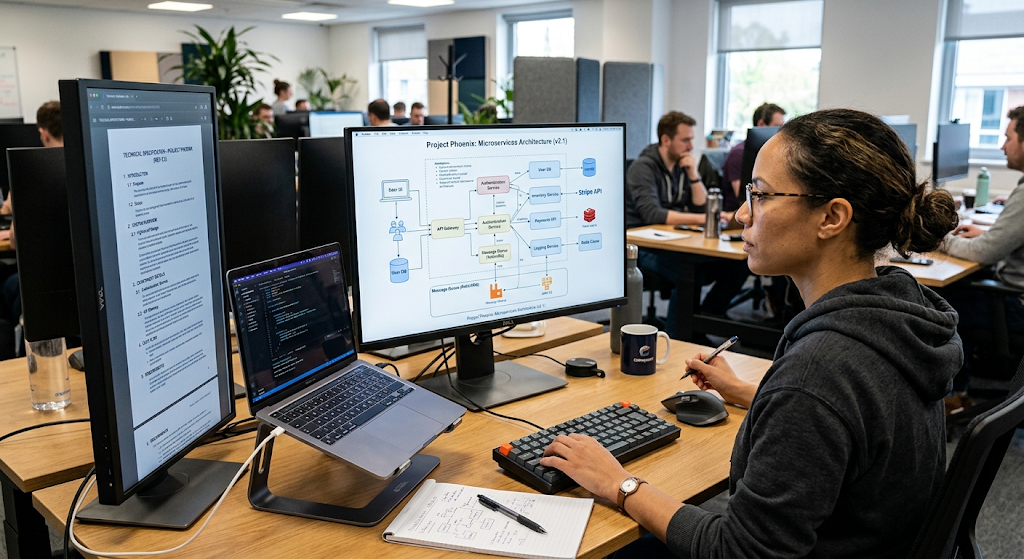
Where appropriate, an acceptable performance requirement can be expressed in a measurable time frame rather than using general terms like “the system should respond quickly.” Systems can also become easier to understand when they are presented in diagrams, tables, examples, and have clearly labelled sections. A specification should provide enough information to allow developers to make consistent decisions on implementation, but it should also be flexible enough to not prescribe any detail that does not need to be resolved.
Organizing a Technical Specification.
The design of a technical specification should be in line with the complexity of the project and the information that readers need to make decisions. A document can start with an overview of the problem, then follow with goals, scope, requirements, architecture, components, data flow, interfaces, error handling, security issues, testing requirements, and implementation constraints. If a term has a specific meaning in the context of the project, the developers should assign that meaning when it is first used and should redefine the term when it first appears in the document.
These requirements need to be expressed in a manner that enables readers to identify that they may have been met. Examples can illustrate desired system behavior better than lengthy abstract explanations, where possible. There should also be statements of uncertainty rather than statements that look like facts. If a specification is reviewed and revised during the development process, it can serve as a common resource for helping to minimize misunderstandings and potential losses of significant requirements.
Writing Developer Guides

Developer guides are practical documents that assist programmers in performing one or more specific tasks or to understand a software system. A developer guide can document how to install a development environment, configure an application, develop a new module, call an API, execute automated tests, troubleshoot common issues, or provide code for a project. As guides are action-oriented, they should be logical. Each big step should describe what the developer should do and, if helpful, what should be displayed following the step.
Commands to be given should be accurate as well as having sufficient context to explain where to place commands. Another good rule of thumb for developers is to not assume that project-specific documented procedures are known by the reader. Simultaneously, a guide for experienced programmers doesn’t require extensive explanations of programming fundamentals. The best developer guides get the details just right for the audience and concentrate on useful activities and pragmatic processes.
The following example is used in Developer Documentation.
The following example has been added to Developer Documentation.
Examples are great for communicating technical concepts because they give the reader a visual representation of how an abstract concept works in practice. For an API, a developer guide might include a description of an endpoint and then provide a sample request and response. A sample configuration file and a description of the usefulness of important fields can be included in documentation for a configuration system. If feasible, code examples should be tested, as a bad code example may be worse than no code example. The developers should also not show examples without providing explanation on what the examples represent. A code block can be syntactically correct, but fail to indicate the conditions under which it should be called for or on which it should be applied. Relevant, focused and in line with the documented version of the software are good examples. If there are placeholders in examples, then the placeholders must be clearly marked so that the reader does not copy values that are specific to the documentation environment.
Writing Effective Release Notes
Release notes tell about changes that have occurred in a software product or project from one version to another. They can be helpful for developers, testers, administrators, customers and others who need to know what the update will do. Release notes should be created to highlight significant changes rather than all changes that take place inside the system. They might contain features, enhancement, fixes, security fixes, deprecated features, breaking changes, compatibility, known problems, etc. depending on the project.
It would be useful for developers to describe changes in language that are appropriate for their listeners. A technical library may need to provide information on API changes, a consumer app may need simple explanations of new functionality. Release notes should also differentiate between changes that need action and changes that are informational. Where the changes required for an update involve changes to configuration, migration steps or code changes, it should be clearly identified so that readers can prepare for the update.
Building Complete Project Documentation
Project Documentation: It is a collection of information that developers and other stakeholders should have to understand, utilize, develop, test and maintain a software project. A README will include an introduction, but there may be additional resources in a complete project documentation, such as architecture description, API reference, developer guide, testing procedures, deployment, troubleshooting, coding, contribution, and configuration references. The documentation should be structured in such a way that the reader can easily jump from general to more specific information, if necessary.
For larger projects, documentation that can be searched is very useful as developers may wish to find one specific piece of information instead of reading an entire document. Versioning is also significant as the documentations should be of the same version as the software. If documentation is considered a part of the project and kept current with code, it will be less likely to become obsolete. This leads to documentation becoming a living technical resource instead of a set of unmaintained documents.
Common Technical Writing Mistakes
There are a few common pitfalls that can affect the usefulness of software documentation. This is one of the most common – using too much jargon, particularly by the writer assuming that everyone will know project-specific jargon. Occasionally, technical terms must be used, but if the audience is likely to be unfamiliar with them, these terms should be defined and/or explained. Another issue is the use of vague language, for example when the reader is told to configure the system properly, without telling them what configuration is needed. The information may also be difficult to use if it is not organized well, so that the reader does not know which section to read to answer the question. The other serious problem is outdated screenshots, commands, API examples and configuration instructions, which could lead readers to follow them and get errors. Aside from that, the developer must keep from repeating words or phrases, from using an unnecessarily long introduction, from using abbreviations without explaining them, and from documenting features rather than how the reader should use them. Many of these issues can be identified by looking at a document from the point of view of a new reader, before it is published.
Improving Technical Writing Skills
By conceptualizing writing as an engineered skill that can be practiced, reviewed and developed over time, developers can enhance their technical writing. They should determine the audience for the document, the purpose of the document, and what the audience is expected to be able to do with the document. At the drafting stage, information should be organized into logical segments and subheadings should be used that adequately describe the material that follows. Avoid having overly simple explanations, which can be easier to follow in shorter sentences, but not too simple. Developers should use clear language and apply it consistently in a document. There should be realistic examples, test valid commands, and check links periodically. Another developer might also notice assumptions that the original developer didn’t and this could be seen as a lack of clarity in the explanation. It is also helpful to read the documentation as if you were a user rather than the documentation author. Even when the writer thinks the documentation is technically correct, if the reader is not able to perform the desired action with the instructions, there is a problem with the documentation.
How to Ensure Accuracy and to Keep Documentation over time.
The value of technical documentation is only as great as its accuracy for the software it documents. Applications evolve and change rapidly, as do APIs, dependencies, interfaces, and development workflows. Readers might find instructions that no longer work if documentation is not kept up to date with these changes. The developers must therefore build in documentation updates as an integral part of the development process and not as an optional last step.
Readme, developer guides, API reference, examples and release notes need to be checked if a feature changes to decide if it needs to be updated. Documentation checks and automated documentation tools can also be useful in identifying some types of issues, with human review for explanations and context. Documentation needs to be maintained continuously but can save a lot of time if it answers the questions many times asked, avoids implementation mistakes and helps future developers understand the history of the project.
Conclusion
In the world of software development, there are many reasons why technical writing is a crucial communication skill to have. Developers should be able to convey requirements, describe design decisions, document implementation details, guide contributors, document releases, and explain how software works. README files are an accessible point of entry, code comments are a useful way to maintain context, technical specifications set common ground rules, developer guides provide practical workflows, release notes offer change communications and project documentation is a way to capture knowledge throughout the life of a system.
It is important to remember that the best technical writing is balance, not compromise, between accuracy and clarity. Developers can make complex technical information easier to understand and act upon by knowing the audience they are writing for, structuring the information in a logical sequence, using clear language, testing examples with the audience, avoiding unnecessary jargon, and keeping documentation current as the software changes. These skills help to enhance collaboration, minimize misunderstandings, aid in software maintenance, and contribute overall to the success and sustainability of software development projects.